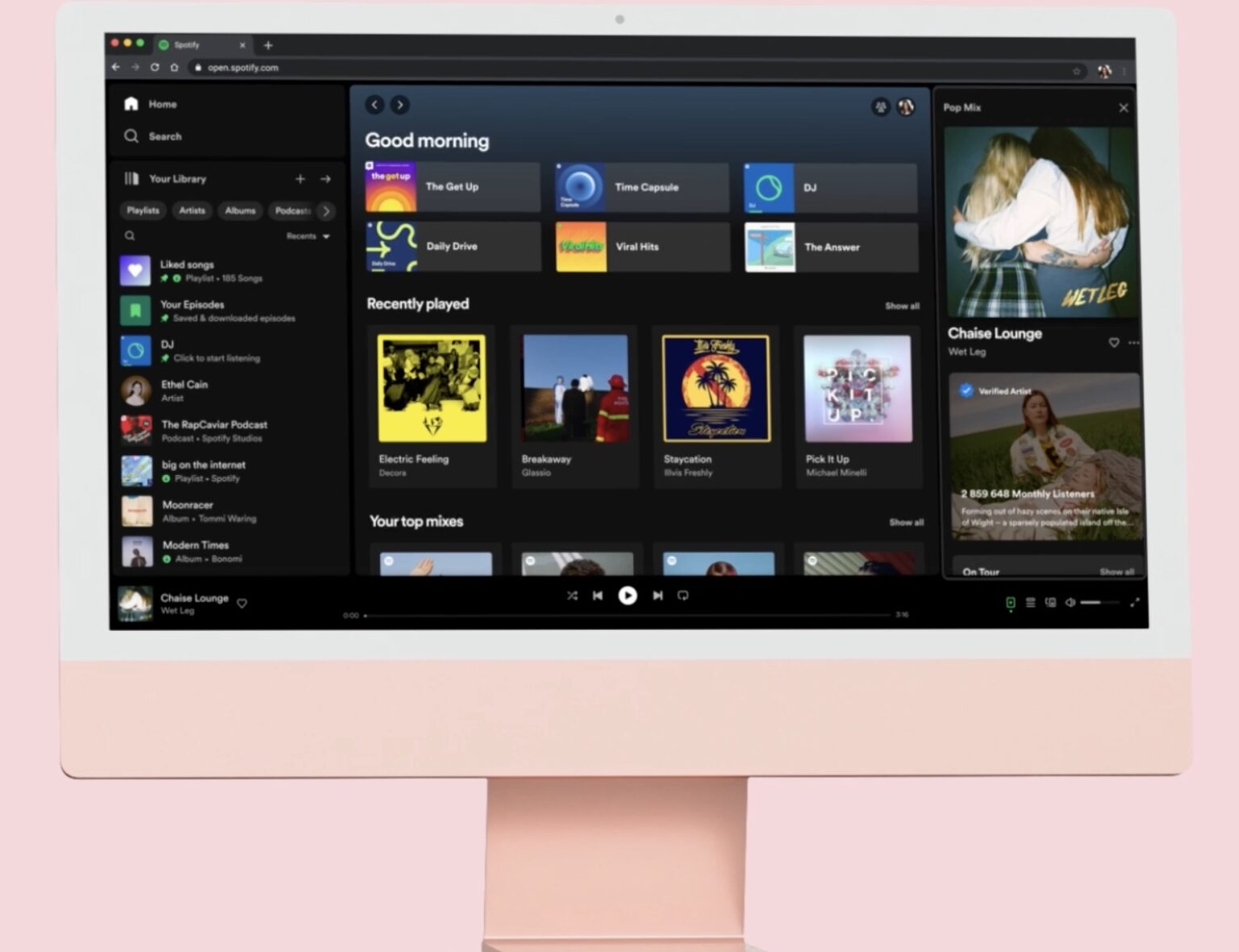
Spotify’s Desktop experience is getting a revamp, the company announced. With redesigned Your Library and Now Playing views, the new update makes the Spotify Desktop experience the best way to explore, curate, listen to, and organize Spotify on a computer or web browser.
Spotify is keeping the main content area unchanged, so it will still be your central hub to browse, discover, and find recommended songs and podcasts. But you’ll also find a few new additions to help align our Desktop experience with the mobile app.
On the left-hand side of the app window, lives the new Your Library so you can quickly access your saved music and podcast collections. And from initial insights seen, users have found that the new Library helps them save time, provides them with a better overview, and allows them to more easily switch between playlists.
On the right-hand side of the app, you’ll find the Now Playing view, which displays the current song or podcast you’re listening to. You can even find more information about the song and artist here, as well as information on tour dates and merch—making it easier to connect with your favorite artists and discover more about them. For select podcasts, you can even follow transcripts as you listen.
The streaming giant say that together, the individually customizable design of these new views provides a richer experience, more context, and quicker access to personal favorites.
Friend Activity is still accessible via the “friends” icon next to your profile picture in the top-right corner of the main content area.
Tips:
- Go compact: By default, you’ll see an expanded view of Your Library. But if you only want to see your playlist icons, you can simply click the “Your Library” button in the top right hand corner to collapse the library.
- Search & filter Your Library: Previously, the only way to find playlists was through the search bar—and you had to wade through not only your own content, but results from the entire Spotify catalog. Now, when it’s expanded, our new Library design allows you to toggle through your dedicated music, podcast, and audiobook feeds and search Your Library exclusively.
- Customize: We want this experience to fit the way you listen, which is why Your Library and Now Playing can both be resized to take up more or less of the screen.
- Pin, drag & drop: You can move and pin the playlists in the Library, as well as drop songs into the editable listed playlists.
The new Your Library and Now Playing views will begin rolling out to all Desktop users worldwide starting today.