By using this site, you agree to our Privacy Policy and Terms of Service.
Accept
Absolute Geeks UAEAbsolute Geeks UAE
  • STORIES
    • TECH
    • AUTOMOTIVE
    • GUIDES
    • OPINIONS
  • REVIEWS
    • READERS’ CHOICE
    • ALL REVIEWS
    • ━
    • SMARTPHONES
    • CARS
    • HEADPHONES
    • ACCESSORIES
    • LAPTOPS
    • TABLETS
    • WEARABLES
    • SPEAKERS
    • APPS
  • WATCHLIST
    • TV & MOVIES REVIEWS
    • SPOTLIGHT
  • GAMING
    • GAMING NEWS
    • GAME REVIEWS
  • +
    • OUR STORY
    • GET IN TOUCH
Reading: Google brings new pill-shaped Gemini overlay to Android devices
Share
Notification Show More
Absolute Geeks UAEAbsolute Geeks UAE
  • STORIES
    • TECH
    • AUTOMOTIVE
    • GUIDES
    • OPINIONS
  • REVIEWS
    • READERS’ CHOICE
    • ALL REVIEWS
    • ━
    • SMARTPHONES
    • CARS
    • HEADPHONES
    • ACCESSORIES
    • LAPTOPS
    • TABLETS
    • WEARABLES
    • SPEAKERS
    • APPS
  • WATCHLIST
    • TV & MOVIES REVIEWS
    • SPOTLIGHT
  • GAMING
    • GAMING NEWS
    • GAME REVIEWS
  • +
    • OUR STORY
    • GET IN TOUCH
Follow US

Google brings new pill-shaped Gemini overlay to Android devices

GEEK DESK
GEEK DESK
Aug 26

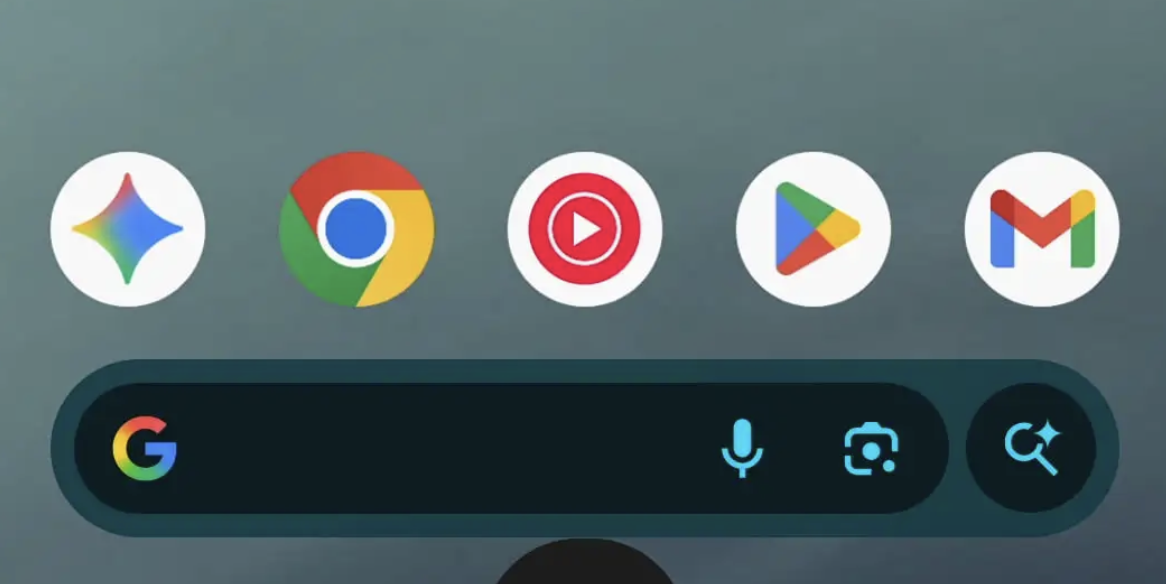
Google is rolling out a design change to Gemini on Android, introducing a new pill-shaped overlay that replaces the older rounded rectangle panel. The update, now appearing in both the stable (v16.32) and beta (v16.33) versions of the Google app, tweaks how Gemini appears when summoned with the “Hey Google” hotword, a long-press of the power button, or a corner swipe gesture.

Instead of sliding up from the bottom of the display, the overlay now begins as a small circle that expands into a wide pill, complete with a gooey-style launch animation. While the animation and entry shape are new, the internal layout remains unchanged. Users will still find the familiar “plus” menu in list form, along with the microphone input, Gemini Live shortcut, and drag handle for opening the homepage.

Google has also redesigned a few secondary controls: the “Share screen with Live” and “Ask about screen” buttons are now styled as smaller pill-shaped elements to match the new aesthetic. Interestingly, the overlay’s shape no longer mirrors the prompt bar inside the full Gemini app, creating a minor inconsistency. Instead, it now aligns visually with the Circle to Search bar and Pixel Launcher search field, suggesting Google is aiming for a more unified design language across its core Android surfaces.
For those not seeing the change right away, Google suggests force-stopping the app from the “App info” page to trigger the update. With Gemini increasingly central to Android’s AI experience, this subtle redesign underscores Google’s ongoing effort to make its assistant tools feel more fluid, modern, and consistent with the rest of the Pixel interface.

Share
What do you think?
Happy0
Sad0
Love0
Surprise0
Cry0
Angry0
Dead0

WHAT'S HOT ❰

Dubai Metro Gold Line: inside the city’s first fully underground rail corridor reshaping urban mobility
Kioxia brings PCIe 5.0 performance to mainstream client SSDs with new BG8 series
SanDisk expands professional memory cards with higher capacities and faster speeds for 8K workflows
Kia Vision Meta Turismo concept explores performance EV design and stationary entertainment
OpenAI rolls out workspace agents to automate team workflows in ChatGPT
Absolute Geeks UAEAbsolute Geeks UAE
Follow US
AbsoluteGeeks.com was assembled during a caffeine incident.
© Absolute Geeks Media FZE LLC 2014–2026.
Proudly made in Dubai, UAE ❤️
Upgrade Your Brain Firmware
Receive updates, patches, and jokes you’ll pretend you understood.
No spam, just RAM for your brain.
Welcome Back!

Sign in to your account

Username or Email Address
Password

Lost your password?