

Apple has released the third beta version of iOS 18.3, continuing its efforts to refine the user experience. This update brings significant adjustments to Notification Summaries, a feature introduced to help users manage the increasing volume of notifications received on their devices. The update also includes smaller changes to Messages, Camera Control, and PDF editing.
Notification Summaries have been a focus of this beta release, with Apple addressing user feedback concerning the accuracy of summarized notification headlines. Here’s a breakdown of the key changes:
- Temporary Disablement for News and Entertainment Apps: To ensure accuracy, Notification Summaries for news and entertainment apps have been temporarily disabled. This step allows Apple time to refine the technology and prevent the potential spread of misleading information through summarized headlines.
- Increased Transparency: Apple has enhanced transparency within the Settings app by explicitly labeling the Notification Summaries feature as a beta. Users are now clearly informed about the potential for errors. Additionally, a warning message has been added, advising users to verify important information from summarized notifications.
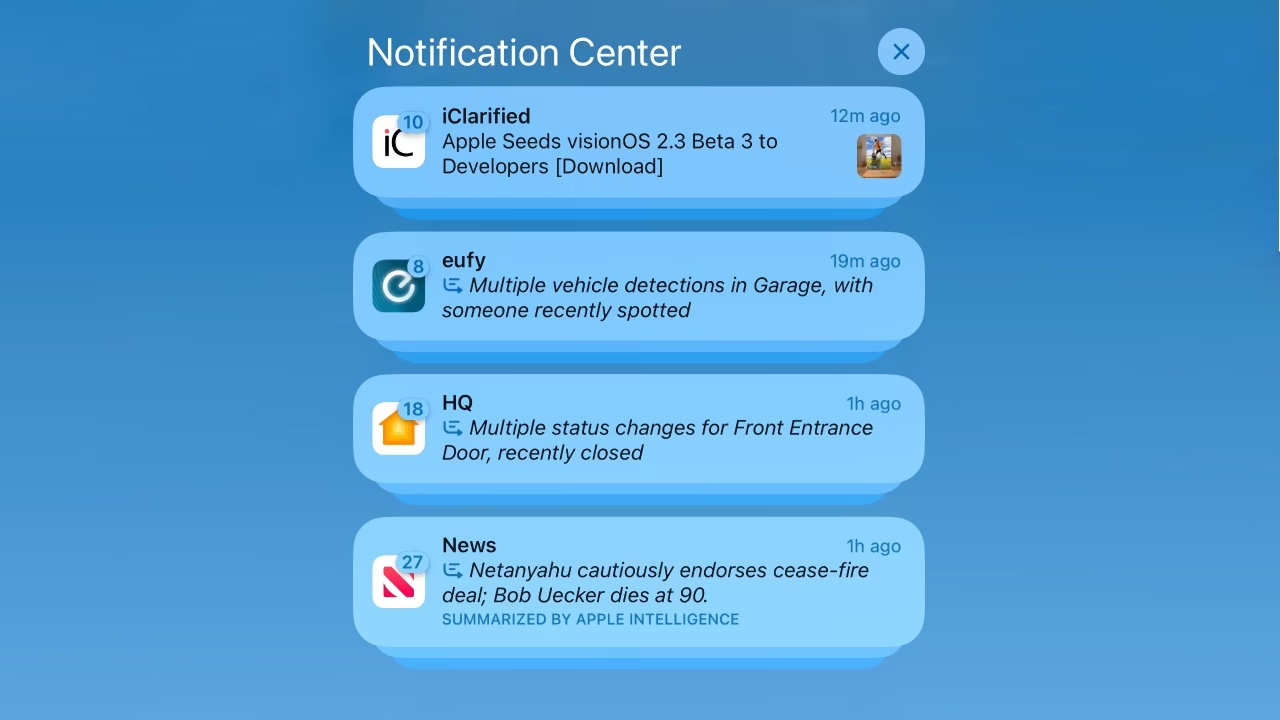
- Improved Visual Clarity: To help users quickly distinguish between summarized and standard notifications, summarized notifications now appear with italicized text. This visual cue provides a clear differentiation on the Lock Screen and in Notification Center.
- Enhanced User Control: Users gain more control over their notification experience with the ability to disable Notification Summaries on a per-app basis. This feature, accessible directly from the Lock Screen, allows for personalized notification management.
Additional Refinements in iOS 18.3 Beta 3
Beyond the significant changes to Notification Summaries, iOS 18.3 beta 3 introduces a series of smaller refinements across the operating system:
- Genmoji Integration in Messages: The Messages app now features a dedicated Genmoji entry in the sidebar. This provides users with quick access to the Genmoji creation interface, making it easier to personalize their messages.
- Clearer Camera Control Labels: On iPhone 16 models, the AE/AF lock toggle in the Camera Control section has been renamed to “Lock Focus and Exposure.” This change provides a more straightforward description of the feature’s functionality.
- PDF Editing Warning: When cropping content within a PDF using the screenshot interface, users will now encounter a warning message. This message informs users that the cropped content might still be accessible when the PDF is opened in certain PDF viewers.