By using this site, you agree to our Privacy Policy and Terms of Service.
Accept
Absolute Geeks UAEAbsolute Geeks UAE
  • STORIES
    • TECH
    • AUTOMOTIVE
    • GUIDES
    • OPINIONS
  • REVIEWS
    • READERS’ CHOICE
    • ALL REVIEWS
    • ━
    • SMARTPHONES
    • CARS
    • HEADPHONES
    • ACCESSORIES
    • LAPTOPS
    • TABLETS
    • WEARABLES
    • SPEAKERS
    • APPS
  • WATCHLIST
    • TV & MOVIES REVIEWS
    • SPOTLIGHT
  • GAMING
    • GAMING NEWS
    • GAME REVIEWS
  • +
    • OUR STORY
    • GET IN TOUCH
Reading: YouTube TV app rolls out “Parent Code” for enhanced child safety
Share
Notification Show More
Absolute Geeks UAEAbsolute Geeks UAE
  • STORIES
    • TECH
    • AUTOMOTIVE
    • GUIDES
    • OPINIONS
  • REVIEWS
    • READERS’ CHOICE
    • ALL REVIEWS
    • ━
    • SMARTPHONES
    • CARS
    • HEADPHONES
    • ACCESSORIES
    • LAPTOPS
    • TABLETS
    • WEARABLES
    • SPEAKERS
    • APPS
  • WATCHLIST
    • TV & MOVIES REVIEWS
    • SPOTLIGHT
  • GAMING
    • GAMING NEWS
    • GAME REVIEWS
  • +
    • OUR STORY
    • GET IN TOUCH
Follow US

YouTube TV app rolls out “Parent Code” for enhanced child safety

GEEK DESK
GEEK DESK
Dec 16

YouTube is introducing a new “parent code” feature on its TV app, providing parents with greater control over their children’s viewing experience. This four-digit PIN adds an extra layer of security, restricting access to content and features that may not be suitable for younger viewers.

With the parent code enabled, users will be required to enter the PIN to:

  • Watch YouTube content when signed out
  • Access accounts belonging to older household members (typically over 13 years old)
  • Remove accounts from the TV device

This feature comes in the wake of YouTube phasing out its dedicated YouTube Kids app on smart TVs. While the standard YouTube app offers parental controls like Restricted Mode, which filters mature content, the parent code provides a more robust solution for managing children’s access.

Parents have expressed concerns about their children potentially encountering inappropriate content on the standard YouTube app. The parent code aims to address these concerns by giving parents greater peace of mind and ensuring a safer viewing environment.

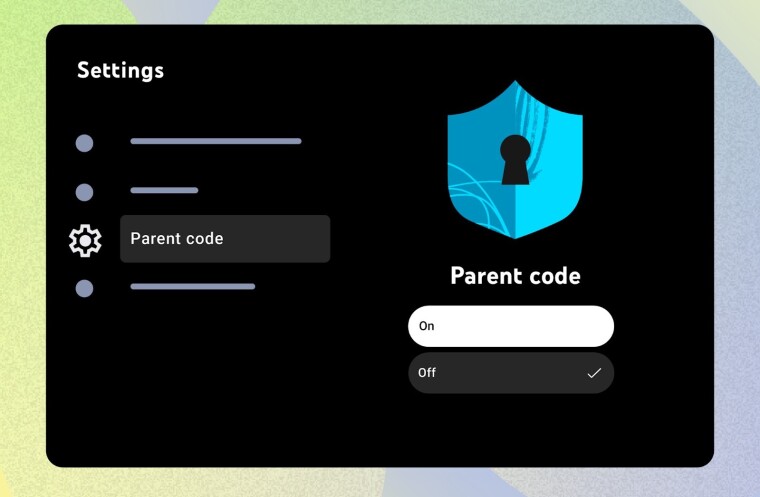
The rollout of the parent code feature is expected to be gradual over the coming days. To set up the code, parents can navigate to the “Settings” menu on the YouTube TV app’s homepage and select the “Parent code” tab.

This initiative by YouTube reflects a broader trend of online platforms prioritizing parental controls and online safety features. The parent code empowers parents with a practical tool to manage their children’s screen time and content access on the platform.

Share
What do you think?
Happy0
Sad0
Love0
Surprise0
Cry0
Angry0
Dead0

WHAT'S HOT ❰

HONOR opens sales for 600 Series with emphasis on AI camera and large battery
Olivia Rodrigo to front FC Barcelona jersey for El Clásico in latest Spotify partnership
HP expands HyperX lineup with Clutch Talon controller and Cloud Stinger 3 headsets
Urban Armor Gear (UAG) acquires Nomad Goods in latest mobile accessories consolidation
Spotify rolls out verified artist badges to counter AI-generated music flood
Absolute Geeks UAEAbsolute Geeks UAE
Follow US
AbsoluteGeeks.com was assembled during a caffeine incident.
© Absolute Geeks Media FZE LLC 2014–2026.
Proudly made in Dubai, UAE ❤️
Upgrade Your Brain Firmware
Receive updates, patches, and jokes you’ll pretend you understood.
No spam, just RAM for your brain.
Welcome Back!

Sign in to your account

Username or Email Address
Password

Lost your password?