iOS14
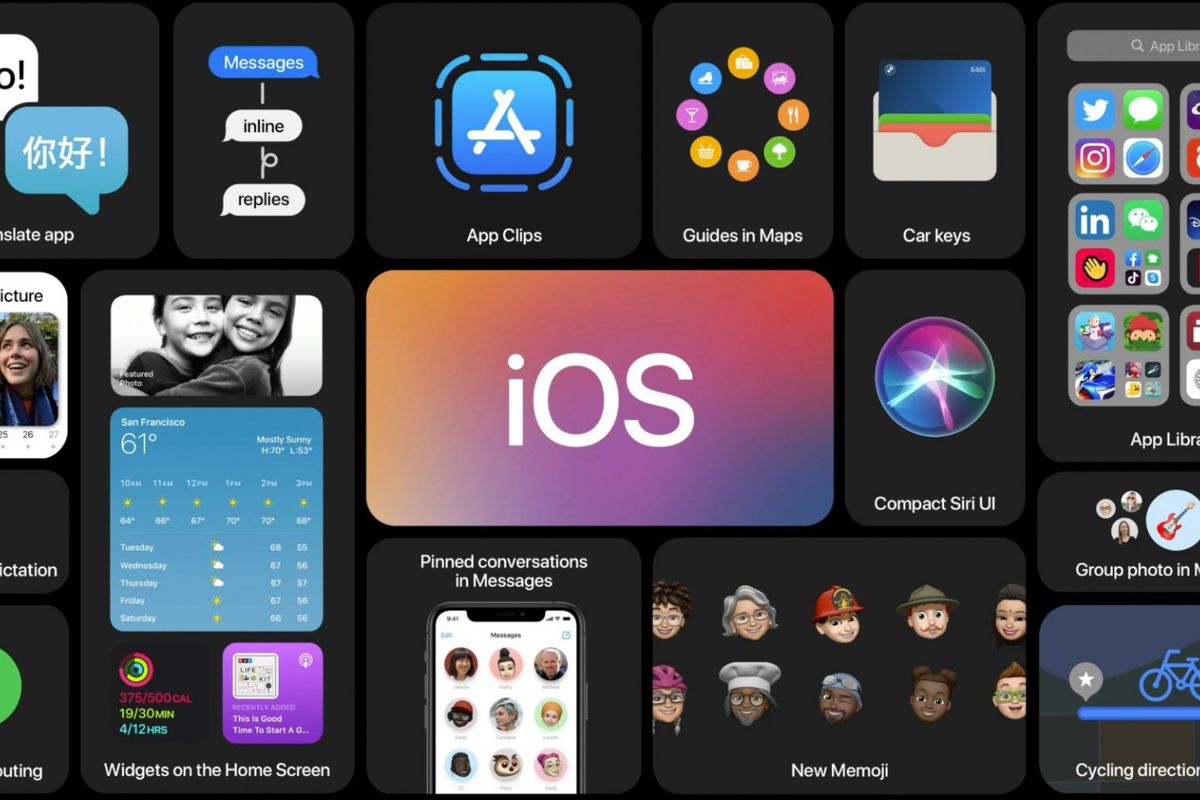
Apple today previewed iOS 14, introducing the biggest update ever to Home Screen pages with beautifully redesigned widgets and the App Library, a new way to tap into the App Store with App Clips, powerful updates to Messages, and more.
The new widgets present timely information at a glance and can be pinned in different sizes on any Home Screen page. Users can create a Smart Stack of widgets, which uses on-device intelligence to surface the right widget based on time, location, and activity.
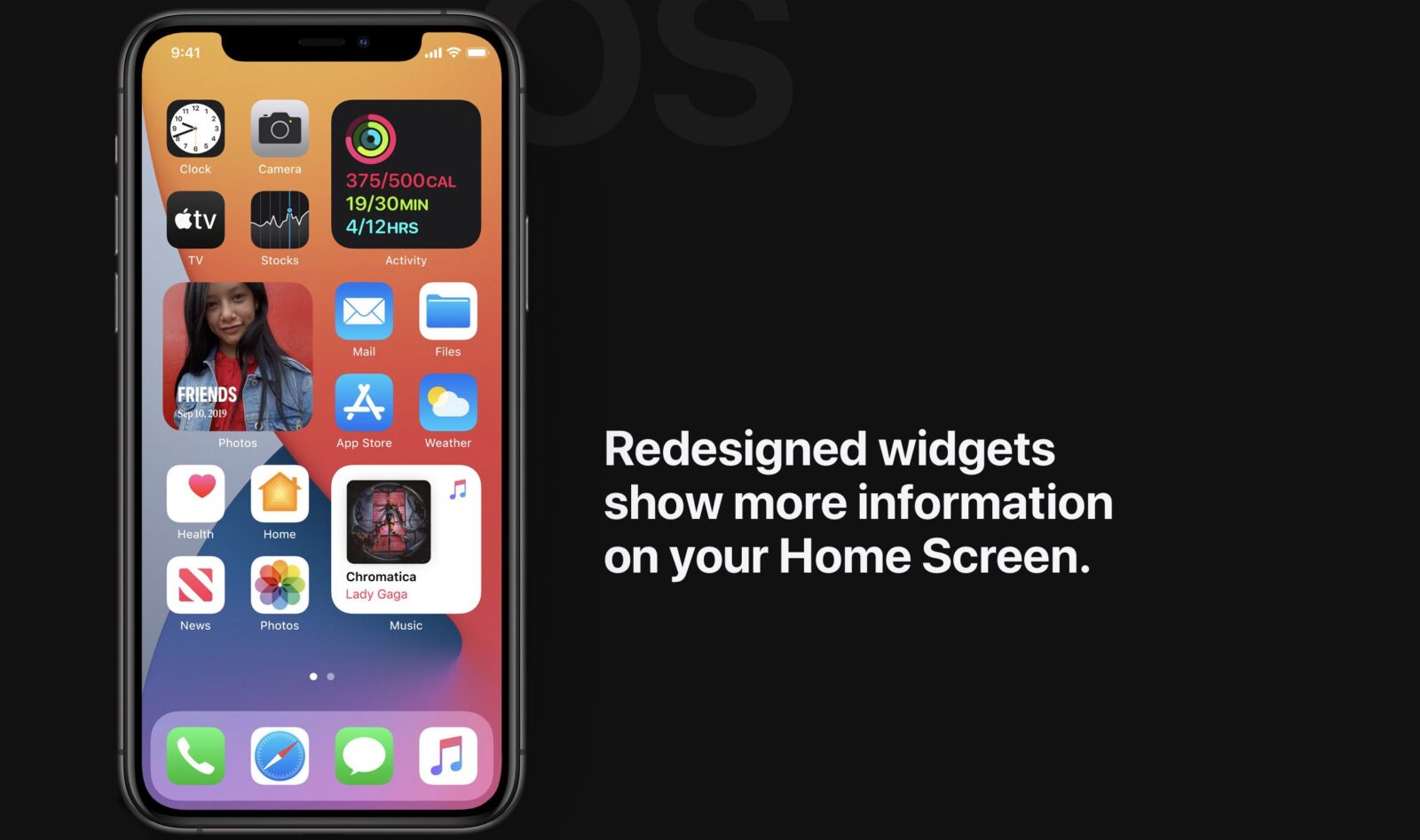
Home Screen pages can display widgets that are customized for work, travel, sports, entertainment, and other areas of interest. At the end of the Home Screen pages is the App Library, a new space that automatically organizes all of a user’s apps into one simple, easy-to-navigate view, and intelligently surfaces apps that may be helpful in the moment. Users can choose how many Home Screen pages to display and easily hide pages for quicker access to the App Library.
Incoming FaceTime and phone calls and Siri interactions take on an all-new compact design that enables users to stay in the context of what they are doing. With Picture-in-Picture support, iPhone users can now watch a video or take a FaceTime call while using another app.
A New Way to Discover and Use Apps with App Clips
An App Clip is a small part of an app experience designed to be discovered the moment it is needed. App Clips are associated with a particular product or business, and load within seconds to complete a specific task, such as renting a scooter, purchasing a coffee, or filling a parking meter. They can be easily discovered and accessed by scanning a new Apple-designed App Clip code, or through NFC tags and QR codes, or shared in Messages or from Safari, all with the security and privacy expected from apps.
Powerful Updates to Conversations in Messages
Messages is central to communicating with friends and family, and now it’s easier to stay connected and quickly access important messages. Users can pin conversations to the top of their messages list, easily keep up with lively group threads through mentions and inline replies, and further customize conversations by setting a group photo using an image or emoji. New Memoji options in Messages are even more inclusive and diverse with additional hairstyles, headwear, face coverings, and more.
Greener Ways to Explore and New Guides in Maps
Maps makes it easier than ever to navigate and explore with new cycling directions, electric vehicle routing, and curated Guides. Cycling directions take into account elevation, how busy a street is, and whether there are stairs along the route. Electric vehicle routing adds charging stops along a planned route based on current vehicle charge and charger types.2 Guides provide a curated list of interesting places to visit in a city, created by a selection of trusted resources. Guides are a great way to discover hot new restaurants, find popular attractions, and explore new recommendations from respected brands, including AllTrails, Complex, The Infatuation, Time Out Group, and The Washington Post, among others.
Enhanced Privacy Features for More Transparency and Control
All apps will now be required to obtain user permission before tracking.3 Later this year, App Store product pages will feature summaries of developers’ self-reported privacy practices, displayed in a simple, easy-to-understand format. In addition, users can upgrade existing accounts to Sign in with Apple, choose to share their approximate location with app developers rather than their precise location when granting an app location access, and get even more transparency into an app’s use of the microphone and camera.
Additional iOS 14 Features
- Translate is designed to be the best and easiest app for translating conversations, offering quick and natural translation of voice and text among 11 different languages. On-device mode allows users to experience the features of the app offline for private voice and text translation.
- Siri expands its knowledge, helps find answers from across the internet, and can now send audio messages. Keyboard dictation runs on device when dictating messages, notes, email, and more.
- The Home app makes smart home control even easier with new automation suggestions and expanded controls in Control Center for quicker access to accessories and scenes. Adaptive Lighting for compatible HomeKit-enabled lights automatically adjusts the color temperature throughout the day, and with on-device Face Recognition, compatible video doorbells and cameras can identify friends and family. The Home app and HomeKit are built to be private and secure, so all information about a user’s home accessories is end-to-end encrypted.
- AirPods gain the ability to seamlessly switch between Apple devices with automatic device switching. Spatial audio with dynamic head tracking brings a theater-like experience to AirPods Pro. By applying directional audio filters, and subtly adjusting the frequencies each ear receives, sounds can be placed virtually anywhere in a space to provide an immersive listening experience.
- Digital carkeys give users a secure way to use iPhone or Apple Watch to unlock and start their car. Digital car keys can be easily shared using Messages, or disabled through iCloud if a device is lost, and are available starting this year through NFC. Apple also unveiled the next generation of digital car keys based on Ultra Wideband technology for spatial awareness delivered through the U1 chip, which will allow users to unlock future car models without removing their iPhone from their pocket or bag, and will become available next year.
- Find Mywill add support for finding third-party products and accessories with the new Find My network accessory program. This will allow customers to use the Find My app to locate other important items in their lives, in addition to their Apple devices. User privacy remains central to the Find My network with end-to-end encryption built in. A draft specification is available for accessory makers and product manufacturers starting today.
- Safari offers a Privacy Report so users can easily see which cross-site trackers have been blocked, secure password monitoring to help users detect saved passwords that may have been involved in a data breach, and built-in translation for entire webpages.
- Health has all-new experiences to manage sleep, better understand audio levels that may affect hearing health, and a new Health Checklist — a centralized place to manage health and safety features — includes Emergency SOS, Medical ID, ECG, Fall Detection, and more.Health also adds support for new data types for mobility, Health Records, symptoms, and ECG.
- TheWeather app and widget keep users up to date on severe weather events and a new next-hour precipitation chart shows minute-by-minute precipitation when rain is in the forecast.
- Accessibility features include Headphone Accommodations, which amplifies or tunes audio to help music, movies, phone calls, and podcasts sound crisper and clearer, and sign language detection in Group FaceTime, which makes the person signing more prominent in a video call.12 VoiceOver, the industry’s leading screen reader for the blind community, now automatically recognizes what is displayed visually onscreen so more apps and web experiences are accessible to more people.
iPadOS 14
iPadOS 14 was also introduced today, with new features and designs that take advantage of the unique capabilities of iPad and its large Multi-Touch display. iPadOS 14 introduces an all-new compact design for incoming FaceTime and phone calls, Siri interactions, and Search to help users stay focused on the task at hand. Apps have new sidebars and toolbars that consolidate controls in one place, making them more streamlined and powerful than ever. New Apple Pencil features, including Scribble for iPad, deliver a whole new way to work with handwritten notes, and ARKit 4 delivers a brand new Depth API that allows developers to create even more powerful features in their apps.
Enhanced App Experience with New Compact Design, Universal Search, and Redesigned Sidebars
An all-new compact design for incoming FaceTime and phone calls, Siri interactions, and Search are especially useful on iPad, helping users stay focused and get more done in the moment. Incoming FaceTime and phone calls now appear as a lightweight banner so they don’t take up the entire screen, making it easy to quickly tap to answer the call or simply flick to dismiss and get right back to work. Siri now appears at the bottom of the screen when activated, allowing users to seamlessly reference information onscreen while making a request, and it quickly gets out of the way when launching other apps or controlling music.
Search on iPad has been rebuilt from the ground up with iPadOS 14 and is now the one place to quickly find practically anything, from locating and launching apps to accessing contacts, files, and quick information, to getting answers to common questions about people or places. With a new compact design, users can start a search from anywhere, without having to leave the app they’re in. Web searches are even more powerful and refined, delivering more relevant suggestions as users type and the ability to get to search results with just a tap.
Redesigned sidebars across many apps, including Photos, Files, Notes, Calendar, and Apple Music, consolidate navigation into a single place, making it easier than ever to navigate within an app while keeping content front and center. Additionally, streamlined toolbars and new pull-down menus provide access to app controls all in one place.
Doing More with Apple Pencil and Handwritten Notes
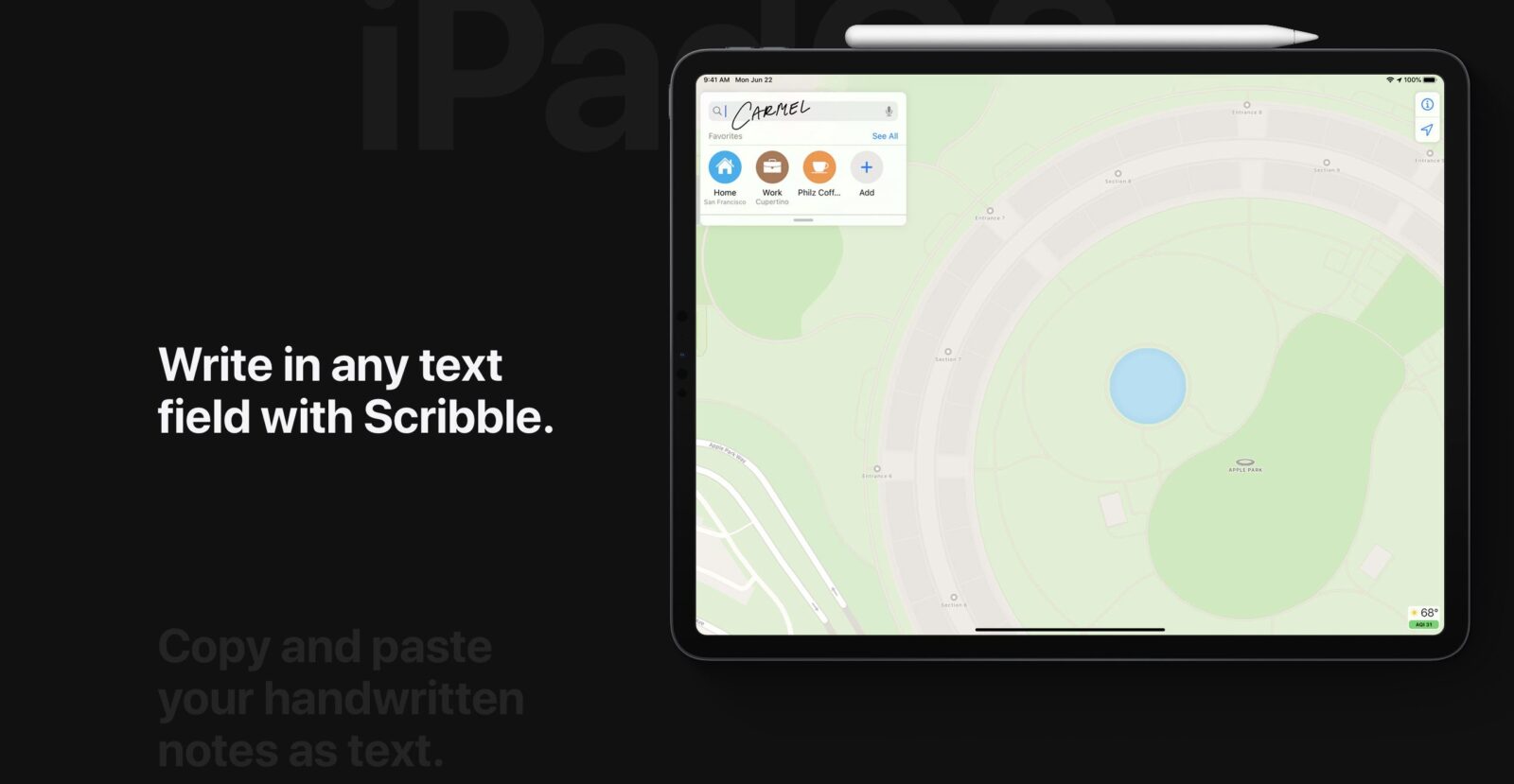
iPadOS 14 brings Scribble to iPad with Apple Pencil, allowing users to write in any text field — where it will automatically be converted to typed text — making actions like replying to an iMessage or searching in Safari fast and easy. All handwriting and conversion to text happens on device, keeping it private and secure. When taking notes, Smart Selection uses on-device machine learning to distinguish handwriting from drawings, so handwritten text can easily be selected, cut, and pasted into another document as typed text. Shape recognition allows users to draw shapes that are made geometrically perfect and snap right into place when adding useful diagrams and illustrations in Notes.
Data detectors now work with handwritten text to recognize phone numbers, dates, and addresses, and offer users the ability to take actions like tapping a written number to make a call, adding an event directly to Calendar, or showing a location in Maps.
Scribble will initially offer support for English, Traditional and Simplified Chinese, and mixed Chinese and English, so users can write English and Chinese words together without needing to switch languages.
Augmented Reality That’s Even More Realistic
AR has proven to be an immensely powerful technology that helps accomplish tasks in ways never before possible. ARKit 4 delivers a brand new Depth API that allows developers to access even more precise depth information captured by the new LiDAR Scanner on iPad Pro. Developers can use the Depth API to drive powerful new features in their apps, like taking body measurements for more accurate virtual try-on, or testing how paint colors will look before painting a room. ARKit 4 also introduces Location Anchors for iOS and iPadOS apps, which leverage the higher resolution data of the new map in Apple Maps, where available, to pin AR experiences to a specific point in the world.
Enhanced Privacy Features for More Transparency and Control
All apps will now be required to obtain user permission before tracking. Later this year, App Store product pages will feature summaries of developers’ self-reported privacy practices, displayed in a simple, easy-to-understand format. In addition, users can upgrade existing accounts to Sign in with Apple, choose to share their approximate location with app developers rather than their precise location when granting an app location access, and get even more transparency into an app’s use of the microphone and camera.
Additional iPadOS 14 Features
- All-new beautifully redesigned widgets present timely information at a glance, and users can select a SmartStack of widgets, which uses on-device intelligence to surface the right widget based on factors such as time, location, and activity.
- Messages is central to communicating with friends and family, and now it’s easier to stay connected and quickly access important messages. Users can pin conversations to the top of their messages list, easily keep up with lively group threads through mentions and inline replies, and further customize conversations by setting a group photo using an image or emoji. New Memoji options in Messages are even more inclusive and diverse with additional hairstyles, headwear, face coverings, and more.
- Siri expands its knowledge, helps find answers from across the internet, and can now send audio messages. Keyboard dictation runs on device when dictating messages, notes, email, and more.
- Maps makes it easier than ever to navigate and explore with new cycling directions and curated Guides. Cycling directions take into account elevation, how busy a street is, and whether there are stairs along the route.Guides provide a curated list of interesting places to visit in a city, created by a selection of trusted resources, making them a great way to discover hot new restaurants, find popular attractions, and explore new recommendations from respected brands, including AllTrails, Complex, The Infatuation, Time Out Group, and The Washington Post, among others.
- The Home app makes smart home control even easier with new automation suggestions and expanded controls in Control Center for quicker access to accessories and scenes. Adaptive Lighting for compatible HomeKit-enabled lights automatically adjusts the color temperature throughout the day, and with on-device Face Recognition, compatible video doorbells and cameras can identify friends and family. The Home app and HomeKit are built to be private and secure, so all information about a user’s home accessories is end-to-end encrypted.
- Safari offers a Privacy Report so users can easily see which cross-site trackers have been blocked, secure password monitoring to help users detect saved passwords that may have been involved in a data breach, and built-in translation for entire webpages.
- Accessibility features include Headphone Accommodations, which amplifies soft sounds and tunes audio to help music, movies, phone calls, and podcasts sound crisper and clearer, and sign language detection in Group FaceTime, which makes the person signing more prominent in a video call. VoiceOver, the industry’s leading screen reader for the blind community, now automatically recognizes what is displayed visually onscreen so more apps and web experiences are accessible to more people.
watchOS 7
watchOS 7 is delivering enhanced customization tools and powerful new health and fitness features to the world’s most advanced smartwatch. Personalization is taken to an entirely new level with shareable and discoverable watch face configurations, while sleep tracking, automatic handwashing detection, additional workout types including dance, and a new hearing health feature give greater insight into overall well-being and are designed with privacy in mind. Conveniently on the wrist, Maps is updated with cycling directions and Siri now offers language translation.
Watch Faces and Sharing
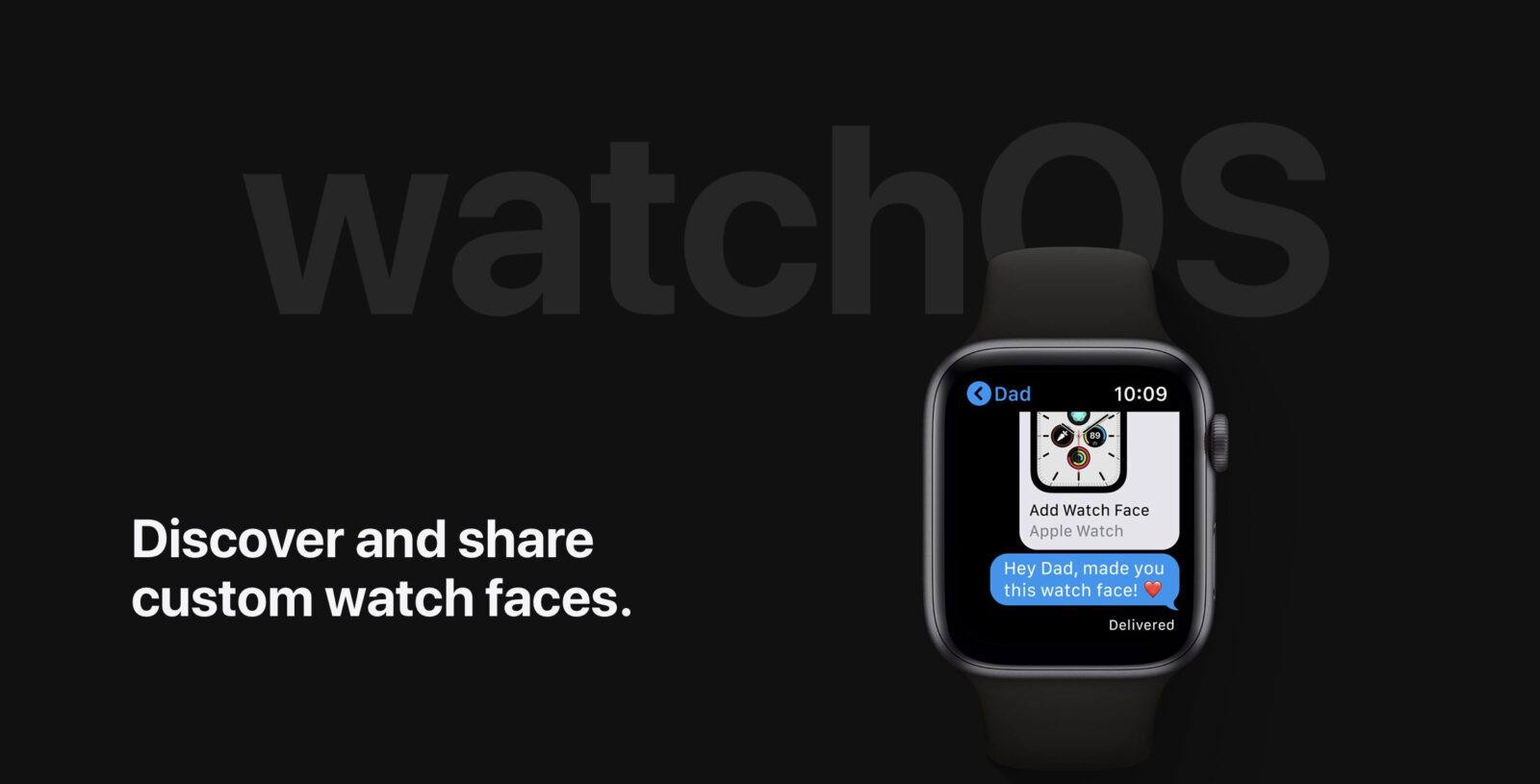
Faces are central to the watch experience, providing customers with valuable information at a glance and the ability to personalize their Apple Watch. watchOS 7 offers new ways to discover and share unique combinations to completely configure the watch face to suit any activity or lifestyle, from the new parent to the surfing aficionado, tennis player, or photographer. Infinitely customizable and personalized faces, inclusive of complications, can be shared through Messages or Mail, and discovered through the App Store or even from links through websites and social media channels.
watchOS 7 offers updates to faces for more personalization and greater access to favorite apps. The beautifully detailed and ultraprecise Chronograph Pro includes a tachymeter to calculate speed based on time traveled over a fixed distance, the Photos face offers color filters, and the bold X-Large face now has an option to add a rich complication.
Developers now have the ability to offer more than one complication per app on a single watch face. For example, on one watch face, Glow Baby can display multiple complications that help new parents track bottle-feeding, breastfeeding, pumping statistics, and nap times, while Dawn Patrol can show surfers tide, wind speed, and water temperature from a favorite surf spot.
Sleep
With watchOS 7, Apple Watch introduces sleep tracking, taking a holistic approach to sleep by providing valuable tools to help users get the desired amount of sleep, get to bed on time, and create a pre-bedtime routine to meet their sleep goals. Through the detection of micro-movements from the watch’s accelerometer, which signals respiration during sleep, Apple Watch intelligently captures when the wearer is sleeping and how much sleep they get each night. In the morning, the wearer will see a visualization of their previous night’s sleep, including periods of wake and sleep. They will also see a chart showing their weekly sleep trend.
According to the American Academy of Sleep Medicine, a bedtime routine helps the body prepare for sleep. To support this, Wind Down allows Apple Watch and iPhone users to create a customized routine before bed, including setting up a specific scene in the Home app, listening to a soothing soundscape, or using a favorite meditation app. In Sleep Mode, Apple Watch turns on Do Not Disturb and automatically darkens the screen overnight.
To help users wake up, Apple Watch offers a silent haptic alarm or gentle sounds, while the wake-up screen shows the current battery level. Depending on personal charging behavior, if the battery is too low within an hour of bedtime, Apple Watch will remind users to charge it ahead of sleep. Sleep data is encrypted on device or in iCloud with iCloud sync, and data is always in the user’s control.
Automatic Handwashing Detection
Washing hands properly for at least 20 seconds can help prevent the spread of illness. In a first-of-its-kind innovation for a wearable, Apple Watch uses the motion sensors, microphone, and on-device machine learning to automatically detect handwashing motions and sounds. It then initiates a 20-second countdown timer, and if the user finishes early, they will be prompted to keep washing. Apple Watch can also conveniently remind the user to wash their hands when they return home.
The Health app on iPhone will show frequency and duration of the user’s handwashing, as well as information on the importance of handwashing, as it relates to overall health. Sounds used to detect handwashing are not automatically recorded or saved by the Health app or Apple Watch.
Workout Types and Fitness App
The Workout app is one of the most popular apps on Apple Watch, and watchOS 7 brings four exciting new workout types supported by powerful heart rate and custom-built motion algorithms: Core Training, Dance, Functional Strength Training, and Cooldown.
To correctly capture calorie exertion for Dance, Apple Watch uses advanced sensor fusion, combining data from the heart rate sensor and inputs from the accelerometer and gyroscope, that accounts for the unique challenges of measuring different body-to-arm motions typical with dance. This workout type was validated and tested with four of the most popular dance styles for exercise: Bollywood, cardio dance, hip-hop, and Latin.
The redesigned Activity app on iPhone, now called Fitness,providesa streamlined view of data including daily Activity, Workouts, Awards, and Activity Trends on one tab, and Activity Sharing and Activity Competitions on another.
Hearing
Following the introduction of the Noise app in watchOS 6 that measures ambient sound levels and duration of exposure, watchOS 7 adds further support for hearing health with headphone audio notifications. Customers can now understand how loudly they are listening to media through their headphones using their iPhone, iPod touch, or Apple Watch, and when these levels may impact hearing over time.
When total listening with headphones has reached 100 percent of the safe weekly listening amount, Apple Watch provides a notification to the wearer. This amount is based on World Health Organization recommendations that, for instance, a person can be exposed to 80 decibels for about 40 hours per week without an impact to hearing abilities.1 Customers can also see how long they have been exposed to high decibel levels each week in the Health app on iPhone and can control the maximum level for headphone volume. No audio from the headphone audio notification feature is recorded or saved by the Health app or Apple Watch.
Additional watchOS 7 Updates
- For optimal convenience while biking, cycling directions are available right on the wrist. Directions are large and easy to read, and Maps can direct when to dismount and walk the bike, or take the stairs to save time. The wearer can choose a route that avoids steep hills, gets to the destination the quickest, or takes the most direct path.
- Customers can now use Siri to translate many languages conveniently from the wrist, dictation is handled on device with the power of the Apple Neural Engine for faster and more reliable processing when dictating messages and more, and Apple Watch now supports Announce Messages with Siri. The Shortcuts app is also now available on Apple Watch and can be accessed as a complication.
- Developers can create graphic complications with SwiftUI, and new developer tools such as Xcode Previews make building them even easier.
- New complications for native features include: Camera Remote, Sleep, and Shortcuts.
- New Mobility Metrics available in the Health app include: low-range cardio fitness, walking speed, stair-descent speed, stair-ascent speed, six-minute walk distance, double support time, step length, and asymmetry. These metrics are important for the clinical community to monitor patients’ ability to move safely and easily as they age. Typically only measured in a lab setting, these metrics can be uniquely measured by Apple Watch and iPhone, and used by developers, such as Zimmer Biomet, a musculoskeletal healthcare company, in patient care and in management tools such as mymobility.
macOS Big Sur
Apple today previewed macOS Big Sur, the latest version of the world’s most advanced desktop operating system. macOS Big Sur introduces a beautiful redesign that is entirely new yet instantly familiar. Safari is packed with new features, including a customizable start page, elegantly designed and more powerful tabs, quick and easy translation, and a new Privacy Report. The updated Messages app lets Mac users send and receive more personal and expressive messages, and easily keep track of and interact within group messages. Maps also offers an all-new experience with immersive features for exploring and navigating the world.
Biggest Design Upgrade Since the Introduction of Mac OS X
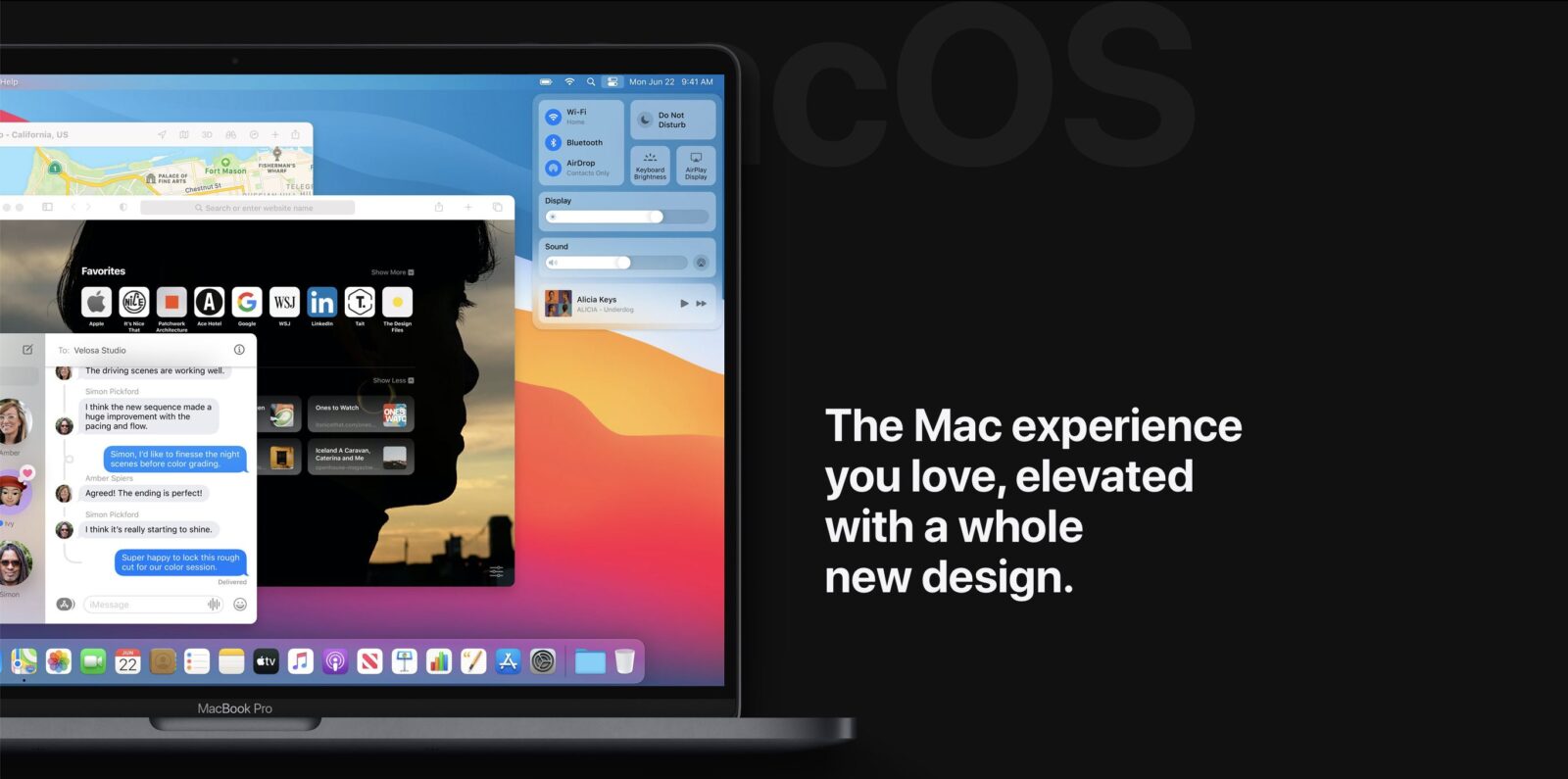
macOS Big Sur delivers a spacious new design that makes navigation easier, while putting more controls at users’ fingertips. Everything from the curvature of window corners to the palette of colors and materials has been refined, and new features provide even more information and power. Icons in the Dock have been thoughtfully designed to be more consistent with icons across the Apple ecosystem while retaining their Mac personality. Buttons and controls appear when needed, and recede when they’re not. The entire experience feels more focused, fresh, and familiar, reducing visual complexity and bringing users’ content front and center.
The customizable menu bar features an all-new Control Center, delivering quick access to controls from the desktop. An updated Notification Center includes more interactive notifications and redesigned widgets that come in different sizes, providing users with more relevant information at a glance. And a new design for core apps brings more organization to multiple open windows and makes interacting with apps even easier.
A Faster, More Personal, Privacy-First Safari Experience
In the biggest update to Safari since its original launch in 2003, the world’s fastest browser is even faster, providing industry-leading speed1 and battery life.2 Safari’s fast JavaScript engine helps it outperform other browsers on Mac and PC, and Safari loads frequently visited sites an average of 50 percent faster than Chrome.1 Tabs have been entirely redesigned to make navigating with Safari faster and more powerful by showing more tabs onscreen, displaying favicons by default to easily identify open tabs, and giving users a quick preview of a page by simply hovering over the tab.
Safari brings new features for greater personalization while browsing the web. Users can customize the new start page with a background image and sections like their Reading List and iCloud Tabs. With built-in translation, Safari can detect and translate entire webpages from seven languages with just a click.3 Users can further personalize their experience with improved support for extensions, and the Mac App Store makes it easy to discover and download great Safari extensions with a new category that includes editorial spotlights and top charts.
Privacy has always been built into Safari, and a new Privacy Report delivers added visibility into how Safari protects browsing activity across the web. Users can choose when and which websites a Safari extension can work with, and tools like data breach password monitoring never reveal your password information — not even to Apple.
Powerful and Expressive Messages
Messages on the Mac includes new tools to better manage important conversations and share expressive messages. Users can now pin their favorite conversations to the top of their messages list for fast access, and search has been entirely redesigned — organizing results into links, photos, and matching terms — to help users quickly find what they are looking for.
Message effects let users add personality to their messages with balloons, confetti, and more. Users can now create and customize their Memoji on the Mac, and express themselves with Memoji stickers to match their mood and personality. And with a new photo picker and #images, it’s easy to quickly share images, GIFs, and videos.
New group messaging features streamline interactions with family, friends, and colleagues. Inline replies enable users to respond directly to a message, and now they can direct a message to an individual in a group conversation by simply typing their name. And users can now set a photo or an emoji for their group conversation that’s shared with all members of the group.
All-New Planning Tools with Maps
Completely redesigned for macOS Big Sur, Maps brings new features for exploring the world. Discover places to visit and things to do with Guides from trusted resources, or create custom guides of favorite restaurants, parks, and vacation spots that can be shared with friends and family. Get a 360-degree view of a destination with Look Around, and browse detailed indoor maps of major airports and shopping centers. Cycling and electric vehicle trips can now be routed on a Mac, and sent directly to iPhone to have when on the go.
Industry-Leading Privacy
Privacy is at the core of the Mac experience, and macOS Big Sur offers users even more transparency and control over their data. Inspired by the convenience and readability of food nutrition labels, new privacy information detailed in the Mac App Store will help users understand the privacy practices of apps before downloading them, including the types of data the apps might collect — such as usage, contact information, or location — and whether that data is shared with third parties for tracking.
World-Class Developer Tools
Apple’s developer community of more than 20 million use the Mac to create amazing experiences for iOS, iPadOS, macOS, watchOS, and tvOS. Xcode 12 makes developing great apps for macOS easier than ever. SwiftUI gets a major upgrade so that developers can write entire apps with shared code across all Apple platforms, while easily adding custom Mac features like Preferences windows. And SwiftUI is used in even more places, powering the new widgets for Mac, iPhone, and iPad using shared Swift code.
Mac Catalyst, which debuted with macOS Catalina last year, has made it easy for developers to bring their iPad apps to the Mac. And in macOS Big Sur, Mac Catalyst apps automatically inherit the new look, while giving developers powerful new APIs and total control over the look and behavior of their apps.
Developers can now also offer Family Sharing for their in-app purchases and subscriptions, and with support for the WebExtensions API, developers can easily bring extensions built for other browsers over to Safari.
Mac Transition to Apple Silicon
In a historic day for the Mac, Apple today announced it will transition the Mac to its world-class custom silicon to deliver industry-leading performance and powerful new technologies. Developers can now get started updating their apps to take advantage of the advanced capabilities of Apple silicon in the Mac. This transition will also establish a common architecture across all Apple products, making it far easier for developers to write and optimize their apps for the entire ecosystem.
Apple today also introduced macOS Big Sur, the next major release of macOS, which delivers its biggest update in more than a decade and includes technologies that will ensure a smooth and seamless transition to Apple silicon. Developers can easily convert their existing apps to run on Apple silicon, taking advantage of its powerful technologies and performance. And for the first time, developers can make their iOS and iPadOS apps available on the Mac without any modifications.
To help developers get started with Apple silicon, Apple is also launching the Universal App Quick Start Program, which provides access to documentation, forums support, beta versions of macOS Big Sur and Xcode 12, and the limited use of a Developer Transition Kit (DTK), a Mac development system based on Apple’s A12Z Bionic System on a Chip (SoC).
Apple plans to ship the first Mac with Apple silicon by the end of the year and complete the transition in about two years. Apple will continue to support and release new versions of macOS for Intel-based Macs for years to come, and has exciting new Intel-based Macs in development. The transition to Apple silicon represents the biggest leap ever for the Mac.
Family of Mac SoCs to Deliver Powerful New Features and Best-in-Class Performance
For over a decade, Apple’s world-class silicon design team has been building and refining Apple SoCs. The result is a scalable architecture custom designed for iPhone, iPad, and Apple Watch that leads the industry in unique features and performance per watt, and makes each of them best in class. Building upon this architecture, Apple is designing a family of SoCs for the Mac. This will give the Mac industry-leading performance per watt and higher performance GPUs — enabling app developers to write even more powerful pro apps and high-end games. And access to technologies such as the Neural Engine will make the Mac an amazing platform for developers to use machine learning. This will also create a common architecture across all Apple products, making it far easier for developers to write and optimize software for the entire Apple ecosystem.
macOS Big Sur Enables Transition to Apple Silicon
In macOS Big Sur, Apple is offering a range of technologies to make the transition to Apple silicon smooth and seamless. With everything built into Xcode 12, such as native compilers, editors, and debugging tools, most developers will be able to get their apps running in a matter of days. Using Universal 2 application binaries, developers will be able to easily create a single app that taps into the native power and performance of the new Macs with Apple silicon, while still supporting Intel-based Macs. With the translation technology of Rosetta 2, users will be able to run existing Mac apps that have not yet been updated, including those with plug-ins. Virtualization technology allows users to run Linux. Developers can also make their iOS and iPadOS apps available on the Mac without any modifications.
Quick Start Program Lets Developers Get Started Today
Apple Developer Program members can start moving their apps to Apple silicon today by applying for the Universal App Quick Start Program. The program provides access to documentation, forums support, beta versions of macOS Big Sur and Xcode 12, and includes the limited use of a DTK, which will enable developers to build and test their Universal 2 apps. The DTK, which must be returned to Apple at the end of the program, consists of a Mac mini with Apple’s A12Z Bionic SoC inside and desktop specs, including 16GB of memory, a 512GB SSD, and a variety of Mac I/O ports. Developers can apply to the program at developer.apple.com.