

By using this site, you agree to our Privacy Policy and Terms of Service.
Accept
Absolute Geeks UAEAbsolute Geeks UAE
  • STORIES
    • TECH
    • AUTOMOTIVE
    • GUIDES
    • OPINIONS
  • REVIEWS
    • READERS’ CHOICE
    • ALL REVIEWS
    • ━
    • SMARTPHONES
    • CARS
    • HEADPHONES
    • ACCESSORIES
    • LAPTOPS
    • TABLETS
    • WEARABLES
    • SPEAKERS
    • APPS
  • WATCHLIST
    • TV & MOVIES REVIEWS
    • SPOTLIGHT
  • GAMING
    • GAMING NEWS
    • GAME REVIEWS
  • +
    • OUR STORY
    • GET IN TOUCH
Reading: Microsoft Planner boosts productivity with new Goals feature
Share
Notification Show More
Absolute Geeks UAEAbsolute Geeks UAE
  • STORIES
    • TECH
    • AUTOMOTIVE
    • GUIDES
    • OPINIONS
  • REVIEWS
    • READERS’ CHOICE
    • ALL REVIEWS
    • ━
    • SMARTPHONES
    • CARS
    • HEADPHONES
    • ACCESSORIES
    • LAPTOPS
    • TABLETS
    • WEARABLES
    • SPEAKERS
    • APPS
  • WATCHLIST
    • TV & MOVIES REVIEWS
    • SPOTLIGHT
  • GAMING
    • GAMING NEWS
    • GAME REVIEWS
  • +
    • OUR STORY
    • GET IN TOUCH
Follow US

Microsoft Planner boosts productivity with new Goals feature

GEEK DESK
GEEK DESK
Sep 6

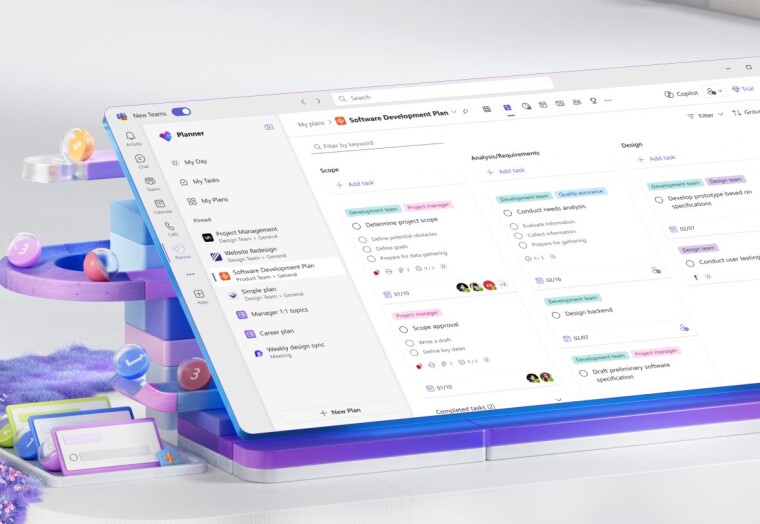
Microsoft Planner has taken a significant step towards enhancing its project management capabilities with the introduction of its new Goals feature. This new functionality allows users to establish and monitor objectives directly within their plans, ensuring teams stay aligned and focused on their targets.

This addition is part of a broader effort to make the new Microsoft Planner a unified work management platform that integrates the strengths of To Do, Planner, Project, and Copilot. This positions Planner to handle various work scenarios,from personal task lists to complex enterprise-level projects.

A standout feature of the Goals update is the ability to link individual tasks to specific goals. This provides a clear picture of how each task contributes to the overall project objectives. Users can also leverage the AI-powered Copilot to help create goals tailored to their specific needs.

To ensure focus and efficiency, Microsoft has limited the number of goals per plan to 10. Accessing and managing these goals is straightforward within the new Planner interface. Users with a Planner Plan 1 or greater subscription can find the dedicated “Goals” view in the navigation header. From there, they can easily add new goals, specifying details like title,end date, status, and even color-coding for visual organization.

This new Goals feature promises to bring enhanced clarity and direction to project execution within Microsoft Planner. By facilitating goal setting, tracking, and linking tasks directly to objectives, it streamlines workflows and encourages better organization within teams.

Share
What do you think?
Happy0
Sad0
Love0
Surprise0
Cry0
Angry0
Dead0

WHAT'S HOT ❰

Hisense partners with Phantom Blade Zero to promote its gaming displays
Grok Voice mode heads to Apple CarPlay, expanding beyond Tesla vehicles
OpenAI adds playful AI pets as floating companions in its Codex coding tool
Fallout Nuka Girl collectible returns with limited exclusive edition
Xiaomi prepares high-performance YU7 GT SUV for May launch
Absolute Geeks UAEAbsolute Geeks UAE
Follow US
AbsoluteGeeks.com was assembled during a caffeine incident.
© Absolute Geeks Media FZE LLC 2014–2026.
Proudly made in Dubai, UAE ❤️
Upgrade Your Brain Firmware
Receive updates, patches, and jokes you’ll pretend you understood.
No spam, just RAM for your brain.
Welcome Back!

Sign in to your account

Username or Email Address
Password

Lost your password?



