

By using this site, you agree to our Privacy Policy and Terms of Service.
Accept
Absolute Geeks UAEAbsolute Geeks UAE
  • STORIES
    • TECH
    • AUTOMOTIVE
    • GUIDES
    • OPINIONS
  • REVIEWS
    • READERS’ CHOICE
    • ALL REVIEWS
    • ━
    • SMARTPHONES
    • CARS
    • HEADPHONES
    • ACCESSORIES
    • LAPTOPS
    • TABLETS
    • WEARABLES
    • SPEAKERS
    • APPS
  • WATCHLIST
    • TV & MOVIES REVIEWS
    • SPOTLIGHT
  • GAMING
    • GAMING NEWS
    • GAME REVIEWS
  • +
    • OUR STORY
    • GET IN TOUCH
Reading: New Gmail Gemini AI features help refine and improve your email drafts on any device
Share
Notification Show More
Absolute Geeks UAEAbsolute Geeks UAE
  • STORIES
    • TECH
    • AUTOMOTIVE
    • GUIDES
    • OPINIONS
  • REVIEWS
    • READERS’ CHOICE
    • ALL REVIEWS
    • ━
    • SMARTPHONES
    • CARS
    • HEADPHONES
    • ACCESSORIES
    • LAPTOPS
    • TABLETS
    • WEARABLES
    • SPEAKERS
    • APPS
  • WATCHLIST
    • TV & MOVIES REVIEWS
    • SPOTLIGHT
  • GAMING
    • GAMING NEWS
    • GAME REVIEWS
  • +
    • OUR STORY
    • GET IN TOUCH
Follow US

New Gmail Gemini AI features help refine and improve your email drafts on any device

GEEK DESK
GEEK DESK
Aug 21

Google has introduced two new AI-powered features to Gmail, designed to streamline and enhance the email drafting process for users across web, Android, and iOS platforms. These new additions build upon the existing “Help me write” feature, showcasing Google’s continued efforts to integrate AI capabilities into its productivity tools.

The first new feature, “Polish,” allows users to refine their email drafts using AI assistance. This improvement offers options to formalize, elaborate, or shorten the text, making it easier to tailor emails to specific contexts and audiences.

Additionally, Google has added convenient “Help me write” and “Refine my draft” shortcuts on Android and iOS devices.These shortcuts provide quick access to the AI features, streamlining the writing process on mobile devices.
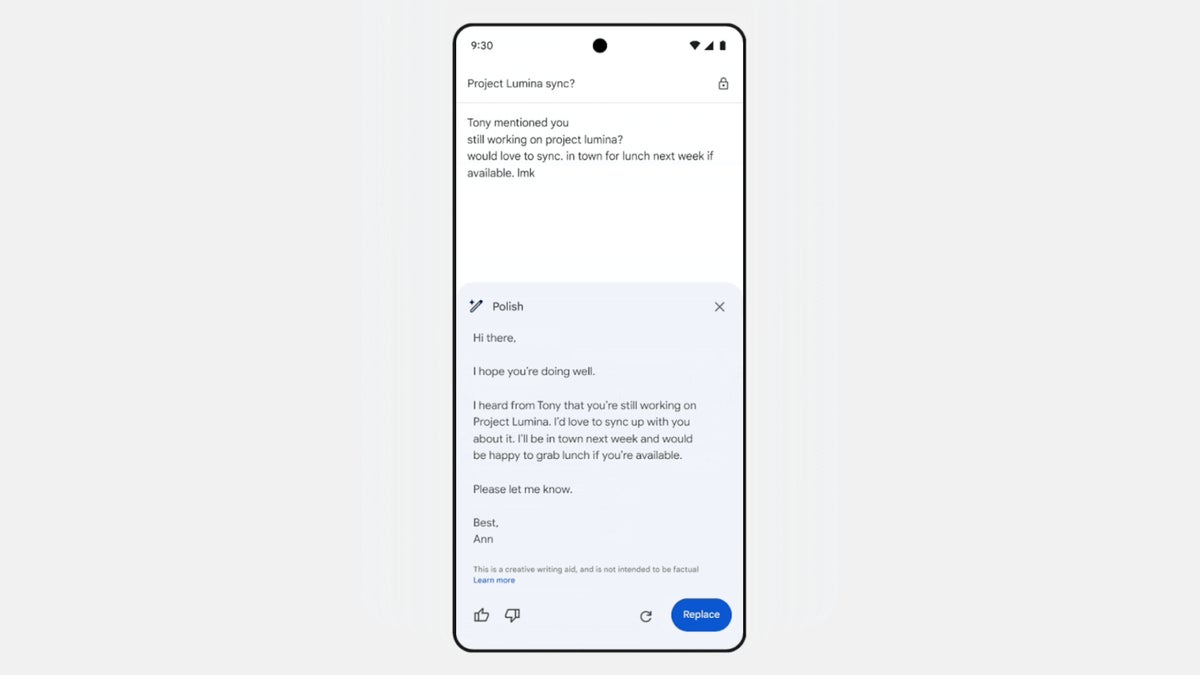
The “Help me write” shortcut appears when an email draft is empty, while the “Refine my draft” shortcut appears after at least 12 words have been written. Users can then swipe right on the latter shortcut to access the full range of AI-powered options, including Polish, Formalize, Elaborate, Shorten, or even start a new draft altogether.

These new features are available to Google Workspace customers with Gemini Business and Enterprise add-ons, Gemini Education and Education Premium add-ons, as well as Google One AI Premium subscribers. The “Polish” feature and shortcuts are already accessible on Android, iOS, and the web, providing Gmail users with even more tools to craft effective and polished emails.

Share
What do you think?
Happy0
Sad0
Love0
Surprise0
Cry0
Angry0
Dead0

WHAT'S HOT ❰

Hisense partners with Phantom Blade Zero to promote its gaming displays
Grok Voice mode heads to Apple CarPlay, expanding beyond Tesla vehicles
OpenAI adds playful AI pets as floating companions in its Codex coding tool
Fallout Nuka Girl collectible returns with limited exclusive edition
Xiaomi prepares high-performance YU7 GT SUV for May launch
Absolute Geeks UAEAbsolute Geeks UAE
Follow US
AbsoluteGeeks.com was assembled during a caffeine incident.
© Absolute Geeks Media FZE LLC 2014–2026.
Proudly made in Dubai, UAE ❤️
Upgrade Your Brain Firmware
Receive updates, patches, and jokes you’ll pretend you understood.
No spam, just RAM for your brain.
Welcome Back!

Sign in to your account

Username or Email Address
Password

Lost your password?



