

By using this site, you agree to our Privacy Policy and Terms of Service.
Accept
Absolute Geeks UAEAbsolute Geeks UAE
  • STORIES
    • TECH
    • AUTOMOTIVE
    • GUIDES
    • OPINIONS
  • REVIEWS
    • READERS’ CHOICE
    • ALL REVIEWS
    • ━
    • SMARTPHONES
    • CARS
    • HEADPHONES
    • ACCESSORIES
    • LAPTOPS
    • TABLETS
    • WEARABLES
    • SPEAKERS
    • APPS
  • WATCHLIST
    • TV & MOVIES REVIEWS
    • SPOTLIGHT
  • GAMING
    • GAMING NEWS
    • GAME REVIEWS
  • +
    • OUR STORY
    • GET IN TOUCH
Reading: Google Chrome’s latest update streamlines tab management
Share
Notification Show More
Absolute Geeks UAEAbsolute Geeks UAE
  • STORIES
    • TECH
    • AUTOMOTIVE
    • GUIDES
    • OPINIONS
  • REVIEWS
    • READERS’ CHOICE
    • ALL REVIEWS
    • ━
    • SMARTPHONES
    • CARS
    • HEADPHONES
    • ACCESSORIES
    • LAPTOPS
    • TABLETS
    • WEARABLES
    • SPEAKERS
    • APPS
  • WATCHLIST
    • TV & MOVIES REVIEWS
    • SPOTLIGHT
  • GAMING
    • GAMING NEWS
    • GAME REVIEWS
  • +
    • OUR STORY
    • GET IN TOUCH
Follow US

Google Chrome’s latest update streamlines tab management

GEEK DESK
GEEK DESK
Sep 11

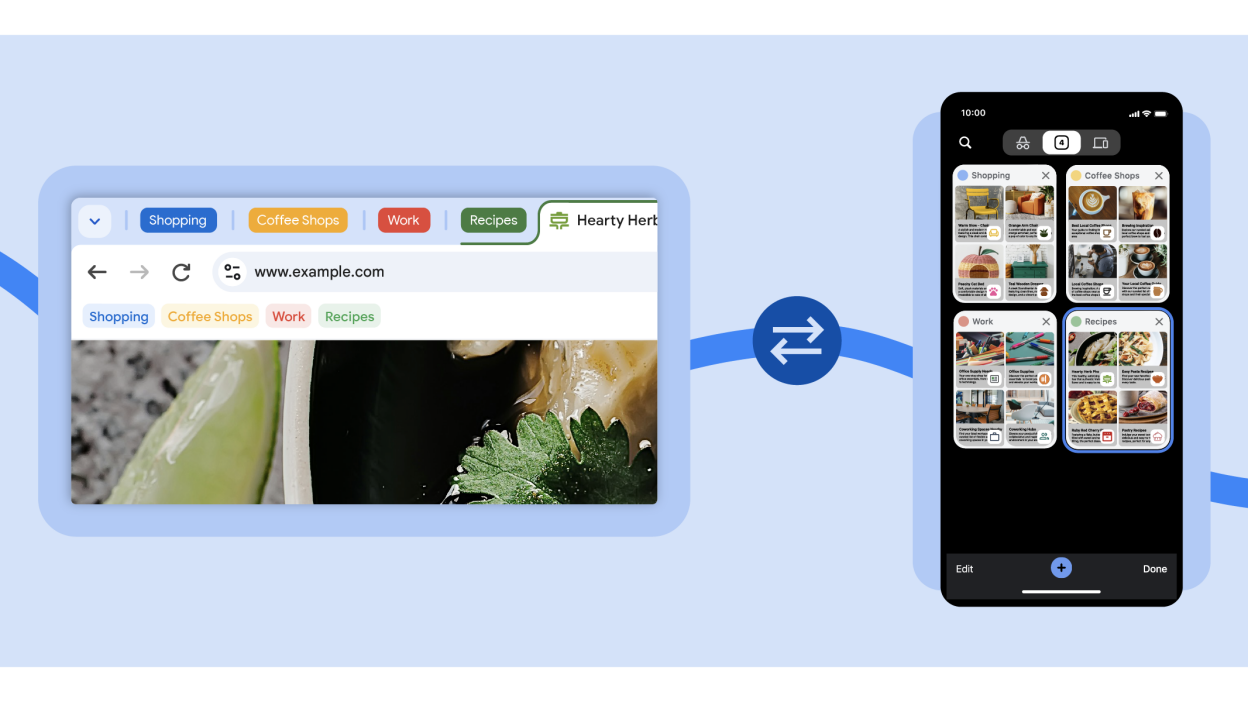
Google has introduced a new set of features aimed at enhancing how users manage their tabs within the Chrome browser.These updates are rolling out across desktop, iOS, and Android platforms, providing a more streamlined and synchronized browsing experience.

Key Features

  • Tab Groups on iOS: This long-awaited feature finally arrives on iPhones and iPads, enabling users to organize related tabs into customizable groups with distinct names and colors. This mirrors the existing functionality available on Android and desktop versions of Chrome.
  • Cross-Device Tab Group Sync: Chrome is taking tab groups to the next level by allowing users to save and sync their tab groups across multiple devices. This means you can start a research project on your phone and seamlessly continue it on your laptop without having to manually recreate your tab organization.
  • Proactive Tab Suggestions: In an experimental phase, Chrome will now start suggesting relevant pages based on your browsing history on other devices. This will make it easier to revisit pages you were previously browsing on a different device, saving you time and effort.

The Benefits

These updates offer a significant improvement in tab management across various devices. Users will appreciate the ability to create and sync tab groups, making their browsing sessions more organized and efficient. The tab suggestions feature promises to streamline the process of resuming work or research that began on a different device.

However, it’s worth noting that while these enhancements boost productivity, they also mean that Google Chrome collects and uses data on your browsing habits across devices. This is something to keep in mind when considering these new features.

Share
What do you think?
Happy0
Sad0
Love0
Surprise0
Cry0
Angry0
Dead0

WHAT'S HOT ❰

Hisense partners with Phantom Blade Zero to promote its gaming displays
Grok Voice mode heads to Apple CarPlay, expanding beyond Tesla vehicles
OpenAI adds playful AI pets as floating companions in its Codex coding tool
Fallout Nuka Girl collectible returns with limited exclusive edition
Xiaomi prepares high-performance YU7 GT SUV for May launch
Absolute Geeks UAEAbsolute Geeks UAE
Follow US
AbsoluteGeeks.com was assembled during a caffeine incident.
© Absolute Geeks Media FZE LLC 2014–2026.
Proudly made in Dubai, UAE ❤️
Upgrade Your Brain Firmware
Receive updates, patches, and jokes you’ll pretend you understood.
No spam, just RAM for your brain.
Welcome Back!

Sign in to your account

Username or Email Address
Password

Lost your password?



