By using this site, you agree to our Privacy Policy and Terms of Service.
Accept
Absolute Geeks UAEAbsolute Geeks UAE
  • STORIES
    • TECH
    • AUTOMOTIVE
    • GUIDES
    • OPINIONS
  • REVIEWS
    • READERS’ CHOICE
    • ALL REVIEWS
    • ━
    • SMARTPHONES
    • CARS
    • HEADPHONES
    • ACCESSORIES
    • LAPTOPS
    • TABLETS
    • WEARABLES
    • SPEAKERS
    • APPS
  • WATCHLIST
    • TV & MOVIES REVIEWS
    • SPOTLIGHT
  • GAMING
    • GAMING NEWS
    • GAME REVIEWS
  • +
    • OUR STORY
    • GET IN TOUCH
Reading: Gmail’s Summary Cards get a makeover: here’s what’s new
Share
Notification Show More
Absolute Geeks UAEAbsolute Geeks UAE
  • STORIES
    • TECH
    • AUTOMOTIVE
    • GUIDES
    • OPINIONS
  • REVIEWS
    • READERS’ CHOICE
    • ALL REVIEWS
    • ━
    • SMARTPHONES
    • CARS
    • HEADPHONES
    • ACCESSORIES
    • LAPTOPS
    • TABLETS
    • WEARABLES
    • SPEAKERS
    • APPS
  • WATCHLIST
    • TV & MOVIES REVIEWS
    • SPOTLIGHT
  • GAMING
    • GAMING NEWS
    • GAME REVIEWS
  • +
    • OUR STORY
    • GET IN TOUCH
Follow US

Gmail’s Summary Cards get a makeover: here’s what’s new

GEEK DESK
GEEK DESK
Oct 3

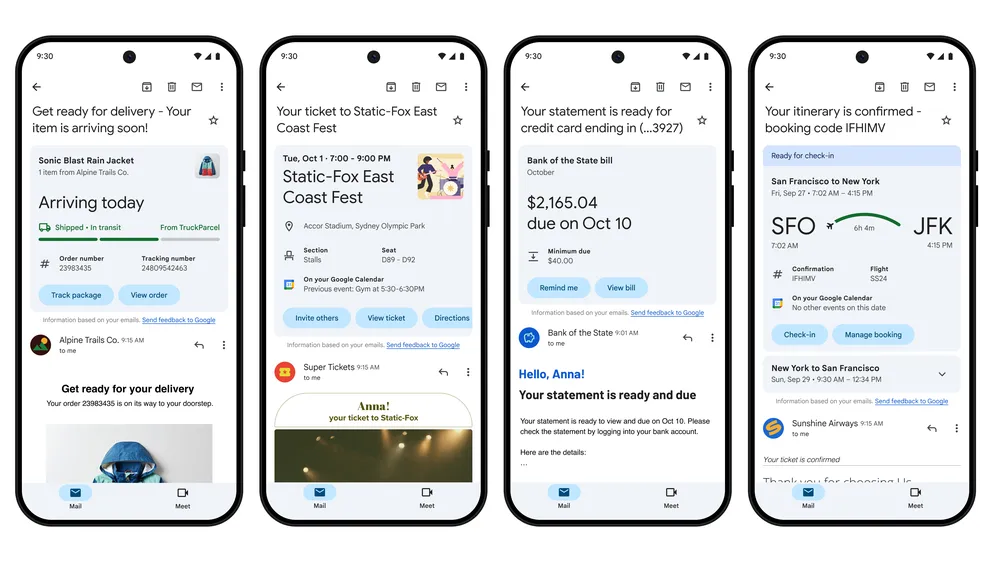
Gmail is getting a major upgrade to its summary cards, making it easier than ever to stay organized and on top of important events, travel plans, bills, and online orders.

These handy cards, which appear at the top of relevant emails, are getting a fresh new look and added functionality. Instead of just displaying information, summary cards will now include interactive buttons that let you take action directly within your inbox.

What’s New?

  • Purchases: Track your online orders at a glance and see key details like delivery estimates and order summaries.
  • Events: RSVP to events, add them to your Google Calendar, invite others, and even get directions – all without leaving your inbox.
  • Bills: Set payment reminders or add due dates to Google Tasks to ensure you never miss a deadline.
  • Travel: Manage your upcoming trips with ease, check in for flights, and see important details like hotel check-out times.
Behind the Scenes Improvements

Google has also revamped the technology behind summary cards. This means the information displayed is more accurate, up-to-date, and organized across all related emails. For example, you can follow the progress of a package delivery in real-time as updates arrive in your inbox.

More Ways to Access Summary Cards

In addition to appearing at the top of emails, summary cards will be accessible in other areas of Gmail:

  • Search: Easily find specific events, bills, or purchases using Gmail’s search function.
  • “Happening Soon” Section: A new section in your inbox will highlight upcoming events and deliveries, providing a quick overview of what’s on the horizon.

Rollout

The updated purchase summary cards are rolling out now for individual emails in the Gmail iOS app. Event, bill, and travel summary cards, along with the “Happening Soon” section, will be available in the coming months.


Share
What do you think?
Happy0
Sad0
Love0
Surprise0
Cry0
Angry0
Dead0

WHAT'S HOT ❰

Grok Voice mode heads to Apple CarPlay, expanding beyond Tesla vehicles
OpenAI adds playful AI pets as floating companions in its Codex coding tool
Fallout Nuka Girl collectible returns with limited exclusive edition
Xiaomi prepares high-performance YU7 GT SUV for May launch
Ask.com shuts down after 25 years, ending the era of the Jeeves butler
Absolute Geeks UAEAbsolute Geeks UAE
Follow US
AbsoluteGeeks.com was assembled during a caffeine incident.
© Absolute Geeks Media FZE LLC 2014–2026.
Proudly made in Dubai, UAE ❤️
Upgrade Your Brain Firmware
Receive updates, patches, and jokes you’ll pretend you understood.
No spam, just RAM for your brain.
Welcome Back!

Sign in to your account

Username or Email Address
Password

Lost your password?