HD Photos and Shared Albums
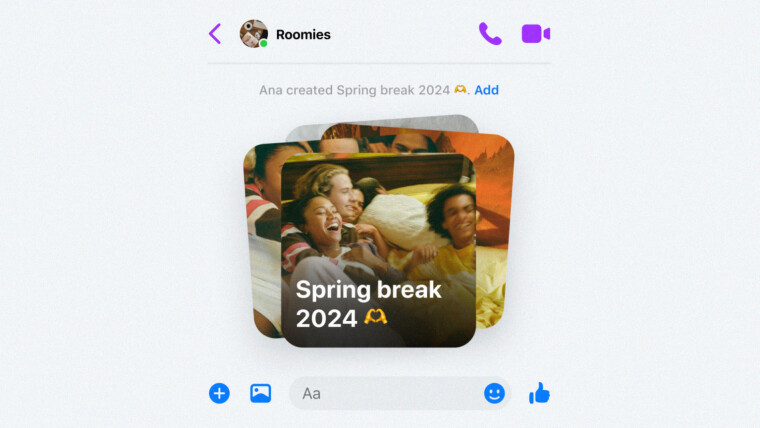
Messenger users will now see an HD toggle in the image picker, allowing for crystal-clear photo sharing. To take advantage of this, simply select multiple images as usual and enable the HD option before sending. Additionally, the ability to create shared albums with contacts simplifies collaborative photo and video collections. Creating an album is as easy as selecting multiple images, tapping “Create album” (or long-pressing a photo and using the same option). Once shared, everyone in the chat can view, add to, delete, and download media from the album. Customize album names and easily locate existing albums via the group chat’s Media tab.
QR Codes and File Sharing Enhancements
Adding contacts on Messenger has become easier than ever! Simply ask a new contact to access their QR code from Messenger Settings and scan it with your camera, or have them share the link directly.
Finally, Messenger now allows the sharing of files up to 100MB. Simply tap the “+” button and choose a file; Messenger supports a wide array of formats, including Word, PDF, and Excel. While not yet as robust as Telegram’s file-sharing functionality, it’s a significant step forward, reducing the need to rely on email for larger attachments.
Keep an eye out for these features rolling out in the coming weeks. While not all features may be immediately available, this update represents a major boost to Messenger’s usability.
Facebook Messenger has received a significant upgrade, bringing a suite of new features designed to enhance photo and file sharing, along with a more seamless way to connect with new contacts.
HD Photos and Shared Albums
Messenger users will now see an HD toggle in the image picker, allowing for crystal-clear photo sharing. To take advantage of this, simply select multiple images as usual and enable the HD option before sending. Additionally, the ability to create shared albums with contacts simplifies collaborative photo and video collections. Creating an album is as easy as selecting multiple images, tapping “Create album” (or long-pressing a photo and using the same option). Once shared, everyone in the chat can view, add to, delete, and download media from the album. Customize album names and easily locate existing albums via the group chat’s Media tab.
QR Codes and File Sharing Enhancements
Adding contacts on Messenger has become easier than ever! Simply ask a new contact to access their QR code from Messenger Settings and scan it with your camera, or have them share the link directly.
Finally, Messenger now allows the sharing of files up to 100MB. Simply tap the “+” button and choose a file; Messenger supports a wide array of formats, including Word, PDF, and Excel. While not yet as robust as Telegram’s file-sharing functionality, it’s a significant step forward, reducing the need to rely on email for larger attachments.
Keep an eye out for these features rolling out in the coming weeks. While not all features may be immediately available, this update represents a major boost to Messenger’s usability.