
Google has rolled out Android 17 to Pixel phones, alongside a fresh Pixel Drop feature bundle and Wear OS 7 for compatible smartwatches. The updates arrive as Android continues its steady evolution, bringing incremental improvements in multitasking, media tools, and device integration rather than sweeping transformations. While the changes will reach other manufacturers later in the year, Pixel owners gain immediate access, highlighting Google’s preference for controlling the flagship experience.
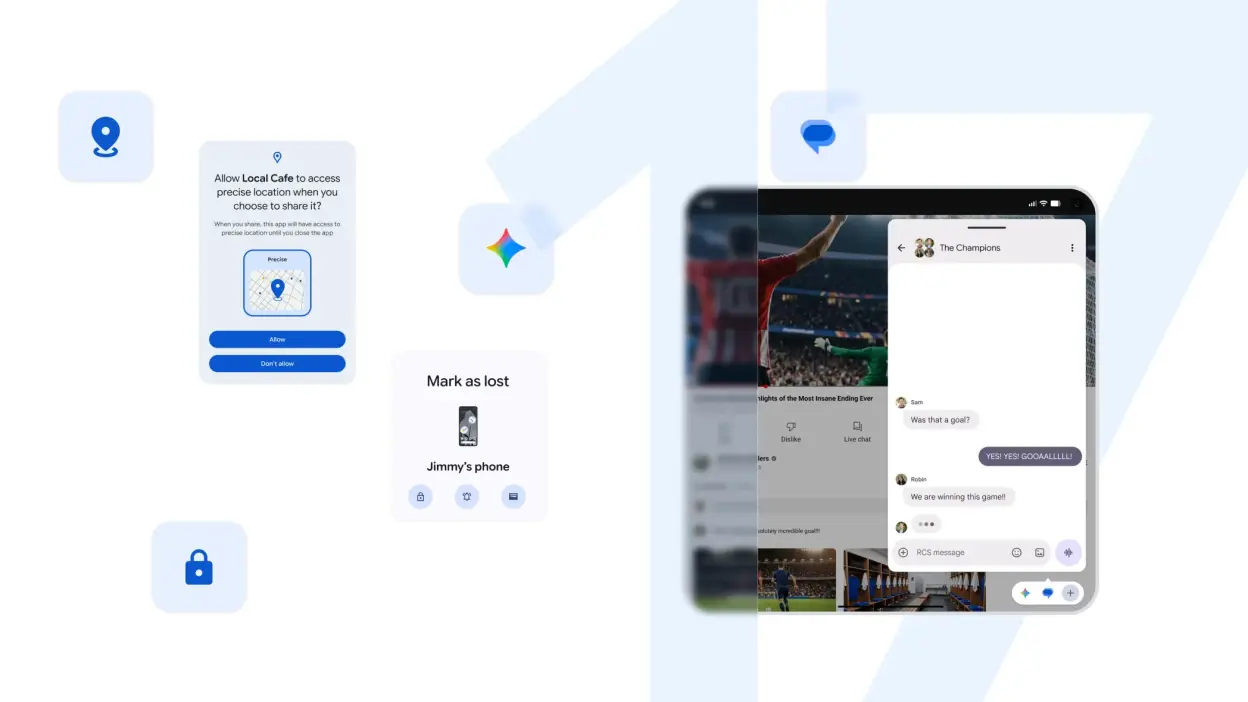
Among the headline additions in Android 17 is Bubbles, which lets users open apps in floating pop-up windows for easier switching between tasks. A new Bubble bar organizes recent ones at the bottom of the screen. This builds on earlier multitasking efforts but may prove more useful on larger displays or for quick reference during workflows. Screen Reactions introduces simultaneous screen and selfie camera recording, catering to tutorial creators and video callers who previously relied on desktop tools. On foldable devices, a dedicated gaming mode converts half the screen into a virtual gamepad, offering a practical if niche convenience for portable play.
Security and parental controls also see refinements. Expanded location-sharing options, Live Threat Detection, and Advanced Protection aim to tighten oversight, while the Find Hub gains a “Mark as lost” function. Parents can now impose screen time limits and content filters without mandatory Google Account linking, addressing a long-standing friction point. These enhancements feel like necessary maintenance in an era of heightened data concerns, though their real-world effectiveness will depend on consistent implementation across the fragmented Android landscape.

The accompanying June Pixel Drop leans heavily into AI capabilities via Gemini. Users can edit videos through conversational prompts, remix media, or generate content from text descriptions, including custom avatars that mimic appearance and voice. Lyria 3 brings music creation tools, allowing style and tempo selection or image-based inspiration. Speech-to-text translation expands to more models, Quick Share improves cross-platform file transfer with iPhones, and Take a Message adds customizable voicemail greetings with transcriptions. These features extend Google’s on-device and cloud AI push, promising creative flexibility, yet they also raise familiar questions about processing demands, data handling, and whether generative tools deliver reliable results outside controlled demos.
On the wearable side, Wear OS 7 introduces Live Updates for glancing at sports scores, deliveries, or workout progress directly from the wrist. Users gain basic controls over connected headphones and speakers, plus instant photo viewing from paired smartglasses. Emergency Sharing automatically notifies contacts and services upon detecting falls, accidents, or pulse irregularities on Pixel Watches. Such integrations strengthen the ecosystem but echo capabilities already present in competing platforms, suggesting Google is catching up in seamless device orchestration rather than pioneering new ground.
Taken together, these releases reflect Android’s ongoing maturation amid competitive pressure from iOS and emerging AI-driven interfaces. Multitasking and media tools address everyday pain points, while safety additions provide welcome reassurance. Still, the heavy emphasis on generative AI invites scrutiny over battery life, privacy, and genuine utility versus novelty. For Pixel users invested in Google’s ecosystem, the updates offer tangible refinements; broader Android adoption will test their polish across varied hardware. In a market where incremental yearly jumps define progress, Android 17 delivers steady iteration without reinventing the fundamentals.