By using this site, you agree to our Privacy Policy and Terms of Service.
Accept
Absolute Geeks UAEAbsolute Geeks UAE
  • STORIES
    • TECH
    • AUTOMOTIVE
    • GUIDES
    • OPINIONS
  • REVIEWS
    • READERS’ CHOICE
    • ALL REVIEWS
    • ━
    • SMARTPHONES
    • CARS
    • HEADPHONES
    • ACCESSORIES
    • LAPTOPS
    • TABLETS
    • WEARABLES
    • SPEAKERS
    • APPS
  • WATCHLIST
    • TV & MOVIES REVIEWS
    • SPOTLIGHT
  • GAMING
    • GAMING NEWS
    • GAME REVIEWS
  • +
    • OUR STORY
    • GET IN TOUCH
Reading: You can now save songs to Spotify from TikTok with a simple tap in the UAE
Share
Notification Show More
Absolute Geeks UAEAbsolute Geeks UAE
  • STORIES
    • TECH
    • AUTOMOTIVE
    • GUIDES
    • OPINIONS
  • REVIEWS
    • READERS’ CHOICE
    • ALL REVIEWS
    • ━
    • SMARTPHONES
    • CARS
    • HEADPHONES
    • ACCESSORIES
    • LAPTOPS
    • TABLETS
    • WEARABLES
    • SPEAKERS
    • APPS
  • WATCHLIST
    • TV & MOVIES REVIEWS
    • SPOTLIGHT
  • GAMING
    • GAMING NEWS
    • GAME REVIEWS
  • +
    • OUR STORY
    • GET IN TOUCH
Follow US

You can now save songs to Spotify from TikTok with a simple tap in the UAE

GEEK DESK
GEEK DESK
Dec 14

Spotify’s latest integration allows Spotify users to save the songs they hear on TikTok videos directly into their Library on Spotify, all without switching apps. 

Launched initially in the US and the UK, Spotify and TikTok users on Android and iOS will now have access to this experience in 19 additional markets, starting from Thursday 14th December, including the UAE.

Other countries on the list include: Argentina, Canada, Colombia, France, Germany, Ireland, Italy, Japan, Malaysia, Netherlands, Philippines, Saudi Arabia, Spain, Sweden, Thailand, Turkey, and Vietnam.

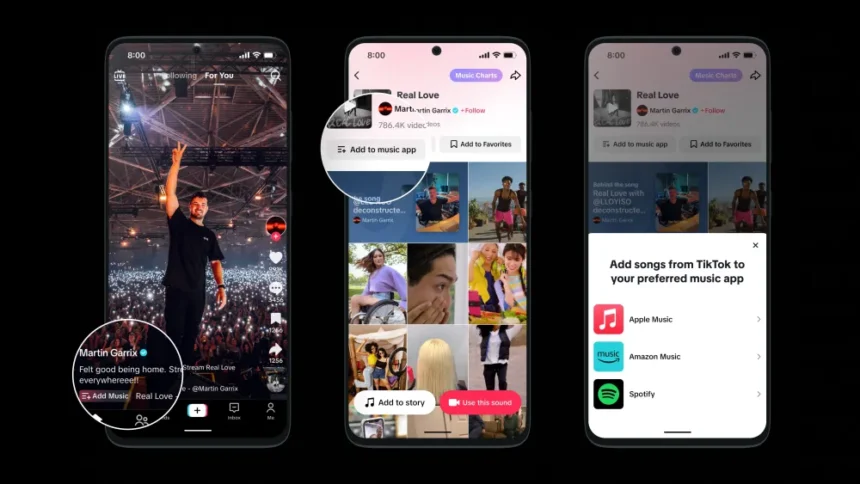
Here’s how it works:

  • Make sure your Spotify and TikTok apps are updated.
  • On TikTok, click ‘Add song’ in the main feed and select Spotify. This will designate Spotify as your default streaming service.
  • From then on, you can automatically save songs to ‘Your Library’ by simply tapping the ‘Add to Spotify’ button.
  • You’ll find your newly saved tracks on Spotify in the ‘Liked Songs’ section of ‘Your Library.’
Share
What do you think?
Happy0
Sad0
Love0
Surprise0
Cry0
Angry0
Dead0

WHAT'S HOT ❰

Honor of Kings launches Attack on Titan crossover with themed skins and new mode
Claude gains built-in scam detection through Malwarebytes integration
Zeekr showcases 8X and 9X flagships at Auto China 2026 amid premium market push
Oppo consolidates OnePlus and Realme into single internal unit under Realme CEO
Hyundai unveils Pleos Connect infotainment system with conversational AI assistant
Absolute Geeks UAEAbsolute Geeks UAE
Follow US
AbsoluteGeeks.com was assembled during a caffeine incident.
© Absolute Geeks Media FZE LLC 2014–2026.
Proudly made in Dubai, UAE ❤️
Upgrade Your Brain Firmware
Receive updates, patches, and jokes you’ll pretend you understood.
No spam, just RAM for your brain.
Welcome Back!

Sign in to your account

Username or Email Address
Password

Lost your password?