By using this site, you agree to our Privacy Policy and Terms of Service.
Accept
Absolute Geeks UAEAbsolute Geeks UAE
  • STORIES
    • TECH
    • AUTOMOTIVE
    • GUIDES
    • OPINIONS
  • REVIEWS
    • READERS’ CHOICE
    • ALL REVIEWS
    • ━
    • SMARTPHONES
    • CARS
    • HEADPHONES
    • ACCESSORIES
    • LAPTOPS
    • TABLETS
    • WEARABLES
    • SPEAKERS
    • APPS
  • WATCHLIST
    • TV & MOVIES REVIEWS
    • SPOTLIGHT
  • GAMING
    • GAMING NEWS
    • GAME REVIEWS
  • +
    • OUR STORY
    • GET IN TOUCH
Reading: Windows enhances iPhone connectivity with easier file sharing
Share
Notification Show More
Absolute Geeks UAEAbsolute Geeks UAE
  • STORIES
    • TECH
    • AUTOMOTIVE
    • GUIDES
    • OPINIONS
  • REVIEWS
    • READERS’ CHOICE
    • ALL REVIEWS
    • ━
    • SMARTPHONES
    • CARS
    • HEADPHONES
    • ACCESSORIES
    • LAPTOPS
    • TABLETS
    • WEARABLES
    • SPEAKERS
    • APPS
  • WATCHLIST
    • TV & MOVIES REVIEWS
    • SPOTLIGHT
  • GAMING
    • GAMING NEWS
    • GAME REVIEWS
  • +
    • OUR STORY
    • GET IN TOUCH
Follow US

Windows enhances iPhone connectivity with easier file sharing

GEEK DESK
GEEK DESK
Dec 12

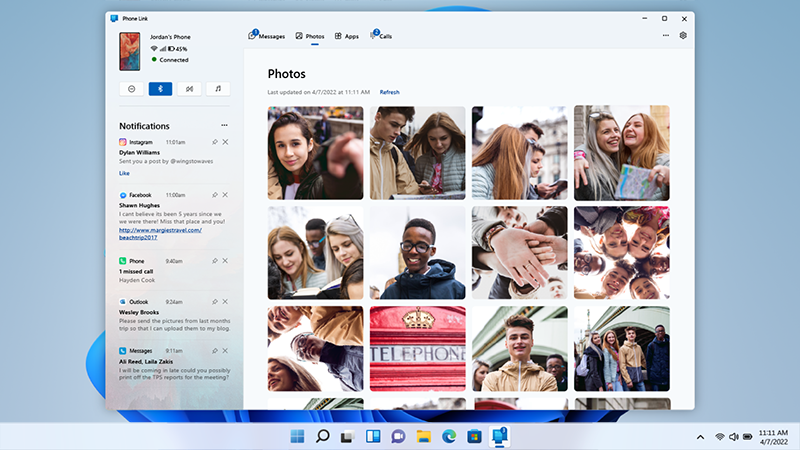
Microsoft is making it easier for iPhone users to connect with their Windows PCs. The latest updates to the Phone Link app for Windows and the Link to Windows app for iOS introduce a convenient file-sharing feature, allowing seamless transfer of files between iPhones and Windows 10 or 11 PCs.

To share a file from your iPhone, simply navigate to the file, tap the “Share” icon, select “Link to Windows,” and choose your PC from the list. This feature requires an iPhone running iOS 16 or later.

Transferring files from your Windows PC to your iPhone is equally straightforward. Select the desired files, right-click, and choose “My Phone” or “Phone Link” if the former option isn’t visible.

Microsoft’s Phone Link app, launched last year, enables Windows users to remotely access their iPhones for various tasks, including making calls, checking notifications, sending and receiving iMessages, and viewing photos and contacts. However, due to iOS restrictions, the functionality is more limited compared to the Android version of Phone Link.

This new file-sharing capability is a welcome addition to Phone Link, further bridging the gap between iPhones and Windows PCs. Currently, the feature is available to Windows Insiders, with a broader rollout expected in the coming months.

Share
What do you think?
Happy0
Sad0
Love0
Surprise0
Cry0
Angry0
Dead0

WHAT'S HOT ❰

Huawei launches watch fit 5 series pre-orders in the uae with practical fitness features
HONOR opens sales for 600 Series with emphasis on AI camera and large battery
Olivia Rodrigo to front FC Barcelona jersey for El Clásico in latest Spotify partnership
HP expands HyperX lineup with Clutch Talon controller and Cloud Stinger 3 headsets
Urban Armor Gear (UAG) acquires Nomad Goods in latest mobile accessories consolidation
Absolute Geeks UAEAbsolute Geeks UAE
Follow US
AbsoluteGeeks.com was assembled during a caffeine incident.
© Absolute Geeks Media FZE LLC 2014–2026.
Proudly made in Dubai, UAE ❤️
Upgrade Your Brain Firmware
Receive updates, patches, and jokes you’ll pretend you understood.
No spam, just RAM for your brain.
Welcome Back!

Sign in to your account

Username or Email Address
Password

Lost your password?