Apple has released the second developer beta of iOS 18.4, and it’s brimming with new features and enhancements that span across various aspects of the iPhone experience. Here’s a detailed look at what’s new:
Expressive Communication with New Emoji
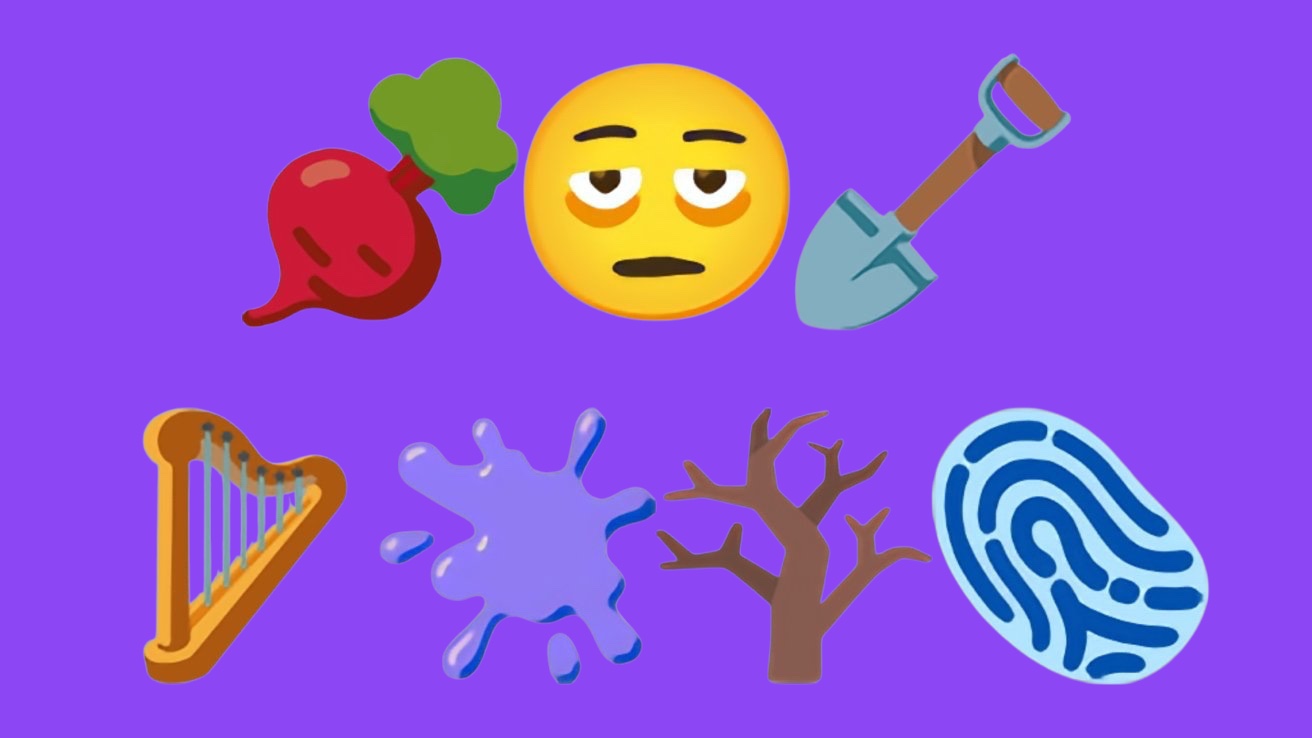
iOS 18.4 beta 2 introduces a fresh batch of emoji characters to enhance your digital conversations. These include expressive options like “bags under eyes” for those weary days, a “fingerprint” for adding a touch of mystery, and a “leafless tree” for capturing the autumnal mood. Foodies will appreciate the “root vegetable” emoji, while music lovers can now express their passion with the “harp.” The “shovel” and “splatter” emoji add a touch of whimsy to the mix.
Prioritize Notifications: Taking Control of Your Alerts
Building upon the Prioritize Notifications feature introduced in the first beta, iOS 18.4 beta 2 offers more granular control. You can now set Priority Notifications on a per-app basis, giving you the flexibility to choose which apps deserve your immediate attention. These prioritized notifications are prominently displayed in a dedicated section on the Lock Screen, ensuring you see them first. Apple Intelligence helps determine which notifications are important, but you can always access all your notifications in Notification Center.
Vision Pro App: A Window into Apple’s XR Future
The arrival of a dedicated Vision Pro app in iOS 18.4 beta 2 is a strong indication that Apple is preparing for the launch of its mixed-reality headset. This app serves as a companion to the Vision Pro headset, allowing you to:
- Discover and download content: Explore a curated selection of immersive videos, 3D movies, and XR experiences designed for the Vision Pro headset.
- Manage apps: Download apps directly to your Vision Pro headset without needing to wear the device.
- Access user guide and tips: Learn how to use your Vision Pro headset and get the most out of its features.
This app highlights the close integration between the iPhone and the upcoming Vision Pro headset, suggesting that the iPhone could play a key role in the XR experience.
Control Center Enhancements: Apple Intelligence and Visual Intelligence
The Control Center in iOS 18.4 beta 2 features a new Apple Intelligence section, housing the “Type to Siri” option and new controls for activating Siri and Visual Intelligence.
Speaking of Visual Intelligence, this AI-powered feature is now available on the iPhone 15 Pro and iPhone 15 Pro Max. Since these models lack a dedicated Camera Control button, you can activate Visual Intelligence through the Control Center or by assigning it to the Action Button.
App Store Downloads: Pause and Resume
Downloading apps and updates from the App Store is now more convenient with the ability to pause and resume downloads directly from the update list. This eliminates the need to navigate to the Home Screen to manage app downloads.
Shortcuts Actions: Streamlining App Settings
The Shortcuts app gains a range of new actions for Apple apps, primarily focused on changing app settings. For example, you can now create shortcuts to adjust Maps settings like avoiding tolls or changing the volume level, or modify Safari settings such as enabling pop-up blocking or changing the default search engine.
Photos: Efficiently Manage Recently Deleted Items
The Recently Deleted section in the Photos app now offers one-tap options to delete or recover all photos, making it easier to manage your photo library.
Wallet: Redesigned Menu for Better Organization
The Wallet app features a redesigned menu with new sections for Orders, Settings, and Subscriptions and Payments. This provides a more organized way to access various Wallet features.
Apple Maps EV Updates: Expanding Charging Support
Code within iOS 18.4 beta 2 suggests that Apple Maps will soon support the North American Charging Standard (NACS) for its EV routing feature. This means that EV owners with compatible vehicles will be able to route to NACS chargers, including Tesla Superchargers, directly within Apple Maps.
Overall, iOS 18.4 beta 2 introduces a wide array of new features and improvements that enhance the iPhone experience. From expressive new emoji to powerful AI capabilities and a glimpse into the future of XR with the Vision Pro app, this update showcases Apple’s commitment to innovation and user satisfaction.