• STORIES
    • TECH
    • AUTOMOTIVE
    • GUIDES
    • OPINIONS
  • REVIEWS
    • READERS’ CHOICE
    • ALL REVIEWS
    • ━
    • SMARTPHONES
    • CARS
    • HEADPHONES
    • ACCESSORIES
    • LAPTOPS
    • TABLETS
    • WEARABLES
    • SPEAKERS
    • APPS
  • WATCHLIST
    • TV & MOVIES REVIEWS
    • SPOTLIGHT
  • GAMING
    • GAMING NEWS
    • GAME REVIEWS
  • +
    • OUR STORY
    • GET IN TOUCH
Reading: Honor expands Device Clone to support Android, iOS, and HarmonyOS Next transfers
Share
Notification Show More
  • STORIES
    • TECH
    • AUTOMOTIVE
    • GUIDES
    • OPINIONS
  • REVIEWS
    • READERS’ CHOICE
    • ALL REVIEWS
    • ━
    • SMARTPHONES
    • CARS
    • HEADPHONES
    • ACCESSORIES
    • LAPTOPS
    • TABLETS
    • WEARABLES
    • SPEAKERS
    • APPS
  • WATCHLIST
    • TV & MOVIES REVIEWS
    • SPOTLIGHT
  • GAMING
    • GAMING NEWS
    • GAME REVIEWS
  • +
    • OUR STORY
    • GET IN TOUCH
Follow US

Honor expands Device Clone to support Android, iOS, and HarmonyOS Next transfers

GEEK DESK
GEEK DESK
Aug 6

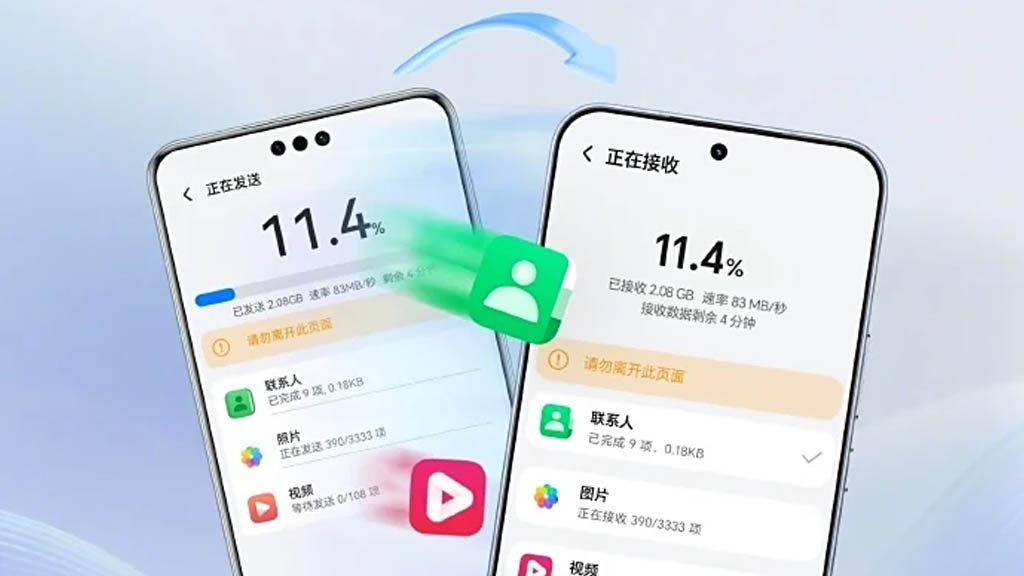
Honor has expanded its Device Clone app to work across Android, iOS, and Huawei’s HarmonyOS Next, making it possible to transfer data between these platforms without additional hardware or accessories. The update builds on the company’s earlier AI Connect feature, which enabled wireless file transfers between Honor and Apple devices, and now broadens compatibility for full device migration.

With the latest version of Device Clone, users can move contacts, media, apps, and other files from an old phone to a new Honor device, regardless of whether the source device runs Android, iOS, or HarmonyOS Next. This also makes Honor the first manufacturer to offer HarmonyOS Next-to-Android data migration support.

The cloning process is straightforward: install the Device Clone app on both devices, open the feature from the new phone’s settings under System & Updates, and choose Device Clone. On the new device, select “This is a new device” and then the operating system of the old phone. On the old device, select “This is an old device.” The two devices connect by scanning a QR code displayed on the new phone, after which the user selects the data to transfer and starts the migration.

This cross-platform capability could be particularly useful for users switching ecosystems, eliminating some of the friction typically involved in moving data between Android, iOS, and HarmonyOS environments. It also positions Honor competitively in a market where seamless device setup and data continuity are increasingly seen as key selling points for new smartphones.

Share
What do you think?
Happy0
Sad0
Love0
Surprise0
Cry0
Angry0
Dead0

WHAT'S HOT ❰

Dragon Ball Cross Force brings new mechanics to Fusion World TCG
2026 FIFA World Cup: how to watch Saudi Arabia vs Uruguay in the UAE
Asus launches affordable GaN charging hub
Microsoft considers restructuring Xbox amid rising hardware costs
Freelander 8 debuts at Abu Dhabi forum ahead of Middle East launch
AbsoluteGeeks.com — assembled by Absolute Geeks Media FZE LLC during a caffeine incident. © 2014–2026. All rights reserved.
Follow US
AbsoluteGeeks.com was assembled during a caffeine incident.
© Absolute Geeks Media FZE LLC 2014–2026.
Proudly made in Dubai, UAE ❤️
Upgrade Your Brain Firmware
Receive updates, patches, and jokes you’ll pretend you understood.
No spam, just RAM for your brain.
Welcome Back!

Sign in to your account

Username or Email Address
Password

Lost your password?