By using this site, you agree to our Privacy Policy and Terms of Service.
Accept
Absolute Geeks UAEAbsolute Geeks UAE
  • STORIES
    • TECH
    • AUTOMOTIVE
    • GUIDES
    • OPINIONS
  • REVIEWS
    • READERS’ CHOICE
    • ALL REVIEWS
    • ━
    • SMARTPHONES
    • CARS
    • HEADPHONES
    • ACCESSORIES
    • LAPTOPS
    • TABLETS
    • WEARABLES
    • SPEAKERS
    • APPS
  • WATCHLIST
    • TV & MOVIES REVIEWS
    • SPOTLIGHT
  • GAMING
    • GAMING NEWS
    • GAME REVIEWS
  • +
    • OUR STORY
    • GET IN TOUCH
Reading: Apple’s NameDrop IS secured and NO, there is nothing to worry about
Share
Notification Show More
Absolute Geeks UAEAbsolute Geeks UAE
  • STORIES
    • TECH
    • AUTOMOTIVE
    • GUIDES
    • OPINIONS
  • REVIEWS
    • READERS’ CHOICE
    • ALL REVIEWS
    • ━
    • SMARTPHONES
    • CARS
    • HEADPHONES
    • ACCESSORIES
    • LAPTOPS
    • TABLETS
    • WEARABLES
    • SPEAKERS
    • APPS
  • WATCHLIST
    • TV & MOVIES REVIEWS
    • SPOTLIGHT
  • GAMING
    • GAMING NEWS
    • GAME REVIEWS
  • +
    • OUR STORY
    • GET IN TOUCH
Follow US

Apple’s NameDrop IS secured and NO, there is nothing to worry about

GEEK DESK
GEEK DESK
Nov 29

Over the last few days, reports out the US have been circulating about police warnings to parents emphasizing the need to close the NameDrop feature that Apple released in iOS17.1, citing security and privacy concerns.

The original messages shared by Police:

If you have an iPhone and have done the recent iOS 17 update, they have set a new feature called NameDrop defaulted to ON. This feature allows the sharing of your contact info just by bringing your phones close together. While you do need to accept the transfer, if you would prefer to shut this off go to: Settings, General, AirDrop, Bringing Devices Together. Change to OFF.

PARENTS: You may consider changing these settings after the update on your children’s phones, also, to help keep them safe as well!

Basically, what is being implied here is that NameDrop automatically shares your contact and information with anyone who brings their iPhone near to yours, which is totally misleading and untrue.

How does NameDrop work?

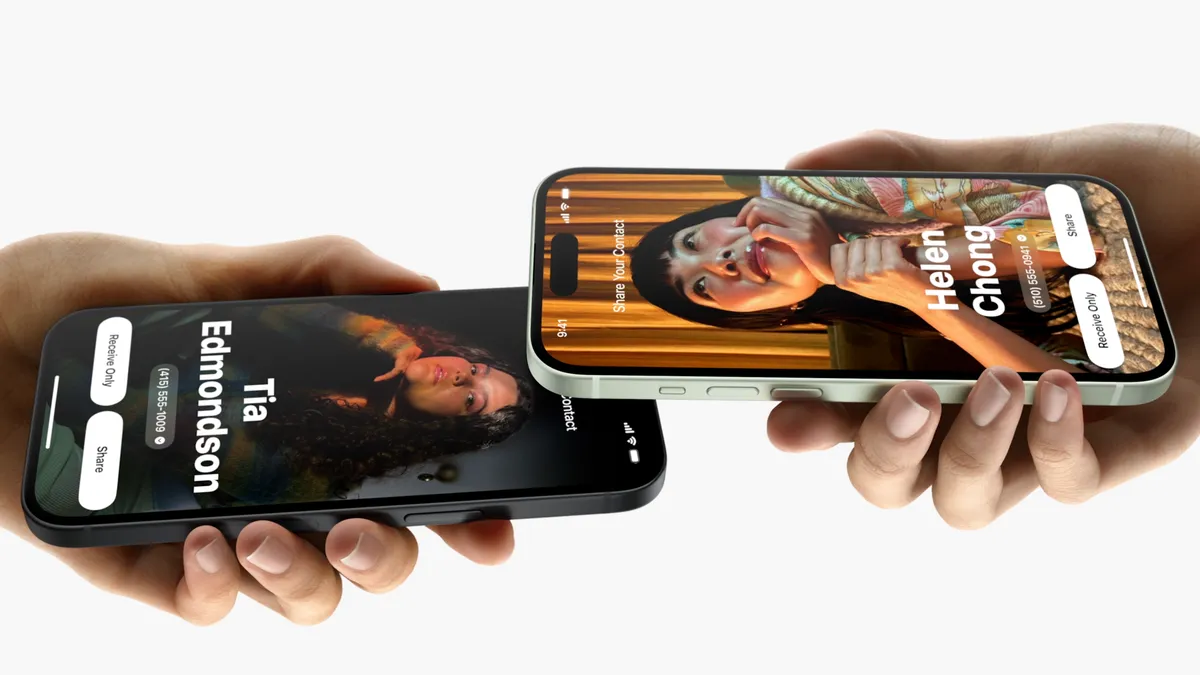
The new feature only works between two iPhone when they are unlocked, next to each other, and only after users tap “share” or “receive” on their phones to send email addresses and phone numbers with one another. Information will not flow by only placing an iPhone next to another. Furthermore, contact sharing will be terminated if the two smartphones are moved apart anytime during the process or locked using the power button.

If you want to turn off the feature, just navigate to Settings, then tap General and AirDrop.

Share
What do you think?
Happy0
Sad0
Love0
Surprise0
Cry0
Angry0
Dead0

WHAT'S HOT ❰

Honor of Kings launches Attack on Titan crossover with themed skins and new mode
Claude gains built-in scam detection through Malwarebytes integration
Zeekr showcases 8X and 9X flagships at Auto China 2026 amid premium market push
Oppo consolidates OnePlus and Realme into single internal unit under Realme CEO
Hyundai unveils Pleos Connect infotainment system with conversational AI assistant
Absolute Geeks UAEAbsolute Geeks UAE
Follow US
AbsoluteGeeks.com was assembled during a caffeine incident.
© Absolute Geeks Media FZE LLC 2014–2026.
Proudly made in Dubai, UAE ❤️
Upgrade Your Brain Firmware
Receive updates, patches, and jokes you’ll pretend you understood.
No spam, just RAM for your brain.
Welcome Back!

Sign in to your account

Username or Email Address
Password

Lost your password?