Since 2020 Apple’s Swift Student Challenge has given thousands of students around the world the opportunity to showcase their creativity and build real-world skills to take into their careers and beyond. The next challenge will open in February 2024, and will include a new category recognizing 50 Distinguished Winners, who will be named for standout submissions.
Apple’s Swift Playgrounds app was designed to take learners from their first line of code to building their first app in Swift.
To help bring app development to learners, Apple works with educators around the globe. To support teaching Swift Playgrounds for educators, four new Everyone Can Code Projects provide step-by-step resources to guide students in developing essential skills while creating apps that solve problems they care about.
In addition to working with educators worldwide, Apple supports learners in 99 countries and regions through its Community Education Initiative, such as the National Coalition of Certification Centers (NC3). NC3 provides hands-on professional development opportunities to prepare community and technical college and high school instructors to teach App Development with Swift. This year, the organization is committing to helping more students than ever submit their app projects for the Swift Student Challenge in 2024.
Apple’s new Everyone Can Code Projects provide step-by-step resources to help educators guide students through every step of their coding and app development journey, and develop essential skills while creating apps that solve problems they care about.
Everyone Can Code Projects can be integrated into any subject area, and are perfect for the classroom or coding clubs. They introduce students to SwiftUI — the modern way to build user interfaces with surprisingly little code — and use the latest app-building technologies in Swift Playgrounds. As they code, students can see how their app changes in real time with App Preview.
Four new Projects available today include:
- Design a Simple App: Students can create an app prototype in Keynote to learn the fundamentals of app design, practice rapid prototyping, and collect feedback, following the same steps as professional developers.
- Build with Stacks and Shapes: Students can take the first steps of building an app in Swift Playgrounds and code a self-portrait or a work of art using SwiftUI to learn the fundamentals of user interface design.
- Build Custom Shapes: Students can bring an app interface to the next level by designing a shape, learning how to plot the coordinates, and coding their custom shape using SwiftUI and the About Me sample app within Swift Playgrounds.
- Design an App Icon: Students can learn and apply app design principles to create a unique and memorable app icon that communicates an idea; practice rapid prototyping; collect feedback; and upload the icon to Swift Playgrounds to become part of an app.
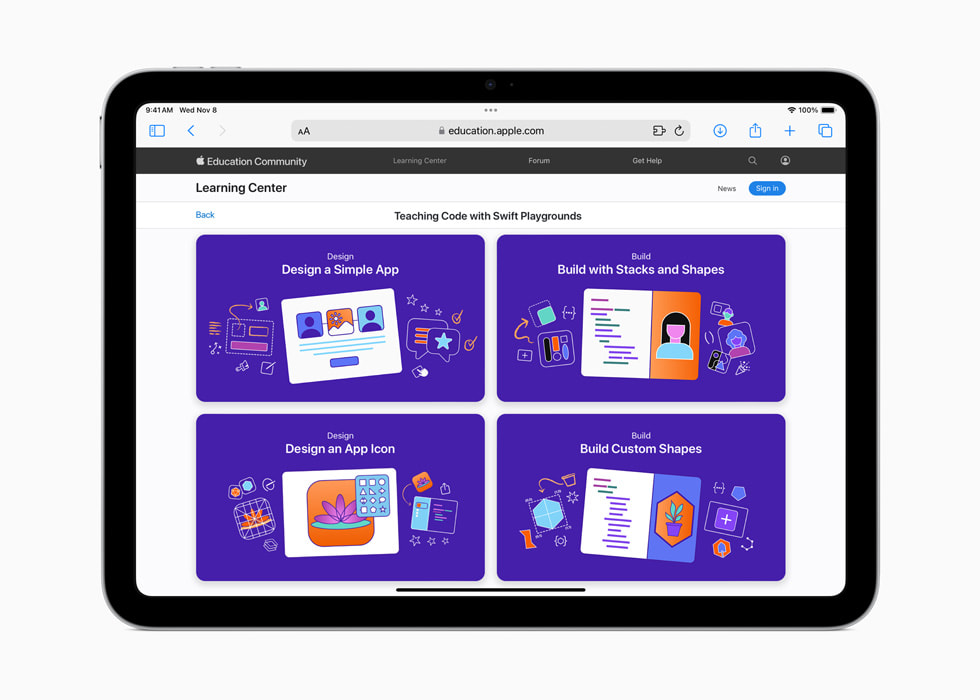
New resources for teaching coding and app development with Swift Playgrounds, including four new Everyone Can Code Projects, are now available in the Apple Education Community, where educators can find resources for any skill level, connect with peers, and more. Swift Playgrounds 4.4 is available now, and includes support for Swift 5.9, and SDKs for iPadOS 17 and macOS Sonoma.
Students will be invited to submit their app playgrounds for the Swift Student Challenge during a three-week window in February 2024. Sign up at developer.apple.com to be notified when the challenge is open. Out of 350 overall winners, 50 Distinguished Winners will be invited to Apple’s headquarters in Cupertino, California, next summer, where they’ll have the opportunity to connect with each other and the Apple team. All winners will receive a one-year membership into the Apple Developer Program, which enables them to submit apps to the App Store and receive support from Apple.