
Google Docs has rolled out a new feature designed to make navigating lengthy documents a breeze: Document Tabs. This update introduces a user-friendly way to organize and access different sections within a document, similar to the tabbed browsing experience we’re familiar with in web browsers.
Whether you’re working on training manuals, style guides, project trackers, or extensive reports, Document Tabs offer a streamlined approach to managing content. By dividing your document into distinct sections with clear headings, you can create a hierarchical structure that is easy to follow and navigate.
The new “Show Tabs & Outline” button, located in the right corner of your document, reveals a side panel displaying the document’s structure. This panel acts as a dynamic table of contents, allowing you to jump to any section with a single click.
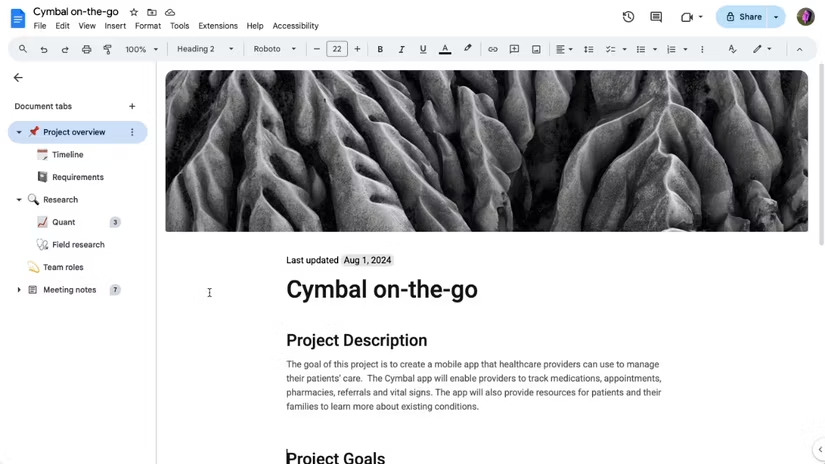
Document Tabs not only benefit writers but also enhance the reading experience. When someone opens a document with two or more tabs, the tabbed interface automatically appears, providing a clear overview of the content and facilitating quick access to specific sections.
To further personalize the organization, you can add emojis to individual tabs, making it even easier to identify key sections at a glance.
Another useful feature is the ability to share direct links to specific tabs. This allows you to send collaborators or readers directly to the relevant section of the document, eliminating the need for them to scroll through pages of content.
While the current version lacks a search bar within the tab panel, this update represents a significant improvement in document organization within Google Docs. The feature is currently rolling out to users and is expected to be fully available by October 21st.