

• the feed
    • Tech
    • Auto
    • Guides
    • Opinions
  • Reviews
    • READERS’ CHOICE
    • ALL REVIEWS
    • ━
    • SMARTPHONES
    • CARS
    • HEADPHONES
    • ACCESSORIES
    • LAPTOPS
    • TABLETS
    • WEARABLES
    • SPEAKERS
    • APPS
  • screen time
    • TV & MOVIE REVIEWS
    • SPOTLIGHT
  • GAMING
    • GAMING NEWS
    • GAME REVIEWS
  • quick bytes
Reading: X finally lets you edit your direct messages
Font ResizerAa
Font ResizerAa
  • menu
  • SEARCH
  • the feed
    • TECH
    • AUTOMOTIVE
    • GUIDES
    • OPINIONS
  • REVIEWS
    • READERS’ CHOICE
    • ALL REVIEWS
    • ━
    • SMARTPHONES
    • CARS
    • HEADPHONES
    • ACCESSORIES
    • LAPTOPS
    • TABLETS
    • WEARABLES
    • SPEAKERS
    • APPS
  • screen time
    • TV & MOVIE REVIEWS
    • SPOTLIGHT
  • GAMING
    • GAMING NEWS
    • GAME REVIEWS
  • quick bytes
Follow US

X finally lets you edit your direct messages

GEEK DESK
GEEK DESK
Sep 3, 2024

X, the social media platform now under Elon Musk’s leadership, has finally introduced a feature that many users have been eagerly anticipating: the ability to edit direct messages (DMs).

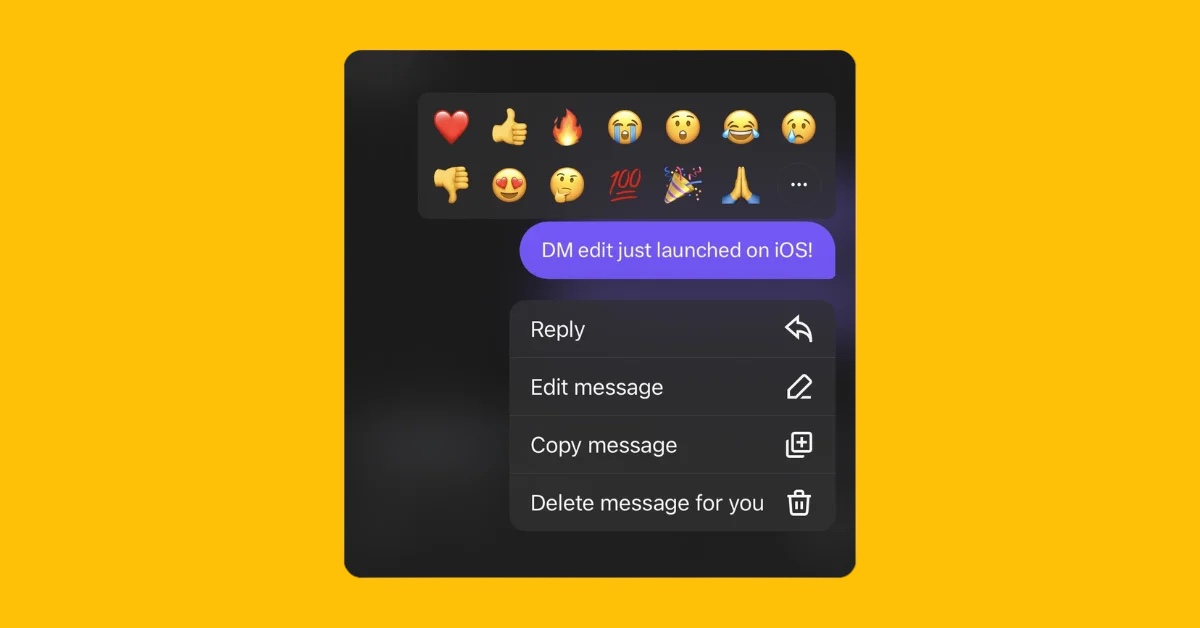
Over the weekend, X quietly rolled out this edit functionality to its iOS users. While an official announcement is still pending, one of the company’s engineers confirmed the news on social media, hinting that the feature will soon be available on other platforms as well.

How to Edit Your DMs on X

For those lucky enough to be using the X iOS app, here’s a quick guide on how to use the new edit feature:

  1. Open any DM chat.
  2. Long press on any message you’ve sent, or tap the three-dot menu next to it.
  3. Select the “Edit message” option.

It’s that simple! You can now modify the text of your sent message. Interestingly, there doesn’t seem to be a time limit on when you can edit your messages, even older ones are fair game. However, there’s a catch: you can only make a total of five edits to any given message. This mirrors the edit limit X has in place for regular posts.

While X assures users that it maintains a log of edited messages for security purposes, there’s currently no way to view the edit history of a DM.

The ability to edit messages has become a standard expectation in modern messaging apps. Popular platforms like WhatsApp, Telegram, Signal, and Messenger have offered this feature for some time now. Even Apple jumped on board,adding message editing to iMessage with the release of iOS 16. X’s addition of DM editing brings it in line with these user expectations, enhancing the overall user experience on the platform.

What do you think?
Happy0
Sad0
Love0
Surprise0
Cry0
Angry0
Dead0
I tried HONOR’s Robot Phone, and that moving camera is seriously wild
RØDECaster Video just got a huge 4K upgrade for free
REDMI Note 17 Series lands in UAE starting at AED 1,059
Spotify just handed your playlists to Meta’s Muse AI, and it’s oddly clever
Meta’s tiny Muse Charm wants to put AI in your pocket
Meta Glasses officially land in the UAE starting at AED 1,160
Follow US
Caffeine. Chaos. Content.
© Absolute Geeks Media FZE LLC 2014–2026.
Proudly made in Dubai, UAE ❤️
Contact · About · Editorial Policy · Privacy Policy
Welcome Back!

Sign in to your account

Username or Email Address
Password

Lost your password?