

• Stories
    • Tech
    • Auto
    • Guides
    • Opinions
  • Reviews
    • READERS’ CHOICE
    • ALL REVIEWS
    • ━
    • SMARTPHONES
    • CARS
    • HEADPHONES
    • ACCESSORIES
    • LAPTOPS
    • TABLETS
    • WEARABLES
    • SPEAKERS
    • APPS
  • Entertainment
    • TV & MOVIE REVIEWS
    • SPOTLIGHT
  • GAMING
    • GAMING NEWS
    • GAME REVIEWS
  • m
Reading: YouTube TV app rolls out “Parent Code” for enhanced child safety
Font ResizerAa
Font ResizerAa
  • menu
  • SEARCH
  • STORIES
    • TECH
    • AUTOMOTIVE
    • GUIDES
    • OPINIONS
  • REVIEWS
    • READERS’ CHOICE
    • ALL REVIEWS
    • ━
    • SMARTPHONES
    • CARS
    • HEADPHONES
    • ACCESSORIES
    • LAPTOPS
    • TABLETS
    • WEARABLES
    • SPEAKERS
    • APPS
  • Entertainment
    • TV & MOVIE REVIEWS
    • SPOTLIGHT
  • GAMING
    • GAMING NEWS
    • GAME REVIEWS
  • m
Follow US

YouTube TV app rolls out “Parent Code” for enhanced child safety

GEEK DESK
GEEK DESK
Dec 16, 2024

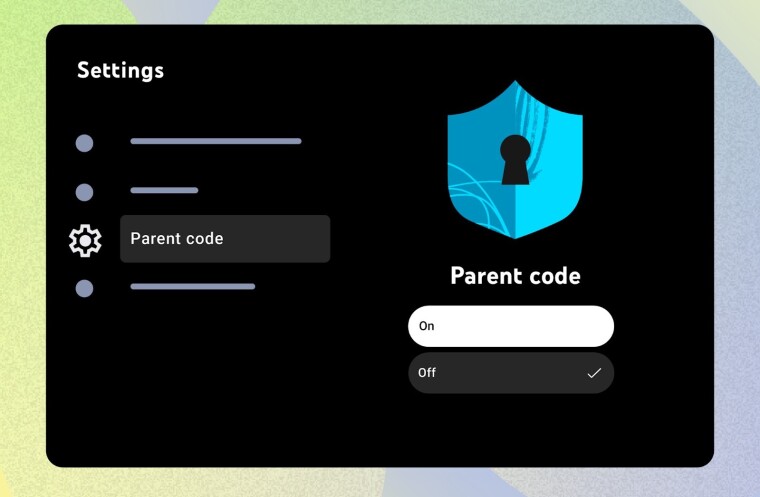
YouTube is introducing a new “parent code” feature on its TV app, providing parents with greater control over their children’s viewing experience. This four-digit PIN adds an extra layer of security, restricting access to content and features that may not be suitable for younger viewers.

With the parent code enabled, users will be required to enter the PIN to:

  • Watch YouTube content when signed out
  • Access accounts belonging to older household members (typically over 13 years old)
  • Remove accounts from the TV device

This feature comes in the wake of YouTube phasing out its dedicated YouTube Kids app on smart TVs. While the standard YouTube app offers parental controls like Restricted Mode, which filters mature content, the parent code provides a more robust solution for managing children’s access.

Parents have expressed concerns about their children potentially encountering inappropriate content on the standard YouTube app. The parent code aims to address these concerns by giving parents greater peace of mind and ensuring a safer viewing environment.

The rollout of the parent code feature is expected to be gradual over the coming days. To set up the code, parents can navigate to the “Settings” menu on the YouTube TV app’s homepage and select the “Parent code” tab.

This initiative by YouTube reflects a broader trend of online platforms prioritizing parental controls and online safety features. The parent code empowers parents with a practical tool to manage their children’s screen time and content access on the platform.


What do you think?
Happy0
Sad0
Love0
Surprise0
Cry0
Angry0
Dead0
Apple spent billions on AI, but we’re excited about a Dogcow
Abu Dhabi gets Qualcomm’s first Middle East Tech for Good grant
iOS 27 parental controls explained: What every parent needs to know
Microsoft wants AI under human control, but can it deliver?
Apple just made AED 3.99 iCloud+ dramatically better in UAE
Xiaomi 18 Pro brings back its strangest feature with AI twist
Follow US
Caffeine. Chaos. Content.
© Absolute Geeks Media FZE LLC 2014–2026.
Proudly made in Dubai, UAE ❤️
Contact · About · Editorial Policy · Privacy Policy
Welcome Back!

Sign in to your account

Username or Email Address
Password

Lost your password?