

• Stories
    • Tech
    • Auto
    • Guides
    • Opinions
  • Reviews
    • READERS’ CHOICE
    • ALL REVIEWS
    • ━
    • SMARTPHONES
    • CARS
    • HEADPHONES
    • ACCESSORIES
    • LAPTOPS
    • TABLETS
    • WEARABLES
    • SPEAKERS
    • APPS
  • Entertainment
    • TV & MOVIE REVIEWS
    • SPOTLIGHT
  • GAMING
    • GAMING NEWS
    • GAME REVIEWS
  • m
Reading: Windows enhances iPhone connectivity with easier file sharing
Font ResizerAa
Font ResizerAa
  • menu
  • SEARCH
  • STORIES
    • TECH
    • AUTOMOTIVE
    • GUIDES
    • OPINIONS
  • REVIEWS
    • READERS’ CHOICE
    • ALL REVIEWS
    • ━
    • SMARTPHONES
    • CARS
    • HEADPHONES
    • ACCESSORIES
    • LAPTOPS
    • TABLETS
    • WEARABLES
    • SPEAKERS
    • APPS
  • Entertainment
    • TV & MOVIE REVIEWS
    • SPOTLIGHT
  • GAMING
    • GAMING NEWS
    • GAME REVIEWS
  • m
Follow US

Windows enhances iPhone connectivity with easier file sharing

GEEK DESK
GEEK DESK
Dec 12, 2024

Microsoft is making it easier for iPhone users to connect with their Windows PCs. The latest updates to the Phone Link app for Windows and the Link to Windows app for iOS introduce a convenient file-sharing feature, allowing seamless transfer of files between iPhones and Windows 10 or 11 PCs.

To share a file from your iPhone, simply navigate to the file, tap the “Share” icon, select “Link to Windows,” and choose your PC from the list. This feature requires an iPhone running iOS 16 or later.

Transferring files from your Windows PC to your iPhone is equally straightforward. Select the desired files, right-click, and choose “My Phone” or “Phone Link” if the former option isn’t visible.

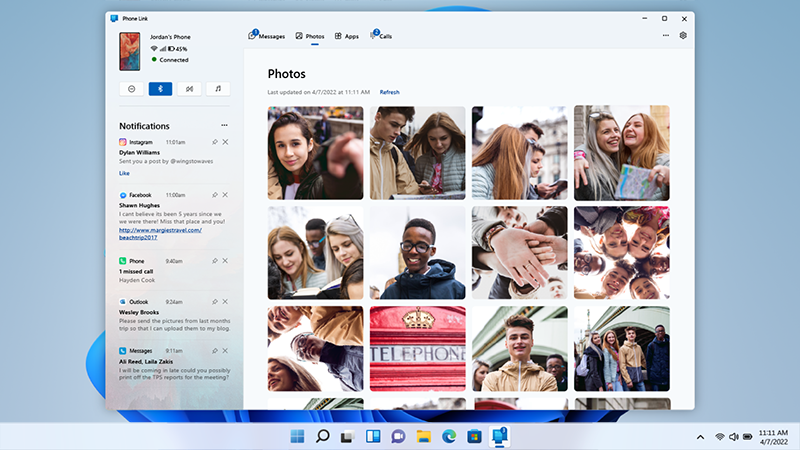
Microsoft’s Phone Link app, launched last year, enables Windows users to remotely access their iPhones for various tasks, including making calls, checking notifications, sending and receiving iMessages, and viewing photos and contacts. However, due to iOS restrictions, the functionality is more limited compared to the Android version of Phone Link.

This new file-sharing capability is a welcome addition to Phone Link, further bridging the gap between iPhones and Windows PCs. Currently, the feature is available to Windows Insiders, with a broader rollout expected in the coming months.


What do you think?
Happy0
Sad0
Love0
Surprise0
Cry0
Angry0
Dead0
Huawei Pura X View challenges everything about modern smartphone screens
Onimusha: Way of the Sword sells 1 million copies day one
Dubai SMEs can now get Canva Business free for a year
Driverless cars hit 252 km/h as A2RL invades Imola
Lexar’s impossibly thin Muse SSD sticks right onto your iPhone
iPhone September 9 event live: Apple is about to Fold
Follow US
Caffeine. Chaos. Content.
© Absolute Geeks Media FZE LLC 2014–2026.
Proudly made in Dubai, UAE ❤️
Contact · About · Editorial Policy · Privacy Policy
Welcome Back!

Sign in to your account

Username or Email Address
Password

Lost your password?