
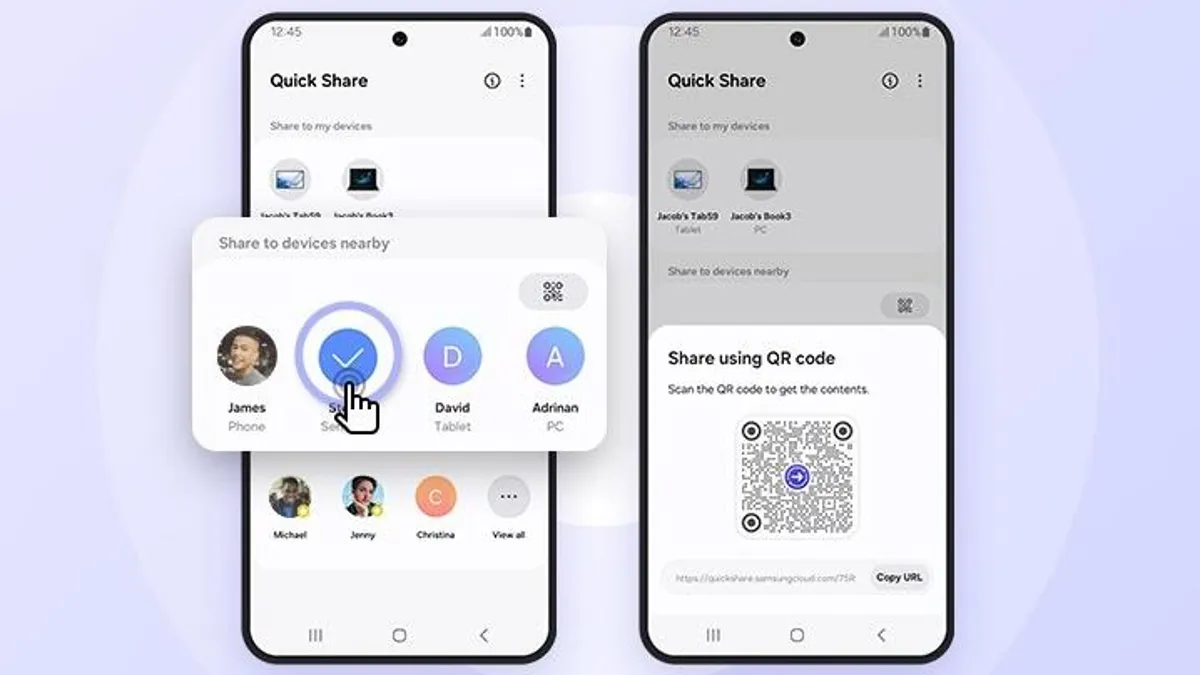
Samsung has begun enabling cross-platform file sharing between its latest phones and Apple devices, narrowing a long-standing gap between Android and iOS ecosystems. The update, arriving first on the Galaxy S26 series, allows users to send files directly to iPhones, iPads, and Macs using an expanded version of Quick Share. The feature effectively mirrors what Apple users have relied on with AirDrop, but its availability comes with a few conditions.
The rollout has started in South Korea, where early adopters report that cross-device sharing is now functional. However, access depends on having an updated version of Google Play Services installed. Samsung indicates that devices must be running version 26.11.xx or newer before the feature becomes usable. Without this update, the option to share files across platforms may not appear at all.
Even with the correct version installed, availability appears to be staged. Some users outside South Korea, including those with fully updated devices, have not yet received access. This suggests the feature is being enabled gradually through server-side controls rather than purely through software updates. In practical terms, users may need to wait even after meeting all technical requirements.
The broader shift reflects a deeper collaboration between Samsung and Google. Quick Share itself originated as a Samsung-exclusive tool before being merged with Android’s Nearby Share in 2024 under a unified system. This integration has gradually expanded its capabilities, and cross-platform compatibility marks one of the more notable steps. Rather than introducing a completely new system, the companies have extended existing infrastructure to support communication with Apple hardware.
From a usability standpoint, the change could simplify file transfers in mixed-device environments, where sharing between Android and Apple products has traditionally required third-party apps or cloud-based workarounds. Still, the experience will likely depend on how consistently the feature is implemented across regions and devices.
Samsung is expected to expand availability beyond South Korea in the coming days, with the United States among the next markets scheduled to receive the update. A wider rollout across Europe, Asia, and the Americas is expected to follow. For now, Galaxy S26 users interested in testing the feature should ensure their system apps are up to date, while recognizing that access may still be limited during the early rollout phase.