


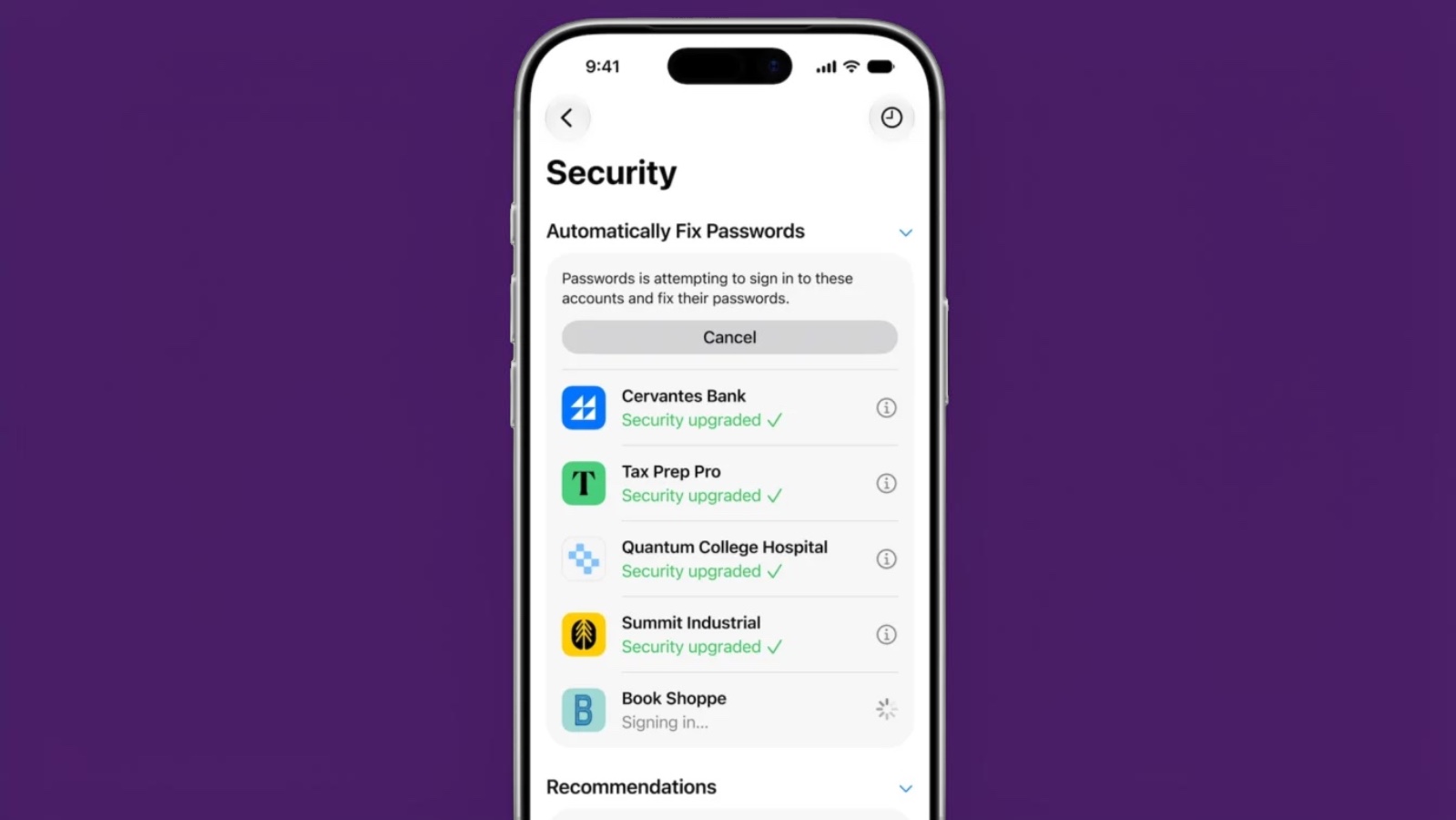
iOS 27 brings a notable evolution to Apple’s built-in password management with automated fixes for weak credentials. The Passwords app, first introduced in iOS 18, already generates strong passwords, stores them securely, and flags issues like reuse or compromise across accounts. Now, the update integrates Apple Intelligence to handle the tedious work of updating those vulnerable logins without requiring manual intervention for each site.
Users will access the Security tab in the Passwords app, where compromised or weak entries appear in a proactive list. A single tap on a Fix Passwords option initiates the process. The system then leverages Safari and on-device AI to sign into affected accounts in the background, replace the passwords with stronger alternatives, and save the updates. Progress indicators show stages from signing in to confirming the security upgrade, with the option to cancel midway if needed. This agentic approach aims to reduce friction in maintaining better online hygiene, especially for people juggling dozens of accounts.
The feature builds on established password manager capabilities that have matured over the past decade. Early tools focused on storage and autofill, but recent iterations from various platforms emphasize automation. Google introduced something comparable in Chrome last year through its Password Manager, allowing bulk updates for flagged credentials. Apple’s implementation stands out for deeper integration across Safari and the broader ecosystem, though it remains limited to supported hardware.
Eligibility requires newer devices: iPhone 16 models or later, iPhone 15 Pro variants, iPads with M1 or newer chips, recent Macs, and Apple Vision Pro. Older hardware misses out on these AI-driven elements, continuing a pattern where advanced features favor premium lineups. The public beta arrives next month, with the full iOS 27 release expected in September. Early testing will be key, as automated logins carry risks around site compatibility, two-factor authentication hurdles, or unexpected errors during the process.
Security experts have long stressed the dangers of weak or reused passwords, which remain a primary vector for breaches even in 2026. Automating fixes could meaningfully lower that risk for average users who rarely update credentials manually. Yet questions linger about transparency and control. While the actions occur on-device where possible, the reliance on AI agents signing into third-party services introduces new layers of complexity. Users will need to weigh convenience against potential edge cases, such as sites with strict security protocols that might flag or block automated changes.
This update fits into a broader push at WWDC 2026 toward practical AI applications rather than flashy demonstrations. Password management has evolved from niche utility to everyday necessity, and streamlining it reflects how digital identities have grown more fragmented. For those already in the Apple ecosystem, it offers a tighter integration than standalone managers, potentially encouraging better habits without switching apps. Still, the real test lies in reliability across varied websites and long-term user trust in letting software handle sensitive operations autonomously.
In practice, this could save significant time for security-conscious individuals, though it does not replace vigilance entirely. Combining automated tools with periodic manual reviews remains sound advice. As iOS 27 rolls out, expect refinements based on beta feedback, underscoring the iterative nature of these systems.