
• the feed
    • Tech
    • Auto
    • Guides
    • Opinions
  • Reviews
    • READERS’ CHOICE
    • ALL REVIEWS
    • ━
    • SMARTPHONES
    • CARS
    • HEADPHONES
    • ACCESSORIES
    • LAPTOPS
    • TABLETS
    • WEARABLES
    • SPEAKERS
    • APPS
  • screen time
    • TV & MOVIE REVIEWS
    • SPOTLIGHT
  • GAMING
    • GAMING NEWS
    • GAME REVIEWS
  • quick bytes
Reading: New Gmail Gemini AI features help refine and improve your email drafts on any device
Font ResizerAa
Font ResizerAa
  • menu
  • SEARCH
  • the feed
    • TECH
    • AUTOMOTIVE
    • GUIDES
    • OPINIONS
  • REVIEWS
    • READERS’ CHOICE
    • ALL REVIEWS
    • ━
    • SMARTPHONES
    • CARS
    • HEADPHONES
    • ACCESSORIES
    • LAPTOPS
    • TABLETS
    • WEARABLES
    • SPEAKERS
    • APPS
  • screen time
    • TV & MOVIE REVIEWS
    • SPOTLIGHT
  • GAMING
    • GAMING NEWS
    • GAME REVIEWS
  • quick bytes
Follow US

New Gmail Gemini AI features help refine and improve your email drafts on any device

GEEK DESK
GEEK DESK
Aug 21, 2024

Google has introduced two new AI-powered features to Gmail, designed to streamline and enhance the email drafting process for users across web, Android, and iOS platforms. These new additions build upon the existing “Help me write” feature, showcasing Google’s continued efforts to integrate AI capabilities into its productivity tools.

The first new feature, “Polish,” allows users to refine their email drafts using AI assistance. This improvement offers options to formalize, elaborate, or shorten the text, making it easier to tailor emails to specific contexts and audiences.

Additionally, Google has added convenient “Help me write” and “Refine my draft” shortcuts on Android and iOS devices.These shortcuts provide quick access to the AI features, streamlining the writing process on mobile devices.
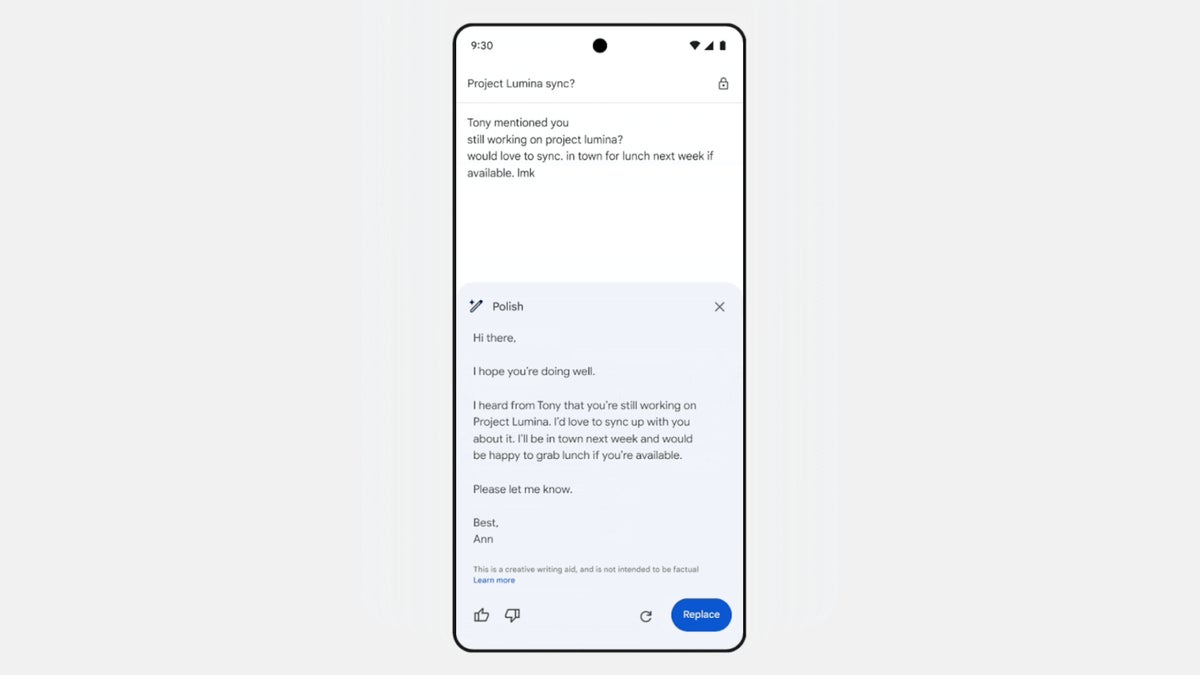
The “Help me write” shortcut appears when an email draft is empty, while the “Refine my draft” shortcut appears after at least 12 words have been written. Users can then swipe right on the latter shortcut to access the full range of AI-powered options, including Polish, Formalize, Elaborate, Shorten, or even start a new draft altogether.

These new features are available to Google Workspace customers with Gemini Business and Enterprise add-ons, Gemini Education and Education Premium add-ons, as well as Google One AI Premium subscribers. The “Polish” feature and shortcuts are already accessible on Android, iOS, and the web, providing Gmail users with even more tools to craft effective and polished emails.
What do you think?
Happy0
Sad0
Love0
Surprise0
Cry0
Angry0
Dead0
Microsoft’s new Copilot Autopilot keeps working after you log off
Why is OpenAI racing to launch a security AI it just warned the world about
Xiaomi’s transparent red 18 Pro might be its wildest phone yet
GTA 6 gets a $400 collector’s box without the game
Your Pixel 11 can now make awkward phone calls for you
Google just gave Gemini 3.8 a face that talks back
Follow US
Caffeine. Chaos. Content.
© Absolute Geeks Media FZE LLC 2014–2026.
Proudly made in Dubai, UAE ❤️
Contact · About · Editorial Policy · Privacy Policy
Welcome Back!

Sign in to your account

Username or Email Address
Password

Lost your password?