A picture speaks a thousand words, and in today’s age we have thousands of pictures that are memories and we need to be able to store them safely to relive them. My choice of online photo backup had been Google Photos all along, until recently when they discontinued the free unlimited (high quality) storage option which got me frantically searching for other alternatives. I did quite a bit of research and tried various options before I chose one that best meets my requirements.

Being a professional photographer, I need to backup a huge amount of photos, and I have over 1 TB of photos (clicked in the last 2 years). So if I do consider buying one of the Google One plans, given the rate at which I fill up my storage, I would at least have to go for the 2TB plan which is for AED 37 / month. If my storage does go up, I might have to eventually move to a 10 TB or higher option which starts at about AED 180 per month. By itself, it may not be such a high price, but for a monthly subscription, you would feel a bit of a pinch. Apart from storing a lot of photos online, I also need to share a bunch of photos with my clients on a regular basis, and that too was a point of consideration while looking for alternatives.
In this article I have listed down websites which are dedicated for photo management. I haven’t included generic cloud storage options primarily because managing a large amount of photos on these gets a bit cumbersome and secondly because most of them have a specific limit on the amount of storage offered.
Included here are some of the dedicated photo backup websites which I considered, and finally the one that I chose, including the pros and cons as well as an in-depth review.
When I started looking for alternatives, I came across this one. It is a Company that is well known so that’s a plus, and Amazon Photos offers unlimited photo storage to its Prime subscribers and I already am one. Viola! Problem solved. Except…it only works in certain countries. In the UAE, it offers just 5GB of storage, and you have to purchase more.
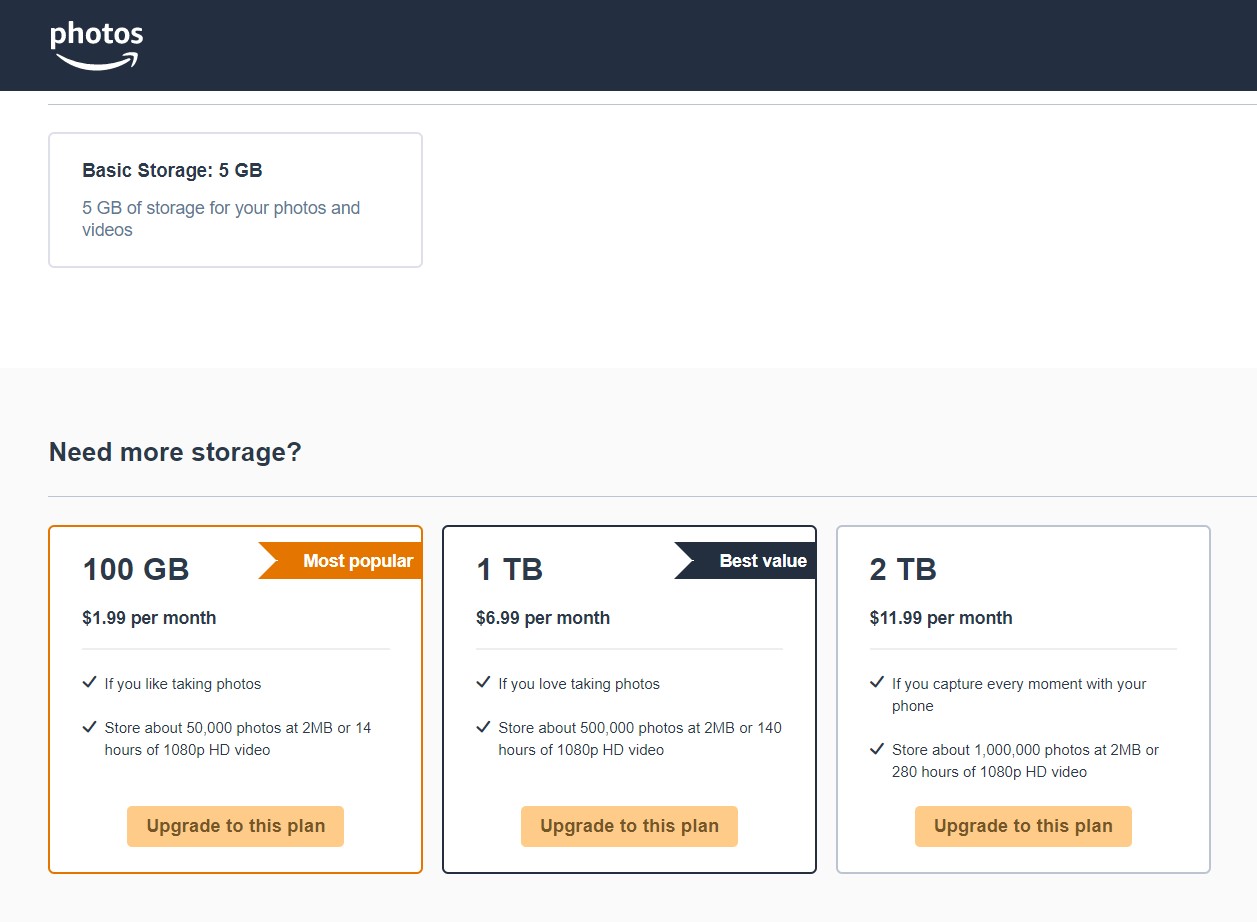
Interesting trivia: Amazon offers its higher-tier plans (more than 2TB) only on an annual basis, while Google offers its higher-tier plans only on a monthly basis.
This website is a known name among photographers and has been around for a while. Apart from backing up photos, it also offers you an option to make your own website which is like a portfolio and you can host it on smugmug itself. It offers various privacy and sharing options for your photos and there’s quite a bit that you can do on the backend. It offers various pricing plans based on the features. I tried using this for a few weeks. I shared some albums and it seemed to work fine. I started backing up my photos here. After a few days, I was checking the links which I shared and these had stopped working. I tried checking the album settings and nothing had been changed. There were too many options though, and the interface seemed a bit finicky. The way to share an album with a link didn’t seem too straightforward.
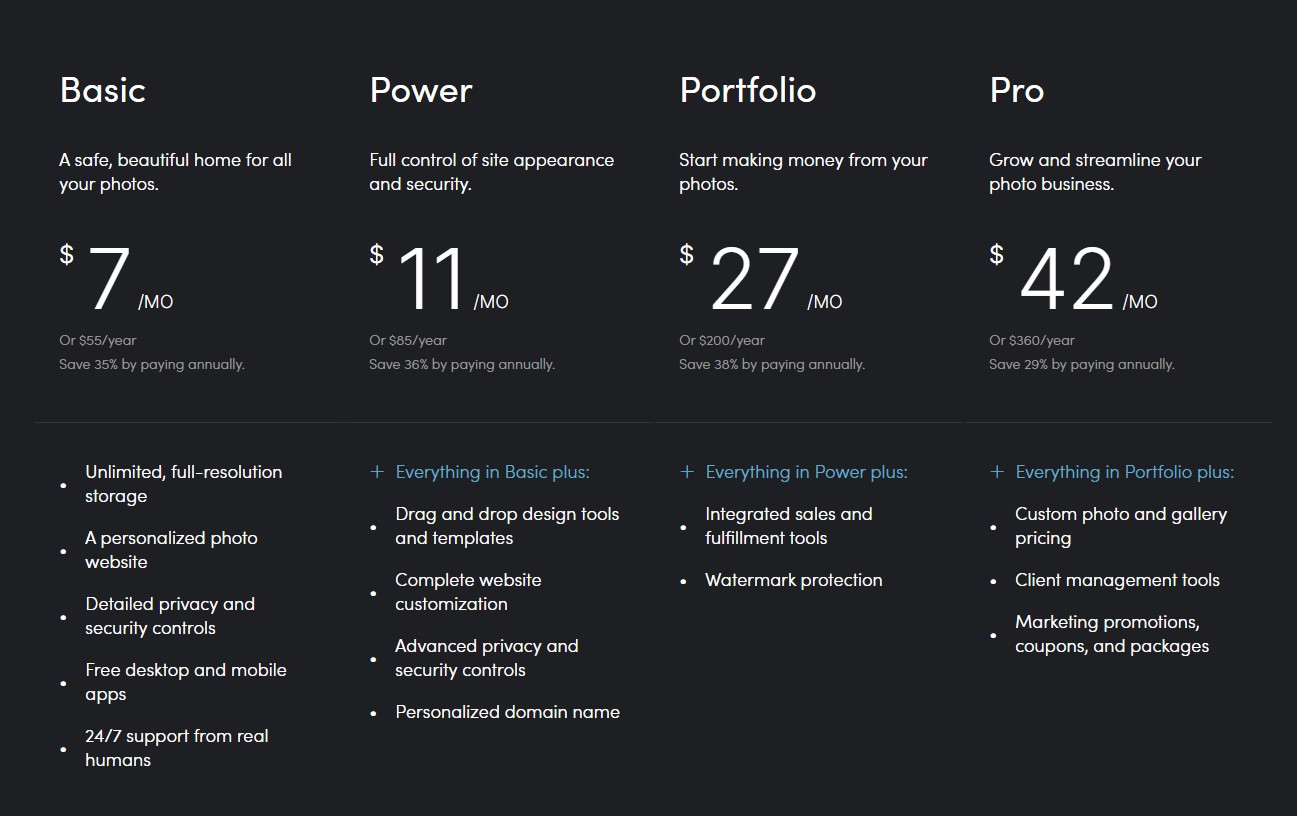
This too is quite similar to SumgMug with a lot of focus on building a portfolio and showcasing your work, an active community that interacts with your work and more. Apart from that, it has a fair usage policy of 1000 photos per week. So it would take me over 2 years to backup all my photos; quite unfair.
It was founded almost 20 years ago, and was quite popular at one point in time. I checked this one out too. The major drawback was that there was no way to download photos when shared as albums and this is something I definitely could not work with. The interface too seemed a bit outdated, and some social sharing links on the platform itself appeared broken.

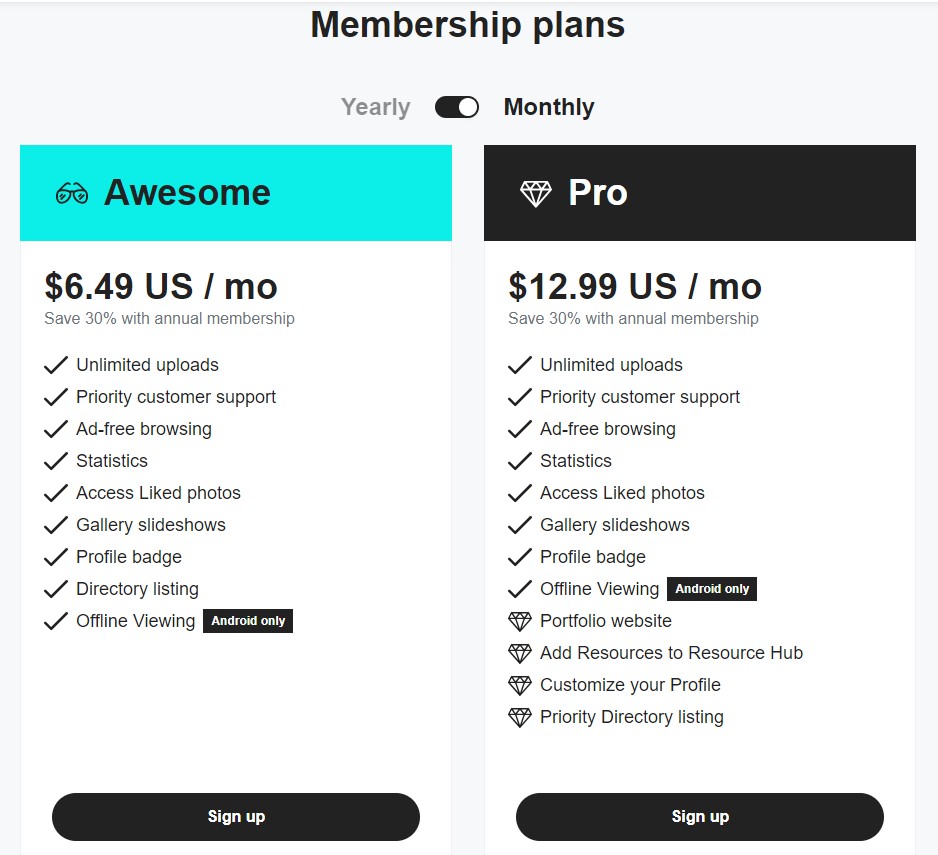
This was the one I finally chose after trying various options. I have been a free member since 2008, although I wasn’t actively using it for the past few years when I was using Google Photos. There was a time (when it was owned by Yahoo) it offered 1 TB of storage for its free members. Later it was bought over by SmugMug and since then offers a total of only 1000 photo uploads for free members. It offers just one tier of membership which is priced at $8 a month ($22 if paid quarterly and $78 annually), and it has unlimited photo uploads. You can also upload videos of upto 1 GB in size irrespective of its duration (and although the playback is limited to 10 minutes on flickr, it can be downloaded in its entirety). Flickr also has a mobile app which can backup all your content automatically. There’s also a desktop app which can backup the folders that you choose and automatically add photos when you add them to those albums on your hard disk. If there are nested albums, Flickr creates those too (upto 3 levels deep), although they are not nested on Flickr and appear as different albums under all albums. Since all of your photos also appear in your photostream, you can find these there by date, so the lack of nesting on Flickr wasn’t a problem for me. The other way to upload photos is via the web browser itself. Adobe Lightroom also has the Flickr plug-in so you get the option to backup your photos directly from there too.
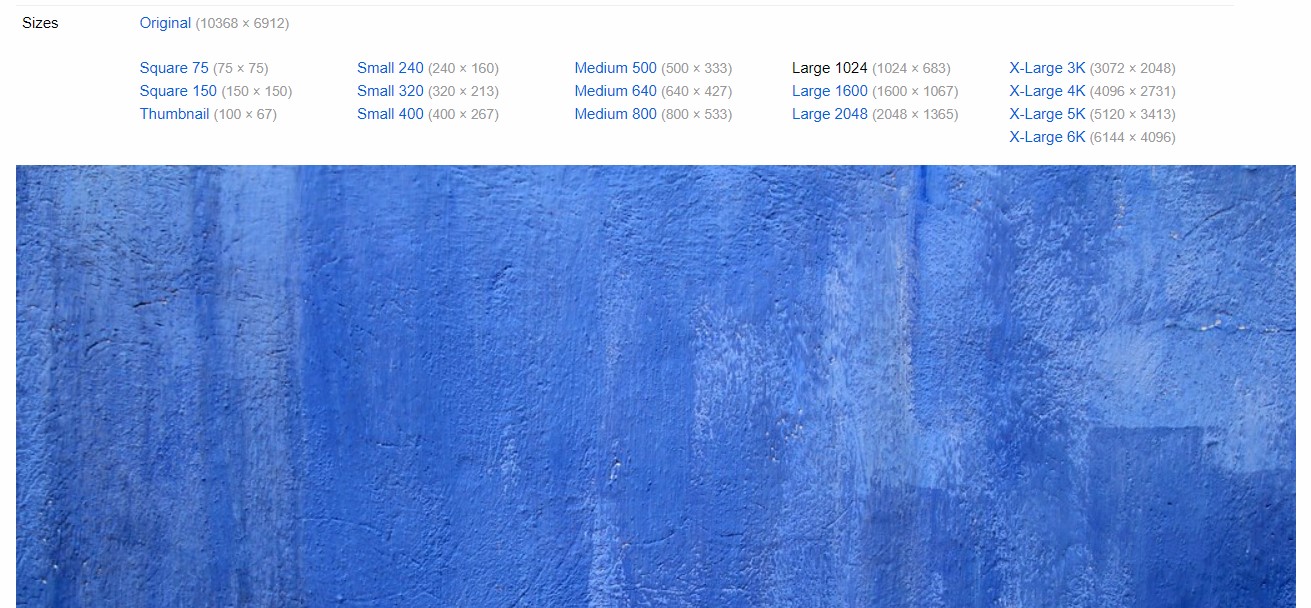
When you share an album on Flickr using a link, it gives the recipient the option to download photos in various sizes which include full resolution and smaller options too which I found really practical. You can tag photos when you upload them through the web browser so that you can easily search for them later. The upload limit for photos is 200 MB per image which I don’t see should be a problem anytime soon.
If you choose to make any of your photos publicly accessible to all, it also gives the option for other Flickr users to comment on them, favourite them, and show various stats for the photos. You can also add geo-location data to your photos by simply dragging them on the map. Flickr also allows you to change the date and time for photos in batches. It allows you to embed individual photos in various sizes too.
Annual subscribers to the platform also get discounts on certain photography related services like Adobe Creative Cloud, Capture One, Pixsy, and more.
Flickr drawbacks:
Just like any platform, this has its shortcomings too, but either they aren’t something that personally bother me that much, or I can find a way around most of these.
Firstly, there are parts of the web interface that look outdated. The home page, and the albums look fine, but when you need to organize the photos in batches, you need to use the old organizer which looks and works like it is from the 20th century. It still gets the work done, so I don’t have much to complain about there.
Downloading an album with more than 500 photos in it isn’t possible. Since my albums are made by date, most of them contain less than 500 images each, so again, this isn’t something that bothers me much.
The download button for photos doesn’t appear when viewing it on a mobile browser, but it can be overcome using the desktop view. Weirdly, everything looks almost identical to the mobile view, except for the addition of the download button.
Something that did bother me though was that the exif data for videos is lost while uploading. This also means the date on which it was created is lost, and so the videos appear in your photostream on the date uploaded, and not the date created. Since videos aren’t all that important to me, I can live with this. Besides, Flickr also has the option to change the date and time of photos and videos in large batches, so if there are some really important videos, I can do that manually.
Flickr does not support RAW image formats. Neither do any of the ones listed above. It’s hard to come across a photo backup platform which allows RAW image files. I found two of them, viz. Photoshelter, and Zenfolio (which is also a portfolio builder), both of which have unlimited plans starting around $30 a month. Since I prefer to use RAW formats only for editing and not storing for long term, I didn’t find the need to pay about 4 times extra.
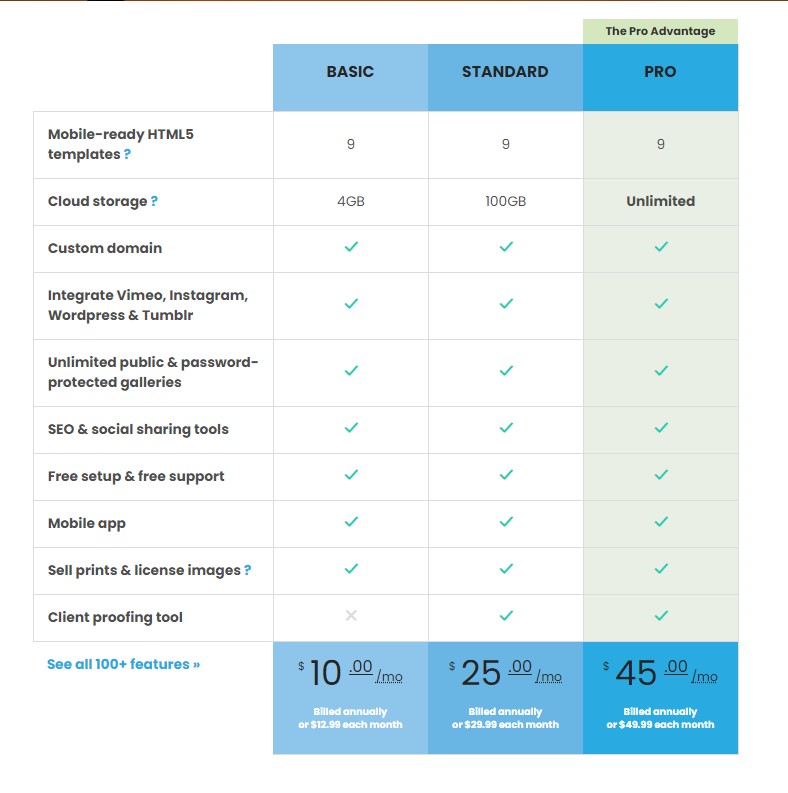
In this comparison, I haven’t included platforms like Dropbox, Box.com, OneDrive etc. since these are generic cloud storage services and do not offer a lot of photo management options like the others do.
Points to consider before choosing an online photo backup service:
Storage: First and foremost is the amount of storage space offered. In case you need to get more space in future, you need to consider the cost associated with it too and plan for the long term.
Backup options: It is best to choose a platform which has auto-backup options like a desktop app and a mobile app, so that you don’t have to keep worrying of having to upload manually.
Sharing: If you’re backing up a large amount of photos, you’ll surely have many situations where you need to share photos with others. Consider how easy it is to share photos, and what are the various privacy settings that you can control. Flickr also allows you to disable downloading of your shared photos.
Image size: Websites like Google Photos offer a reduced resolution option, and some websites have a limit on the file size / resolution that is uploaded; like Flickr is limited to 200 MB per photo.
Image info: Different platforms offer different amounts of Exif data (photo information) to be uploaded. Some of them also have the option to choose what information is shared when you share the photos with someone. Flickr allows you to control whether exif data and geo-location is shared when you share photos with people.
At the end of the day, it’s about what you find the most comfortable and what suits your needs the best.
Tell us what’s your preferred choice of photo backup and your thoughts on this article in the comments below.