iOS 15
Apple announced iOS 15, a major update with powerful features that enhance the iPhone® experience. iOS 15 makes FaceTime® calls more natural, introduces SharePlay™ for shared experiences, helps users focus and be in the moment with new ways to manage notifications, and brings more intelligence to photos and search to quickly access information. Apple Maps unveils beautiful new ways to explore the world, Weather is redesigned with full-screen maps and more graphical displays of data, Wallet adds support for home keys and ID cards, and browsing the internet with Safari® is even simpler with a new tab bar design and Tab Groups. iOS 15 also includes new privacy controls in Siri®, Mail, and more places across the system to further protect user information.

More Natural FaceTime Calls and Shared Experiences with SharePlay
FaceTime helps customers easily connect with those who matter most and with iOS 15, conversations with friends and family feel even more natural. With spatial audio, voices in a FaceTime call sound as if they are coming from where the person is positioned on the screen,1 and new microphone modes separate the user’s voice from background noise. Inspired by the stunning portrait photos taken on iPhone, Portrait mode is now available for FaceTime and designed specifically for video calls, so users can blur their background and put themselves in focus.2 While using Group FaceTime, a new grid view enables participants to see more faces at the same time.
Users can now share experiences with SharePlay while connecting with friends on FaceTime, including listening to songs together with Apple Music®, watching a TV show or movie in sync, or sharing their screen to view apps together. SharePlay works across iPhone, iPad®, and Mac®, and with shared playback controls, anyone in a SharePlay session can play, pause, or jump ahead. SharePlay even extends to Apple TV®, so users can watch shows or movies on a big screen while connecting over FaceTime, and SharePlay will keep everyone’s playback in sync. Disney+, ESPN+, HBO Max, Hulu, MasterClass, Paramount+, Pluto TV, TikTok, Twitch, and many others are integrating SharePlay into their apps — creating entirely new ways to connect.
FaceTime calls also extend beyond Apple devices with the ability to create a link from iPhone, iPad, or Mac, and share it through Messages, Calendar, Mail, or third-party apps, so anyone can join a FaceTime call from their web browser on Android and Windows devices.3 FaceTime calls on the web remain end-to-end encrypted, so privacy is not compromised.
Tools to Find Focus
iOS 15 delivers powerful tools that help users focus and reduce distraction. Focus is a new feature that filters notifications and apps based on what a user wants to focus on. Customers can set their device to help them be in the moment by creating a custom Focus or selecting a suggested Focus, which uses on-device intelligence to suggest which people and apps are allowed to notify them. Focus suggestions are based on users’ context, like during their work hours or while they’re winding down for bed, and when Focus is set on one Apple device, it automatically applies to their other Apple devices. Users can create Home Screen pages with apps and widgets that apply to moments of focus to only display relevant apps and reduce temptation. When a user’s Focus is blocking incoming notifications, their status is automatically displayed to others in Messages, reflecting that a user is not currently reachable.
New Notifications Experience
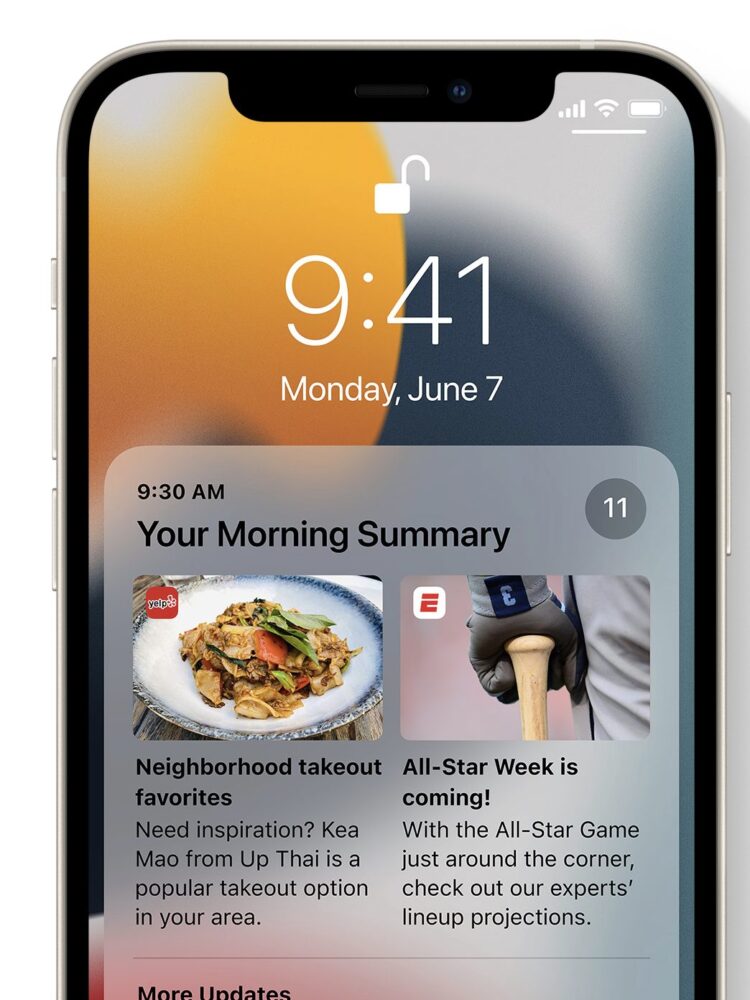
Notifications have been redesigned, adding contact photos for people and larger icons for apps that make them even easier to identify. To help reduce distraction, a new notification summary collects non-time-critical notifications for delivery at a more opportune time, such as in the morning and evening. Using on-device intelligence, notifications are arranged by priority, with the most relevant notifications rising to the top, and based on a user’s interactions with apps. Urgent messages will be delivered immediately, so important communications will not end up in the summary, and it’s easy to temporarily mute any app or messaging thread for the next hour or for the day.
On-Device Intelligence Powers Live Text, Advanced Spotlight Search, and More
Live Text uses on-device intelligence to recognize text in a photo and allow users to take action. For example, users can search for and locate the picture of a handwritten family recipe, or capture a phone number from a storefront with the option to place a call. With the power of the Apple Neural Engine, the Camera app can also quickly recognize and copy text in the moment, such as the Wi-Fi password displayed at a local coffee shop. With Visual Look Up, users can learn more about popular art and landmarks around the world, plants and flowers found in nature, breeds of pets, and even find books.
Spotlight® now uses intelligence to search photos by location, people, scenes, or objects, and using Live Text, Spotlight can find text and handwriting in photos. Spotlight now offers web image search and all-new rich results for actors, musicians, TV shows, and movies. Enhanced results for contacts show recent conversations, shared photos, and even their location if shared through Find My™.
Photos includes the biggest update ever to Memories, with a fresh new look, an interactive interface, and integration with Apple Music, which uses on-device intelligence to personalize song suggestions that bring memories to life.
A Redesigned Browsing Experience with Safari
Safari gets a new design that makes controls easier to reach with one hand and puts content front and center. The new tab bar is compact and lightweight, and floats at the bottom of the screen, so users can easily swipe between tabs. Tab Groups allow users to save tabs and easily access them at any time across iPhone, iPad, or Mac. New features, such as the customizable start page and web extensions on iOS, make Safari even more personal and powerful.
Explore the World with Apple Maps
Apple is committed to building the world’s best map, and iOS 15 takes Maps even further with brand new ways to navigate and explore. Users will experience significantly enhanced details in cities for neighborhoods, commercial districts, elevation, and buildings, new road colors and labels, custom-designed landmarks, and a new night-time mode with a moonlit glow. This is a whole new way of looking at the world through Maps.
When navigating using iPhone or CarPlay®, Maps features a three-dimensional city-driving experience with new road details that help users better see and understand important details like turn lanes, medians, bike lanes, and pedestrian crosswalks.4 Transit riders can find nearby stations more easily and pin favorite lines. Maps automatically follows along with a selected transit route, notifying users when it’s nearly time to disembark, and riders can even keep track on Apple Watch®. With iOS 15, users can simply hold up iPhone, and Maps generates a highly accurate position to deliver detailed walking directions in augmented reality.
New Keys and State IDs Come to Apple Wallet
Apple Wallet® adds support for additional types of keys, making it possible to access everyday places with just a tap. Last summer, Apple introduced digital car keys, and BMW was the first car company to add its keys, allowing users to tap to unlock. This year, digital car keys get even better with support for Ultra Wideband technology, so users can securely unlock and start their supported vehicle without removing their iPhone from a pocket or bag.5 iPhone can also be used to unlock a user’s home, office, or even a hotel room — all through keys stored in Wallet.6
Later this year, customers in participating states will be able to add their driver’s license or state IDs to Wallet. The Transportation Security Administration is working to enable airport security checkpoints as the first place customers can use their digital Identity Card in Wallet. Identity Cards in Wallet are encrypted and safely stored in the Secure Element, the same hardware technology that makes Apple Pay® private and secure.
New Privacy Features
iOS 15 introduces even more privacy controls to help protect user information. With on-device speech recognition, audio of Siri requests is now processed entirely on iPhone by default,7 and performance improves significantly. Mail Privacy Protection stops senders from learning whether an email has been opened, and hides IP addresses so senders can’t learn a user’s location or use it to build a profile on them. App Privacy Report offers an overview of how apps use the access that has been granted to location, photos, camera, microphone, and contacts in the last seven days, and which other domains are contacted.8
Redesigned Weather and Notes Apps
Weather includes more graphical displays of weather data, full-screen maps, and dynamic layouts that change based on conditions. Beautifully redesigned animated backgrounds more accurately reflect the sun’s position and precipitation, and notifications highlight when rain or snow starts and stops.
Notes adds user-created tags that make it easy to quickly categorize notes, and mentions allow members of shared notes to notify one another of important updates. An all-new Activity view shows the recent history of a shared note.
Additional Features
- Siri adds Announce Notifications on AirPods®, the ability for users to share what’s on their screen just by asking, and more.
- Shared with You works across the system to find the articles, music, TV shows, photos, and more that are shared in Messages conversations, and conveniently surfaces them in apps like Photos, Safari, Apple News®, Music, Podcasts, and the Apple TV app, making it easy to quickly access the information in context.
- iCloud+ combines everything users love about iCloud® with new premium features, including Hide My Email, expanded HomeKit® Secure Video support, and an innovative new internet privacy service, iCloud Private Relay, at no additional cost.9 Current iCloud subscribers will be upgraded to iCloud+ automatically this fall. All iCloud+ plans can be shared with people in the same Family Sharing group, so everyone can enjoy the new features, storage, and elevated experience that comes with the service.
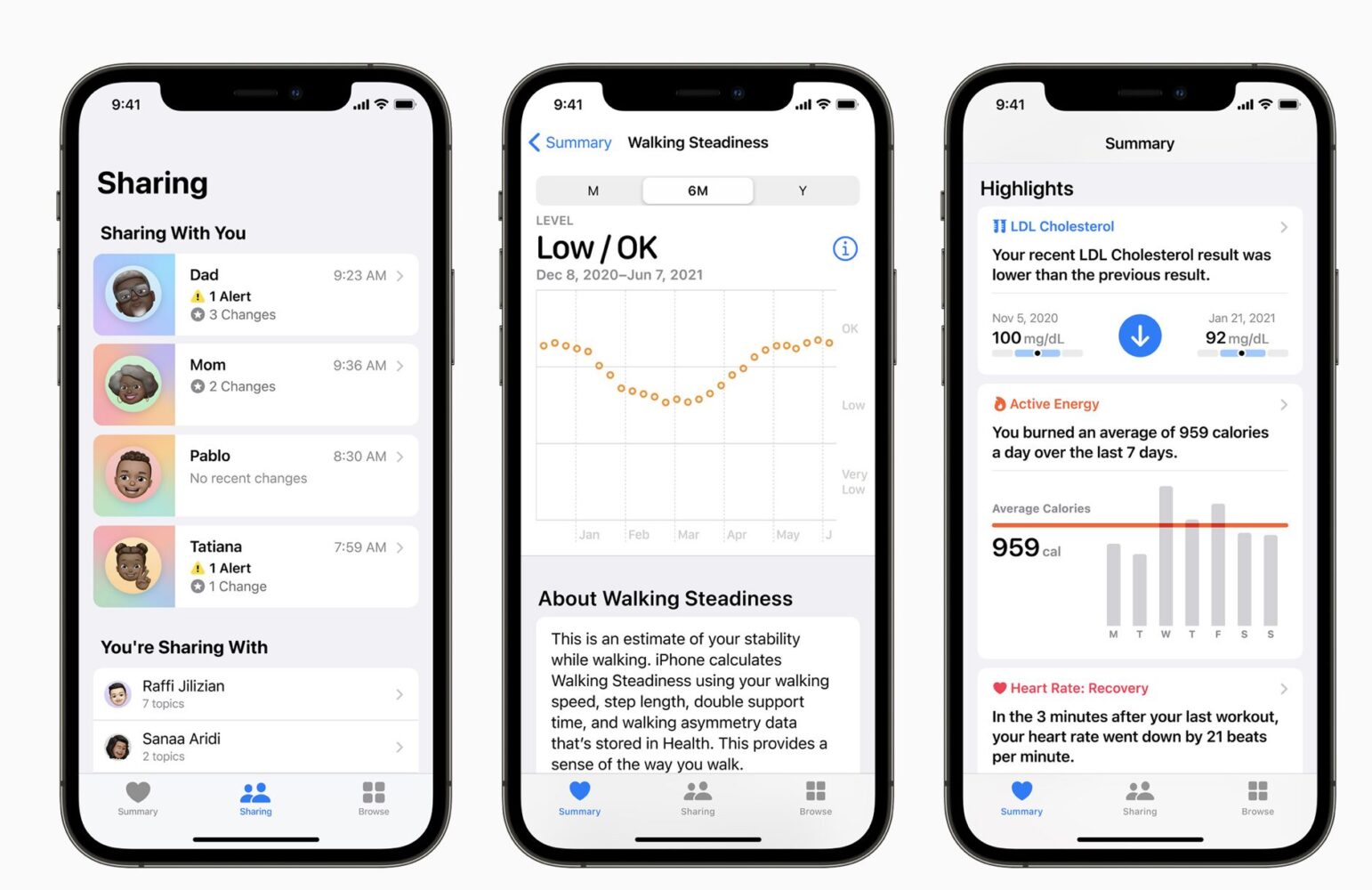
- The Health app gets a new sharing tab that lets users share their health data with family, caregivers, or a care team, Trends gives users a way to focus attention on meaningful changes in personal health metrics, and Walking Steadiness is a new metric that empowers people to proactively manage their fall risk.
- HomeKit accessory makers can now enable “Hey Siri” in their products, allowing customers to talk to and get responses from Siri on third-party devices. “Hey Siri”-enabled accessories will relay requests through HomePod® or HomePod mini™ and will support features such as Personal Requests, Intercom, timers, and alarms. Starting today, smart home device manufacturers can begin working with Apple to integrate Siri into their accessories.
- Find My introduces new capabilities to help locate a device that has been turned off or erased, as well as live-streaming locations for family and friends who choose to share their location. Separation Alerts notify a user if they leave an AirTag™, Apple device, or Find My network accessory behind in an unfamiliar location, and the Find My network now supports AirPods Pro® and AirPods Max™. A new Find My widget offers an at-a-glance view directly from the Home Screen.
- Translate adds a new Live Translate feature that makes conversation flow naturally across languages. Systemwide translation allows users to translate text anywhere on iPhone.
- The Apple TV app now features a new row titled “For All of You” — showcasing a collection of shows and movies based on the interests of selected people or an entire household — perfect for movie nights.
- New iPhone setup makes it more seamless than ever to get started with iPhone. Existing iPhone users can temporarily back up data to iCloud — even without a subscription — to easily transfer their data to a new iPhone. For those moving to iPhone for the first time, an improved “Move to iOS” experience easily transfers photo albums, files, folders, and Accessibility settings, so iPhone feels personal right from the start.
- Accessibility across iPhone expands with new features for VoiceOver that enable users to explore even more details about the people, text, table data, and other objects within images. In support of neurodiversity, new background sounds help minimize distractions, and for those who are deaf or hard of hearing, Made for iPhone supports new bidirectional hearing aids. Sound Actions customizes Switch Control to work with mouth sounds, and users can now customize display and text size on an app-by-app basis. Apple is also bringing support for recognizing imported audiograms — charts that show the results of a hearing test — to Headphone Accommodations.
iPadOS 15
Apple® previewed iPadOS® 15, with new features that take advantage of the unique capabilities of iPad®, helping users be more productive and taking the versatility of iPad even further. iPadOS 15 introduces a multitasking experience that is even more intuitive, making features like Split View and Slide Over easier to discover, easier to use, and more powerful. Notes goes systemwide with Quick Note, and offers new ways to collaborate and organize whether typing or writing with Apple Pencil®. New widget layouts for the Home Screen and App Library offer simple ways to personalize the iPad experience and organize apps. Translate delivers new features for translating text and conversations, and users can now build apps for iPhone® and iPad, on iPad, with Swift Playgrounds®. iPadOS 15 also includes new privacy controls in Siri®, Mail, and more places across the system to further protect user information.
Get More Done with Multitasking and Keyboard Shortcuts
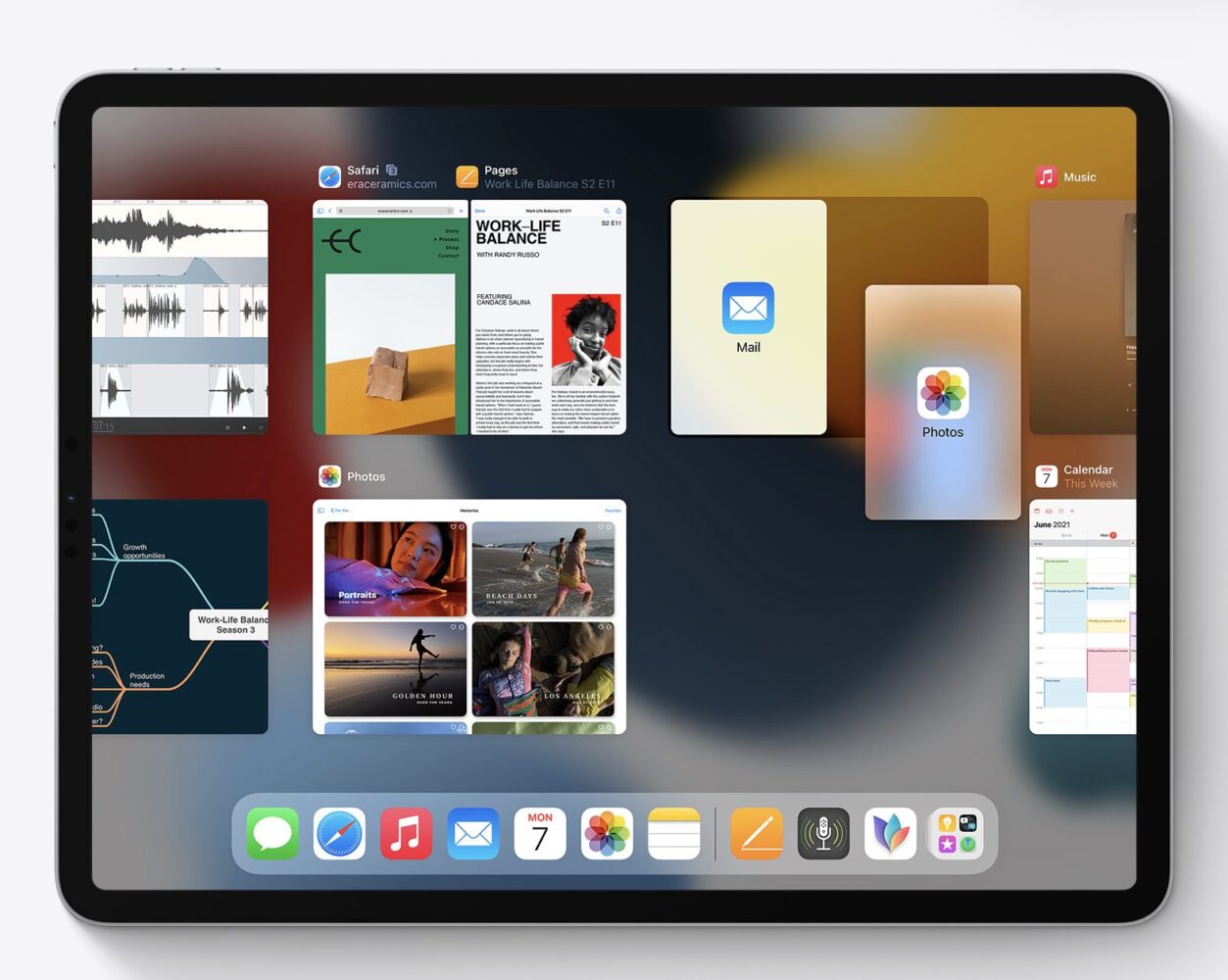
iPadOS 15 makes working with multiple apps easier than ever. A new multitasking menu appears at the top of apps, letting users go into Split View or Slide Over with just a tap. Users now have quick access to the Home Screen when using Split View, making it easier to get to the right app. Using the new shelf, they can also multitask with apps that have multiple windows like Safari® and Pages®, as well as quickly preview emails.
The experience with an external keyboard allows users to get more done with all-new keyboard shortcuts and a redesign of the menu bar. Users can quickly set up and switch between Split View and Slide Over with new shortcuts for multitasking right from the keyboard.
Organize and Personalize iPad with Widgets and the App Library
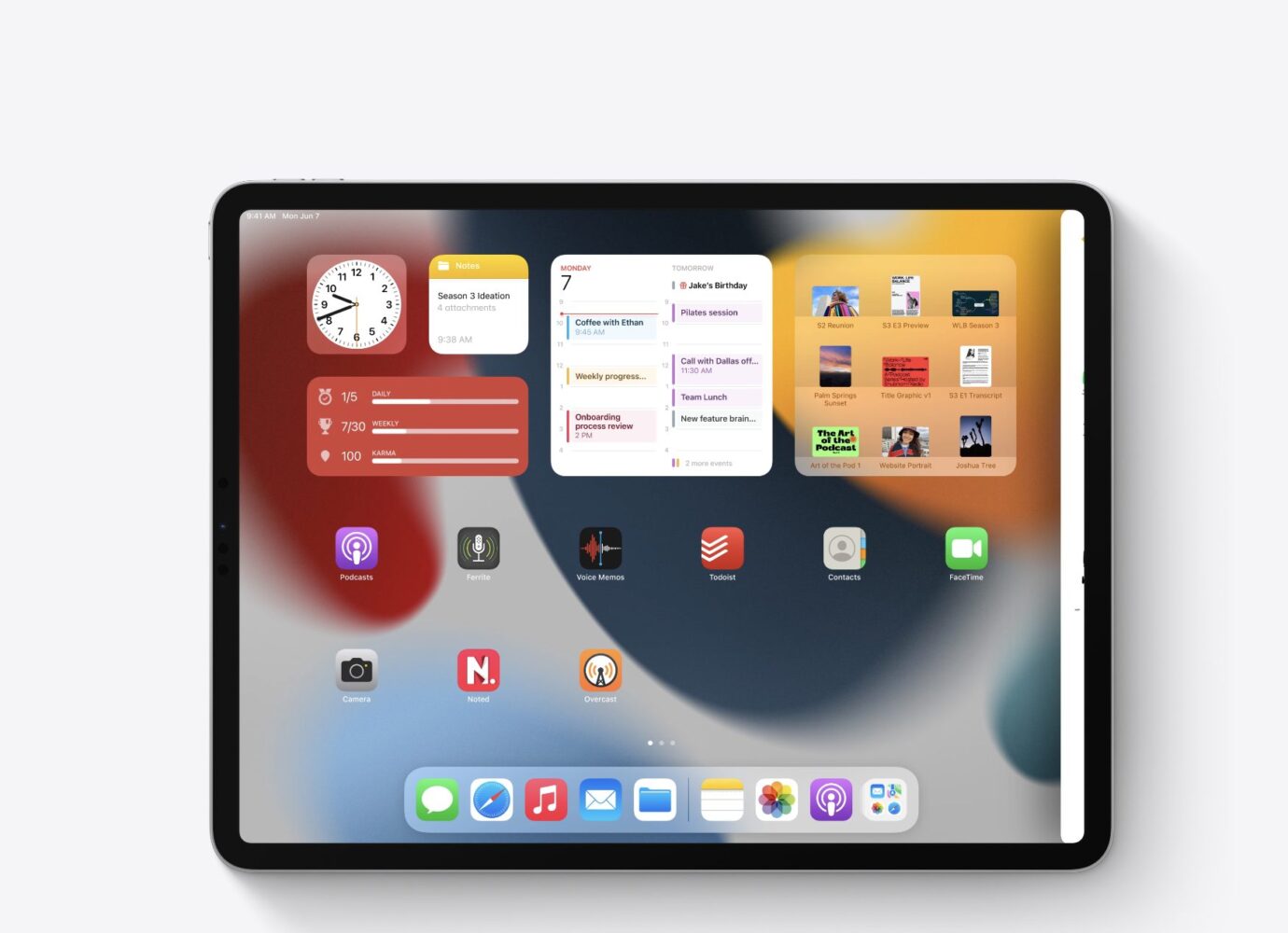
Users can now place widgets among apps on Home Screen pages, providing more information at a glance and offering a more personalized experience. Designed specifically for the larger display of iPad, a new, larger widget size is perfect for showcasing videos, music, games, photos, and more. iPadOS 15 also brings all-new widgets for App Store, Find My™, Game Center, Mail, and Contacts.
Also coming to iPad is the App Library, automatically organizing apps into helpful categories like Productivity, Games, and Recently Added, and allowing users to access all their apps right from the Dock.
Capturing Thoughts with Quick Note and Organizing with Tags
Note taking on iPad gets even better with new features that make it easier to capture and organize thoughts. Notes goes systemwide with Quick Note, a fast and easy way to take notes anywhere across the system. Whether browsing in Safari or finding a restaurant on Yelp, users can bring up Quick Note anywhere to jot down a thought and add links, providing an easy way to get back to exactly what they were looking at.
Notes also has new ways to organize, collaborate, and capture information. Tags make it easy to categorize notes and find them quickly with an all-new Tag Browser and tag-based Smart Folders. For users working with others in shared notes, mentions create a way to notify collaborators and link them back to the note, and a new Activity view shows recent updates in the note.
More Natural FaceTime Calls and Shared Experiences with SharePlay
FaceTime® helps users easily connect with those who matter most, and with iPadOS 15, conversations with friends and family feel even more natural. Users can now share experiences with SharePlay™ while connecting with friends on FaceTime, including listening to songs together with Apple Music®, watching a TV show or movie in sync, or sharing their screen to view apps together. Shared playback controls let anyone play, pause, or jump ahead. Users can extend playback to Apple TV®, and watch it on their TV while sharing the moment with friends and family connected over FaceTime. SharePlay also lets users share their screen, perfect for browsing the web together.
A Redesigned Browsing Experience with Safari
Safari gets a new tab design that lets users see more of the page as they browse. A new tab bar takes on the color of the webpage and combines tabs, the toolbar, and the search field into a single, compact design. Tab Groups offer a new way to easily save and manage tabs — great for planning trips, shopping, or storing frequently visited tabs. Tab Groups also sync across Mac® and iPhone, so users can continue their project from anywhere or easily share them with friends and family. Safari on iPad also now supports web extensions, available from the App Store®.
Tools to Find Focus
iPadOS 15 delivers powerful tools that help users focus and reduce distractions. Focus is a new feature that filters notifications based on what a user is doing. Users can set their device to help them be in the moment by creating a custom Focus or selecting a suggested one based on their context, like during their work hours or while they’re winding down for bed. Users can also create Home Screen pages with apps and widgets that apply to moments of focus to only display relevant apps and reduce temptation.
A new notification summary offers an organized collection of notifications that can be delivered any time the user chooses, such as in the morning and evening, making it easy to catch up on the day’s activity at their convenience.
On-Device Intelligence Powers New Photo Features
Live Text uses on-device intelligence to recognize text in a photo and allow users to take action.1 For example, a snapshot of a storefront may reveal a phone number and the option to place a call. With Visual Look Up, users can identify objects within a photo, such as a type of flower or dog breed.
Spotlight® now adds the ability to search the Photos app and web images, and has all-new rich results for contacts with context like recent conversations, shared photos, and their location if shared through Find My. Leveraging Live Text, Spotlight makes it easy to look up a photo of a public transit map, receipt, or a screenshot of a cooking recipe. Live Text also works with handwritten text — great for searching photos of whiteboards or notes.
Translate Comes to iPad with New Ways to Communicate
The Translate app comes to iPad with new features that make conversations easier and more natural. When using the Translate app, Auto Translate detects when someone is speaking, and in which language, so users can converse naturally without having to tap a microphone button. For even more personal conversations, face-to-face view allows two people to sit across from each other with iPad between them and see translations of the conversation from their own side. Text can now be translated anywhere on iPad by selecting it and tapping Translate, and handwritten text can also be translated. In combination with Live Text, users can even translate text in photos.
Build Apps with Swift Playgrounds
Swift Playgrounds is the best and easiest way to learn how to code. And now with Swift Playgrounds 4,2 users have the tools to build iPhone and iPad apps right on their iPad and submit them directly to the App Store, offering new ways for anyone to create apps and share them with the world.3 Code is immediately reflected in the live preview while building apps, and users can run their apps full screen to test them out. A new open project format based on Swift packages can open and be edited in Swift Playgrounds for iPad as well as within Xcode® on Mac, offering users even more versatility to develop apps across iPad and Mac.
Additional iPadOS 15 Features
- Universal Control lets users work with a single mouse and keyboard to move between iPad and Mac for a seamless experience, with no setup required. Users can even drag and drop content back and forth between devices — great for sketching a drawing with Apple Pencil on iPad and placing it into a Keynote® slide on Mac.
- Shared with You works across the system to find the articles, music, TV shows, photos, and more that are shared in Messages conversations, and conveniently surfaces them in apps like Photos, Safari, Apple News®, Music, Podcasts, and the Apple TV app, making it easy to quickly access the information in context.
- Photos includes the biggest update ever to Memories, with a fresh, new look; an immersive, interactive interface; and integration with Apple Music, which uses on-device intelligence to personalize song suggestions that bring memories to life.
- Maps delivers new ways to navigate and explore the world. Users will experience significantly enhanced details in cities for neighborhoods, commercial districts, elevation, and buildings, new road colors and labels, custom-designed landmarks, and a new night-time mode with a moonlit glow.
- Privacy is taken to the next level with new protections, transparency features, and controls. Mail Privacy Protection helps stop trackers from snooping on an email, and App Privacy Report provides transparency into how apps are sharing information with other companies.4
- Siri is designed to protect user privacy. Now, with on-device speech recognition, audio of Siri requests is processed entirely on iPad by default,5 and performance improves significantly. Siri also adds Announce Notifications on AirPods®, the ability for users to share what’s on their screen just by asking, and more.
- iCloud+℠ combines everything users love about iCloud® with new premium features, including Hide My Email, expanded HomeKit® Secure Video support, and an innovative new internet privacy service, iCloud Private Relay, at no additional cost.6 Current iCloud subscribers will be upgraded to iCloud+ automatically this fall. All iCloud+ plans can be shared with people in the same Family Sharing group, so everyone can enjoy the new features, storage, and elevated experience that comes with the service.
- New accessibility features are designed to work the way users do. The VoiceOver screen reader now uses on-device intelligence to explore objects within images, enabling users to discover more details about the people, text, table data, and other objects within images. Support for third-party eye-tracking hardware enables users to control iPad using only their eyes. Background sounds play continuously and mix into or duck under other audio and system sounds to mask unwanted environmental or external noise, and help users focus, stay calm, or rest. Sound Actions lets users customize Switch Control to work with mouth sounds. Users can now customize display and text size on an app-by-app basis.
macOS Monterey
Apple® today previewed macOS® Monterey, the latest version of the world’s most advanced desktop operating system. macOS Monterey comes with new ways for users to connect, get more done, and work more fluidly across their Apple devices. SharePlay™, a new feature in FaceTime®, lets users share experiences together, and Shared with You makes it easy to discover and enjoy content shared through Messages right in Photos, Safari®, Apple Podcasts®, Apple News®, and the Apple TV® app. A major update to Safari features a gorgeous streamlined tab bar and powerful tab organization with Tab Groups, Shortcuts comes to the Mac® to automate everyday tasks, and Focus helps users stay on task and reduce distractions. Additionally, Universal Control and AirPlay® to Mac are new Continuity features that offer more ways to work effortlessly across Apple devices. macOS Monterey will support the broadest lineup of Macs in history, including the latest iMac®, MacBook Air®, 13-inch MacBook Pro®, and Mac mini®, as well as Apple’s Intel-based Macs.

Getting More Done with Mac
New tools in macOS Monterey are designed to help users get more done, stay focused, and collaborate:
— Already the world’s fastest browser, Safari now reimagines the browsing experience with a new tab design that lets users see more of the page as they scroll. A new tab bar takes on the color of the webpage and combines tabs, the tool bar, and the search field into a single compact design. Tab Groups offer a new way to easily save and manage tabs — great for planning trips, shopping, or storing the tabs users visit daily. Tab Groups also sync across Mac®, iPhone®, and iPad®, so users can continue their project from anywhere and easily share tabs with friends and family.
— Shortcuts arrives on the Mac to help users automate everyday tasks and achieve peak productivity. Just like on iPhone and iPad, Shortcuts on Mac lets users quickly accomplish tasks with the apps they use the most. With a rich gallery of pre-built actions designed just for Mac, users can instantly share files, make animated GIFs, and more. Power users looking to take things further can use the Shortcuts Editor on Mac to customize shortcuts to match their workflows. Shortcuts is integrated throughout macOS, including the menu bar, Finder®, Spotlight®, and even hands-free with Siri® — making it easy to run shortcuts no matter which app the user is in. Users can easily import existing Automator workflows into Shortcuts and be up and running right away.
— New features in Notes help users stay organized, collaborate, and create notes from anywhere. Quick Note is a new way for users to jot down notes on any app or website systemwide, making it easy to capture thoughts and ideas wherever inspiration strikes. Users can also add links from an app to their Quick Note to create context, even on a website in Safari or an address in Maps. As users work through projects in Notes with friends or colleagues, they can add mentions, see everyone’s edits in the new Activity View, and categorize their Notes with tags to quickly and easily find them in the new Tag Browser and in tag-based Smart Folders.
— With Focus, Mac users can stay in the moment by automatically filtering out notifications unrelated to their current activity. Users can signal their status to let others know when they are focusing and not available. When a user has Focus set on one device, it automatically sets across their other devices and can be customized based on their current activity — whether they are preparing for a presentation or wrapping up an assignment for school.
All New Ways to Stay Connected
macOS Monterey provides meaningful new ways to connect and enjoy time with friends, family, and colleagues:
— FaceTime now includes a suite of new audio and video features that make calls feel more natural and lifelike. With spatial audio, voices in a FaceTime call sound like they are coming from where the person is positioned on the screen, while Voice Isolation ensures the user’s voice is crystal clear and uses machine learning to eliminate background noise, and Wide Spectrum allows all the sound in the area to come through so participants can hear everything. Portrait mode taps into the Apple Neural Engine in the M1 chip to blur the user’s background for a stunning video effect, and a new Grid View shows participants in same-sized tiles.
— SharePlay is a powerful set of system features that enables users to have shared experiences while on a FaceTime call. Users can share their favorite music, TV shows, movies, projects, and more with friends and family in real time — kicking off a shared listening party, watching movies and shows, collaborating in apps through screen sharing, and more. With an API built for easy adoption, third-party developers can bring their own apps right into FaceTime.
— Shared with You makes it easy to locate and enjoy all the great content that’s shared through Messages, including photos, videos, articles, and more, right from a Shared with You tab within Photos, Safari, Apple Podcasts, Apple News, and the Apple TV app.
New Ways to Work Across Apple Devices
Working across Apple devices is now better than ever with new Continuity features:
— Universal Control lets users work with a single mouse and keyboard and move between Mac and iPad for a seamless experience, with no setup required. Users can even drag and drop content back and forth between devices — great for sketching a drawing with Apple Pencil® on iPad and placing it into a Keynote® slide on the Mac.
— With AirPlay to Mac, users can play, present, and share just about anything — from the latest movies and games to vacation photos and presentations — from their iPhone or iPad right to their Mac’s stunning Retina® display. The Mac’s high-fidelity sound system can also be used as an AirPlay speaker, so users can play music or podcasts on their Mac, or use their Mac as a secondary speaker for multiroom audio.
Additional New Features of macOS Monterey
- With the new interactive globe in Maps and an amazing, immersive, and detailed city experience, users can enjoy new ways to navigate and explore the natural beauty of the Earth on the Mac’s large, gorgeous display.
- Live Text uses on-device machine learning to detect text in photos, including phone numbers, websites, addresses, and tracking numbers, so users can copy and paste, make a phone call, open a website, and easily find more information. Visual Lookup also uses machine learning to help users discover and learn about animals, art, landmarks, plants, and more in photos. These features work across macOS, including in apps like Photos, Messages, and Safari.
- iCloud+℠ combines everything users love about iCloud® with new premium features, including Hide My Email, expanded HomeKit® Secure Video support, and an innovative new internet privacy service, iCloud Private Relay, at no additional cost.1 All iCloud+ plans can be shared with people in the same Family Sharing group, so everyone can enjoy the new features, storage, and elevated experience that comes with the service.
- AirPods Pro® and AirPods Max™ deliver a theater-like experience with spatial audio on Macs with the M1 chip.
- Privacy features like Mail Privacy Protection let users choose whether emails can collect information about their Mail activity, and the Mac recording indicator now shows which app is accessing the Mac’s microphone.
- New accessibility features let anyone add alternative image descriptions right from Markup, and improved Full Keyboard Access and new cursor customization options provide more flexibility when navigating Mac.
Health
Apple® also previewed advanced consumer health and wellness insights for users, as well as new tools for supporting loved ones. Building on the current innovative health features of iPhone® and Apple Watch®, iOS 15 gives users the ability to securely share their data with important people in their life, like a family member or physician, and receive insights into the health trends of their loved ones. Additionally, new tools in iOS 15 can be used to identify, measure, and understand changes in a person’s health data.
Health Sharing
With iOS 15, users can choose to securely give a loved one visibility into their health and wellness data, enabling them to have more meaningful conversations and provide support — even from afar — as they follow important alerts and changes over time.
In the Health app, a new Sharing tab lets users privately share their data with a trusted partner or caregiver. Users have full control over which data they share and with whom, whether they’re an aging parent who shares their activity or heart health data with a family member, a partner who chooses to share their fertility window insights, or a person with Parkinson’s disease who wants to share their mobility data with a physical therapist. For the person receiving this information, shared data is presented with important insights and trends highlighted.
Having meaningful conversations with a doctor about everyday activities during a visit is a key part of managing health, but it can be difficult to remember the details. With user permission, the Health app can keep track of valuable information, helping bridge the gap of what a person experiences between clinic appointments. Now, users in the US can choose to share certain types of health data — like heart rate, detected falls, hours of sleep, or exercise minutes — with their doctor, for more informed conversations. At participating healthcare organizations, a physician can review the Apple Health app data that a user chooses to share directly in the electronic health records system.
Trends
The Health app adds trend analysis for 20 types of data — ranging from resting heart rate to sleep to cardio fitness — so users can easily see how a given metric is progressing. A critical part of maintainingpersonalwellness is tracking changes in health, which can be subtle and easy to miss. For users looking to keep an eye on their data over time, Trends is a new way to intelligently and proactively highlight important changes, and surfaces the information in a way that’s easy to understand.
Users can also keep tabs on goals, like increasing running distance or mindful minutes. For those looking to monitor insights across areas like insulin delivery, trend analysis applies to data from third-party devices connected to the Health app.
With optional notifications, Trends can highlight long-term changes in health, so a user can celebrate progress toward a goal, or discuss with a doctor or care team.
Walking Steadiness
More than 37 million people each year require medical attention as a result of a fall, which can often be a tipping point for more serious conditions and a loss of independence.1 Walking Steadiness on iPhone is an industry first, providing insight into fall risk by capturing important mobility data as users walk with their iPhone. Currently, fall risk is assessed by a care provider through a questionnaire and an in-person evaluation. Walking Steadiness offers the added ability to capture everyday movements and surface classifications within the Health app as OK, Low, or Very Low, allowing users to proactively take action to help reduce their risk of falling.
Walking Steadiness uses custom algorithms to assess balance, stability, and coordination through built-in motion sensors on iPhone. This first-of-its-kind metric was established using real-world data from the Apple Heart and Movement Study, with more than 100,000 participants across all ages — the largest data set ever used to study fall risk.
In addition to alerting users of possible fall risk, Walking Steadiness helps users meet their stability goals. Users can choose to receive a notification when their score is Low or Very Low, and be directed to curated visual exercises that are based on clinically validated methods to increase strength and balance.
Privacy
Privacy is fundamental in the design and development across all of Apple’s health features. Health data is under a user’s control, with granular control over which data types they choose to share and with whom. Data is encrypted when in transit and while at rest on a user’s device when locked behind a passcode, Face ID®, or Touch ID®. Apple does not have access to this information when a user chooses to share it with a loved one or doctor.
Additional Health and Wellness Updates
- An enhanced labs experience comes to Health Records on iPhone, making it easier for users to review their results. Users can view highlights, pin results that may matter most to them, see whether labs are within range, and, for those in the US, access educational content about common lab tests.
- With watchOS® 8, Apple Watch measures respiratory rate — the number of breaths per minute — during sleep. Users can review this information in the Health app and be notified if a meaningful trend has been identified.
- The new Mindfulness app in watchOS 8 includes a refresh of the deep breathing experience, as well as another simple way to stay centered and calm. Breathe sessions give users more opportunities to slow down and focus, and feature a new animation. Users also have access to new Reflect sessions, a way to be more mindful that helps them focus on positive thoughts.
- In iOS 15, users worldwide have an additional option for storing medical records of immunizations and test results directly in the Health app. Now, even if a vaccine provider or medical location doesn’t currently support the Health Records feature, it can allow patients to download verifiable COVID-19 vaccination or test result records from an online browser or QR code, so they can easily access them at any time.
watchOS 8
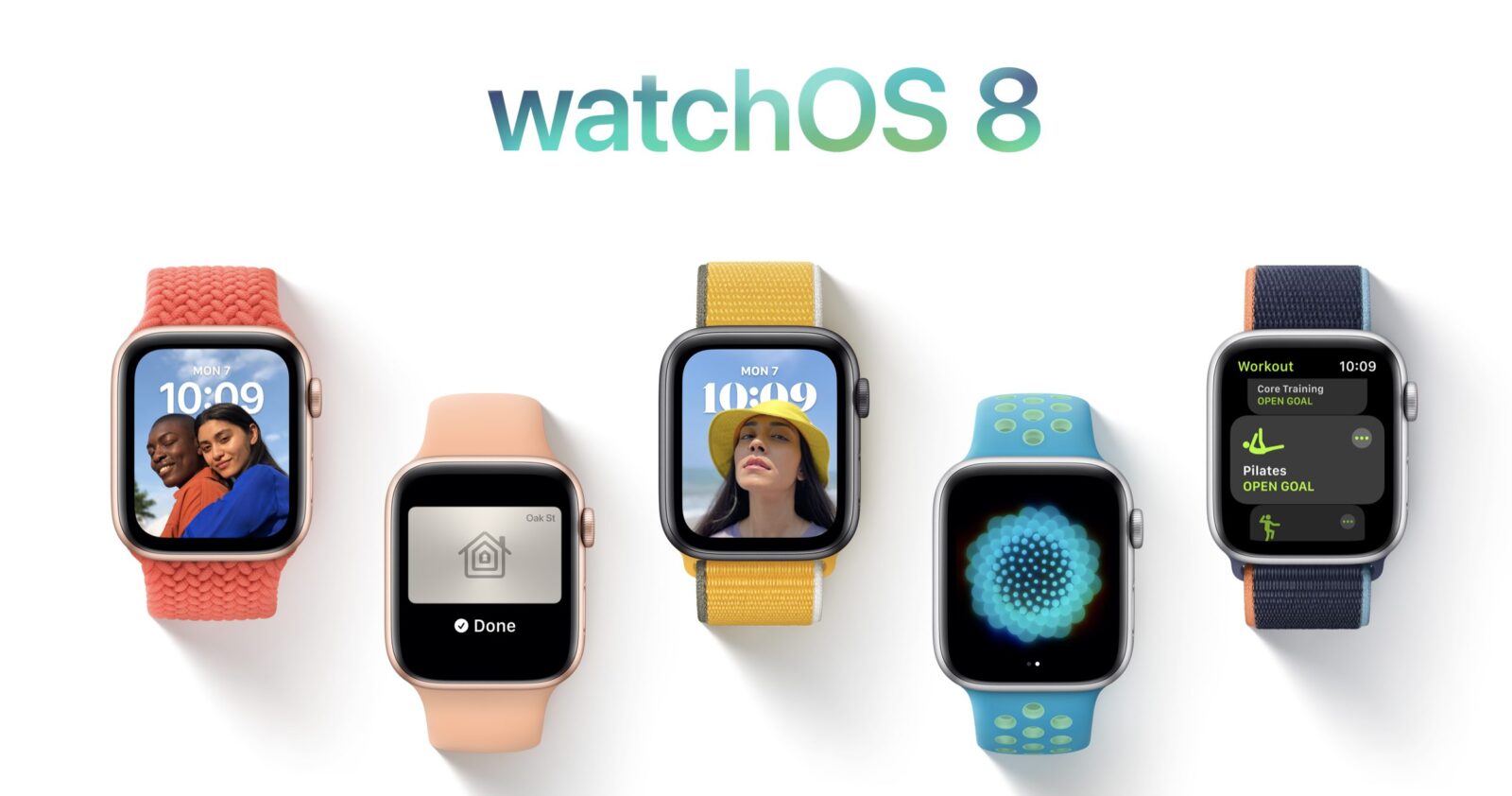
watchOS® 8 comes with impactful new features that make the world’s most advanced wearable operating system even more essential for users to stay healthy, active, and connected. Updates to the Wallet and Home apps extend Apple Watch® as an increasingly useful tool for convenient access across the car and places users live, work, and visit. A reimagined Breathe app and new Tai Chi and Pilates workout types help users lead a fit and healthy life and support mental well-being, while a new Portraits watch face and enhancements to Messages and the Photos app make staying connected to loved ones even easier.
More Access with Wallet
With Apple Watch, it is incredibly convenient to use Apple Pay® and Wallet to make secure, contactless payments in stores or ride transit. With watchOS 8, Wallet brings even more powerful contact-free ways for users to access the places and things they care about seamlessly, safely, and securely.
First announced at WWDC in 2020, Ultra Wideband support now arrives for digital car keys on Apple Watch Series 6. Apple Watch wearers can securely unlock their car from a distance and start it from the driver’s seat.1 This fall, users can also add keys for their home, office, and hotel to Wallet, and tap their Apple Watch to unlock.2 Later this year, beginning with participating states in the US, users will be able to add their driver’s license or state ID to Wallet. Select TSA checkpoints will be the first place users can begin using their digital ID.
Redesigned Home App
The redesigned Home app in watchOS 8 offers more convenient access to accessories and scenes needed in a particular moment, and the ability to control accessories by room. Users with a HomeKit®-enabled camera can view who is at the door directly on their wrist. Apple Watch users can also tap Intercom to quickly broadcast a message throughout the home or to individual rooms via HomePod®, HomePod mini™, or other personal devices.
New Workout Types
watchOS 8 introduces two new popular workout types that are beneficial for both physical fitness and mindful movement: Tai Chi and Pilates. These new workout types are supported by powerful, validated custom-built heart rate and motion algorithms to provide users with accurate metrics.
A New Approach to Mindfulness
Now more than ever, people are recognizing the importance of finding small moments in their day to be more mindful. In watchOS 8, the Breathe app becomes the Mindfulness app, featuring an enhanced Breathe experience, plus a new session type, Reflect. Reflect offers a mindful intention to focus on for as little as one minute that can be done anywhere and at any time. Each Reflect session welcomes the user with a unique, thoughtful notion to consider that invites a positive frame of mind. For example, the user may see something like “Recall a time recently when you felt a sense of calm. Bring that feeling into this moment,” or “Reflect on one thing you’re grateful for and think about why you appreciate it so much.” Both the Breathe and Reflect experiences also offer tips to help users get more from each session and feature beautiful new animations.
Sleeping Respiratory Rate
Today, Apple Watch helps users meet their sleep goals by establishing a pre-bedtime routine, and tracks metrics like time asleep, heart rate, and blood oxygen. watchOS 8 gives users even more insight into their overall wellness by tracking sleeping respiratory rate, which is the number of breaths per minute. To do this, Apple Watch uses the built-in accelerometer to measure respiratory rate while sleeping, and this information can be viewed, along with trends over time, in the Health app on iPhone®. This metric is also available for developers to use with permission through HealthKit®.
Portraits Watch Face and Photos
The Photos face is the most popular Apple Watch face, and watchOS 8 introduces new ways to view and engage with users’ favorite photos right from their wrist. The new Portraits watch face brings to life stunning portrait photos shot on iPhone with an immersive, multilayered effect, intelligently recognizing faces in photos and cropping in to highlight the subject. The Photos app is also redesigned, offering new ways to view and navigate collections, Memories and Featured Photos now sync to Apple Watch, and photos can be shared through Messages and Mail with the new Share Sheet.
Messages and Contacts
Communicating on Apple Watch is even easier with new tools in Messages. Users can combine the use of Scribble, dictation, and emoji all within the same message, and for dictated messages, they have the option to edit the presented text. To easily add even more expression to a message, users can simply enter a word or phrase and select from hundreds of trending GIFs.
watchOS 8 also brings the Contacts app to Apple Watch, providing a simple way for users to browse, add, and edit contacts, and share contacts directly from the app.
Focus
watchOS 8 supports Focus, a powerful set of tools available in iOS 15 to help users reduce distraction and be in the moment. Apple Watch will automatically align with any Focus set on iOS, so that notifications from people and apps are filtered based on what a user is currently doing. Focus uses on-device intelligence to make suggestions based on usage patterns — for example, when starting a workout on Apple Watch, the Focus for fitness is suggested.
Additional watchOS 8 Updates
- Multiple timers come to Apple Watch and can be given a specific label using Siri® (such as “Laundry Timer” or “Cooking Timer”).
- In watchOS 8, more Apple Watch apps support the Always-On display, including Maps, Mindfulness, Now Playing, Phone, Podcasts, Stopwatch, Timers, Voice Memos, and others. watchOS 8 is also making it easier for developers to keep their apps timely and relevant with a new Always-On API for third-party apps.
- To support Apple Watch users with upper-body limb differences, AssistiveTouch® enables one-arm usage of Apple Watch by sensing simple hand gestures to interact without touching the display. Using the built-in motion sensors, users can answer incoming calls, control an onscreen motion pointer, and surface an action menu that can access Notification Center, Control Center, and more.
- A new Find Items app on Apple Watch helps users locate tagged items using the Find My™ network, and a new Find Devices app helps users locate lost Apple devices that are signed in with the same Apple ID.
- The redesigned Music appenables users to share songs, albums, and playlists through Messages and Mail, and enjoy music and radio all in one place.
- The Weather app now supports Severe Weather notifications, displaying government alerts about certain severe weather events. The app also delivers Next Hour precipitation alertsand offers updated complications.
- Family Setup introduces the ability to add transit cards from Hong Kong, Japan, and select China mainland and US cities, and Calendar and Mail now include the option to add a Google account.
- Apple Fitness+℠, the first fitness service created entirely around Apple Watch, expands its offering in watchOS 8 with Picture in Picture support and new filtering options, and users can stop and resume an in-progress workout on any device. Later this month, Fitness+ introduces a new series of workouts featuring Jeanette Jenkins, one of the most sought-after fitness experts, and a new Artist Spotlight Series with workouts featuring entire playlists from Lady Gaga, Jennifer Lopez, Keith Urban, and Alicia Keys.
New Developer Tools and Technologies
Apple® unveiled new tools and technologies designed to help developers create more engaging app experiences and make it even easier to build high-quality apps. Xcode® Cloud brings together the multiple tasks and tools required to build, test, and deliver apps using powerful cloud services, enabling individual developers and teams to be more productive and provide great apps to their users. With In-App Events and Custom Product Pages, the App Store® now provides all-new ways for developers to promote their apps and connect with users. Swift® takes a massive leap forward with concurrency support built into the language, and new augmented reality (AR) technologies make it easier than ever to build immersive content in apps or on the web.

Xcode Cloud
Xcode Cloud is a new continuous integration and delivery cloud service designed specifically for Apple developers. Built into Xcode 13, Xcode Cloud offers a fast and simple way for developers and teams of all sizes to build, test, and deliver high-quality apps even more efficiently. Xcode Cloud can automatically build apps in the cloud to free up developers’ Macs for other tasks. Parallel testing in the cloud means developers can test on a simulated version of every current Apple device, then easily deploy a build of the app for internal testing, or deliver to external beta testers through TestFlight® for instant feedback.
App Store
With more apps and games featuring events like live competitions, movie premieres, live-streamed experiences, and much more, it’s now easier for users to discover these events right on the App Store — in personalized recommendations, editorial selections, search results, and on app product pages. This greatly expands the reach of developers’ events — helping connect them with new users, keep their current users informed, or reconnect them with past users. It’s a whole new way for developers to showcase what’s happening in their apps.
A top-requested feature among developers, Apple is introducing new product page tools that offer developers greater flexibility and new ways to connect with users right in the App Store. Custom Product Pages let developers showcase different features of their app for different users, while Product Page Optimization gives developers the ability to test different screenshots, preview videos, and even app icons. With rich, privacy-friendly analytics in App Store Connect, developers can see what their users like most and make the best decisions for their product pages.
Apple is introducing updated guidelines that include support for the emerging category of apps that offer creator content experiences. The developer code of conduct expands to help keep the App Store a fair marketplace for developers and users, including updated guidelines around developer identity requirements, ratings and review manipulation, and excessive customer complaints. There are also new avenues for developers to appeal an app rejection on concerns of bias, as well as the option for them to report an app if there is reason to believe an app presents a trust or safety concern, or is in violation of the App Store Review Guidelines.
Swift
Swift — Apple’s powerful and intuitive programming language — now features built-in concurrency support. This means developers can more easily write code that does work in parallel, which is key to building apps that are responsive to user input, while doing more work in the background. With concurrency in Swift, developers can write fast, modern, safe code with fewer mistakes, and take full advantage of the powerful multicore silicon across Apple’s devices.
SwiftUI® has reinvented user interface development by making it easier to develop great-looking apps with as little code as possible. Now SwiftUI takes a huge step forward, helping developers bring better experiences to all their users. This includes enhancements for improving list views, search experiences, in-app accessibility features, multi-column tables, and so much more.
Swift Playgrounds® is a great way to learn to code right on a Mac® or iPad®. With Swift Playgrounds 4, coming later this year, users will be able to create the visual design of an app with SwiftUI. App projects can be opened and edited in Swift Playgrounds or in Xcode, and when they’re ready, users can build a real app and submit it directly to the App Store right from their iPad.
Augmented Reality
Apple has the world’s largest augmented reality platform with over 1 billion AR-enabled devices powered by ARKit®, a framework that allows developers to easily create AR experiences, and RealityKit™, the rendering, animation, audio, and physics engine built from the ground up for AR.
RealityKit 2 introduces Object Capture, a simple and powerful API on macOS Monterey™ that enables developers — like Wayfair, Etsy, and more — to create high-quality, photo-realistic 3D models of real-world objects in minutes by taking photos shot on iPhone®, iPad, or DSLR and transforming them into 3D models optimized for AR. These models can be viewed in AR Quick Look or added to AR scenes in Reality Composer™ or Xcode, making it easier than ever to build amazing AR apps. Developers like Maxon and Unity are using Object Capture to unlock entirely new ways of creating 3D content within some of the leading 3D content creation apps, such as Cinema4D and Unity MARS.
With new APIs in RealityKit 2, developers can also create more realistic and complex AR experiences with greater visual, audio, and animation control, including custom render passes and dynamic shaders.
Graphics and Games
New APIs and tools in iOS, iPadOS®, and macOS® will help game developers create the next generation of games and deliver all-new experiences to their users. A new Metal® texture compression tool supports all of the latest formats, as well as optimized formats for Apple silicon, making it easier for developers to bring high-end games to all of Apple’s platforms. Additionally, a new Virtual Game Controller on iPhone and iPad provides an easy method to optimize games that build in Game Controller support.
Additional Developer Tools and APIs
Apple is providing developers with a range of new tools and APIs that will push their app experience forward and enable them to create entirely new features — all built with privacy at the forefront.
— Xcode 13 adds powerful new team development features that are perfect for working with Xcode Cloud, as well as with GitHub, Bitbucket, and GitLab collaboration features.
— With SharePlay™, popular apps like Disney+, ESPN+, HBO Max, Hulu, MasterClass, Paramount+, TikTok, and Twitch are building new types of shared experiences for users on iPhone, iPad, and Mac.1
— Third-party video-calling apps can take advantage of the latest FaceTime® enhancements, including Voice Isolation, Wide Spectrum Audio, and Portrait mode.
— Messaging apps including Slack and WeChat can now share user status in conversations; apps like Uber Eats can have Siri announce incoming messages; and new Notification APIs enable high-priority and communication notifications from apps like Chase Mobile and Zomato to break through Do Not Disturb or a Focus.
— New camera APIs allow for better fused images and add the ability to capture high-quality stills and 1080p video in the same session.
— Apple Watch® developers like Breakpoint Studio, Pandora, Qardio, and more are now creating new app experiences that offer a deeper level of customization, and are more responsive to their users’ environment.
— With TestFlight on the Mac, developers can test in-app purchases and other great Mac app features.
— StoreKit™ 2, which ensures in-app purchases are safe and secure for customers, now features new APIs for handling product entitlements and subscriber status, and testing support in both Xcode and the Apple sandbox environment.
— Web developers including Grammarly and Honey are now building extensions in Safari that are available across iPhone, iPad, and Mac. Developers can even create new, powerful extensions in the Mail app.
— Third-party navigation apps can now show a map view in a vehicle’s instrument cluster display, and a new CarPlay® simulator for Mac vastly improves testing efficiency.
— Apps can offer the theater-like experience of spatial audio and place sounds all around to bring their content to life. And Physical Audio Spatialization Engine (PHASE) makes it easy for game developers to render true-to-life audio across all of Apple’s platforms.
— ShazamKit™ enables developers to integrate audio recognition technology directly from Shazam® into their apps, making it possible not only to match music to Shazam’s vast catalog of songs, but also to match any prerecorded audio to custom results developers create.
Privacy
Apple® previewed powerful new privacy protections in iOS 15, iPadOS® 15, macOS® Monterey, and watchOS® 8, which help users better control and manage access to their data. These features represent the latest innovations in Apple’s legacy of privacy leadership, as the company has continually expanded its commitment to privacy and encouraged change across the industry with features like App Tracking Transparency and Privacy Nutrition Labels on the App Store®.
Protect Data from Third Parties
In the Mail app, Mail Privacy Protection stops senders from using invisible pixels to collect information about the user. The new feature helps users prevent senders from knowing when they open an email, and masks their IP address so it can’t be linked to other online activity or used to determine their location.
For a number of years, Intelligent Tracking Prevention has helped protect Safari® users from unwanted tracking by using on-device machine learning to stop trackers while allowing websites to function normally. This year, Intelligent Tracking Prevention is getting even stronger by also hiding the user’s IP address from trackers. This means they can’t utilize the user’s IP address as a unique identifier to connect their activity across websites and build a profile about them.
Check Up on App Privacy
With App Privacy Report, users can see how often each app has used the permission they’ve previously granted to access their location, photos, camera, microphone, and contacts during the past seven days.1 Users can check whether this makes sense to them, and take action by going to the app in Settings if it doesn’t. Users can also find out with whom their data may be shared by seeing all the third-party domains an app is contacting.
Process Audio of Siri Requests on Device
With on-device speech recognition, the audio of users’ requests is processed right on their iPhone® or iPad® by default. This addresses one of the biggest privacy concerns for voice assistants, which is unwanted audio recording. For many requests, Siri® processing is also moving on device, enabling requests to be processed without an internet connection, such as launching apps, setting timers and alarms, changing settings, or controlling music.
Enhance Internet Privacy with iCloud+
iCloud+℠ combines everything customers love about iCloud® with new premium features, including iCloud Private Relay, Hide My Email, and expanded HomeKit® Secure Video support, at no additional cost.2
Private Relay is a new internet privacy service that’s built right into iCloud, allowing users to connect to and browse the web in a more secure and private way. When browsing with Safari, Private Relay ensures all traffic leaving a user’s device is encrypted, so no one between the user and the website they are visiting can access and read it, not even Apple or the user’s network provider. All the user’s requests are then sent through two separate internet relays. The first assigns the user an anonymous IP address that maps to their region but not their actual location. The second decrypts the web address they want to visit and forwards them to their destination. This separation of information protects the user’s privacy because no single entity can identify both who a user is and which sites they visit.
Expanding on the capabilities of Sign in with Apple, Hide My Email lets users share unique, random email addresses that forward to their personal inbox anytime they wish to keep their personal email address private. Built directly into Safari, iCloud settings, and Mail, Hide My Email also enables users to create and delete as many addresses as needed at any time, helping give users control of who is able to contact them.3
iCloud+ expands built-in support for HomeKit Secure Video, so users can connect more cameras than ever before in the Home app, while giving them end-to-end encrypted storage for home security video footage that will not count against their storage capacity. HomeKit Secure Video also ensures that activity detected by users’ security cameras is analyzed and encrypted by their Apple devices at home before being securely stored in iCloud.
Additional Features for Users and Developers
These releases also feature powerful new tools that help developers enhance app functionality while preserving user privacy.
- With share current location, users can easily share their current location with an app just once, without giving the developer further access after that session. Developers can customize the share current location button, and integrate it directly into their apps.
- With enhanced Photos limited library access, developers can offer smart functionality — like a recent photos folder for specific albums — even when a user has only granted limited access.
- With secure paste, developers can let users paste from a different app without having access to what was copied until the user takes action to paste it into their app. When developers use secure paste, users will be able to paste without being alerted via the pasteboard transparency notification, helping give them peace of mind.