

By using this site, you agree to our Privacy Policy and Terms of Service.
Accept
Absolute Geeks UAEAbsolute Geeks UAE
  • STORIES
    • TECH
    • AUTOMOTIVE
    • GUIDES
    • OPINIONS
  • REVIEWS
    • READERS’ CHOICE
    • ALL REVIEWS
    • ━
    • SMARTPHONES
    • CARS
    • HEADPHONES
    • ACCESSORIES
    • LAPTOPS
    • TABLETS
    • WEARABLES
    • SPEAKERS
    • APPS
  • WATCHLIST
    • TV & MOVIES REVIEWS
    • SPOTLIGHT
  • GAMING
    • GAMING NEWS
    • GAME REVIEWS
  • +
    • OUR STORY
    • GET IN TOUCH
Reading: WhatsApp launches ‘Lists’ feature for UAE users to organize chats
Share
Notification Show More
Absolute Geeks UAEAbsolute Geeks UAE
  • STORIES
    • TECH
    • AUTOMOTIVE
    • GUIDES
    • OPINIONS
  • REVIEWS
    • READERS’ CHOICE
    • ALL REVIEWS
    • ━
    • SMARTPHONES
    • CARS
    • HEADPHONES
    • ACCESSORIES
    • LAPTOPS
    • TABLETS
    • WEARABLES
    • SPEAKERS
    • APPS
  • WATCHLIST
    • TV & MOVIES REVIEWS
    • SPOTLIGHT
  • GAMING
    • GAMING NEWS
    • GAME REVIEWS
  • +
    • OUR STORY
    • GET IN TOUCH
Follow US

WhatsApp launches ‘Lists’ feature for UAE users to organize chats

GEEK DESK
GEEK DESK
Mar 7

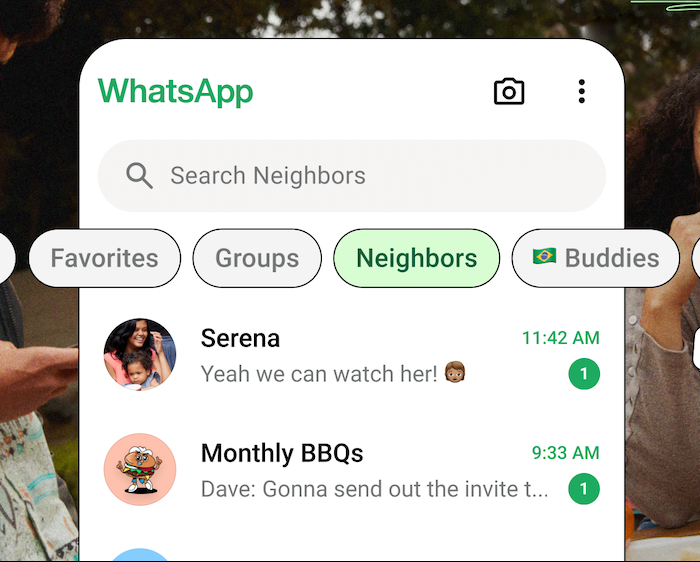
WhatsApp has introduced a new feature called ‘Lists’ for users in the UAE, allowing them to organize their conversations into custom categories. This feature aims to improve chat management and make it easier for users to find specific conversations.

With ‘Lists,’ users can create and label categories for different types of chats, such as family, work, or friends. These lists appear at the top of the inbox, alongside the existing “All,” “Unread,” and “Groups” filters. This provides a more structured and efficient way to navigate conversations.

The ‘Lists’ feature was initially rolled out in the US in November 2024 and has now been made available to users in the UAE. WhatsApp has been steadily introducing new features and enhancements, including an event planning tool and the ‘Meta AI’ chatbot, which was recently launched in the UAE.

These updates reflect WhatsApp’s ongoing efforts to improve user experience and provide more versatile tools for communication and organization within the app.

Lists are customizable filters that can help you keep your chats organized. Open the Chats tab and swipe down to view your lists.

How to create a new list

  1. Tap Chats and swipe down to view your lists.
  2. Tap add.
    • You might need to swipe on your lists to find add. 
  3. Add a name for your list and tap Add people or groups.
  4. Select chats or tap Search to search for and select a person or group.
  5. Tap Add > Add.

Alternatively, tap Settings > Lists > New list.

Note: 

  • You need to add at least one chat to create a list. 
  • You can add and remove chats from the list after creation.
Share
What do you think?
Happy0
Sad0
Love0
Surprise0
Cry0
Angry0
Dead0

WHAT'S HOT ❰

Xiaomi 17 series launches globally ahead of MWC 2026
UAE dirham symbol approved for unicode, arriving on keyboards in 2026
Paramount to acquire Warner Bros Discovery in $110 billion media merger
ChatGPT nears 1 billion weekly users as OpenAI reports 900m milestone
Nintendo reveals $70 Game Boy Jukebox for Pokémon’s 30th anniversary
Absolute Geeks UAEAbsolute Geeks UAE
Follow US
AbsoluteGeeks.com was assembled by Absolute Geeks Media FZE LLC during a caffeine incident.
© 2014–2026. All rights reserved.
Proudly made in Dubai, UAE ❤️
Upgrade Your Brain Firmware
Receive updates, patches, and jokes you’ll pretend you understood.
No spam, just RAM for your brain.
Welcome Back!

Sign in to your account

Username or Email Address
Password

Lost your password?