By using this site, you agree to our Privacy Policy and Terms of Service.
Accept
Absolute Geeks UAEAbsolute Geeks UAE
  • STORIES
    • TECH
    • AUTOMOTIVE
    • GUIDES
    • OPINIONS
  • REVIEWS
    • READERS’ CHOICE
    • ALL REVIEWS
    • ━
    • SMARTPHONES
    • CARS
    • HEADPHONES
    • ACCESSORIES
    • LAPTOPS
    • TABLETS
    • WEARABLES
    • SPEAKERS
    • APPS
  • WATCHLIST
    • TV & MOVIES REVIEWS
    • SPOTLIGHT
  • GAMING
    • GAMING NEWS
    • GAME REVIEWS
  • +
    • OUR STORY
    • GET IN TOUCH
Reading: TikTok introduces text posts
Share
Notification Show More
Absolute Geeks UAEAbsolute Geeks UAE
  • STORIES
    • TECH
    • AUTOMOTIVE
    • GUIDES
    • OPINIONS
  • REVIEWS
    • READERS’ CHOICE
    • ALL REVIEWS
    • ━
    • SMARTPHONES
    • CARS
    • HEADPHONES
    • ACCESSORIES
    • LAPTOPS
    • TABLETS
    • WEARABLES
    • SPEAKERS
    • APPS
  • WATCHLIST
    • TV & MOVIES REVIEWS
    • SPOTLIGHT
  • GAMING
    • GAMING NEWS
    • GAME REVIEWS
  • +
    • OUR STORY
    • GET IN TOUCH
Follow US

TikTok introduces text posts

GEEK DESK
GEEK DESK
Jul 25

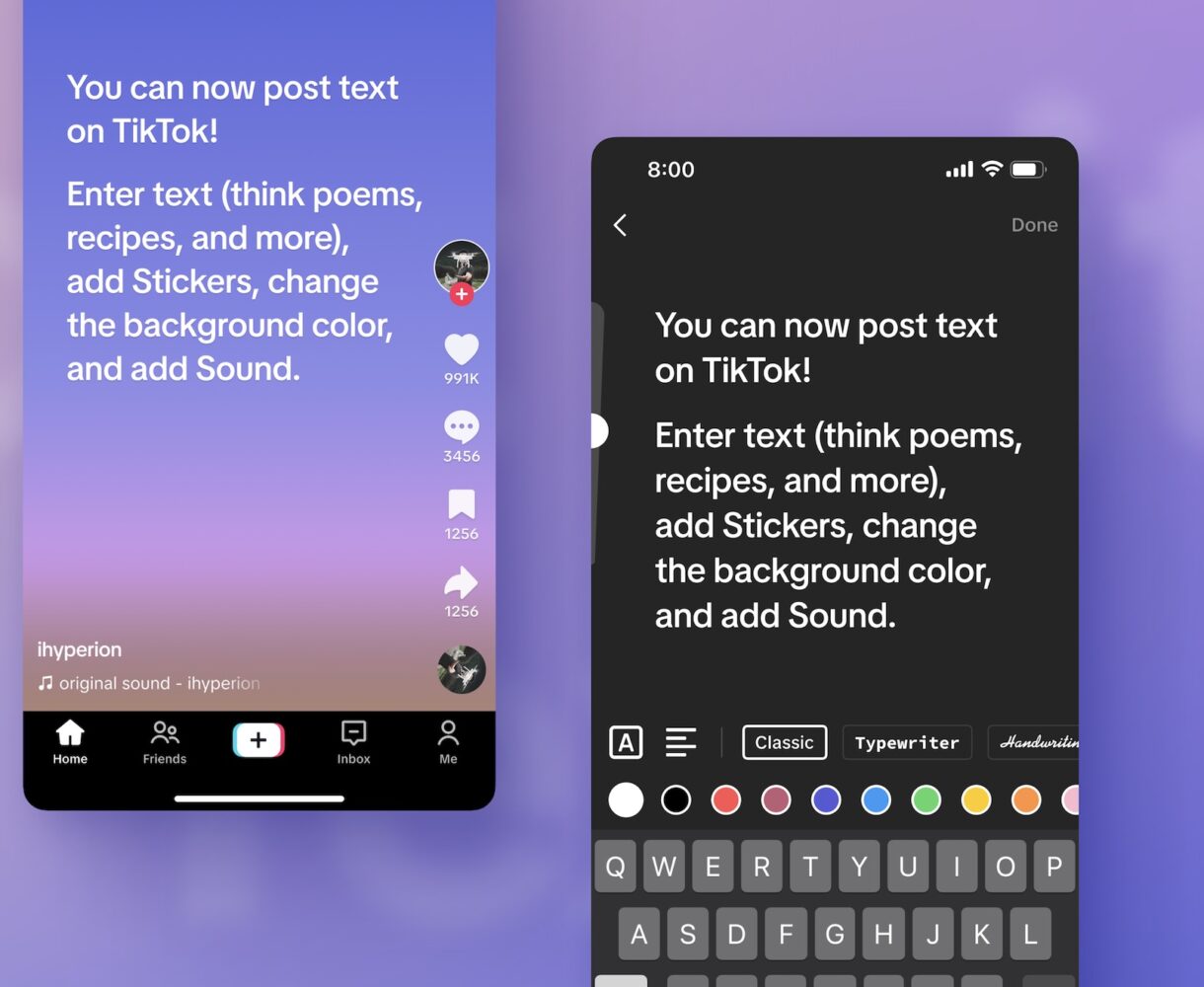
While ‘X’ is erasing our beloved Twitter brand from existence, TikTok unexpectedly announced that it has launched text posts. With text posts (basically TikTok’s version of tweets), users can now create text-based content, which the company says will broadens options for creators to share their ideas and express their creativity. Creators have been able to make content on TikTok across a variety of formats — from LIVE videos to photos, Duets to Stitch. Text is the latest addition to options for content creation, allowing creators to share their stories, poems, recipes, and other written content on TikTok.

How to create text posts?

When you access the Camera page, you’ll be able to choose from three options: photo, video, and text. By selecting text, you’ll be directed to the text creation page, where you can type out the content of your post.

Upon reaching the Post page, you’ll find familiar options to customize your content. These include adding Sound, tagging a location, enabling comments, and allowing Duets, among others.

Features to Try

Text posts offer a range of features that empower you to make your text-based content stand out. Here are some highlights:

  • Stickers: Enhance your text by selecting stickers that relate to your content and add some pizazz to your post.
  • Tags and Hashtags: Just like in video or photo posts, you can tag other accounts, as well as add hashtags that relate to relevant topics or trends.
  • Background colors: Choose from a variety of background colors to make your text pop.
  • Adding Sound: Sounds are core to the TikTok experience, which is why we’ve incorporated them into text posts. You’ll be able to add tunes that readers can groove to as they peruse your writing.
  • Draft and Discard: Similar to video or photo posts, you can save your drafts and store them with other unpublished posts for later editing or discard them entirely.

Share
What do you think?
Happy0
Sad0
Love0
Surprise0
Cry0
Angry0
Dead0

WHAT'S HOT ❰

Huawei expands wearables and tablets with Bangkok product launch
XPENG Reveals the Future of AI Mobility at the 2026 Beijing Auto Show
Nomad releases durable power cable for Starlink Mini users in remote settings
Qualcomm announces Snapdragon 6 Gen 5 and 4 Gen 5
Ring adds new indoor and outdoor cameras to its UAE lineup
Absolute Geeks UAEAbsolute Geeks UAE
Follow US
AbsoluteGeeks.com was assembled during a caffeine incident.
© Absolute Geeks Media FZE LLC 2014–2026.
Proudly made in Dubai, UAE ❤️
Upgrade Your Brain Firmware
Receive updates, patches, and jokes you’ll pretend you understood.
No spam, just RAM for your brain.
Welcome Back!

Sign in to your account

Username or Email Address
Password

Lost your password?