By using this site, you agree to our Privacy Policy and Terms of Service.
Accept
Absolute Geeks UAEAbsolute Geeks UAE
  • STORIES
    • TECH
    • AUTOMOTIVE
    • GUIDES
    • OPINIONS
  • REVIEWS
    • READERS’ CHOICE
    • ALL REVIEWS
    • ━
    • SMARTPHONES
    • CARS
    • HEADPHONES
    • ACCESSORIES
    • LAPTOPS
    • TABLETS
    • WEARABLES
    • SPEAKERS
    • APPS
  • WATCHLIST
    • TV & MOVIES REVIEWS
    • SPOTLIGHT
  • GAMING
    • GAMING NEWS
    • GAME REVIEWS
  • +
    • OUR STORY
    • GET IN TOUCH
Reading: Spotify update lets you remove the “Create” button from the navigation bar
Share
Notification Show More
Absolute Geeks UAEAbsolute Geeks UAE
  • STORIES
    • TECH
    • AUTOMOTIVE
    • GUIDES
    • OPINIONS
  • REVIEWS
    • READERS’ CHOICE
    • ALL REVIEWS
    • ━
    • SMARTPHONES
    • CARS
    • HEADPHONES
    • ACCESSORIES
    • LAPTOPS
    • TABLETS
    • WEARABLES
    • SPEAKERS
    • APPS
  • WATCHLIST
    • TV & MOVIES REVIEWS
    • SPOTLIGHT
  • GAMING
    • GAMING NEWS
    • GAME REVIEWS
  • +
    • OUR STORY
    • GET IN TOUCH
Follow US

Spotify update lets you remove the “Create” button from the navigation bar

GEEK DESK
GEEK DESK
Aug 2

Spotify has added a new option to remove the “Create” button from its bottom navigation bar, following months of user feedback. The feature, which was introduced earlier this year, gave quick access to playlist creation tools but was widely seen as unnecessary by many users.

The Create button previously lived inside the Library tab before being promoted to its own spot in the app’s main navigation. Tapping it opens options to start a new playlist, a collaborative playlist, a “Blend” mix with friends, an AI-generated playlist, or a “Jam” session. While these tools remain available, users can now choose whether they want them taking up permanent space in the navigation bar.

How to remove Spotify’s Create button:

  1. Tap your profile picture at the top of the app.
  2. Select Settings and privacy.
  3. Under Content and display, toggle Create button off (or back on, if you change your mind).
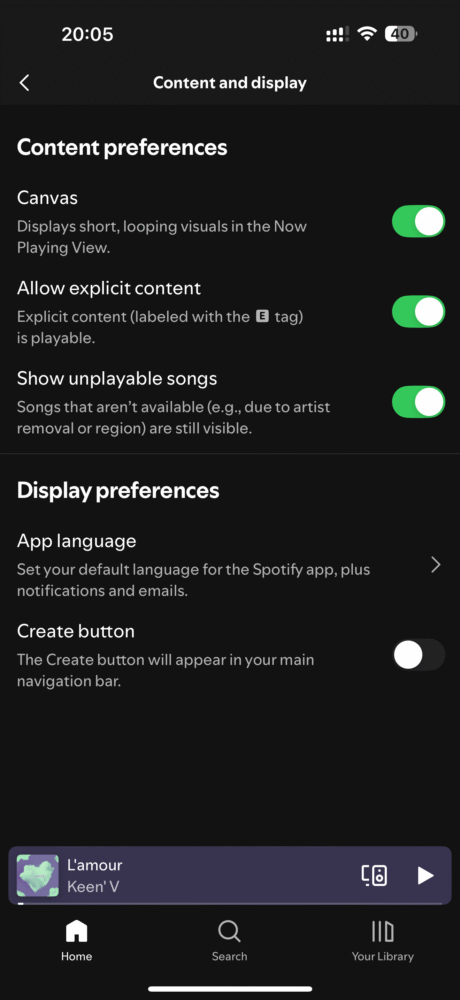
Spotify notes that this setting is device-specific — meaning if you use multiple devices or get a new phone, you’ll need to disable the button separately on each one.

The change began rolling out to both Android and iOS users on July 31 and should now be available globally.

By making the Create button optional, Spotify has addressed a long-running community request, offering more control over how users customize their app’s layout. The playlist creation tools themselves remain unchanged and can still be accessed through the Library tab or other menu options.


Share
What do you think?
Happy0
Sad0
Love0
Surprise0
Cry0
Angry0
Dead0

WHAT'S HOT ❰

Spotify at 20 reveals the tracks and artists that defined two decades of streaming.
OpenAI releases GPT-5.5 with focus on coding efficiency and multi-step tasks.
Nothing’s Essential Voice tries to make speech the default way to type on phones
Assassin’s Creed Black Flag Resynced arrives July 9 with reworked combat and new story content
LEGO reveals first Shrek sets for the franchise’s 25th anniversary.
Absolute Geeks UAEAbsolute Geeks UAE
Follow US
AbsoluteGeeks.com was assembled during a caffeine incident.
© Absolute Geeks Media FZE LLC 2014–2026.
Proudly made in Dubai, UAE ❤️
Upgrade Your Brain Firmware
Receive updates, patches, and jokes you’ll pretend you understood.
No spam, just RAM for your brain.
Welcome Back!

Sign in to your account

Username or Email Address
Password

Lost your password?