By using this site, you agree to our Privacy Policy and Terms of Service.
Accept
Absolute Geeks UAEAbsolute Geeks UAE
  • STORIES
    • TECH
    • AUTOMOTIVE
    • GUIDES
    • OPINIONS
  • REVIEWS
    • READERS’ CHOICE
    • ALL REVIEWS
    • ━
    • SMARTPHONES
    • CARS
    • HEADPHONES
    • ACCESSORIES
    • LAPTOPS
    • TABLETS
    • WEARABLES
    • SPEAKERS
    • APPS
  • WATCHLIST
    • TV & MOVIES REVIEWS
    • SPOTLIGHT
  • GAMING
    • GAMING NEWS
    • GAME REVIEWS
  • +
    • OUR STORY
    • GET IN TOUCH
Reading: Spotify and BeReal’s Integration is now available in the MENA region, here’s how to get started
Share
Notification Show More
Absolute Geeks UAEAbsolute Geeks UAE
  • STORIES
    • TECH
    • AUTOMOTIVE
    • GUIDES
    • OPINIONS
  • REVIEWS
    • READERS’ CHOICE
    • ALL REVIEWS
    • ━
    • SMARTPHONES
    • CARS
    • HEADPHONES
    • ACCESSORIES
    • LAPTOPS
    • TABLETS
    • WEARABLES
    • SPEAKERS
    • APPS
  • WATCHLIST
    • TV & MOVIES REVIEWS
    • SPOTLIGHT
  • GAMING
    • GAMING NEWS
    • GAME REVIEWS
  • +
    • OUR STORY
    • GET IN TOUCH
Follow US

Spotify and BeReal’s Integration is now available in the MENA region, here’s how to get started

GEEK DESK
GEEK DESK
May 11

Spotify rolled out its integration with BeReal to users across the Middle East and North Africa. Now, when users use BeReal, they can also include what they are listening to on Spotify – bringing another layer of authenticity and connection to their BeReal moment. 

Here’s how to get started: 

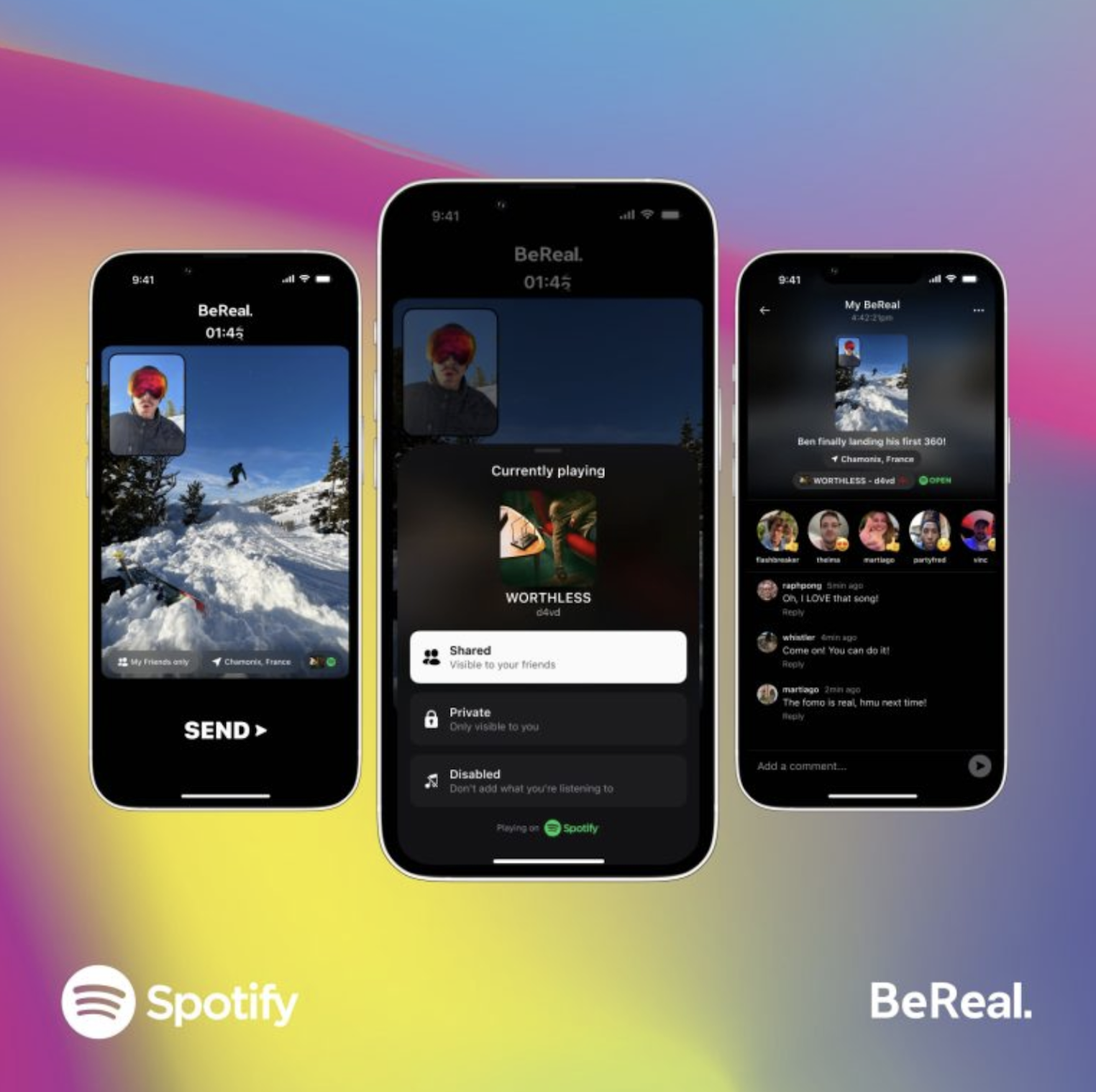
  1. Connect your Spotify and BeReal accounts. There are two ways to do this. Eligible users—or even soon-to-be users—can do this by tapping on the music icon before posting their BeReal. 
  2. Otherwise, within the BeReal app, navigate to “Settings,” then “Music,” and follow the prompts to connect to Spotify. 
  3. Once the accounts are connected, the song or podcast you listen to on Spotify will automatically be added to the BeReal post, with the cover art of the audio displayed at the bottom of the camera lens.
  4. Check out what other friends are listening to on your BeReal feed! You’ll also be able to listen to a preview of what they’ve shared. 
The integration is just another way of bringing Spotify to more people in more ways – helping fans, artists, and communities find new ways to connect through audio around the world. BeReal and Spotify users on Android and iOS can access this experience as it rolls out. 

The integration is now live across Algeria, Bahrain, Egypt, Jordan, Kuwait, Lebanon, Morocco, Oman, Palestine, Qatar, Saudi Arabia, Tunisia, UAE, Iraq, and Libya.


Share
What do you think?
Happy0
Sad0
Love0
Surprise0
Cry0
Angry0
Dead0

WHAT'S HOT ❰

Spotify at 20 reveals the tracks and artists that defined two decades of streaming.
OpenAI releases GPT-5.5 with focus on coding efficiency and multi-step tasks.
Nothing’s Essential Voice tries to make speech the default way to type on phones
Assassin’s Creed Black Flag Resynced arrives July 9 with reworked combat and new story content
LEGO reveals first Shrek sets for the franchise’s 25th anniversary.
Absolute Geeks UAEAbsolute Geeks UAE
Follow US
AbsoluteGeeks.com was assembled during a caffeine incident.
© Absolute Geeks Media FZE LLC 2014–2026.
Proudly made in Dubai, UAE ❤️
Upgrade Your Brain Firmware
Receive updates, patches, and jokes you’ll pretend you understood.
No spam, just RAM for your brain.
Welcome Back!

Sign in to your account

Username or Email Address
Password

Lost your password?