
By using this site, you agree to our Privacy Policy and Terms of Service.
Accept
Absolute Geeks UAEAbsolute Geeks UAE
  • STORIES
    • TECH
    • AUTOMOTIVE
    • GUIDES
    • OPINIONS
  • REVIEWS
    • READERS’ CHOICE
    • ALL REVIEWS
    • ━
    • SMARTPHONES
    • CARS
    • HEADPHONES
    • ACCESSORIES
    • LAPTOPS
    • TABLETS
    • WEARABLES
    • SPEAKERS
    • APPS
  • WATCHLIST
    • TV & MOVIES REVIEWS
    • SPOTLIGHT
  • GAMING
    • GAMING NEWS
    • GAME REVIEWS
  • +
    • OUR STORY
    • GET IN TOUCH
Reading: Microsoft Teams (free) receives a visual overhaul and feature enhancements
Share
Notification Show More
Absolute Geeks UAEAbsolute Geeks UAE
  • STORIES
    • TECH
    • AUTOMOTIVE
    • GUIDES
    • OPINIONS
  • REVIEWS
    • READERS’ CHOICE
    • ALL REVIEWS
    • ━
    • SMARTPHONES
    • CARS
    • HEADPHONES
    • ACCESSORIES
    • LAPTOPS
    • TABLETS
    • WEARABLES
    • SPEAKERS
    • APPS
  • WATCHLIST
    • TV & MOVIES REVIEWS
    • SPOTLIGHT
  • GAMING
    • GAMING NEWS
    • GAME REVIEWS
  • +
    • OUR STORY
    • GET IN TOUCH
Follow US

Microsoft Teams (free) receives a visual overhaul and feature enhancements

GEEK DESK
GEEK DESK
Oct 7

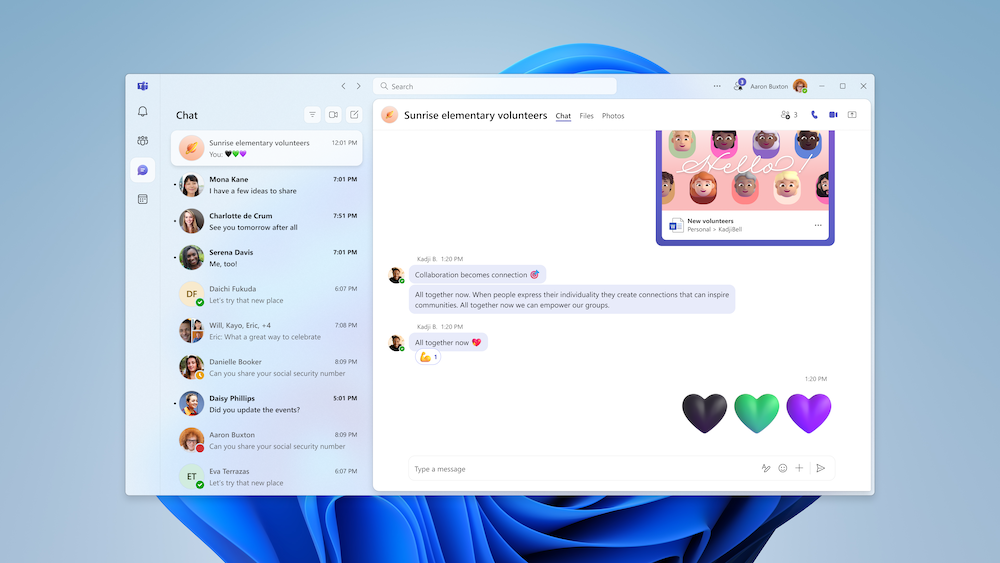
Microsoft has announced a series of updates to its free communication platform, Microsoft Teams for Personal (formerly known as Microsoft Teams (free)). These updates focus primarily on enhancing the visual experience for users on desktop and web platforms, along with introducing new features to improve community interaction.

A New Look for Teams for Personal

The most noticeable change is a redesigned interface for both desktop and web versions of the application. This refresh includes larger, more visually engaging avatars, a revised color palette, and updated design elements. The company aims to create a “simpler and more welcoming environment” by increasing the spacing between elements, leading to a cleaner and less cluttered look.

Enhanced Community Features

In addition to the visual refresh, Microsoft is introducing “Community Owner Badges” to the desktop version of Teams for Personal. This feature, previously available only on mobile, allows users to easily identify community owners and moderators within conversations. By clicking on the badge, users can access a full roster of community members, improving transparency and organization within groups.

Recap of Recent Updates

These updates follow a series of enhancements rolled out in August, which included the ability to pin important community conversations, a dedicated “Files” tab for easier access to shared documents, and enhanced meeting collaboration features. Windows users also gained the ability to customize notification sounds and link their LinkedIn profiles to their Teams for Personal accounts.

These ongoing updates demonstrate Microsoft’s commitment to improving the user experience of its free Teams platform. By focusing on visual appeal and community features, the company aims to make Teams for Personal a more engaging and user-friendly communication tool.

Share
What do you think?
Happy0
Sad0
Love0
Surprise0
Cry0
Angry0
Dead0

WHAT'S HOT ❰

Luna Ring Gen 2 introduces voice logging to the smart ring market
Samsung Galaxy S26 Series launches with smarter Galaxy AI, faster performance, and a privacy display on the Ultra
Fujifilm QuickSnap partners with Tayeb Santo to spotlight analog photography across the Middle East
TikTok reveals Discover List 2026 spotlighting emerging global creators
Sandisk expands portable SSD lineup to address AI workflows and larger file demands
Absolute Geeks UAEAbsolute Geeks UAE
Follow US
AbsoluteGeeks.com was assembled by Absolute Geeks Media FZE LLC during a caffeine incident.
© 2014–2026. All rights reserved.
Proudly made in Dubai, UAE ❤️
Upgrade Your Brain Firmware
Receive updates, patches, and jokes you’ll pretend you understood.
No spam, just RAM for your brain.
Welcome Back!

Sign in to your account

Username or Email Address
Password

Lost your password?