
• the feed
    • Tech
    • Auto
    • Guides
    • Opinions
  • Reviews
    • READERS’ CHOICE
    • ALL REVIEWS
    • ━
    • SMARTPHONES
    • CARS
    • HEADPHONES
    • ACCESSORIES
    • LAPTOPS
    • TABLETS
    • WEARABLES
    • SPEAKERS
    • APPS
  • screen time
    • TV & MOVIE REVIEWS
    • SPOTLIGHT
  • GAMING
    • GAMING NEWS
    • GAME REVIEWS
  • quick bytes
Reading: Apple introduces “Distraction Control” feature for Safari in latest betas
Font ResizerAa
Font ResizerAa
  • Menu Item
  • Menu Item
  • the feed
    • TECH
    • AUTOMOTIVE
    • GUIDES
    • OPINIONS
  • REVIEWS
    • READERS’ CHOICE
    • ALL REVIEWS
    • ━
    • SMARTPHONES
    • CARS
    • HEADPHONES
    • ACCESSORIES
    • LAPTOPS
    • TABLETS
    • WEARABLES
    • SPEAKERS
    • APPS
  • screen time
    • TV & MOVIE REVIEWS
    • SPOTLIGHT
  • GAMING
    • GAMING NEWS
    • GAME REVIEWS
  • quick bytes
Follow US

Apple introduces “Distraction Control” feature for Safari in latest betas

GEEK DESK
GEEK DESK
Aug 6, 2024

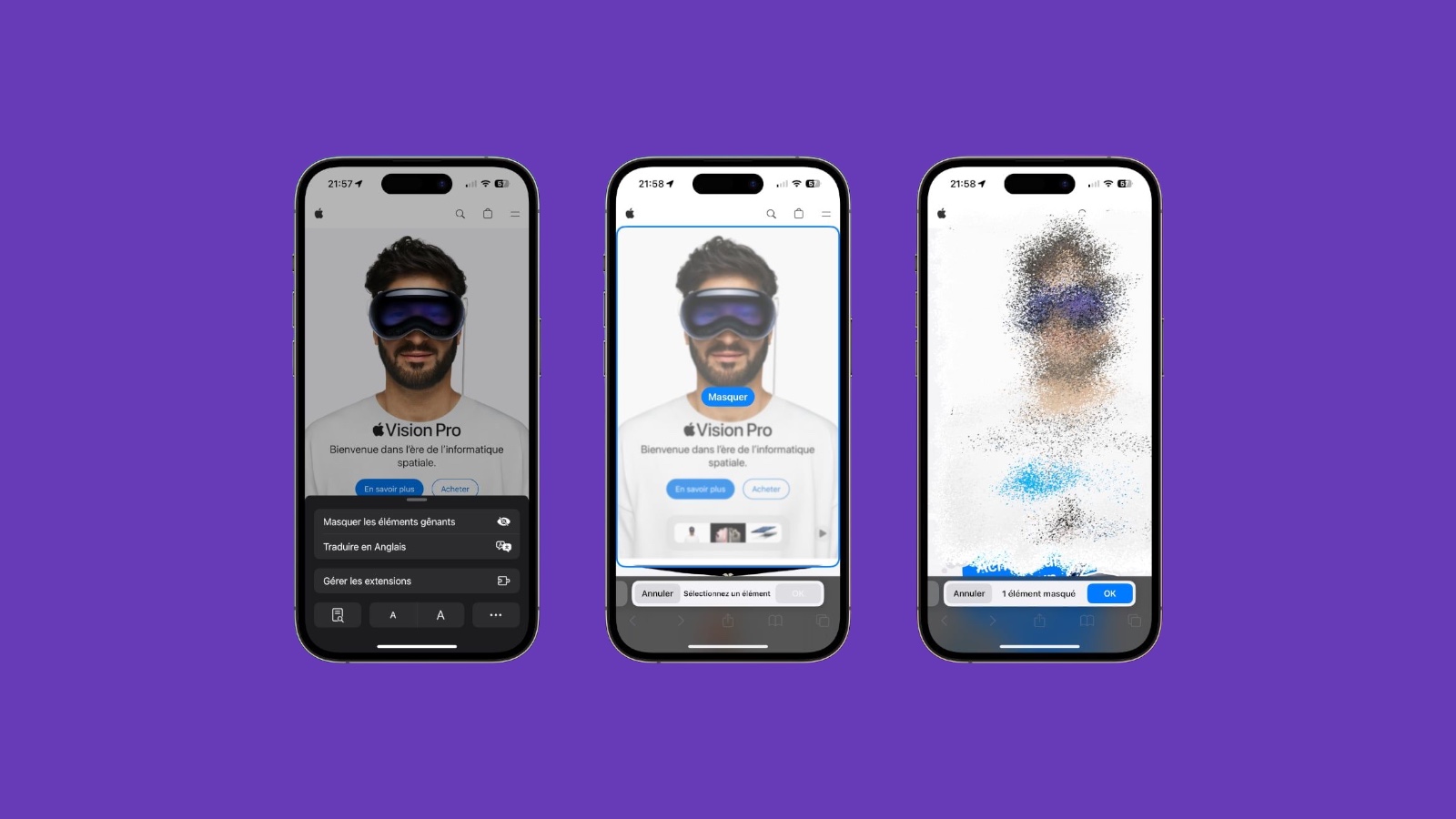
Apple has quietly released a new feature called “Distraction Control” in the latest developer betas for iOS 18, iPadOS 18,and macOS Sequoia. This feature aims to enhance browsing experience by eliminating distracting elements from webpages.

“Distraction Control” allows users to temporarily hide elements such as sign-in windows, cookie pop-ups, newsletter banners, autoplay videos, and more. While it’s not an ad blocker and can’t permanently remove ads, it’s useful for eliminating persistent pop-ups while browsing online stores or reading articles.

To use “Distraction Control,” go to the Page Menu in Safari and select “Hide Distracting Items.” Users can then choose the specific elements they want to hide, and these will remain hidden for that session.
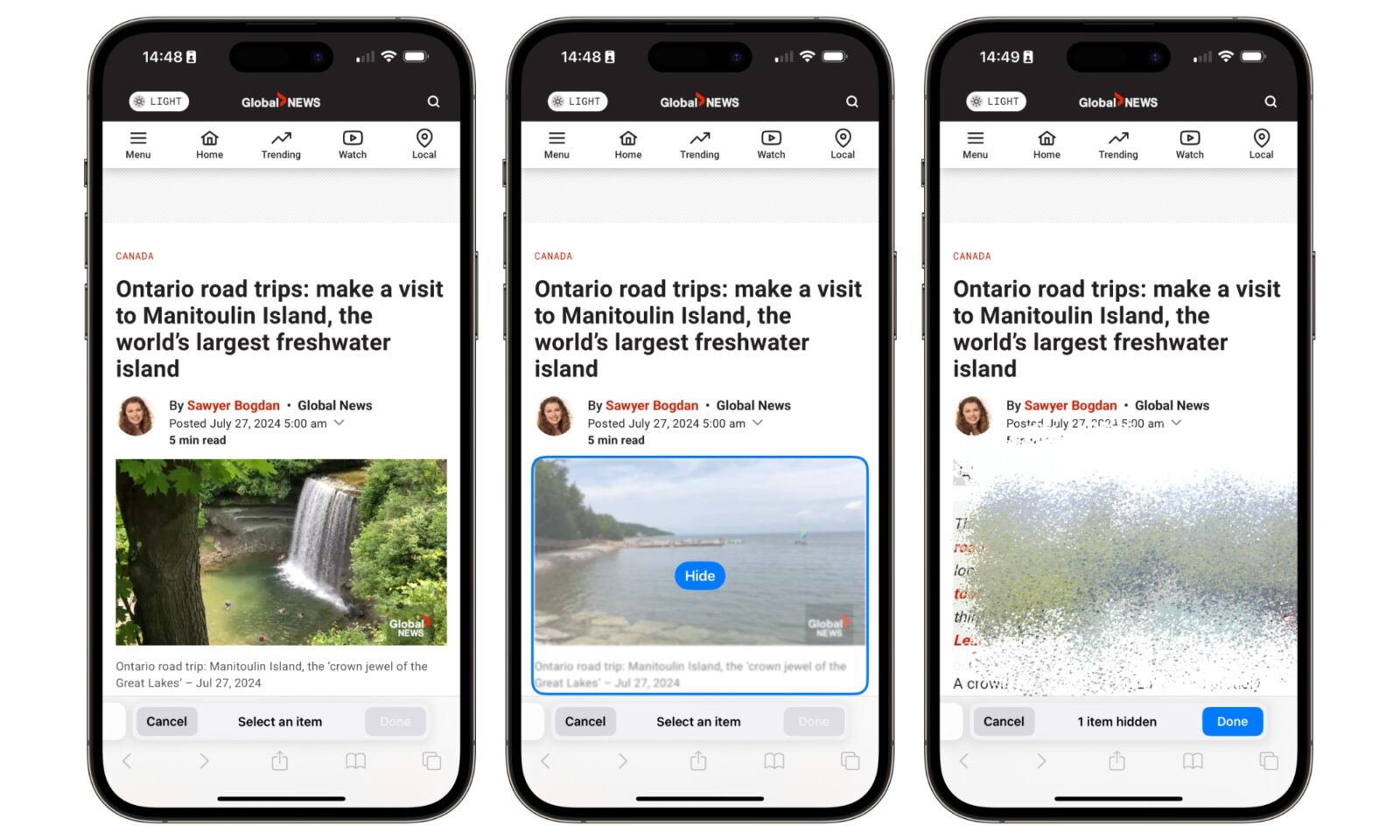
It’s important to note that this feature works on a per-device basis and doesn’t sync settings across devices. Also, hidden elements can be easily revealed by selecting “Show Hidden Items” in the Safari search field.

“Distraction Control” joins other recent additions to Safari, including the Highlights feature, the redesigned Reader interface, and the video viewer with distraction removal. This feature is currently available in the developer betas and is expected to be available for public beta testers soon.


What do you think?
Happy0
Sad0
Love1
Surprise0
Cry0
Angry0
Dead0
Meta and YouTube reverse course on banned Elon Musk documentary ads
Minecraft’s first new dimension in 14 years is finally coming
watchOS 27 features explained: what’s actually worth your attention
Xiaomi just turned its flagship phone into a guitar, seriously
Nothing Headphone 1 Pro leak reveals a bold bet beyond design
New Apple TV 4K leak hints Siri AI is coming to your living room
Follow US
Caffeine. Chaos. Content.
© Absolute Geeks Media FZE LLC 2014–2026.
Proudly made in Dubai, UAE ❤️
Contact · About · Editorial Policy · Privacy Policy
Welcome Back!

Sign in to your account

Username or Email Address
Password

Lost your password?