• Menu Item
  • STORIES
    • TECH
    • AUTOMOTIVE
    • GUIDES
    • OPINIONS
  • REVIEWS
    • READERS’ CHOICE
    • ALL REVIEWS
    • ━
    • SMARTPHONES
    • CARS
    • HEADPHONES
    • ACCESSORIES
    • LAPTOPS
    • TABLETS
    • WEARABLES
    • SPEAKERS
    • APPS
  • FINAL CUT
    • TV & MOVIES REVIEWS
    • SPOTLIGHT
  • GAMING
    • GAMING NEWS
    • GAMING REVIEWS
  • n
  • m
  • Menu Item
  • STORIES
    • TECH
    • AUTOMOTIVE
    • GUIDES
    • OPINIONS
  • REVIEWS
    • READERS’ CHOICE
    • ALL REVIEWS
    • ━
    • SMARTPHONES
    • CARS
    • HEADPHONES
    • ACCESSORIES
    • LAPTOPS
    • TABLETS
    • WEARABLES
    • SPEAKERS
    • APPS
  • FINAL CUT
    • TV & MOVIES REVIEWS
    • SPOTLIGHT
  • GAMING
    • GAMING NEWS
    • GAMING REVIEWS
  • n
  • m
Follow US

Google Meet gets collaborative annotations: here’s what you need to know

GEEK DESK
GEEK DESK
Apr 22

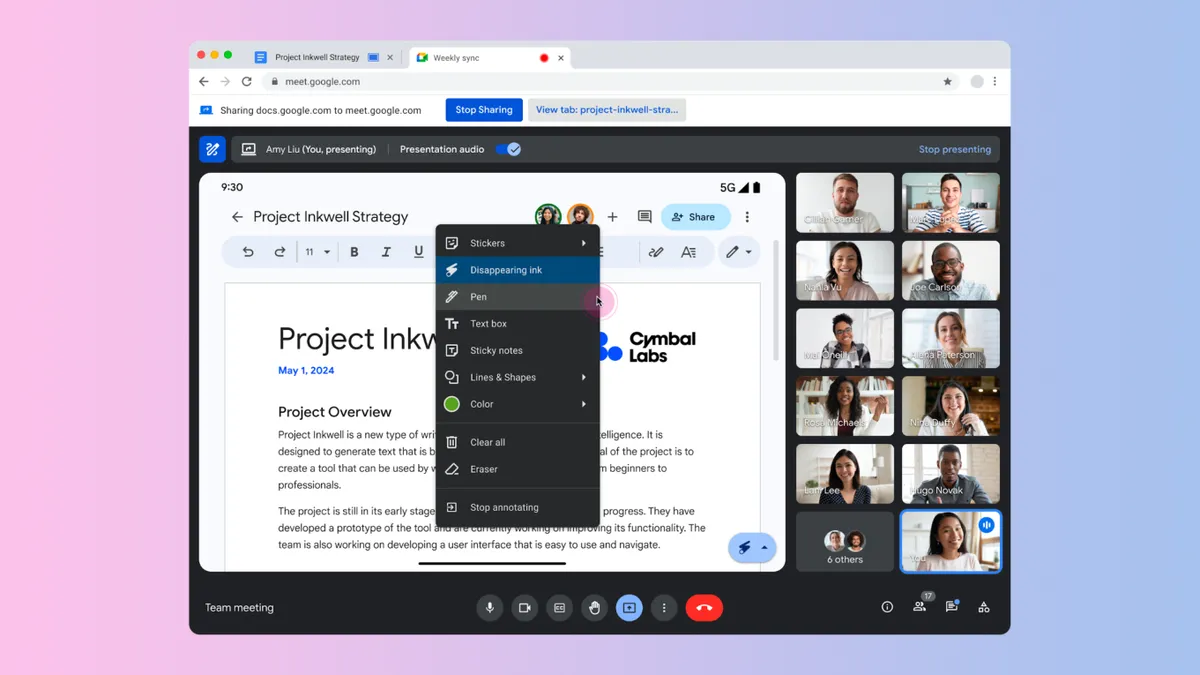
Get ready to make your Google Meet presentations more engaging! Google is rolling out annotation support, allowing you and other participants to highlight, draw, and add comments directly on presented content. It’s perfect for brainstorming sessions, live demonstrations, or collaborative note-taking.

How It Works

  • Find the Tools: Look for the new annotation menu in the bottom right corner of your shared content, or use the annotation button in the Google Meet toolbar.
  • Annotate Away: Choose from pens, highlighters, text boxes, sticky notes, shapes, and more!
  • Collaborate: Designate other participants as co-annotators to boost participation.
  • Easy Cleanup: Use the “Clear all” or eraser tools to start fresh.

Key Points & Limitations

  • Workspace Tiers: Annotations are available for specific Google Workspace tiers (listed below).
  • iOS & Android: Currently, iOS users can only co-annotate. Android users can present and annotate, but co-annotating is coming soon.
  • Rollout Schedule: The feature is rolling out gradually, so check your Google Meet settings in the coming weeks.

Eligible Google Workspace Tiers:

  • Business Starter, Standard, and Plus
  • Enterprise Starter, Standard, and Plus

Annotations in Google Meet can transform your presentations, making them more interactive, collaborative, and visually engaging.

Share
What do you think?
Happy0
Sad0
Love0
Surprise0
Cry0
Angry0
Dead0

WHAT'S HOT ❰

HellSlave II launches on Steam with expanded dark fantasy RPG adventure
AULUMU launches ultra-slim aramid fiber case for Galaxy Z Fold8 series
WhatsApp account review issue temporarily locks users out without warning
Google Health explores visual summaries for medical test results
52 billion stolen cookies reveal a growing shift in cybercriminal tactics
Follow US
Caffeine. Chaos. Content.
© Absolute Geeks Media FZE LLC 2014–2026.
Proudly made in Dubai, UAE ❤️
Contact · About · Editorial Policy · Privacy Policy
Welcome Back!

Sign in to your account

Username or Email Address
Password

Lost your password?