
WWDC live event is done and here’s everything Apple announced during the yearly keynote.
15-inch MacBook Air
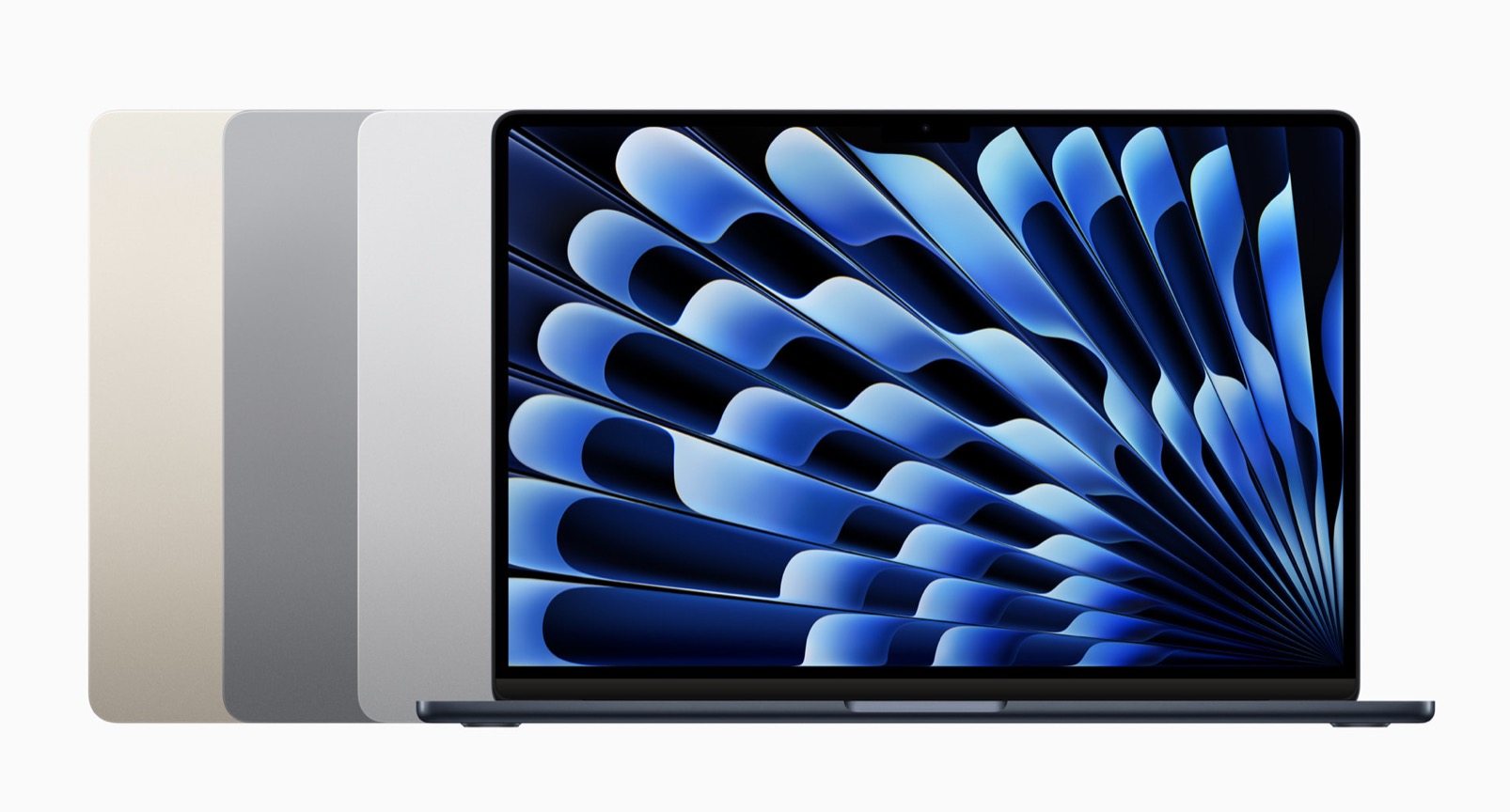
To start, Apple introduced the 15-inch MacBook Air, the world’s best 15-inch laptop. With an expansive 15.3-inch Liquid Retina display, the incredible performance of M2, up to 18 hours of battery life, and a silent, fanless design, the new MacBook Air brings power and portability — all in the world’s thinnest 15-inch laptop. With an all-new six-speaker sound system, the 15-inch MacBook Air delivers immersive Spatial Audio, along with a 1080p FaceTime HD camera, MagSafe charging, and the power and ease of macOS Ventura for an unrivaled experience.

Brilliant 15.3-inch Liquid Retina Display
The new MacBook Air features a spacious, high-resolution 15.3-inch Liquid Retina display, so users can see even more content. With up to 500 nits of brightness and support for 1 billion colors, the brilliant Liquid Retina display makes content look remarkably rich and vibrant, and text razor sharp. It is also twice the resolution and 25 percent brighter than a comparable PC laptop.
World’s Thinnest 15-inch Laptop
The new MacBook Air measures only 11.5mm thin, making it the world’s thinnest 15-inch laptop. It weighs just 3.3 pounds, so it’s incredibly portable. Even with its expansive display, the new MacBook Air is solid and durable. And it is also nearly 40 percent thinner and half a pound lighter than a comparable PC laptop.
MacBook Air also features MagSafe charging, two Thunderbolt ports for connecting accessories and up to a 6K external display, along with a 3.5mm headphone jack for versatile connectivity. It comes in four gorgeous finishes — midnight, starlight, space gray, and silver.
Blazing Performance and Tremendous Battery Life with M2
With the M2 chip, the 15-inch MacBook Air has incredible performance. It’s up to 12x faster than the fastest Intel-based MacBook Air. When compared to the best-selling 15-inch PC laptop with a Core i7 processor, the new MacBook Air is up to twice as fast. It also delivers extraordinary battery life, with up to 18 hours — 50 percent more than on the PC — even with a better display and better performance. The 15-inch MacBook Air features a powerful 8-core CPU with four performance cores and four efficiency cores, a 10-core GPU for blazing-fast graphics, and a 16-core Neural Engine. M2 also delivers 100GB/s of memory bandwidth and supports up to 24GB of fast unified memory, so multitasking and working with complex workloads is superfluid. The performance of M2 lets users work, play, or create just about anything — anywhere.
1080p FaceTime HD Camera and Six-Speaker Sound System
The 1080p FaceTime HD camera on MacBook Air is perfect for FaceTime calls and video conferencing. Combined with the processing power of the advanced image signal processor on M2, users will look great on video calls. A three-mic array captures clean audio using advanced beamforming algorithms, so users come through loud and clear on video calls.
The design of the new 15-inch MacBook Air also features a phenomenal new six-speaker sound system with two tweeters and two sets of force-cancelling woofers. The new speakers deliver twice the bass depth for fuller sound, and Spatial Audio with support for Dolby Atmos provides immersive experiences whether listening to music or watching movies.
Pricing and Availability
- The 15-inch MacBook Air with M2 is available to order today on apple.com/ae/store and in the Apple Store app. It will begin arriving to customers, and in Apple Store locations and Apple Authorized Resellers, beginning Tuesday, June 13.
- The 15-inch MacBook Air with M2, available in midnight, starlight, silver, and space gray, starts at AED 5,499 and AED 5,099 for education.
- The 13-inch MacBook Air with M2, available in midnight, starlight, silver, and space gray, now starts at AED 4,599 and AED 4,199 for education.
- The 13-inch MacBook Air with M1, available in gold, silver, and space gray, remains in the lineup, starting at AED 4,199and AED 3,946 for education.
M2 Ultra
M2 Ultra, a new system on a chip (SoC) that delivers huge performance increases to the Mac and completes the M2 family. M2 Ultra is the largest and most capable chip Apple has ever created, and it makes the new Mac Studio and Mac Pro the most powerful Mac desktops ever made. M2 Ultra is built using a second-generation 5-nanometer process and uses Apple’s groundbreaking UltraFusion technology to connect the die of two M2 Max chips, doubling the performance. M2 Ultra consists of 134 billion transistors — 20 billion more than M1 Ultra. Its unified memory architecture supports up to a breakthrough 192GB of memory capacity, which is 50 percent more than M1 Ultra, and features 800GB/s of memory bandwidth — twice that of M2 Max. M2 Ultra features a more powerful CPU that’s 20 percent faster than M1 Ultra, a larger GPU that’s up to 30 percent faster, and a Neural Engine that’s up to 40 percent faster. It also features a media engine with twice the capabilities of M2 Max for blazing ProRes acceleration. With all these advancements, M2 Ultra takes Mac performance to a whole new level yet again.

Industry-Leading UltraFusion Technology
M2 Ultra is built from two M2 Max dies connected through UltraFusion, Apple’s industry-leading, custom-built packaging technology. UltraFusion uses a silicon interposer that connects the dies with more than 10,000 signals, providing over 2.5TB/s of low-latency interprocessor bandwidth.
UltraFusion’s architecture enables M2 Ultra to appear as a single chip to software. This means code doesn’t need to be rewritten to utilize the extreme performance of M2 Ultra and makes UltraFusion unlike anything else in the industry.
Unparalleled Performance and Power Efficiency
The 24-core CPU of M2 Ultra consists of 16 next-generation high-performance cores and eight next-generation high-efficiency cores, delivering up to 20 percent faster performance than M1 Ultra. With Mac Studio powered by M2 Ultra, colorists using DaVinci Resolve will experience up to 50 percent faster video processing compared to Mac Studio with M1 Ultra.2
The GPU can be configured with 60 or 76 next-generation cores. This is up to 12 more cores and up to a 30 percent improvement compared to the incredibly powerful GPU of M1 Ultra. Rendering 3D effects using Octane on Mac Studio with M2 Ultra is up to 3x faster than Mac Studio with M1 Ultra.
Game-Changing Unified Memory Architecture
Apple’s unified memory architecture, a hallmark of Apple silicon, delivers incredible bandwidth, low latency, and unmatched power efficiency. M2 Ultra features 800GB/s of system memory bandwidth, far greater than anything found in a PC. And it can be configured with a massive 192GB of unified memory, which enables workflows not possible on a PC. For example, M2 Ultra can train massive machine learning workloads in a single system that the most powerful discrete GPU can’t even process.

Advanced Custom Technologies Supercharge Machine Learning, Video, and More
M2 Ultra integrates Apple’s latest custom technologies right on the chip, maximizing performance and efficiency:
- M2 Ultra features a 32-core Neural Engine, delivering 31.6 trillion operations per second, which is 40 percent faster performance than M1 Ultra.
- The powerful media engine has twice the capabilities of M2 Max, further accelerating video processing. It has dedicated, hardware-enabled H.264, HEVC, and ProRes encode and decode, allowing M2 Ultra to play back up to 22 streams of 8K ProRes 422 video — far more than any PC chip can do.
- The display engine supports up to six Pro Display XDRs, driving more than 100 million pixels.
- The latest Secure Enclave, along with hardware-verified secure boot and runtime anti-exploitation technologies, provides best-in-class security.
Mac Studio and Mac Pro
The new Mac Studio and Mac Pro, the two most powerful Macs ever made. Mac Studio features M2 Max and the new M2 Ultra, delivering a huge boost in performance and enhanced connectivity in its stunningly compact design. Mac Studio is up to 6x faster than the most powerful Intel-based 27-inch iMac, and up to 3x faster than the previous-generation Mac Studio with M1 Ultra. Mac Pro, now featuring M2 Ultra, combines the unprecedented performance of Apple’s most powerful chip with the versatility of PCIe expansion. Mac Pro is up to 3x faster than the previous-generation Intel-based model. Featuring up to 192GB of unified memory, Mac Studio with M2 Ultra and Mac Pro have far more memory than the most advanced workstation graphics cards, taking on demanding workloads other systems can’t even process. The new Mac Pro completes the Mac transition to Apple silicon and, together with the rest of Apple’s pro systems, gives users the most powerful and capable lineup of pro products Apple has ever offered.

Mac Studio: A Performance Powerhouse
Mac Studio empowers pros to build the studio of their dreams with its groundbreaking performance and extensive connectivity in a compact form that lives right on their desks. With M2 Max and M2 Ultra, the new Mac Studio provides a big boost in performance versus the previous generation and a massive leap for users coming from older Macs. Mac Studio with M2 Max is up to 50 percent faster than the previous-generation Mac Studio and 4x faster than the most powerful Intel-based 27-inch iMac. It features a 12-core CPU, up to a 38-core GPU, and up to 96GB of unified memory with 400GB/s of memory bandwidth.
When compared to Mac Studio with M1 Max, Mac Studio with M2 Max:
- Empowers motion graphics designers using After Effects to render up to 50 percent faster.
- Enables developers to build new versions of apps with Xcode at blazing speed, with up to 25 percent faster performance.
Mac Studio with M2 Ultra takes Mac performance to new heights. M2 Ultra delivers twice the performance and capabilities of M2 Max, and is Apple’s largest and most capable system on a chip (SoC) ever. Mac Studio with M2 Ultra is up to 3x faster than the previous-generation Mac Studio with M1 Ultra, and up to 6x faster than the most powerful Intel-based 27-inch iMac. It features a 24-core CPU, up to a 76-core GPU, and up to 192GB of memory with 800GB/s of unified memory bandwidth for workstation-class performance.
When compared to Mac Studio with M1 Ultra, Mac Studio with M2 Ultra:
- Empowers 3D artists using Octane to render up to 3x faster.
- Enables colorists using DaVinci Resolve to see up to 50 percent faster video processing than before.
Mac Studio: Enhanced Connectivity
Featuring a wide array of connectivity within easy reach for pros, the new Mac Studio now has higher-bandwidth HDMI, enabling up to 8K resolution and 240Hz frame rates. With M2 Ultra, Mac Studio supports up to six Pro Display XDRs — driving over 100 million pixels — allowing for a vast amount of screen real estate for pro workflows. Additionally, it now features advanced built-in wireless technologies. Wi-Fi 6E delivers download speeds that are up to twice as fast as the previous generation, while Bluetooth 5.3 allows users to connect to the latest Bluetooth accessories. On the back, Mac Studio includes four Thunderbolt 4 ports, a 10Gb Ethernet port, an enhanced HDMI port, and two USB-A ports. It also conveniently has two USB-C ports and an SD card slot on the front to easily import photos and video.
Apple Silicon Comes to Mac Pro
Mac Pro delivers the groundbreaking performance of M2 Ultra, plus the versatility of PCIe expansion, taking the most demanding workflows to the next level. While the Intel-based Mac Pro started with an 8-core CPU and could be configured up from there, every Mac Pro has Apple’s most powerful 24-core CPU, an up to 76-core GPU, and starts with twice the memory and SSD storage. The new Mac Pro can also be configured with up to a massive 192GB of memory with 800GB/s of unified memory bandwidth. This is far more memory than the most advanced workstation graphics cards. Now every Mac Pro has the performance of not just one but seven Afterburner cards built in. It also features the same industry-leading media engine as Mac Studio with M2 Ultra. Both can play an unprecedented 22 streams of 8K ProRes video.

When compared to the Intel-based Mac Pro,Mac Pro with M2 Ultra:
- Empowers demanding real-world pro workflows like video transcoding and 3D simulations to run up to 3x faster.
- Enables video engineers to ingest 24 4K camera feeds and encode them to ProRes in real time, all on a single machine, when using six video I/O cards.5
Mac Pro: The Versatility of PCIe Expansion
The new Mac Pro brings PCIe expansion to Apple silicon for pros who want the performance of M2 Ultra and rely on internal expansion for their workflows. Mac Pro features seven PCle expansion slots, with six open expansion slots that support gen 4, which is 2x faster than before, so users can customize Mac Pro with essential cards. From audio pros who need digital signal processing (DSP) cards, to video pros who need serial digital interface (SDI) I/O cards for connecting to professional cameras and monitors, to users who need additional networking and storage, Mac Pro lets professionals customize and expand their systems, pushing the limits of their most demanding workflows.
Mac Pro: Advanced Connectivity
The wide array of connectivity in Mac Pro gets even better with eight built-in Thunderbolt 4 ports — six on the back and two on the top — which is twice as many as before. It supports up to six Pro Display XDRs, along with Wi-Fi 6E and Bluetooth 5.3, which come to the new Mac Pro for fast wireless connectivity. Additionally, Mac Pro includes three USB-A ports, two higher-bandwidth HDMI ports that support up to 8K resolution and up to 240Hz frame rates, two 10Gb Ethernet ports, and a headphone jack that enables the use of high-impedance headphones.Today, Apple is carbon neutral for global corporate operations and is focused on its Apple 2030 goal to make every product carbon neutral. This means every Mac Apple creates, from design to manufacturing to customer use, will have net-zero climate impact.
Pricing and Availability
- The new Mac Studio and Mac Pro are available to order today on apple.com/store and in the Apple Store app. They will start to arrive to customers, and will be available in Apple Store locations and Apple Authorized Resellers, beginning Tuesday, June 13.
- Mac Studio starts at AED 8,599 and AED 7,699 for education. Additional configure-to-order options are available at apple.com/ae/store.
- Available in both tower and rack-mounted enclosures, Mac Pro (Tower Enclosure) starts at AED 28,999 and AED 27,299 for education. Mac Pro (Rack Enclosure) starts at AED 31,099 and AED 28,999 for education. Additional technical specifications and configure-to-order options are available at apple.com/ae/mac-pro.
iOS 17
iOS 17, got a major release that upgrades the communications experience across Phone, FaceTime, and Messages; makes sharing even easier with AirDrop; and provides more intelligent input that improves the speed and accuracy of typing. iOS 17 also introduces new experiences with Journal, an app that makes it easy for people to practice gratitude, and StandBy, a new way to view glanceable information when iPhone is set down and charging.
Major Upgrades to the Phone Experience
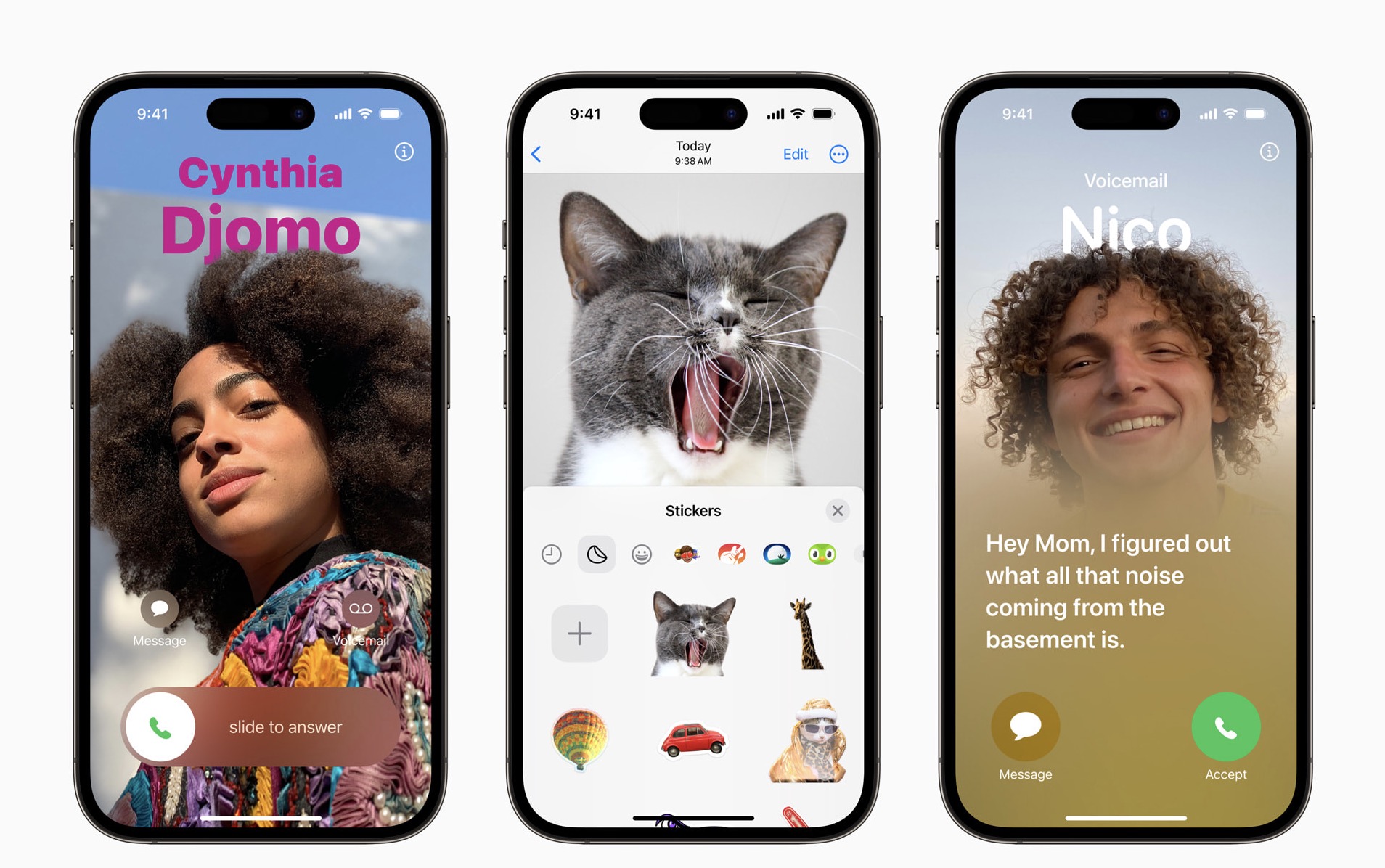
The Phone app is central to the iPhone experience, and it receives a big update with personalized Contact Posters, providing a new way for users to express themselves. Users can customize how they appear, bringing a completely new look to incoming calls, and choose beautiful treatments for photos or Memoji, as well as eye-catching typography and font colors. Contact Posters will also be available for third-party calling apps.
Live Voicemail gives users the ability to see real-time transcription as someone leaves a voicemail, and the opportunity to pick up while the caller is leaving their message. Calls identified as spam by carriers won’t appear as Live Voicemail, and will instead be instantly declined. With the power of the Neural Engine, Live Voicemail transcription is handled on-device and remains entirely private.
FaceTime Adds Audio and Video Messages, Reactions, and Extends to Apple TV
FaceTime now supports audio and video messages so when users call someone who is not available, they can share a message that can be enjoyed later.
FaceTime calls also get more expressive with Reactions such as hearts, balloons, fireworks, laser beams, rain, and more. The new effects can be activated through simple gestures, and third-party video calling apps can take advantage of them as well.
In an exciting update to Apple TV 4K, FaceTime now extends to the biggest screen in the home. Powered by Continuity Camera, users can initiate a video call directly from Apple TV, or start the call on iPhone and then hand it off to Apple TV, to see friends and family on their television. With Center Stage, users will have perfect framing even as they move around the room.
A Fresh Look and Big Updates to Messages
Messages gets significant updates with iOS 17, including an all-new stickers experience with new emoji stickers and the ability to create Live Stickers by lifting subjects from photos. Users can also add effects to Live Stickers that bring them to life, and a new drawer in the keyboard puts all of a user’s stickers in one place for easier access across iOS.
New Messages features enhance the way users communicate. An expandable menu that can be accessed with a simple tap to display iMessage apps gives Messages a sleeker look. Search gets more powerful and precise with search filters, making it possible for users to start a search and add additional filters to narrow down the results and find exactly what they are seeking. A new catch-up arrow indicates where the user last left off in the conversation, and replying inline is as simple as swiping on a text bubble. If a user shares their location, it will update in real time right in the conversation. When sending an audio message, it’s transcribed automatically so users can read it in the moment or listen later.

Messages also introduces Check In, an important feature for when a user wants to notify a family member or friend that they have made it to their destination safely. After a user initiates a Check In, their friend or family member will automatically be notified as soon as the user arrives. If they are not making progress toward their destination, useful information will be temporarily shared with the selected contact, such as the device’s location, battery level, and cell service status. Any information shared is end-to-end encrypted.
Easier Sharing with AirDrop and NameDrop
AirDrop makes it easy to share a file with a colleague or send photos to a friend in seconds, and with iOS 17, AirDrop gets new ways to share. NameDrop allows users to easily share contact information by simply bringing their iPhones together, or by bringing an iPhone and Apple Watch together.1 With the same gesture, users can also share content or start SharePlay to listen to music, watch a movie, or play a game while in close proximity between iPhone devices.
Improvements to Autocorrect and Dictation Deliver More Intelligent Input
Autocorrect receives a comprehensive update with a transformer language model, a state-of-the-art on-device machine learning language model for word prediction — improving the experience and accuracy for users every time they type. It also receives a refreshed design to better support typing, and sentence-level autocorrections can fix more types of grammatical mistakes. Users will now receive predictive text recommendations inline as they type, so adding entire words or completing sentences is as easy as tapping the space bar, making text entry faster than ever. Dictation leverages a new speech recognition model to make it even more accurate.
StandBy Displays Glanceable Information While iPhone Is Charging
iOS 17 introduces StandBy, giving users a full-screen experience with glanceable information designed to be viewed from a distance when iPhone is on its side and charging. StandBy is perfect on a nightstand, kitchen counter, or desk, and can be personalized to display a range of beautiful clock styles, favorite photos, or widgets, including Smart Stacks, which surface the right widgets at the right time. With support for Live Activities, Siri, incoming calls, and larger notifications, StandBy makes iPhone even more useful when viewed at a distance. When charging with MagSafe, StandBy remembers a user’s preferred view. It is easy to bring up StandBy anytime by tapping the screen, and on iPhone 14 Pro with the Always-On display, it is always available.
A New Way to Appreciate Life’s Moments with Journal
Journal is a new app that helps iPhone users reflect and practice gratitude through journaling, which has been shown to improve wellbeing. Using on-device machine learning, personalized suggestions can be provided to help inspire a user’s journal entry. Suggestions are intelligently curated from recent activity, including photos, people, places, workouts, and more, making it easy to start a journal entry, and scheduled notifications can help build a journaling habit. With the ability to lock the app, the use of on-device processing, and end-to-end encryption, Journal is built to protect a user’s privacy and ensure no one — including Apple — can access a user’s entries. With the new Journaling Suggestions API, developers will be able to add journaling suggestions to their apps.2
Additional features in iOS 17 include:
- Safari adds greater protection for Private Browsing, both from trackers as a user browses, and from people who might have access to a user’s device. Advanced tracking and fingerprinting protections go even further to help prevent websites from tracking or identifying a user’s device. Private Browsing now locks when not in use, allowing a user to keep tabs open even when stepping away from the device.
- For easier and more secure password and passkeys sharing, users can share passwords with a group of trusted contacts. Everyone in the group can add and edit passwords to keep them up to date. Since sharing is through iCloud Keychain, it’s end-to-end encrypted.
- The Health app offers new mental health features. Users can log their daily moods and momentary emotions; see what might be contributing to their state of mind; and easily access depression and anxiety assessments often used in clinics, plus resources available in their region. Additionally, increasing the distance the device is viewed from can help children lower their risk of myopia and gives adult users the opportunity to reduce digital eyestrain. Screen Distance in Screen Time uses the TrueDepth camera to encourage users to move their device farther away after holding it closer than 12 inches from their face for an extended period of time.
- Maps adds offline maps, so users can download a specific area and access turn-by-turn navigation, see their estimated time of arrival, find places in Maps, and more while offline. Maps also makes it easier than ever to discover thousands of trails in parks across the United States, and supports electric vehicle drivers with real-time charging availability information.
- AirTag can be shared with up to five other people, allowing friends and family to keep track of an item in Find My. Everyone in a group will be able to see an item’s location, play a sound, and use Precision Finding to help pinpoint the location of a shared AirTag when nearby. This also works with all other Find My network accessories.
- Apple Music introduces Collaborative Playlists that make listening to music with friends easier than ever before, and SharePlay in the car allows all passengers to easily contribute to what’s playing.3 Listeners can control the music from their own devices, even if they don’t have an Apple Music subscription.
- Sharing content using AirPlay is even easier with on-device intelligence now learning a user’s preferences. AirPlay will also work with supported televisions in hotels, allowing users to easily enjoy their favorite content on the TV when traveling. Built with a foundation of privacy and security, this capability will be available before the end of the year in select hotels, starting with brands from IHG Hotels & Resorts.
- AirPods receive powerful new features, including Adaptive Audio, Personalized Volume, and Conversation Awareness, that redefine the personal audio experience. Plus, improvements to Automatic Switching and call controls make AirPods even easier to use.
- The Home app adds the ability for users to view up to 30 days of activity history across door locks, garage doors, alarm systems, and contact sensors. Additionally, two popular HomeKit lock features — tap to unlock and PIN codes — are now available for Matter-compatible locks, providing even more ways to connect the home.
- Reminders features a grocery list that automatically groups added items into categories to make shopping easier. Users can change how the items are grouped and the list remembers their preferences.
- Visual Look Up is now available in paused video frames. Now users can identify food, storefronts, signs, and symbols, and lift individual subjects from photos and videos.
- Siri can be activated by simply saying “Siri.” Once activated, users can issue multiple commands in succession without needing to reactivate the assistant.
- In Photos, the People album uses on-device machine learning to recognize more photos of a user’s favorite people, as well as cats and dogs.
- Privacy updates include the expansion of Communication Safety beyond Messages to help keep kids safe when sending and receiving content via AirDrop, Contact Posters, a FaceTime message, and when using the Photos picker to choose content to send. It also expands to cover video content in addition to still images. A new feature, Sensitive Content Warning, helps adult users avoid seeing unwanted nude images and videos. As with Communication Safety, all image and video processing for Sensitive Content Warning occurs on-device, so Apple does not get access to the content.
- Accessibility updates include Assistive Access, a customizable interface that helps users with cognitive disabilities use iPhone with greater ease and independence; Live Speech, which gives nonspeaking users the option to type and have their words spoken in person, or on phone and FaceTime calls; Personal Voice, which gives users at risk of speech loss the option to create a voice that sounds like theirs; and Point and Speak, which helps users who are blind or have low vision read text on physical objects by pointing.
iPadOS 17
iPadOS 17 is delivering entirely new ways for users to personalize the Lock Screen and interact with widgets. Working with PDFs is easier with AutoFill, which intelligently identifies and fills fields in forms, and Notes brings a new experience for marking up and collaborating on PDFs. Messages gets significant updates, including a new stickers experience, and users can now leave FaceTime video and audio messages. The Health app comes to iPad with interactive charts, and HealthKit enables developers to create innovative experiences designed for the iPad display. iPadOS 17 is available as a developer beta today, and will be available as a free software update this fall.
A Personalized and Beautiful Lock Screen Experience
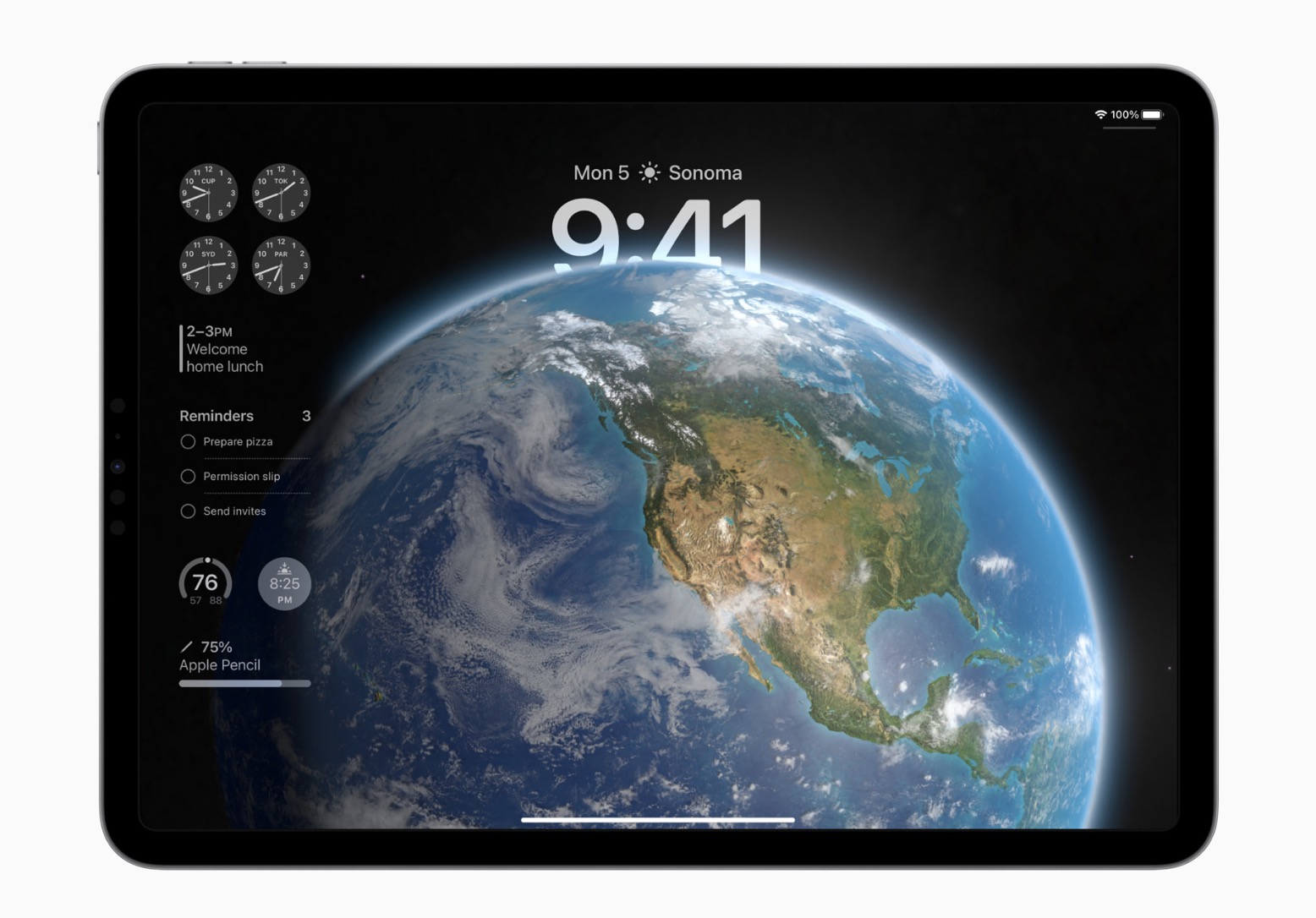
Taking full advantage of the iPad display, users can now customize the Lock Screen to make it more personal, useful, and beautiful. Rich new photo features allow users to set their favorite images on the Lock Screen and stylize them in new ways. Users can select a photo from their personal library, a dynamic set of photos that shuffle throughout the day, or a Live Photo for a smooth slow-motion effect whenever they wake iPad.
Users can choose a wallpaper from the Lock Screen gallery that will look stunning on the large canvas of iPad, pick from a set of expressive font styles and colors to customize the look of the date and time, or create unique designs with their favorite emoji and color combinations.
Live Activities comes to iPadOS, allowing users to stay on top of things that are happening in real time right from the Lock Screen, such as a sports game, travel plans, or a food delivery order.
More Powerful Widgets
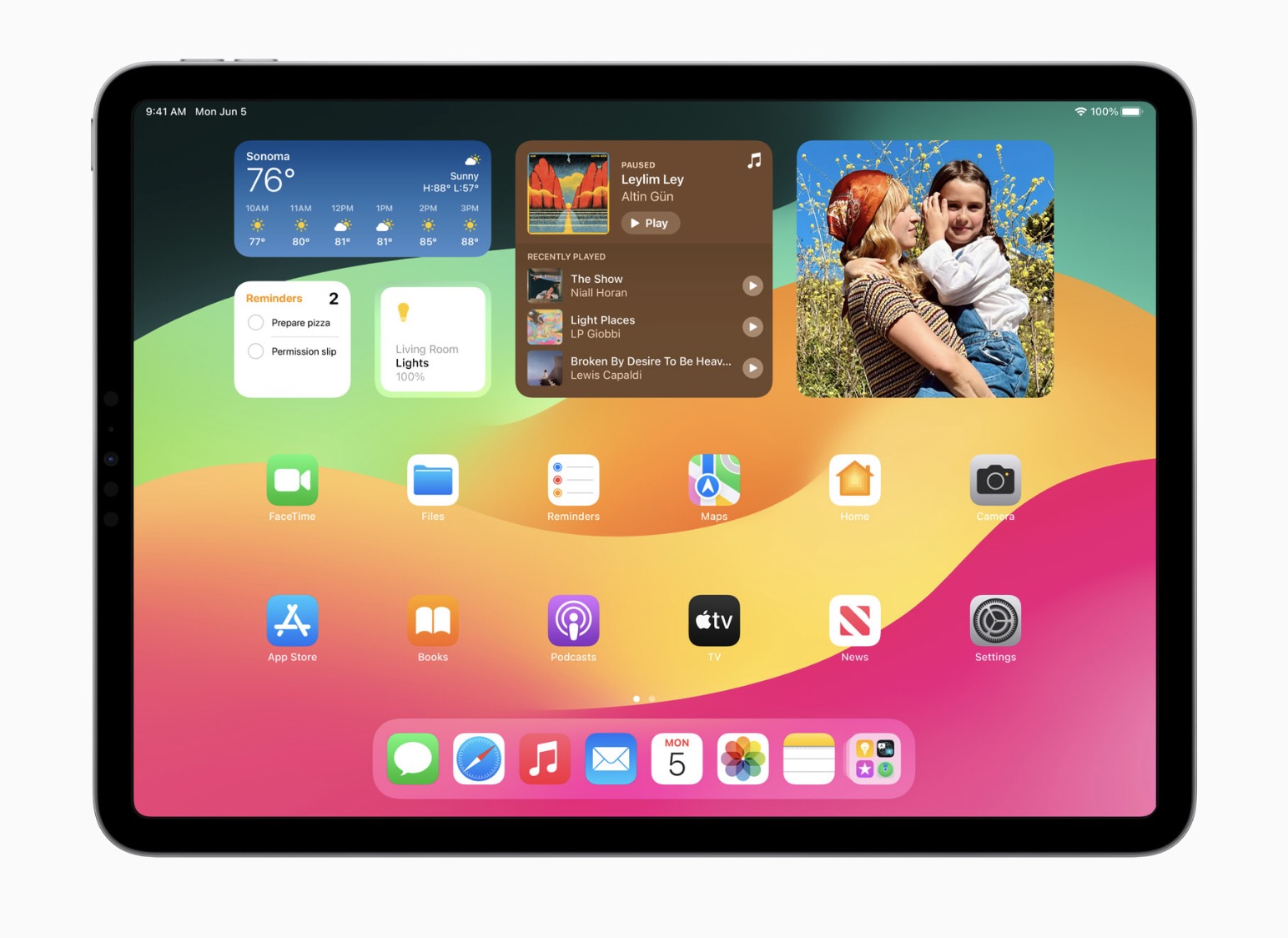
Widgets get interactive in iPadOS 17, allowing users to get tasks done with just a tap. For example, users can turn on the lights, play a song, or mark a reminder as complete in the moment, right from a widget. And with updates to WidgetKit, developers can build interactivity into their widgets.
Interactive widgets are now available on the Lock Screen and Home Screen, making it easy to take action and get helpful information at a glance. On the Lock Screen, widgets blend seamlessly with the wallpaper with adaptive tinting to optimize for legibility.
Working with PDFs Is Even Easier
Entering information in PDFs is now easier than ever. iPadOS 17 uses machine learning to identify fields in a PDF so that users can quickly add details, such as names, addresses, and emails from Contacts.
Notes Introduces a New PDF Experience
A big update to the Notes app gives users new ways to organize, read, annotate, and collaborate on PDFs. In iPadOS 17, PDFs appear full width, making it easy to flip through pages, make a quick annotation, or sketch directly in the document with Apple Pencil. Users can now review and mark up PDFs and scanned documents right in their note, and with live collaboration, updates appear in real time when users are sharing a note with others.
Messages Gets More Interactive with Enhanced Communication Tools
Messages offers new ways to connect, including a stickers experience with emoji stickers, and the ability for users to create Live Stickers from their own photos by lifting a subject from the background. Users can also add effects to Live Stickers that help bring conversations to life. Available from the keyboard, a new drawer gathers all of a user’s stickers in one place for easier access across iPadOS.
New Messages features include an expandable menu that appears with a simple tap for easy access to the user’s most frequently used iMessage apps. The search experience is improved with filters — including people, keywords, and content types — that allow more specificity in finding exactly what users are looking for. Users can now easily jump to their last-read message in an active group chat, and replying to a message inline is even simpler and quicker by swiping on a message bubble.
Audio messages are transcribed automatically so users can read them in the moment or listen later. When a user shares their location in Messages, it shows up live in the conversation until the sharing session is over.
More Expressive Ways to Communicate with FaceTime
In FaceTime, users can leave an audio or video message when someone doesn’t pick up the call.
FaceTime calls also get more expressive with Reactions, such as hearts, balloons, fireworks, laser beams, rain, and more. The new effects can be activated through simple gestures, and third-party video-calling apps can take advantage of them as well.
In an exciting update to Apple TV 4K, FaceTime now extends to the biggest screen in the home. Powered by Continuity Camera, users can initiate a video call directly from Apple TV, or start the call on iPad and then hand it off to Apple TV to see friends and family on their television. With Center Stage, users will have perfect framing even as they move around the room.
Safari Helps Users Be More Productive
Improvements to Safari allow users to be more productive than ever. With Profiles, users can keep their browsing separate between topics like work and personal. Each profile has their own history, cookies, Tab Groups, and Favorites, and it’s easy to switch between them.
Private Browsing now allows users to lock the window they’re viewing with Face ID or Touch ID, and removes trackers used for cross-site tracking. The search experience gets even better with increased responsiveness, more relevant search suggestions, and easier-to-read suggestions.
The Health App Comes to iPad
iPadOS 17 brings the Health app to iPad, giving users new ways to see their health data in rich detail. With an optimized design for the iPad display, Favorites has a new look, and users can receive insights into their health data with Trends, Highlights, and detailed interactive charts. Now, iPad users can also track and manage their medications, use Cycle Tracking, log their momentary emotions and daily moods, view their available health records from multiple institutions, and more — all in one central, secure, and private place.
Health and fitness developers can now use HealthKit on iPad, opening up new opportunities to create innovative experiences in their apps that incorporate data users choose to share, with rigorous privacy and data security protocols from the Health app.
Additional iPadOS 17 updates include:
- Stage Manager adds even more flexibility to the position and size of the windows, giving users more control over their workspace, and supports built-in cameras on an external display.
- Freeform offers new drawing tools; support for hover, tilt, and snap to shape; the ability to add connection lines and new shapes to any object; and Follow Along to guide collaborators around the board.
- Spotlight helps users find information and take action even faster by offering shortcuts to the next action, enhanced visual results, and video search.
- Visual Look Up expands its recognition capabilities to food, storefronts, and signs and symbols on things like the laundry tags on clothes.
- Keyboard brings improvements to autocorrect, allowing users to enter text faster and easier than ever before. Inline predictive text helps users quickly finish sentences, and the new speech recognition model in Dictation improves accuracy.
- Siri can now be activated by simply saying “Siri.” Once activated, users can issue multiple commands back to back without needing to reactivate it.
- Sharing content using AirPlay is even easier with on-device intelligence now learning a user’s preferences. AirPlay will also work with supported TVs in hotels, allowing users to easily enjoy their favorite content on the TV when traveling. Built with a foundation of privacy and security, this capability will be available before the end of the year in select hotels, starting with brands from IHG Hotels & Resorts.
- Reminders introduces a new intelligent grocery list experience, making shopping easier by automatically grouping related items into sections, and provides a new column view to display sections horizontally across the screen.
- Maps now allows users to download maps and use them while offline. Users can select an area, search and explore rich place information, and get routes for all modes of mobility, all while offline.
- Privacy updates include the expansion of Communication Safety, adding protections for children as well as a Sensitive Content Warning for adults. Updates to Photos and Calendar permissions help users make more informed choices about what data they share with apps. And a Lockdown Mode update enhances the protections for those who may be targeted by mercenary spyware.
- New accessibility tools make iPad even more accessible. Assistive Access is a customizable interface that helps users with cognitive disabilities use iPad with greater ease and independence. Live Speech helps nonspeaking users type what they want to say and have it read aloud during phone, FaceTime, and in-person conversations. Personal Voice gives users at risk of speech loss the option to create a personalized voice that sounds like them and integrates seamlessly with Live Speech. And in Magnifier, Point and Speak helps users who are blind or have low vision interact with electrical appliances and other physical objects with small text labels.
watchOS 10
watchOS 10 is bringing Apple Watch users a fresh approach to quickly view information with redesigned apps, a new Smart Stack to show relevant widgets right when they’re needed, and delightful new watch faces. New metrics, Workout Views, and Bluetooth connectivity for power meters, speed sensors, and cadence sensors arrive for cyclists, while new Compass Waypoints and Maps capabilities further help hikers. The Mindfulness app offers additional tools to support mental health. watchOS 10 is available as a developer beta today, and will be available as a free software update this fall.
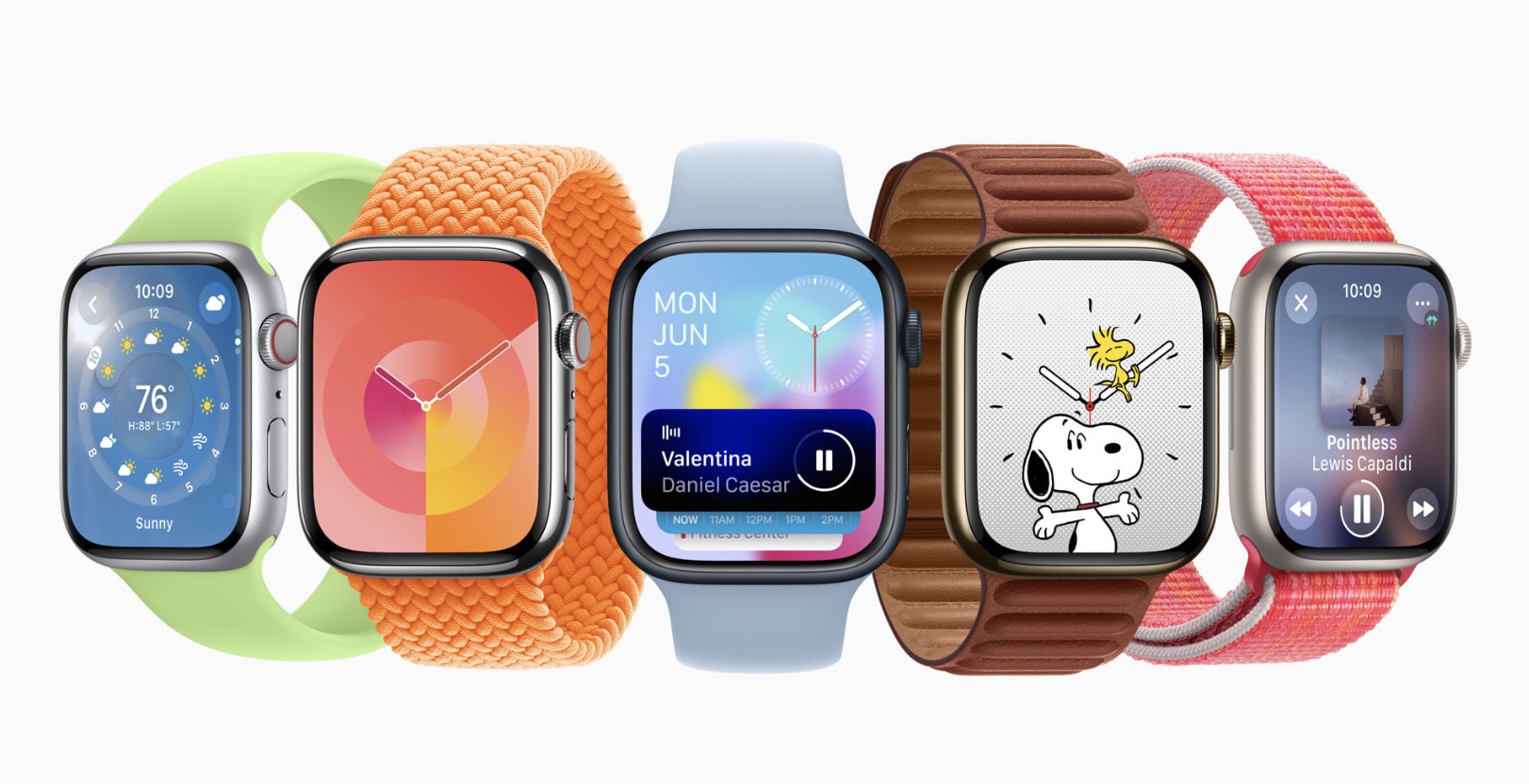
New Design Language and Navigation
With watchOS 10, redesigned apps provide more information at a glance, and there are new ways to navigate and quickly access content.
Apple Watch apps, including Weather, Stocks, Home, Maps, Messages, World Clock, and others, now utilize more of the Apple Watch display for more glanceable information. The Activity app on Apple Watch and the Fitness app on iPhone make tracking daily movement even easier with more details, improvements to sharing, a redesigned trophy case, and Apple Fitness+ trainer tips.
A new Smart Stack contains widgets that display timely information that adapts to the user’s context and can be revealed with a simple turn of the Digital Crown from any watch face. For example, at the beginning of the day, Weather will show the forecast, or, when traveling, the Smart Stack will show boarding passes from Wallet. Calendar and Reminders will reshuffle to the top to display upcoming meetings or tasks, and apps that are running, such as Podcasts, will also move up so they are readily available. Smart Stack also enables users to enjoy a beautiful watch face, like Portraits, while still offering a way to quickly access information they care about.
Developers can also use the new design language to update their apps. For example, Streaks now utilizes the entire display to easily show progress and access tasks, the NBA app makes keeping up with a favorite team even more compelling with team colors and new game details, and with Waterllama’s redesign, users can quickly glance at their hydration from the last seven days with just a turn of the Digital Crown.
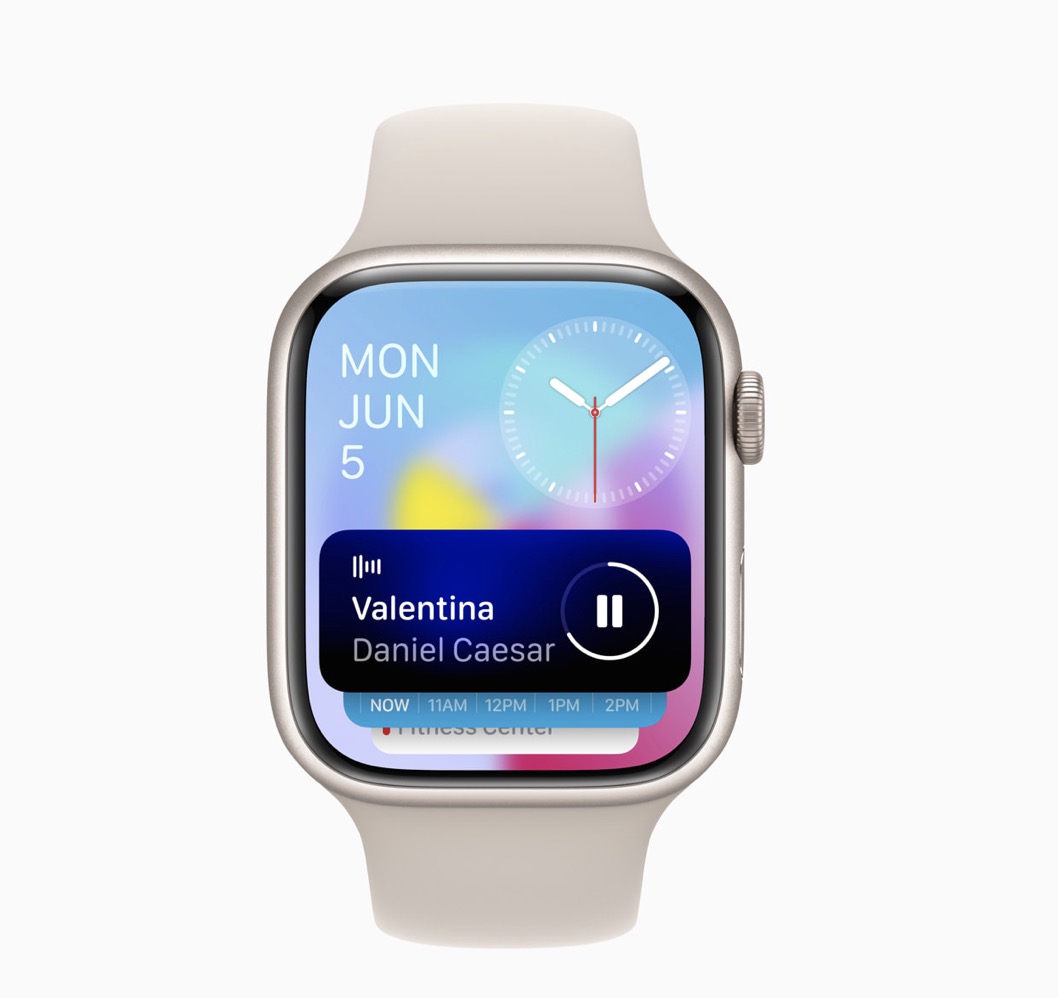
Control Center is now accessible using the side button, making it easy to quickly open it at any time, over any app. A double-click of the Digital Crown reverts back to any apps used recently.
New Watch Faces
watchOS 10 introduces two new artistic and joyful watch faces: Palette and Snoopy. The Palette face depicts time in a wide variety of colors using three distinct overlapping layers, and as the time changes, the colors on the display also shift.
Additionally, the beloved comic strip Peanuts comes to life on Apple Watch with a new watch face featuring Snoopy and Woodstock. The characters interact and play with the watch hands, react to the weather conditions in the area, or even get active when the user does a workout.
Cycling
Apple Watch is a great device for cyclists, with features including automatic Workout reminders, calorimetry for e-biking, and Fall Detection. watchOS 10 takes this popular activity even further with advanced new metrics, views, and experiences.
When a cycling workout is started from Apple Watch in watchOS 10, it will automatically show up as a Live Activity on iPhone and, when tapped, will utilize the full screen. Workout Views, such as Heart Rate Zones, Elevation, Race Route, Custom Workouts, and a new Cycling Speed view, have been optimized for the display size of iPhone, which can be mounted to a bike for convenient, easy viewing during a ride.
Apple Watch can now automatically connect to Bluetooth-enabled cycling accessories, such as power meters, speed sensors, and cadence sensors. This enables brand-new metrics, including cycling power (watts) and cadence (RPM), and additional Workout Views, including Power Zones. Bluetooth connection is supported for Indoor and Outdoor cycling workouts, as well as GymKit.
New algorithms combining sensor data from Apple Watch and connected power meters can estimate Functional Threshold Power (FTP), the highest level of cycling intensity that a rider could theoretically maintain for an hour. Using FTP, Apple Watch calculates personalized Power Zones, used to easily see the current zone and track how long is spent in each, which is an effective and popular way of improving performance.
Hiking
The Compass app on Apple Watch is a helpful tool for exploring the great outdoors. With watchOS 10, Compass automatically generates two new waypoints: A Last Cellular Connection Waypoint will estimate the last place with cellular reception, which may be useful for checking messages or making a call. In case of emergencies, a Last Emergency Call Waypoint will estimate where on the route their device had the last connection to any available carrier’s network so that an emergency call can be made.
When preparing routes, a new Elevation view uses altimeter data, offering a three-dimensional view of saved waypoints. And starting in the U.S., Apple Maps displays a new topographic map featuring contour lines, hill shading, elevation details, and points of interest. Users can also search for nearby trails and trailheads, with place cards that include detailed information, like trail length, type, and difficulty.
Mental Health
Mental health is as important as physical health, and research shows that reflecting on state of mind can help build emotional awareness and resilience. With the Mindfulness app in watchOS 10, users can discreetly and conveniently log their momentary emotions and daily moods. Users can turn the Digital Crown to scroll through engaging, multidimensional shapes to choose how they are feeling, select what is having the biggest impact on them, and describe their feelings.
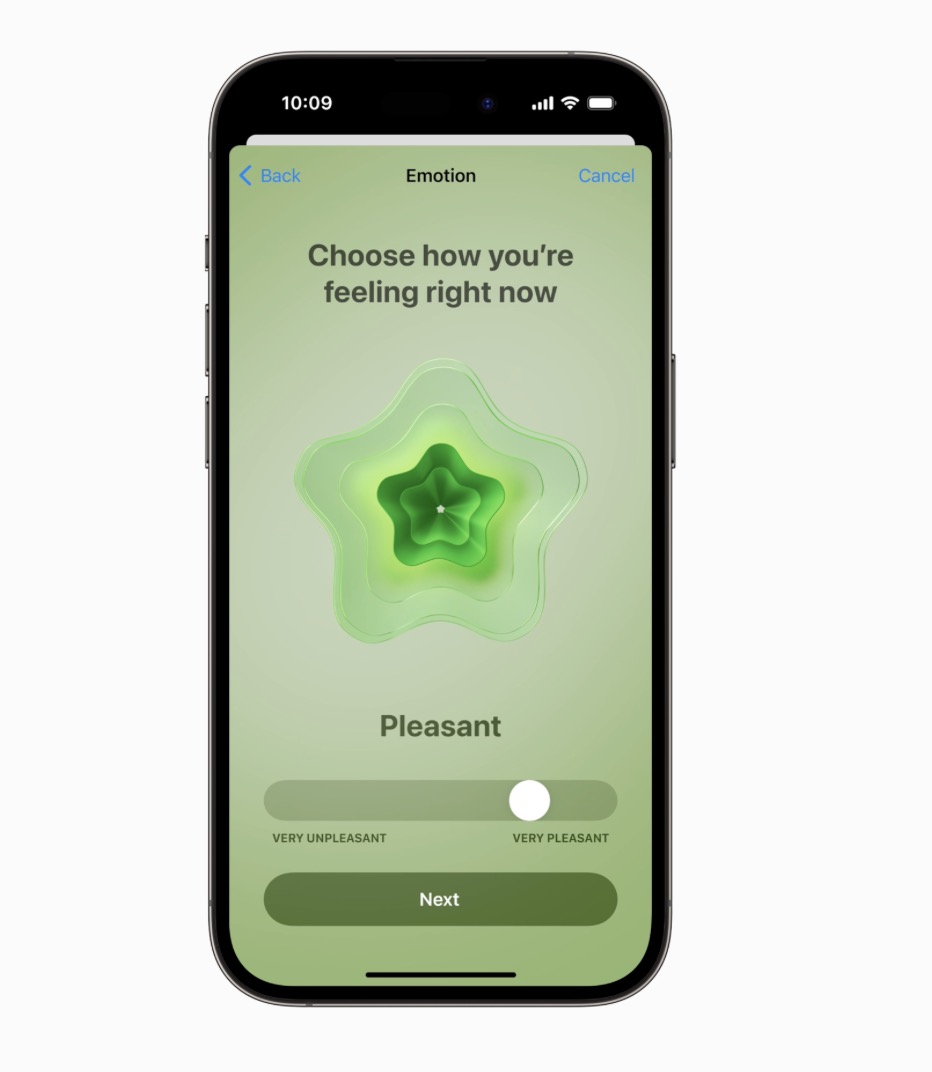
In the Health app in iOS 17 and iPadOS 17, users can see valuable insights to identify what might be contributing to their state of mind — whether it’s associations or lifestyle factors, like sleep or exercise. Additionally, depression and anxiety assessments often used in clinics are now easily accessible in the Health app and can help users determine their risk level, connect to resources available in their region, and create a PDF to share with their doctor.
Vision Health
Myopia, or nearsightedness, is the leading cause of vision impairment globally. To reduce the risk of myopia, the International Myopia Institute recommends children spend at least 80-120 minutes a day outdoors. With watchOS 10, Apple Watch introduces the ability to measure time spent in daylight using the ambient light sensor. Users can view this information in the Health app on iPhone or iPad.
Time spent in daylight can provide additional benefits to physical and mental health for all ages. And children who do not have their own iPhone can use Family Setup to pair their Apple Watch to their parent’s iPhone, giving parents visibility into the amount of time their kids are spending in daylight with Health Sharing.
Viewing something like a device or a book too closely has also been documented as a myopia risk factor. The new Screen Distance feature uses the same TrueDepth camera that powers Face ID in iPad and iPhone to encourage users to move their device farther away after holding it closer than 12 inches for an extended period of time.
When a device is locked with a passcode, Touch ID, or Face ID, all Health app data, including mental health and vision health data, is encrypted.
Additional watchOS 10 updates include:
- NameDrop allows users to easily share contact information by bringing Apple Watch close to someone else’s iPhone. Apple Watch users can also use NameDrop by tapping the Share button in My Card in the Contacts app, or by tapping the My Card watch face complication, and then bringing Apple Watch face to face with someone else’s Apple Watch.2
- Offline maps on iPhone provide access to turn-by-turn navigation, estimated time of arrival, places in Maps, and more while away from Wi-Fi or cellular services. These features can also be used on a paired Apple Watch that is in range of its companion iPhone.
- Users can now initiate playback of a FaceTime video message and view it directly on Apple Watch. Additionally, Group FaceTime audio is now supported on Apple Watch.
- The Medications app can send follow-up reminders if a medication hasn’t been logged 30 minutes after the scheduled time.
- Apple Fitness+ introduces Custom Plans, a new way to receive a custom workout or meditation schedule based on day, duration, workout type, and more; Stacks, which allows users to select multiple workouts and meditations to do seamlessly back to back; and Audio Focus, which gives users the ability to prioritize the volume of the music or the trainers’ voices.
APIs for Workout App Developers
watchOS 10 includes new APIs for workout app developers that will allow them to create compelling new experiences. The powerful motion sensors on both Apple Watch Series 8 and Apple Watch Ultra can detect rapid changes in velocity and acceleration, such as when swinging a golf club or a tennis racket. Now, developers will have access to this high-frequency motion data, so apps like SwingVision can analyze serve pronation, which is the twisting motion of the forearm, wrist, and hand, and Golfshot can detect small wrist movements to refine a golf swing.
Popular coaching platforms such as TrainingPeaks can use a new API to create a Custom Workout that can be imported directly into the Workout app. App developers using HealthKit for workouts will be able to provide validated calories for golf workouts, as the variation between using a golf cart or walking on the green is now identified. Developers can also access speed, cadence, and power metrics for cycling, plus mirror workouts from Apple Watch to iPhone.
macOS Sonoma
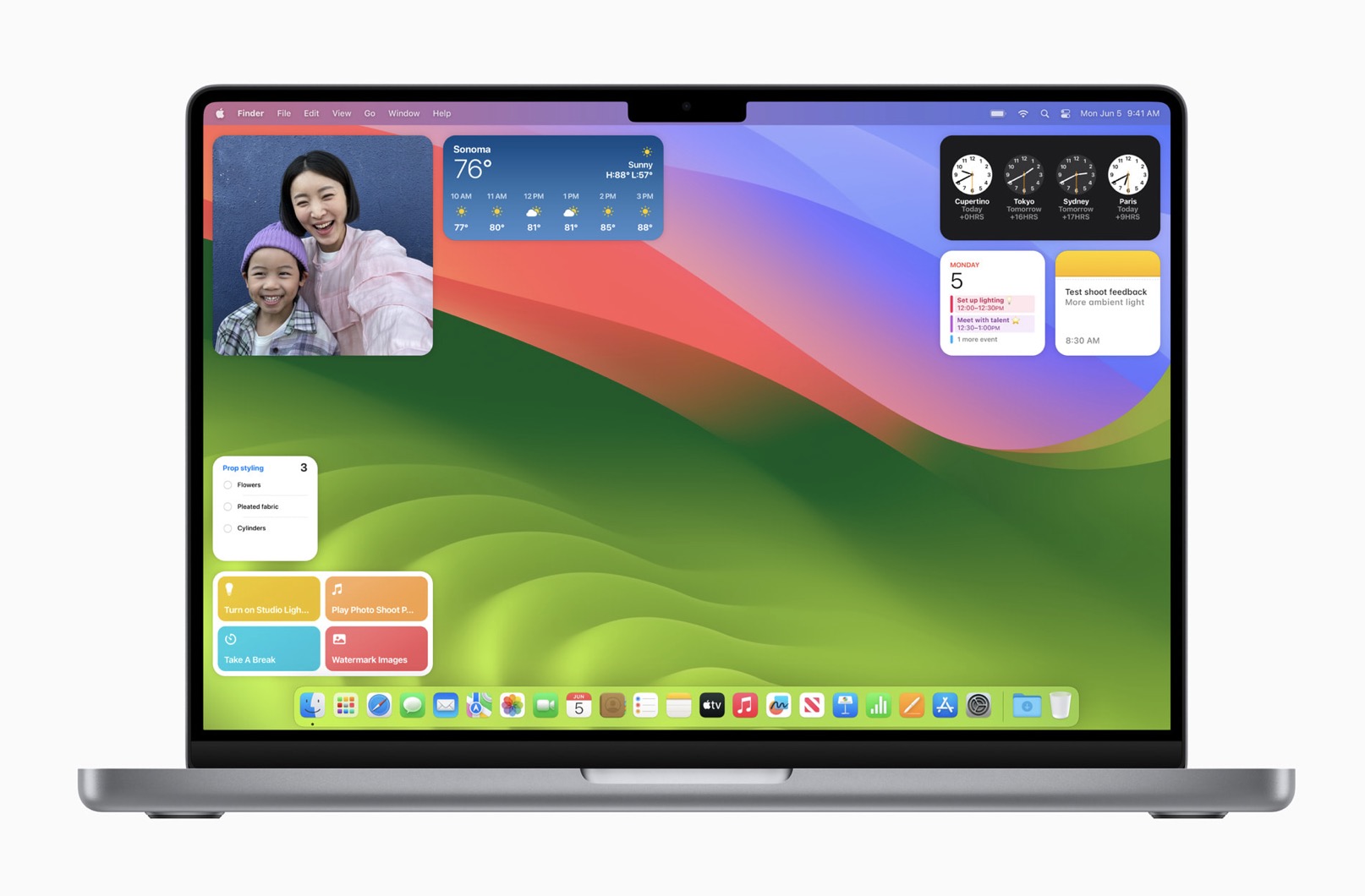
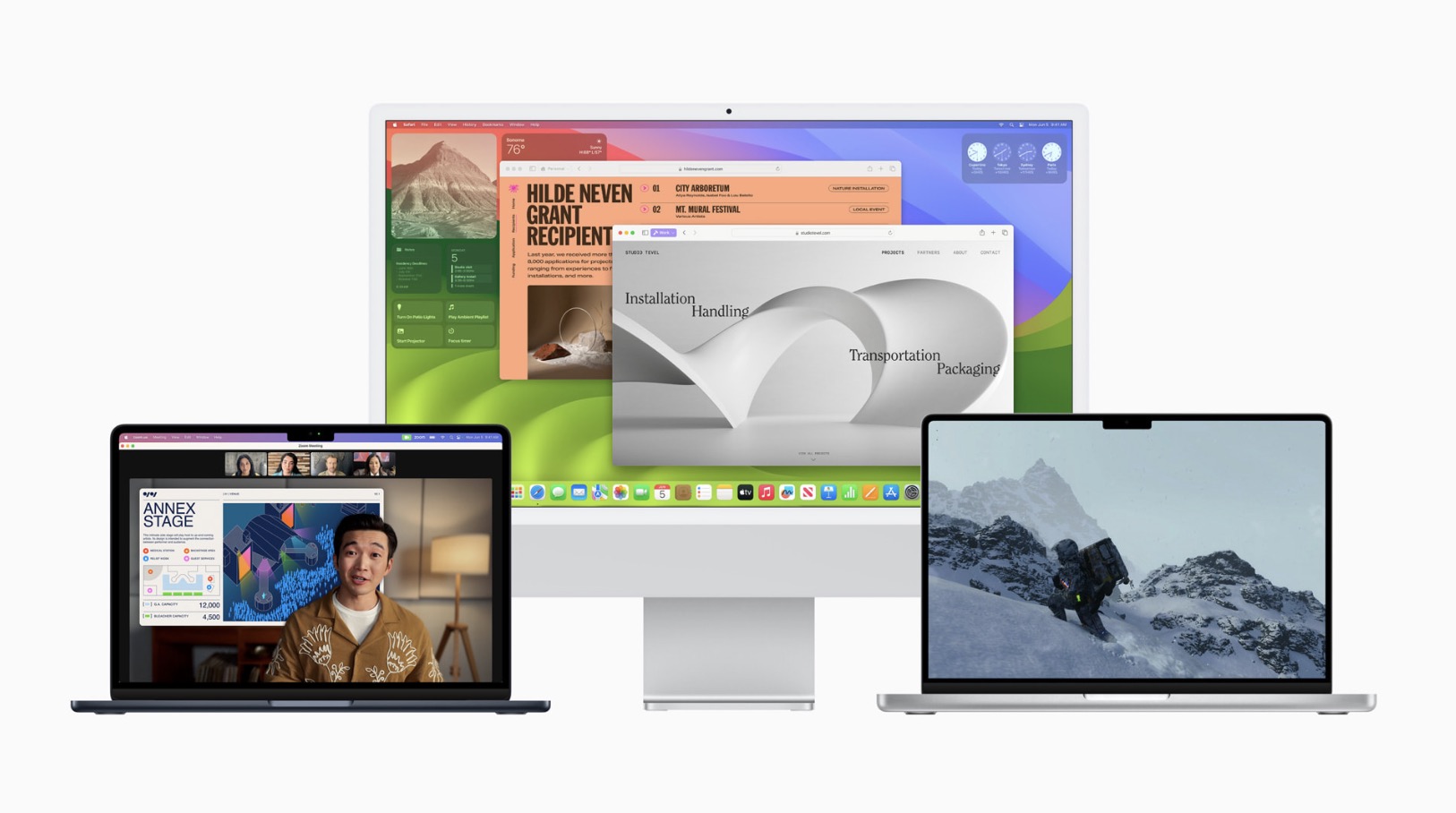
macOS Sonoma, the latest version of the world’s most advanced desktop operating system, bringing a rich set of features that elevate the Mac experience. Stunning screen savers and powerful widgets unlock an entirely new way to personalize. Users can now place widgets right on the desktop, interact with them with just a click, and through the magic of Continuity, access the extensive ecosystem of iPhone widgets on their Mac. In macOS Sonoma, video conferencing also gets more engaging with great new features to help users present remotely, like Presenter Overlay, which places a presenter on top of the content being shared, and Reactions, which enables fun gesture-triggered video effects in cinematic quality. Significant updates come to Safari, taking the web experience to the next level. Profiles keeps browsing separate between multiple topics or projects, and web apps provide faster access to favorite sites. And gaming gets even better, with the introduction of Game Mode, exciting new titles, and a new game porting toolkit that makes it even easier for developers to bring more games to Mac.
Get More Done with Interactive Widgets
Widgets are now even more powerful and personal on Mac. Users can place widgets right on the desktop and conveniently access the widget gallery to find the ones they know and love. Widgets blend seamlessly with the wallpaper while users work in apps, so they can stay focused on the task at hand. Through the magic of Continuity, users can also enjoy the vast ecosystem of iPhone widgets on their Mac. And widgets become interactive, allowing users to check off reminders, play or pause media, access home controls, and perform various tasks from their Mac, all directly from the desktop.
Smarter Video Conferencing Experiences
macOS Sonoma brings enhanced video conferencing features that enable users to present and share their work more effectively within any video conferencing app. Presenter Overlay, a new video effect, elevates a user’s presence by displaying them on top of the content they are sharing. Additionally, Reactions allow users to share how they feel by seamlessly adding balloons, confetti, hearts, and more into the video, which can also be triggered with a hand gesture. The improved Screen Sharing picker simplifies the process of sharing apps during video calls. Users can simply click the green button in the top-left corner of an app and choose to share it in the call, allowing for easy content sharing from their currently open windows.
Major Updates to Safari
Safari, the world’s fastest browser, introduces new features to enhance the browsing experience for Mac users. This year brings a significant update to Private Browsing, which provides even greater protection during browsing both from trackers and from people who might have access to the user’s device. Advanced tracking and fingerprinting protections in Private Browsing go even further to help prevent websites from tracking or identifying the user. Private Browsing windows also lock when users are not using them, allowing them to keep tabs open even when they step away from their device.
Additionally, profiles help users stay organized by offering a way to separate browsing between topics, while also keeping cookies, history, extensions, Tab Groups, and Favorites separate. Users can sign in to the same site with both work and personal accounts — and quickly switch between them — ensuring a smooth browsing experience. Safari also enables the creation of web apps that behave like normal apps, putting users’ favorite sites at their fingertips and providing a simplified toolbar for an app-like experience.
Stunning New Screen Savers
macOS Sonoma brings stunning screen savers featuring slow-motion videos of various locations worldwide, such as the sweeping skyline of Hong Kong, the sandstone buttes of Monument Valley in Arizona, and the rolling hills of Sonoma in Northern California. This rich graphical and photographic imagery enhances the Mac experience by shuffling through Landscape, Earth, Underwater, or Cityscape themes. The login experience is now repositioned at the bottom of the screen, making space for the new screen savers, which seamlessly transition into the desktop.
Games on Mac Get Even Better
With the power of Apple silicon, users experience incredible graphics performance on every Mac. And now, tens of millions of Macs with Apple silicon can run demanding games with great performance, long battery life, and breathtaking visuals. Developers continue to take advantage of Metal 3, bringing exciting new titles to Mac, including DEATH STRANDING DIRECTOR’S CUT, Stray, Fort Solis, World of Warcraft: Dragonflight, HUMANKIND, Resident Evil Village: Winters’ Expansion, The Medium, ELEX II, Firmament, SnowRunner, Disney Dreamlight Valley, No Man’s Sky, Dragonheir: Silent Gods, and Layers of Fear. To make it easier to port games from other platforms to Mac, Metal introduces a new game porting toolkit, eliminating months of upfront work and enabling developers to see how well their existing game could run on Mac in just a few days. It also dramatically simplifies the process of converting the game’s shaders and graphics code to take full advantage of Apple silicon performance, significantly reducing the total development time.
macOS Sonoma also introduces Game Mode, giving players an edge when performance is measured in precious milliseconds. Game Mode delivers an optimized gaming experience with smoother and more consistent frame rates, by ensuring games get the highest priority on the CPU and GPU. Game Mode also makes gaming on Mac even more immersive — dramatically lowering audio latency with AirPods, and significantly reducing input latency with popular game controllers like those for Xbox and PlayStation by doubling the Bluetooth sampling rate. Game Mode works with any game, including all of the recent and upcoming Mac games.
Enhancing Hybrid and Remote Pro Workflows
Leveraging the advanced media engine in Apple silicon, macOS Sonoma brings a new high performance mode to the Screen Sharing app. Enabling incredibly responsive remote access to hybrid in-studio and remote pro workflows, it delivers low-latency audio, high frame rates, and supports up to two virtual displays. This mode empowers pros to securely access their content creation workflows from anywhere — whether editing in Final Cut Pro or DaVinci Resolve, or animating complex 3D assets in Maya. And with support for reference color, it also enables remote color workflows that traditionally could not be performed without dedicated hardware and specialized software.
Enhanced Accessibility Features
macOS Sonoma introduces a range of accessibility features that make Mac even more customizable for all users. For customers with hearing disabilities, Made for iPhone hearing devices can connect to their Mac for calls and media consumption,1 while users who are nonspeaking can use Live Speech to type and vocalize their thoughts during calls and conversations. For users with physical and motor disabilities, phonetic suggestions appear when dictating and editing text with Voice Control on Mac. To assist users with cognitive disabilities, animated images like GIFs can be automatically paused in Messages and Safari. Additionally, users who are blind or have low vision can easily customize text size across Mac apps, and utilize Xcode with VoiceOver, Apple’s industry-leading screen reader.
Additional macOS Sonoma updates include:
- Streamlined PDFs:Enhanced PDF functionality allows for quick form-filling with AutoFill, and smart recipient recommendations.
- Inline PDFs in Notes:Notes now displays PDFs and document scans in full width, and with linked notes, users can quickly connect related notes like recipes or homework.
- Siri: Users have the ability to simply say “Siri” to activate Siri.2
- Passwords:Users can now create a group to share a set of passwords. Everyone in a group can add and edit passwords to keep them up to date, and since sharing is through iCloud Keychain, it’s end-to-end encrypted. Additionally, the one-time verification codes received in Mail will now autofill in Safari, making it easy to securely log in without leaving the browser.
- Messages: Users can connect with those closest to them with an all-new stickers experience, enhancements to features like search, reply, groups, and syncing with Messages in iCloud.
- Reminders:Intelligent grocery lists in Reminders streamline weekly trips to the store. Additionally, users can organize lists into sections and arrange them horizontally using a new column view.
- Keyboard:An all-new autocorrect makes corrections more accurate and easier to fix. Inline completions help users quickly finish sentences, while Dictation brings accuracy improvements through next-level speech recognition.
- Privacy and Safety: Communication Safety expands to AirDrop, the Photos picker, incoming calls, and FaceTime messages, further broadening protections for children. Additionally, Sensitive Content Warning prevents unexpected exposure to sensitive images and videos in AirDrop and Messages, incoming calls, and FaceTime messages, while giving the user the option to block the contact or seek further resources for help.
tvOS 17
With tvOS 17, FaceTime comes to Apple TV 4K, so users — for the first time ever — can enjoy the popular app on their TV for even more engaging conversations with family and friends. tvOS 17 also introduces an all-new Control Center, along with other enhancements that provide a more personalized experience that works even better with iPhone. Apple TV 4K brings together Apple TV+ and all of the most popular streaming apps — in cinematic picture and audio quality — as well as Apple Music, Apple Fitness+, and Apple Arcade to the biggest screen in the home. Boasting the powerful performance of the A15 Bionic chip, intuitive controls, and seamless interaction with Apple devices and smart home accessories, Apple TV 4K is the best living room device. tvOS 17 is available as a developer beta today, and it will be available as a free software update this fall.

Starting this fall, Apple TV 4K users can take advantage of the new FaceTime app on Apple TV and initiate calls directly from Apple TV, or start calls on iPhone or iPad, and hand them off to Apple TV. FaceTime on Apple TV takes advantage of Continuity Camera support to wirelessly connect to the user’s iPhone or iPad, and leverages the device’s camera and microphone to bring participants together on the TV.
Center Stage keeps everyone in the room perfectly framed on the screen, even as they move around, while new gesture-based reactions allow callers to use their hands to generate onscreen effects, such as hearts or fireworks, and add even more fun to the conversation. The introduction of Split View for Apple TV lets users enjoy watching shows or movies with their loved ones during a SharePlay session while also seeing everyone on the FaceTime call.
Controls on iPhone or iPad make it easy to transfer a FaceTime call back to those devices as needed. If another FaceTime or phone call comes in during a session, a notification appears on the TV to let the user know someone is calling — without revealing who the caller is, to preserve the user’s privacy on a communal device.
Later this year, video conferencing apps like Webex by Cisco and Zoom will launch on tvOS, bringing their communications capabilities to Apple TV 4K. Developers can take advantage of Continuity Camera APIs on Apple TV 4K to integrate the iPhone or iPad camera and microphone into their tvOS app, and create new shared and immersive entertainment experiences for the living room.
Apple Music Sing — a feature that lets users sing along to their favorite tracks — will also integrate Continuity Camera so users can see themselves onscreen and add entertaining filters.
A More Personalized Experience That Works Even Better with iPhone
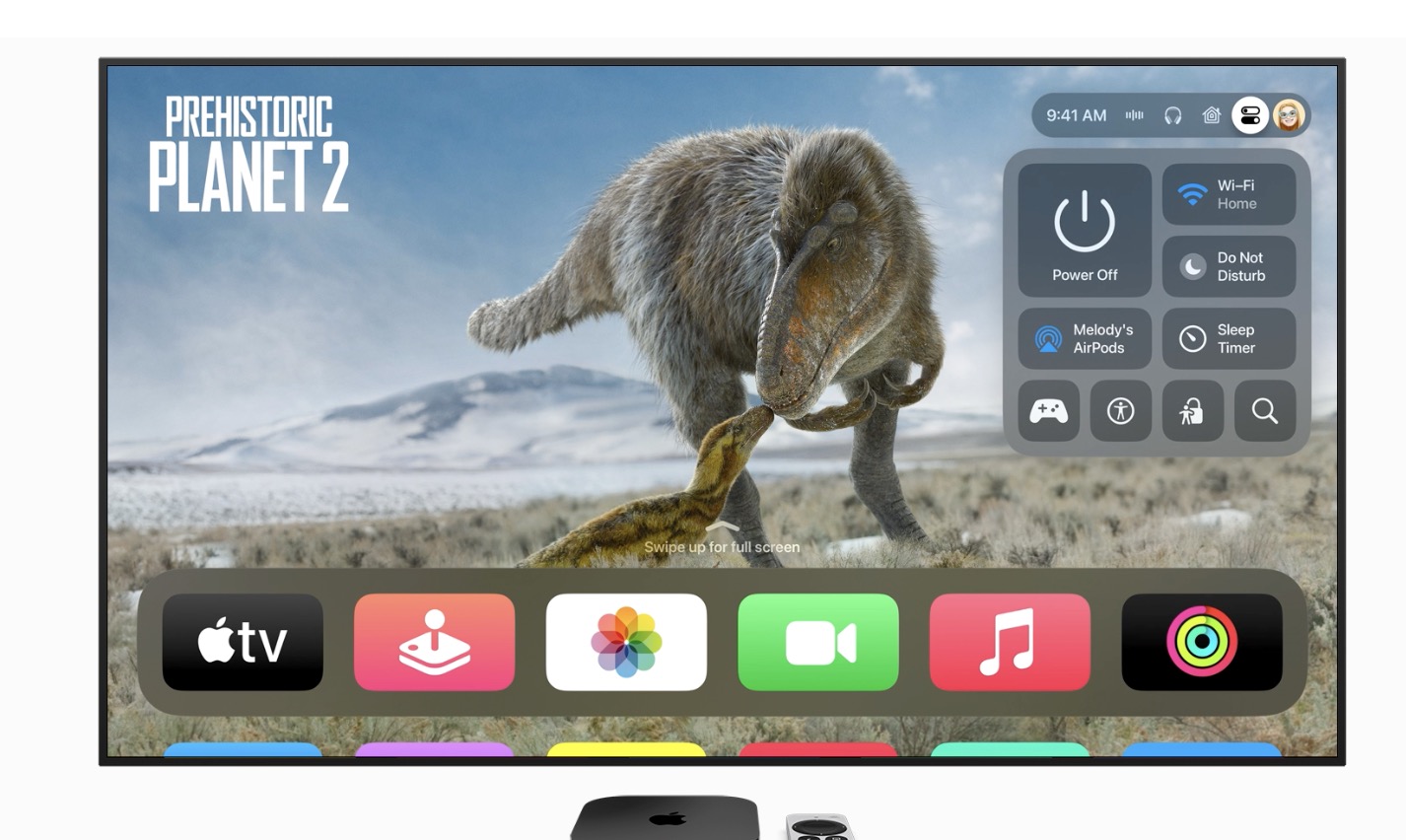
The new Control Center on Apple TV makes it easier than ever for users to access key settings and information throughout the entire Apple TV experience. Control Center now displays system status, including the time and active profile, and expands with other helpful details based on a user’s activity.
tvOS 17 strengthens the seamless integration of Apple TV and iPhone with the ability to locate the Siri Remote. Users can launch the Apple TV remote inside Control Center on iPhone to find their Siri Remote (2nd generation or later). As users get closer to the remote, an onscreen circle grows in size to guide their movement.
In addition, when using the remote on iPhone to wake up and control Apple TV, users will be automatically switched to their profile, ensuring they have access to their recently watched shows and personalized recommendations. Additional settings and preferences are now saved for each user profile, including their system language and paired AirPods, delivering an even more personalized experience.
Screen saver enhancements provide a more beautiful and even more customized experience on Apple TV, as users can now enjoy curated Memories from their personal library, shared library, or both on the big screen. The widely popular aerial screen savers will feature a collection of stunning new locations, including Arizona’s Monument Valley and California’s coastal redwoods.
Additional features coming with tvOS 17 include:
- Enhance Dialogue, which lets users more clearly hear what is being said over the effects, action, and music in a movie or TV show on Apple TV 4K paired with HomePod (2nd generation) by separating the dialogue from the background noise and bringing it forward to the center channel.
- Dolby Vision 8.1 support, which offers Apple TV 4K users a more cinematic visual experience with dynamic metadata over a broader range of movies and TV shows.
- Apple Fitness+ enhancements, including Custom Plans, a new way for Fitness+ users to receive a custom workout or meditation schedule based on day, duration, workout type, and more; Stacks, which allows users to select multiple workouts and meditations to seamlessly do back to back; and Audio Focus, which gives users the ability to prioritize the volume of the music or the trainers’ voices.
- Third-party VPN support, which enables developers to create VPN apps for Apple TV. This can benefit enterprise and education users wanting to access content on their private networks, allowing Apple TV to be a great office and conference room solution in even more places.