By using this site, you agree to our Privacy Policy and Terms of Service.
Accept
Absolute Geeks UAEAbsolute Geeks UAE
  • STORIES
    • TECH
    • AUTOMOTIVE
    • GUIDES
    • OPINIONS
  • REVIEWS
    • READERS’ CHOICE
    • ALL REVIEWS
    • ━
    • SMARTPHONES
    • CARS
    • HEADPHONES
    • ACCESSORIES
    • LAPTOPS
    • TABLETS
    • WEARABLES
    • SPEAKERS
    • APPS
  • WATCHLIST
    • TV & MOVIES REVIEWS
    • SPOTLIGHT
  • GAMING
    • GAMING NEWS
    • GAME REVIEWS
  • +
    • OUR STORY
    • GET IN TOUCH
Reading: Apple introduces “Distraction Control” feature for Safari in latest betas
Share
Notification Show More
Absolute Geeks UAEAbsolute Geeks UAE
  • STORIES
    • TECH
    • AUTOMOTIVE
    • GUIDES
    • OPINIONS
  • REVIEWS
    • READERS’ CHOICE
    • ALL REVIEWS
    • ━
    • SMARTPHONES
    • CARS
    • HEADPHONES
    • ACCESSORIES
    • LAPTOPS
    • TABLETS
    • WEARABLES
    • SPEAKERS
    • APPS
  • WATCHLIST
    • TV & MOVIES REVIEWS
    • SPOTLIGHT
  • GAMING
    • GAMING NEWS
    • GAME REVIEWS
  • +
    • OUR STORY
    • GET IN TOUCH
Follow US

Apple introduces “Distraction Control” feature for Safari in latest betas

GEEK DESK
GEEK DESK
Aug 6

Apple has quietly released a new feature called “Distraction Control” in the latest developer betas for iOS 18, iPadOS 18,and macOS Sequoia. This feature aims to enhance browsing experience by eliminating distracting elements from webpages.

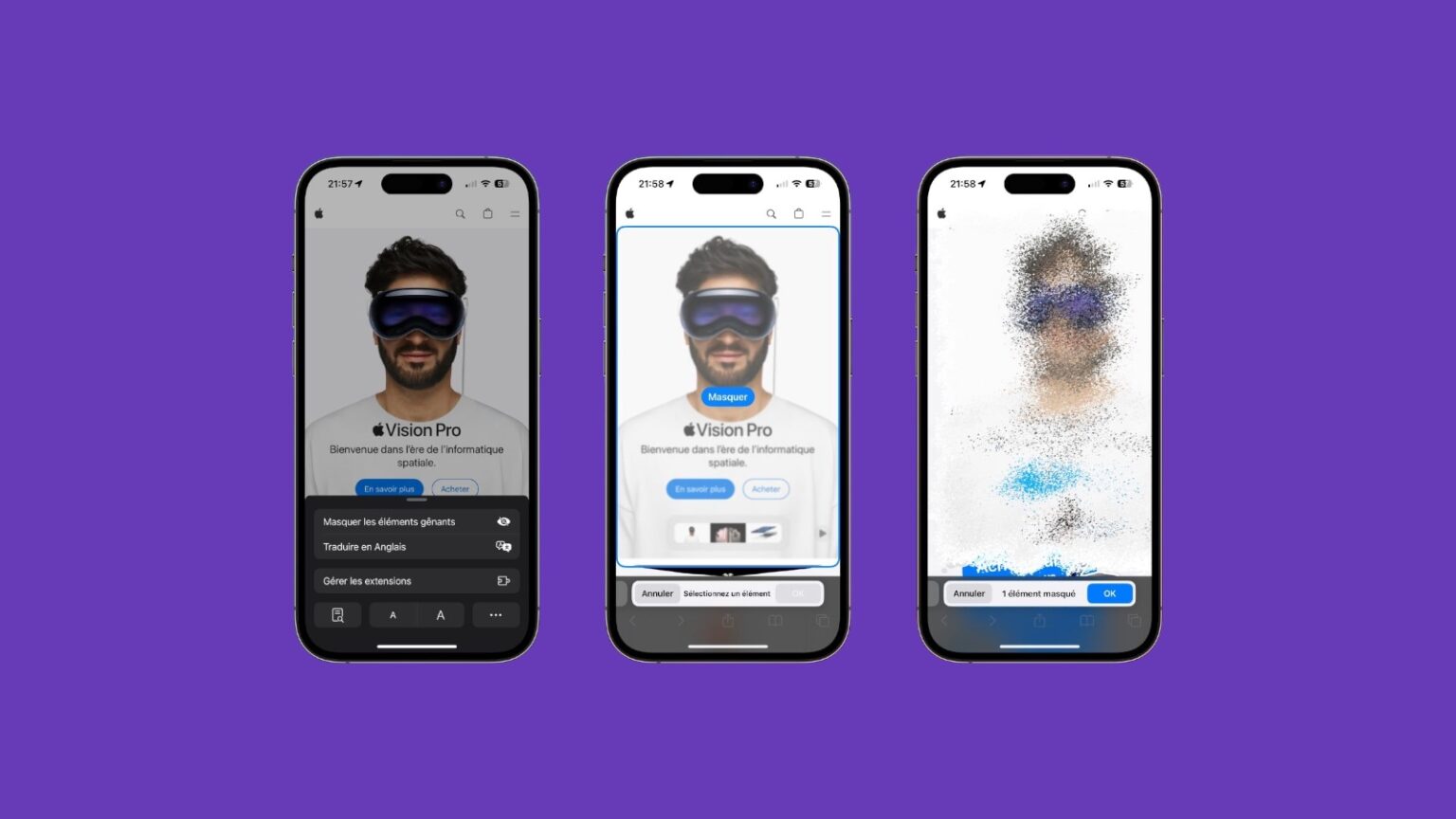
“Distraction Control” allows users to temporarily hide elements such as sign-in windows, cookie pop-ups, newsletter banners, autoplay videos, and more. While it’s not an ad blocker and can’t permanently remove ads, it’s useful for eliminating persistent pop-ups while browsing online stores or reading articles.

To use “Distraction Control,” go to the Page Menu in Safari and select “Hide Distracting Items.” Users can then choose the specific elements they want to hide, and these will remain hidden for that session.

It’s important to note that this feature works on a per-device basis and doesn’t sync settings across devices. Also, hidden elements can be easily revealed by selecting “Show Hidden Items” in the Safari search field.

“Distraction Control” joins other recent additions to Safari, including the Highlights feature, the redesigned Reader interface, and the video viewer with distraction removal. This feature is currently available in the developer betas and is expected to be available for public beta testers soon.


Share
What do you think?
Happy0
Sad0
Love1
Surprise0
Cry0
Angry0
Dead0

WHAT'S HOT ❰

DeepSeek releases V4 AI model previews with extended context capabilities
Spotify at 20 reveals the tracks and artists that defined two decades of streaming.
OpenAI releases GPT-5.5 with focus on coding efficiency and multi-step tasks.
Nothing’s Essential Voice tries to make speech the default way to type on phones
Assassin’s Creed Black Flag Resynced arrives July 9 with reworked combat and new story content
Absolute Geeks UAEAbsolute Geeks UAE
Follow US
AbsoluteGeeks.com was assembled during a caffeine incident.
© Absolute Geeks Media FZE LLC 2014–2026.
Proudly made in Dubai, UAE ❤️
Upgrade Your Brain Firmware
Receive updates, patches, and jokes you’ll pretend you understood.
No spam, just RAM for your brain.
Welcome Back!

Sign in to your account

Username or Email Address
Password

Lost your password?