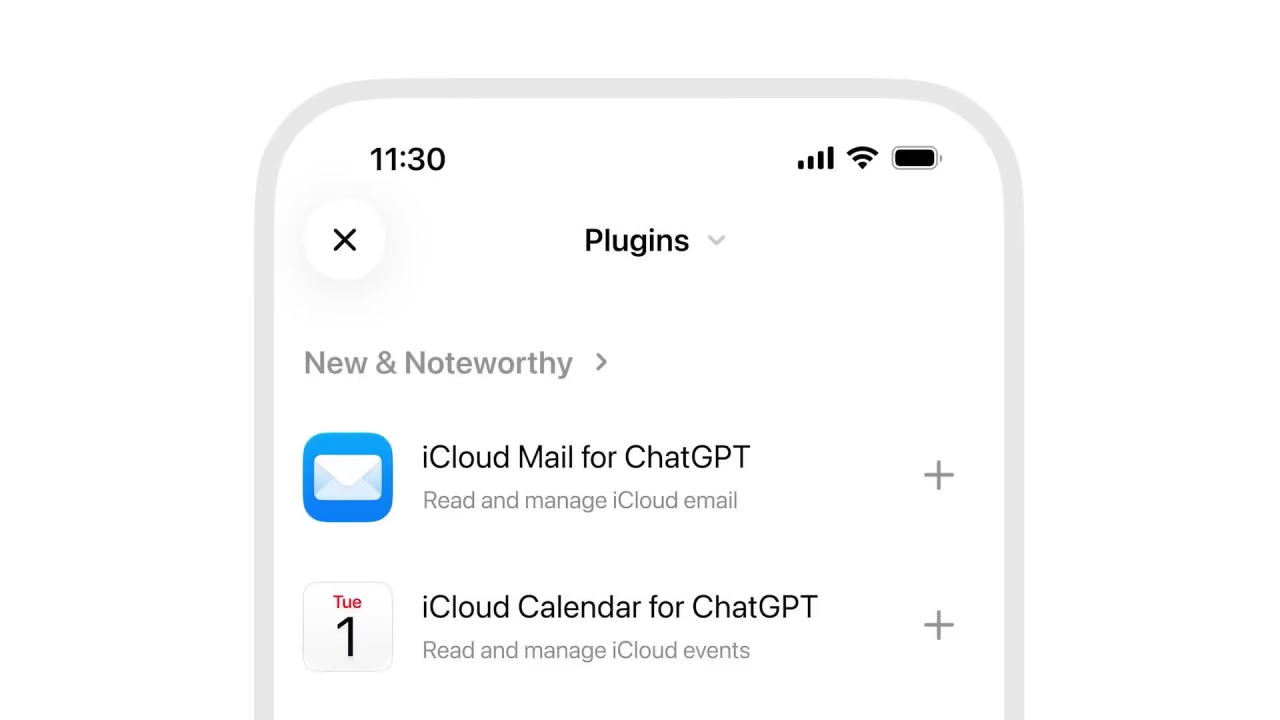
OpenAI is pushing ChatGPT deeper into Apple’s territory. The chatbot can now connect to iCloud Mail and iCloud Calendar, letting users search their inbox, catch up on messages, check their schedule and create or change calendar events without leaving ChatGPT. The plugins are available on every ChatGPT plan, including free accounts, across the web, desktop apps and iOS.
That last detail is significant. Gmail, Google Calendar and Outlook users have been able to link those services to ChatGPT for some time, which left iCloud as one of the more noticeable gaps among mainstream personal accounts. For the many iPhone owners who never moved their email or calendar away from Apple’s defaults, ChatGPT’s agent-style features were less useful than they could have been. This closes that gap.
The more interesting part is that the two plugins can work together in a single request. OpenAI’s own example has a user asking ChatGPT to find a museum event that fits into their free time. The assistant pulls exhibit details from an email, checks the calendar for an open evening and adds the event. It’s a small task, but it shows the direction AI assistants are moving in: from answering questions to carrying out small chains of actions across your personal data.
There are some practical limits worth knowing. The integration is tied specifically to iCloud accounts, not to Apple’s Mail and Calendar apps as a whole. If you’ve added a Gmail or Outlook account to the Mail app on your iPhone, ChatGPT won’t see it through this connection, and those services need their own separate links. Mail and Calendar are also two different plugins, so users can connect one without the other. Setup happens through the Plugins section in ChatGPT, and it’s worth reading the access permissions carefully before approving, since you’re granting a third-party AI service the ability to read your email and edit your schedule.
The move also continues a pattern. OpenAI previously released an Apple Messages plugin for ChatGPT on Mac, which works through the Messages app inside ChatGPT Work and Codex, although that one remains Mac-only. The new iCloud plugins are more broadly available.
The timing is pointed. Apple has just shipped iOS 27.2 with expanded Siri AI features that draw on personal data across its own apps, and now OpenAI is offering a similar kind of help with the same iCloud information, through its own app. For iPhone owners, the question is shifting from which assistant is smarter to which company they trust more with their inbox and calendar.