Google Photos is introducing a series of new features that are rolling out first to iPhone users, with Android devices set to receive them at a later, unspecified date. This staggered release reverses the usual pattern of Android-first feature rollouts and gives iOS users early access to several practical updates within the app.
One of the notable additions is light mode support, which aligns Google Photos with your iPhone’s system settings. The app will now switch between light and dark modes automatically based on your device preferences. While this change may not appeal to users who keep their phones in dark mode around the clock, it provides flexibility for those who prefer a lighter interface during daytime use.
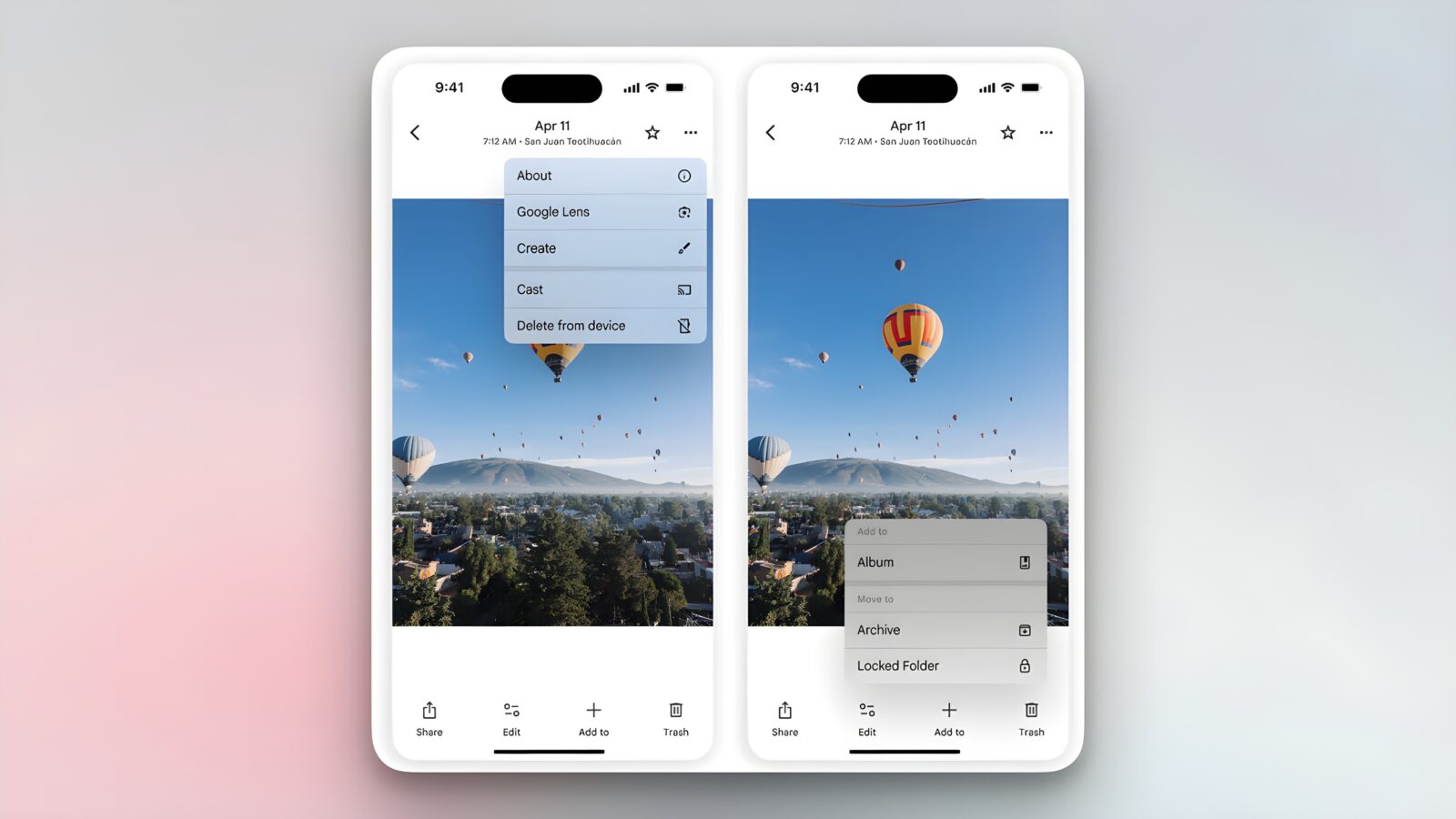
Another update is the introduction of glanceable photo data. Previously, viewing details such as the date, time, and location of a photo required tapping into the image information menu. Now, this metadata will appear above each photo by default, allowing users to view geotags and timestamps at a glance without additional steps.
Google has also redesigned the actions menu, streamlining available options for faster access. Tapping the action button next to a photo will display choices such as About, Google Lens, Create, Cast, Save as (for Live Photos), Download, or Delete from device. Some existing actions have been moved under the new “Add to” (+) button located in the bottom bar, where users can organise photos into albums, archive them, or move images to the Locked Folder for privacy.
Management of photo stacks and burst mode images has also been improved. The new action menu accessible from photo stack thumbnails lets users remove items from stacks, unstack groups entirely, select multiple photos to apply actions simultaneously, or change the top pick in a stack. This update aims to make navigating and editing groups of similar photos or burst shots more intuitive.
Finally, Google Photos for iOS introduces badges for quick actions. These badges, displayed above each photo, let users rapidly change a photo’s category, play or pause Live Photos, save shared photos to their library, or back up images to manage storage. The addition of these badges reduces the number of taps required for common actions, streamlining everyday app use.
Currently, all these features are only available to iPhone users. Google has indicated that Android devices will receive the updates “soon,” but no specific timeline has been confirmed. The shift to iOS-first releases for Google Photos may reflect the company’s strategy to maintain parity across platforms while testing new UI approaches within the tightly controlled iOS ecosystem before wider Android rollout.
As Google Photos continues to evolve into a cross-platform hub for photo storage and editing, these incremental updates demonstrate its focus on interface efficiency and reduced friction in everyday usage. Whether Android users will see additional refinements when these features reach their devices remains to be seen.