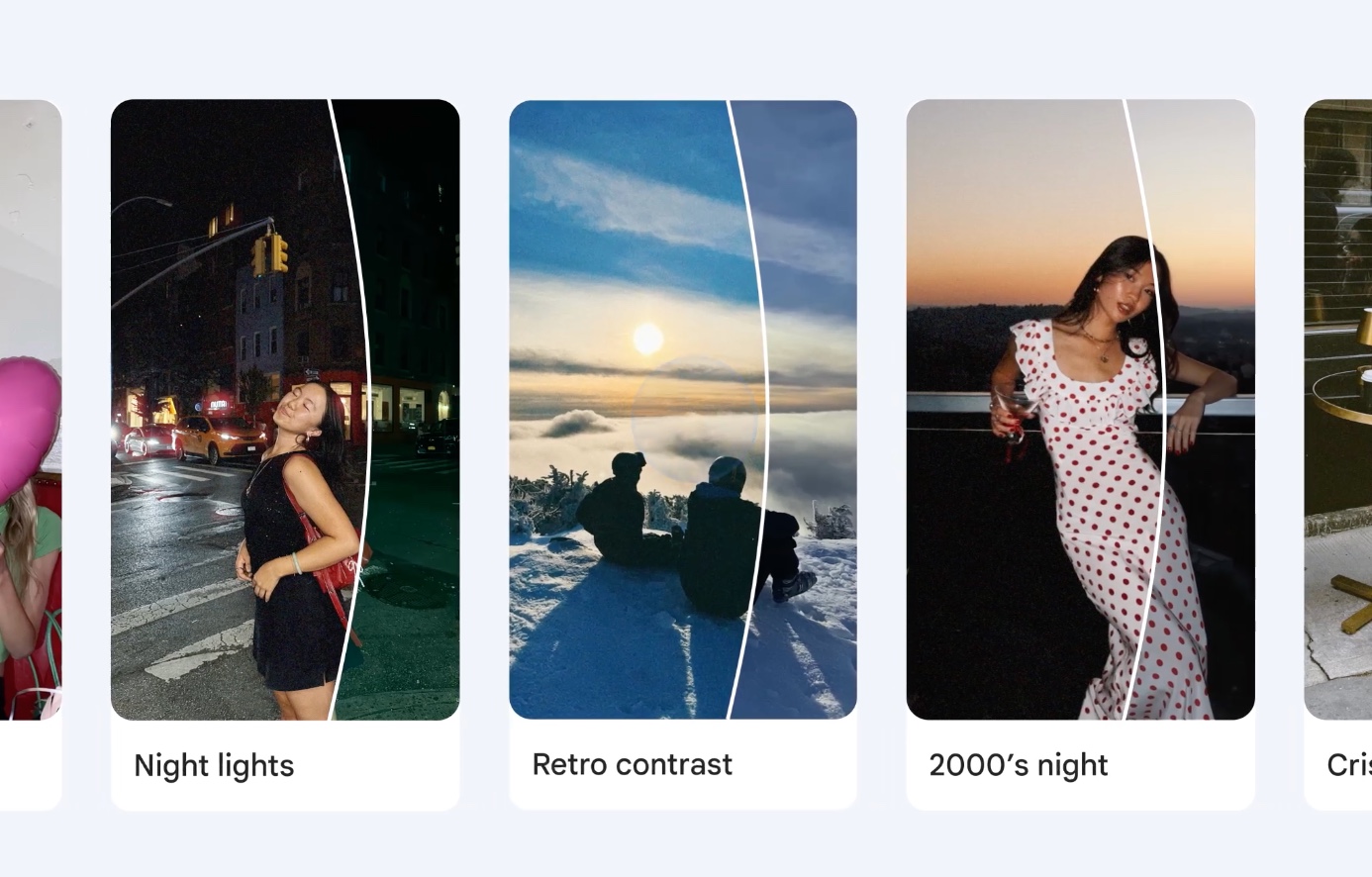
Google Photos has a new set of filters called Moods, and it leans heavily into the retro look that has taken over social feeds. The feature adds eight one-tap presets based on film stock and early digital cameras. It costs nothing and doesn’t require a Pixel or a paid Google AI plan.
The timing makes sense. Grainy, slightly flawed photos have been popular for a while now. Old point-and-shoot cameras sell for more than they used to, and apps like VSCO and Lightroom’s preset marketplaces built loyal followings around specific analog looks. Google’s own editor has grown more capable over the years with tools like Magic Eraser, AI-driven Remix effects and a full set of manual sliders. Even so, recreating a specific vintage style in Photos used to mean adjusting several settings by hand. Moods turns that into a single tap.
The eight presets cover a fairly wide range. Crisp 35mm adds film grain and sharpening for a classic negative look. 2000’s night produces the noisier texture of an early digital sensor. Night Lights adds a soft glow to light sources and color, so it suits city scenes after dark. Airy Minimalist is the mildest option, brightening whites and softening detail. For portraits, 2000’s cinema deepens shadows for a film-still look. Rich Textures brings out detail in fabric and surfaces with a warmer, redder tint. Retro Contrast crushes the blacks for a harder digicam feel. Pink Digicam is a lighter, warmer version of that same idea.
The controls are simple. Moods is in the Create tab, where you pick a photo from suggestions or search your library by place, date or person. Each filter has an intensity slider from 0 to 100, set to 80 by default. Tapping Save a copy keeps the original and saves the edit as a new image. The editor remembers the last filter you used, which helps if you want a consistent look.
There are some limits. You can’t apply a look to a batch of photos at once, which is a real gap for anyone editing a whole trip or event in one style. Lightroom still has the advantage there. Moods is also Android-only for now, and Google says availability varies by region. Google hasn’t announced an iPhone version, though Photos features often reach iOS eventually.
Google’s choice to run the AI models behind Moods on older hardware, outside its paid tiers, stands out. It contrasts with the company’s recent habit of reserving its best editing features for Pixel owners or subscribers. The question now is whether Google keeps expanding the preset library, or whether eight looks is all Moods will ever offer.