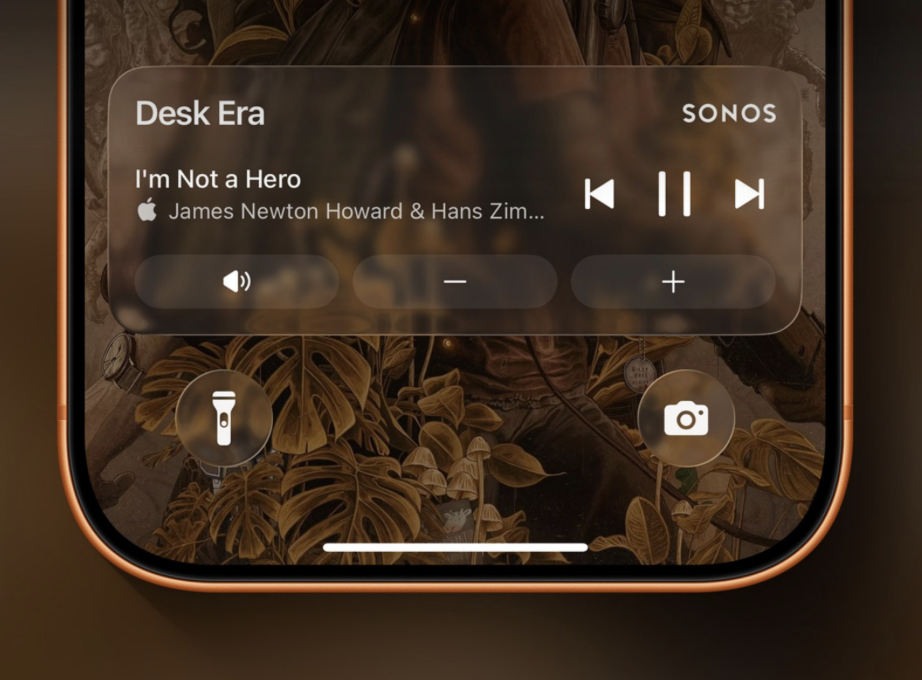
Sonos is giving iPhone users a more convenient way to control their speakers without repeatedly opening its app. The latest Sonos iOS update adds support for Apple’s Live Activities, putting current playback information and controls directly on the iPhone Lock Screen.
The feature appears after a user starts playback in the Sonos app and then leaves it. The Live Activity reflects the room or speaker group that was most recently playing, providing quicker access to playback controls. If playback stops, the activity remains available for up to 15 minutes before disappearing.
There is one notable security-related limitation. Although playback information is visible from the Lock Screen, users need to authenticate with Face ID or their passcode before making changes. That adds an extra step compared with some native media controls, but prevents anyone with physical access to an iPhone from casually interfering with a Sonos system.
Live Activities can be switched off through the Sonos app settings for users who would rather keep their Lock Screen uncluttered.
The implementation is also fairly basic at launch. Album artwork is not currently displayed, although Sonos says it is considering other ways to improve the Lock Screen presentation. Live Activities can surface through CarPlay and Apple Watch as well, but playback controls are not supported on those platforms for now.
Those limitations make this less of a dramatic new feature and more of a useful piece of overdue iOS integration. Apple introduced Live Activities as a way for apps to display continuously updated information outside their main interfaces, and the feature has since become a natural fit for everything from sports scores and deliveries to timers and media playback.
For Sonos, however, even relatively small app improvements carry additional weight after the company’s difficult software overhaul. Its redesigned app in 2024 removed or disrupted functionality that customers had previously relied on, prompting widespread criticism. The fallout extended well beyond complaints about interface design, forcing Sonos into a lengthy process of restoring features and rebuilding confidence in its software.
Support for Live Activities had been reported as being in development earlier this year, so its arrival is not unexpected. More importantly, it continues Sonos’ effort to make its iPhone experience feel less isolated from the wider Apple ecosystem.
Users who start playback through AirPlay, Bluetooth or compatible third-party services can still use the playback controls already available through those methods, meaning Live Activities are primarily aimed at people controlling their system directly through the Sonos app.
That distinction matters. Sonos has traditionally sold the idea of a tightly integrated multi-room audio system, but the usefulness of that hardware increasingly depends on how smoothly its software works alongside the devices people already use. Live Activities will not erase the problems of the past two years, but making routine speaker controls easier to reach is exactly the kind of unglamorous software improvement Sonos needs to keep delivering.