

Samsung’s Gallery app now backs up photos and videos to Google Photos, ending a years-long arrangement that sent Galaxy users’ media to Microsoft OneDrive instead. The feature started appearing quietly in September, and Samsung has now made it official, with broad availability across Galaxy devices. There is a significant catch, though: it requires One UI 9.
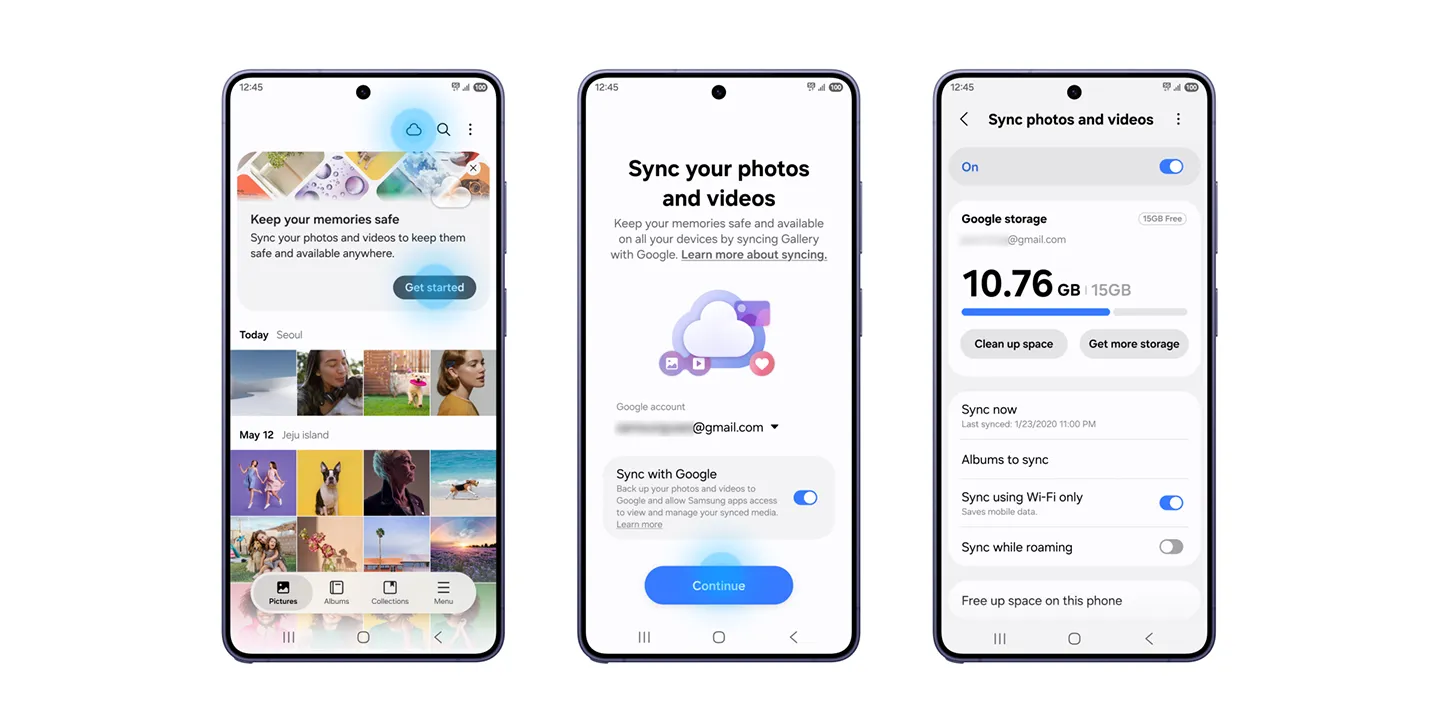
The new setup is called Gallery Sync. It replaces the OneDrive option inside Samsung’s own gallery, letting users sign in with a Google account of their choice and back up to the standard free 15GB tier or to paid Google One storage. For many Galaxy owners, this formalises something they were already doing by running Google Photos alongside Samsung’s app. Now the default gallery can feed Google’s cloud directly, with no second app needed.
The change has clear limits. Gallery Sync is a backup tool, not a full Google Photos integration. Media backed up from another Galaxy device will appear in Samsung Gallery, but your wider Google Photos library won’t. Anything uploaded from an iPhone, a Pixel or a web browser stays in Google’s app. Users who wanted a single combined view of every photo they own still need both apps.
Storage is another consideration. Google’s free 15GB is shared across Gmail, Drive and Photos, and anyone shooting high-resolution video on a recent Galaxy flagship will fill it quickly. That likely pushes some users toward a Google One subscription, which works out well for Google even if Samsung presents the change as a convenience.
Samsung has also added a “free up space” button that deletes local copies of photos and videos once they’re safely in the cloud. It is useful on phones with limited storage, but it deserves care. Clearing local files is only safe if you’re confident the backup actually finished, and anyone relying on the free tier should check their remaining quota first.
Availability is the bigger hurdle for now. The feature only works on devices running One UI 9, which is based on Android 17, and that update is still rolling out. Samsung says support will reach more Galaxy devices in phases, but it hasn’t given a timeline or a list of devices. Owners of older or mid-range models may wait some time, and phones that never get One UI 9 may be left on the old arrangement or without built-in cloud backup altogether.
For eligible users, setup is under Menu, then Settings, then “Sync photos and videos” in the Gallery app. Some devices also show a pop-up prompt about the feature.
The open question is what happens to existing OneDrive users and their libraries. Samsung hasn’t explained clearly how that transition will work.