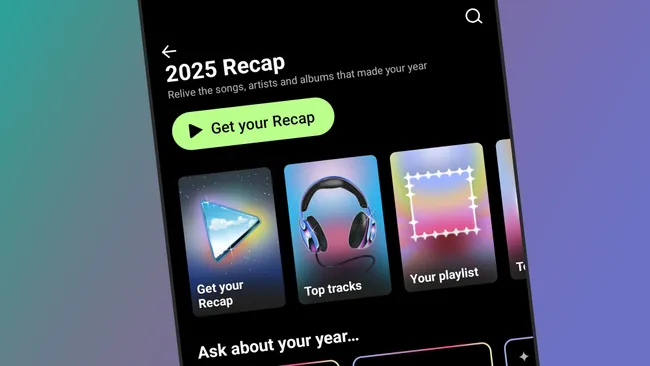
YouTube Music Recap 2025 is now rolling out to users, offering a yearly snapshot of listening habits and a set of new AI-powered tricks. If you use YouTube Music and want to see your own summary, open the mobile app, tap your profile picture in the top right, and look for the “your recap” option. Not everyone will see it at the same time, so if YouTube Music Recap 2025 is not there yet, it may still be in the process of appearing on your account.
Once it’s available, the recap appears in a story-style format that will feel familiar if you have used Spotify Wrapped or previous YouTube Music recaps. You can tap through a sequence of cards that highlight the artists, albums, and tracks you played the most in 2025, along with a running total of your listening minutes. The YouTube Music 2025 recap also breaks down how varied your listening has been, and shows where your favorite artists are from, which can surface patterns you may not have noticed during the year.
The recap is interactive to a limited degree. You can tap and hold to pause any card if you want more time to read the details, and you can restart the YouTube Music recap whenever you like. Once you reach the end, you can jump back to specific sections, which makes it easier to revisit particular stats or share screenshots with friends on social platforms.
As in previous years, YouTube Music automatically generates a recap playlist based on your most-played songs of 2025. From within the recap, you can tap the on-screen button to save this playlist to your library. It is a straightforward way to keep a snapshot of your year in music in one place, whether you want it for nostalgia, background listening, or to compare how your taste changes from one year to the next. For some users, this recap playlist is likely to be the most practical part of YouTube Music Recap 2025.
The main new feature this year is the option to ask AI questions about your listening history. On the recap page, you will see an “ask about your listening” box. This lets you type prompts for the system to answer based on your 2025 data. YouTube Music suggests ideas such as “what’s my musical mascot?” or “write a haiku about my listening,” but you can also ask more direct questions, such as which era your oldest track comes from or how your genres are distributed.
However, as with most consumer AI tools, the results should be treated as approximate rather than definitive. In one example, asking for the oldest song played in 2025 produced one answer, then a different, older track when the question was repeated and the AI was told to “really think about it.” That kind of inconsistency underlines the fact that YouTube Music’s AI recap elements are more about playful summaries than precise reports. The traditional recap stats and the generated playlist remain the more reliable components.
For listeners comparing Spotify Wrapped 2025 with YouTube Music Recap 2025, Google’s service is positioning its recap as a slightly earlier and more experimental alternative, especially with the AI questions. Whether that is enough to make users switch platforms is another matter, but for existing subscribers, YouTube Music Recap 2025 is at least a simple, built-in way to review the year and get a personalized playlist without extra effort.
If you are interested in your YouTube Music 2025 recap, the main steps are straightforward: open the app, go to your profile, select “your recap,” tap through the story cards, save the recap playlist, and experiment with the AI prompts if you are curious. Just keep in mind that the core value here is the listening data you have built up all year, while the AI layer is better viewed as a novelty than a precise analysis of your music taste.