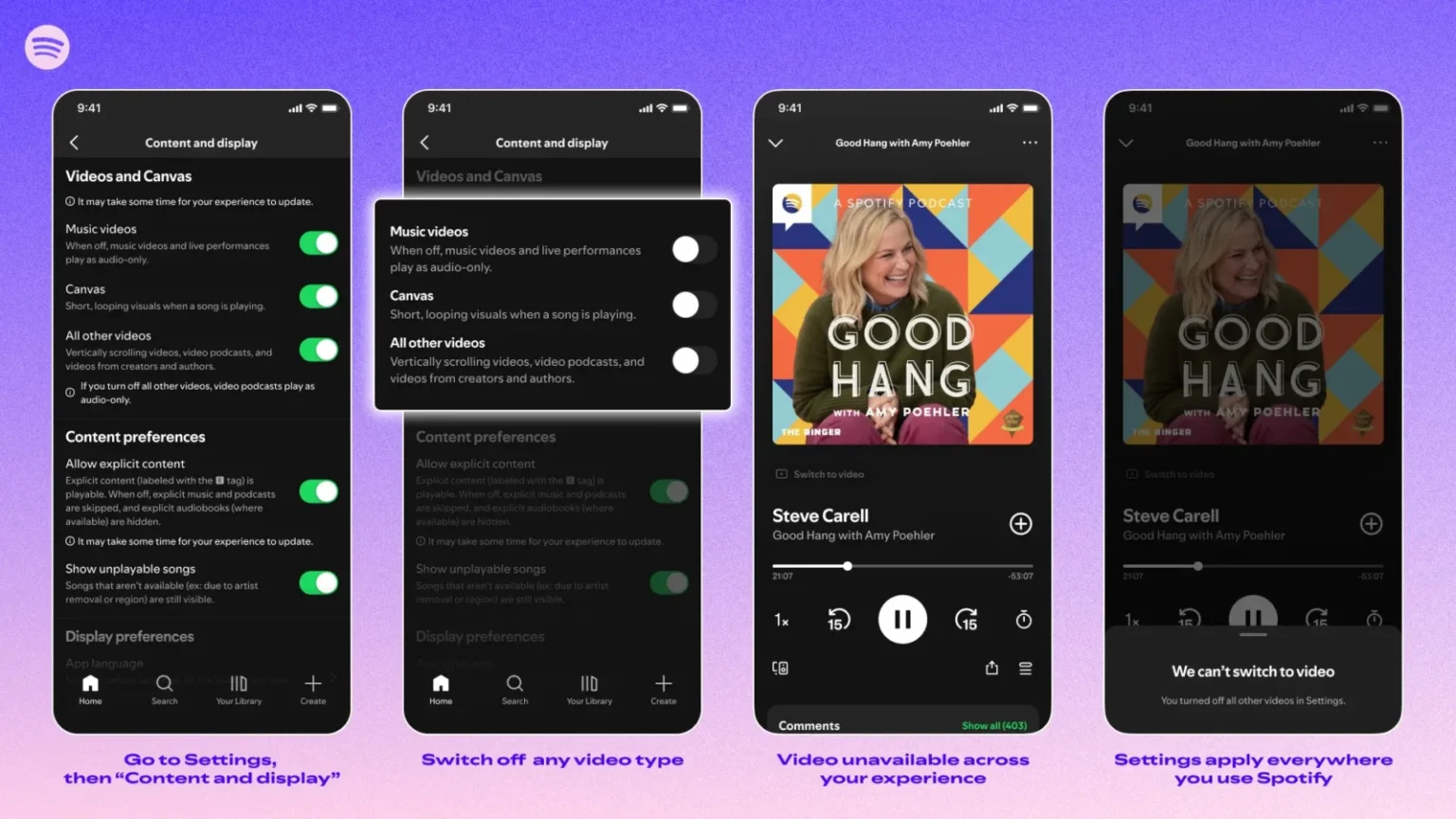
Spotify is rolling out new controls that let users disable video content across its platform, giving people the option to stick strictly to audio.
The update addresses a common frustration for those who open the app expecting music or podcasts but encounter a mix of videos, looping visuals, and other multimedia elements. Starting today, the feature is available to Family Plan subscribers. Plan owners and parents can now turn video content on or off for every member of the household through the subscription settings. Until now, this level of restriction existed only for accounts belonging to children under 13.
Later this month, the controls will expand to Free, Individual, Duo, and Student plans. Users will find the options in Settings under Content and display. There, they can toggle Canvas—the short looping visuals that often accompany tracks—or broader Video content for both music and podcasts. Preferences sync automatically across mobile, desktop, web, and TV apps, so the choice stays consistent no matter which device is in use.
The change is not absolute. Video ads and any Canvas-style elements tied to audio advertisements will continue to play for both free and paid users. Spotify has framed the update around giving listeners more deliberate control over their experience, particularly for those looking to conserve mobile data, reduce battery usage, or maintain focus without visual distractions.
This move comes at a time when the service, which now counts more than 600 million users worldwide, has steadily increased its investment in video features alongside its traditional audio catalog. While many appreciate the added visuals for certain artists and shows, others have long requested simpler audio-only pathways, especially on mobile where data and attention can be limited.
The rollout also arrives shortly after reports of another long-requested feature in development: native playlist folder management on the mobile app. Playlist folders have existed since 2010 but have so far been limited to creation and editing on desktop and web versions. Recent code discoveries suggest mobile support could arrive soon, potentially rounding out a series of quality-of-life improvements for users who prefer a more organized, audio-centric experience.
In practice, the video controls offer a practical adjustment rather than a fundamental shift in how Spotify operates. They reflect ongoing tension between the platform’s push toward richer multimedia content and the expectations of listeners who primarily want reliable, distraction-light access to music and spoken-word audio. For many, the ability to opt out of video may simply make daily use feel less cluttered.
As the feature reaches wider availability in the coming weeks, it will be worth watching whether it influences how users engage with the app—or whether most simply leave the defaults unchanged.