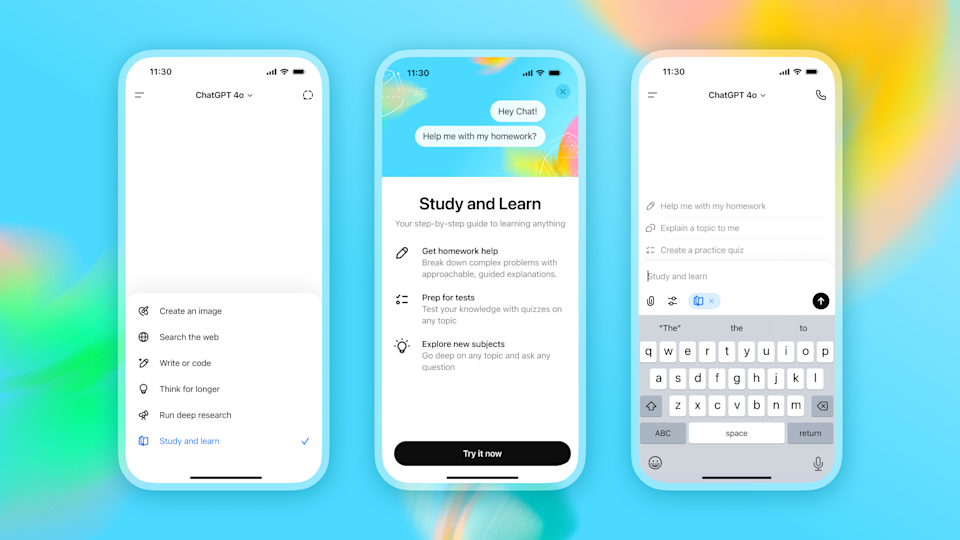
OpenAI has introduced a new Study Mode for ChatGPT, designed to help students work through complex topics without simply handing them the answer. The feature adopts a Socratic teaching style, asking guided questions and gradually revealing information so users can arrive at solutions on their own.
Similar in concept to Anthropic’s Claude Learning Mode, ChatGPT’s Study Mode uses a “scaffold” approach — breaking down learning into small, digestible steps to prevent information overload. Before diving in, the chatbot gauges a student’s knowledge level and goals, adjusting its responses accordingly.
OpenAI says the feature was developed in collaboration with teachers, scientists, and education experts. It doesn’t run on a new AI model; instead, it’s powered by custom system instructions that shape ChatGPT’s responses. This setup allows the company to quickly refine the experience based on real-world student feedback, even if that means some early inconsistencies. The long-term goal is to integrate this behavior directly into its core models once the best teaching methods have been identified.
Study Mode is not exclusive to ChatGPT’s education-focused plan. The initial rollout is available to logged-in Free, Plus, Pro, and Team subscribers, with ChatGPT Edu users expected to receive access in the coming weeks.
While OpenAI has framed Study Mode as a learning tool, its release comes amid ongoing concerns about AI-assisted cheating in schools and universities. Reports have highlighted widespread misuse of chatbots for academic work, prompting institutions to rethink policies around AI in education. By slowing down the delivery of answers and encouraging active engagement, Study Mode may help address some of those concerns — though its effectiveness will depend on how students choose to use it.
OpenAI says it is already exploring enhancements for the tool, including greater personalization, goal-setting features, and progress tracking. Students will be able to toggle Study Mode on or off, giving them flexibility in how they interact with ChatGPT.