

Apple has added a new battery management option to the Mac with the release of the macOS Tahoe 26.4 beta. The update introduces a Charge Limit feature that allows users to manually cap how much their Mac charges, bringing functionality long available on the iPhone to macOS.
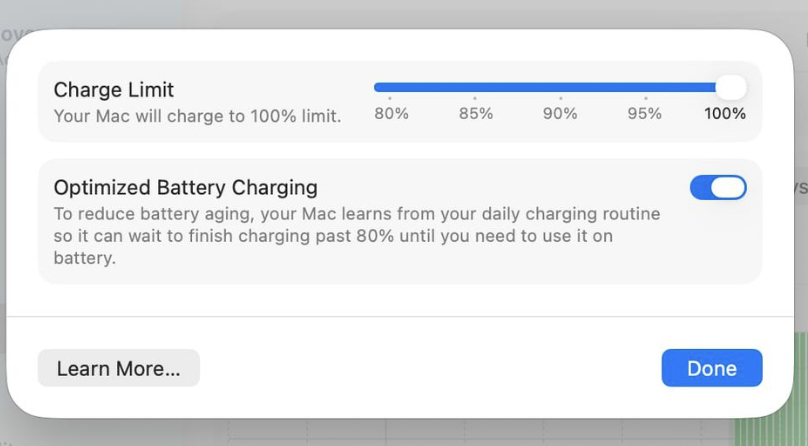
In macOS Tahoe 26.4, users will find a slider that lets them choose a maximum charge level between 80 percent and 100 percent. The available increments include 80, 85, 90, 95, or 100 percent. Once set, the Mac will not charge beyond the selected threshold. This differs from Apple’s existing Optimized Battery Charging feature, which uses daily usage patterns to delay charging past 80 percent until it predicts the device will be needed at full capacity.
Optimized Battery Charging remains available in macOS Tahoe 26.4, but it operates dynamically. Under that system, a Mac may still reach 100 percent on a regular basis if the algorithm determines it is appropriate. The new Charge Limit setting, by contrast, acts as a fixed cap. If a user selects 80 percent, the Mac will consistently stop charging at that level unless the setting is changed.
The rationale behind battery charge limits is straightforward. Lithium-ion batteries experience more stress when held at or near full charge for extended periods. By keeping a device at 80 percent instead of 100 percent, users can potentially slow long-term battery degradation. For people who primarily use a Mac plugged in at a desk, the ability to enforce a hard charge ceiling may help preserve battery health over several years.
The setting can be enabled in the System Settings app under Battery. Users must click the information icon next to Charging to access the Charge Limit slider. Because this feature is currently part of the macOS Tahoe 26.4 beta, it is being tested before a broader public rollout.
Apple first introduced a similar charge limit feature with the iPhone 15 lineup in 2023, giving iPhone users the option to cap charging at 80 percent. Bringing the same capability to the Mac suggests a more consistent battery health strategy across Apple’s hardware ecosystem.
While this is not a major redesign or headline-grabbing addition, it reflects a gradual shift toward giving users more granular control over device longevity. For Mac owners concerned about maintaining battery capacity over time, the macOS Tahoe 26.4 Charge Limit feature adds a practical tool that goes beyond automated optimization.