
Apple is preparing to release iOS 26.1 early next week, marking the first major update to the iOS 26 operating system. While the update doesn’t introduce the new version of Siri that many users have been anticipating, it brings a wide range of interface refinements, accessibility upgrades, and small but meaningful quality-of-life changes across core apps and settings.
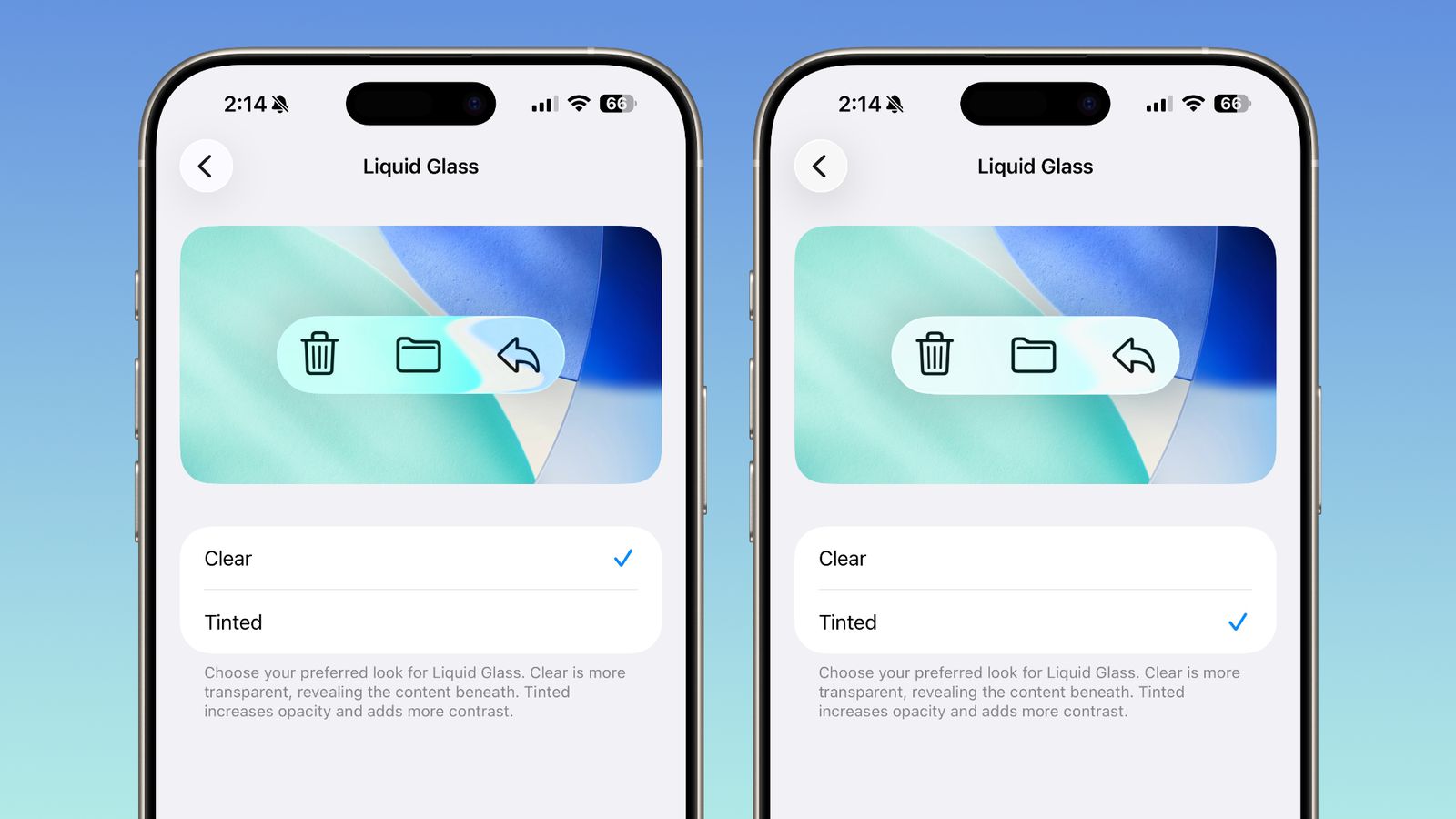
One of the most noticeable additions is the Liquid Glass Transparency toggle, which lets users adjust the transparency level of interface elements like buttons and menu bars. The new “Tinted” option increases opacity and contrast for better readability, while “Clear” retains the default, more transparent look.
The Lock Screen camera swipe can now be turned off — a first for iOS — allowing users to disable the quick-swipe camera shortcut without removing camera access entirely. Meanwhile, Phone app haptics can be toggled off, stopping the vibration feedback when calls connect or disconnect.
In the Clock app, Apple has added a “slide to stop” gesture for alarms and timers. This replaces the previous tap-to-stop method, reducing the chance of accidentally dismissing an alarm instead of snoozing it.
Apple Intelligence, the company’s AI framework, expands to new languages including Danish, Dutch, Norwegian, Portuguese (Portugal), Swedish, Turkish, Traditional Chinese, and Vietnamese. AirPods Live Translation gains support for Japanese, Korean, Italian, and both forms of Chinese.
Apple Music gets a new gesture-based control that allows users to swipe across the song title to skip forward or back. The Apple TV app now features a redesigned icon using the new Liquid Glass aesthetic, reflecting Apple’s broader rebrand that drops the “TV+” label.
The Fitness app adds the ability to create fully custom workouts, including control over calorie goals, effort, and duration — offering more flexibility than the previous template-based setup. In the Settings app, headers are now left-aligned for better consistency across the system, a change mirrored in Home Screen folders.
The Phone keypad now uses Liquid Glass styling, and the Photos app introduces a refined video scrubber, updated menu layout, and a more pronounced frosted effect in navigation bars. Safari’s tab bar has been slightly widened for better usability, and the Privacy and Security section gains a new option for automatically installing security updates, replacing the Rapid Security Response toggle.
Accessibility also sees improvements with a new “Display Borders” feature under Display & Text Size, which adds visible outlines to buttons for easier navigation. Users can now specify storage locations for locally captured audio and video recordings in the Files app.
On iPadOS 26.1, Apple reintroduces Slide Over, allowing users to access an app in a floating window alongside the new multitasking interface. The update also adds manual input gain control for external microphones connected to iPads.
iOS 26.1 will be compatible with all iPhones that already support iOS 26 and is expected to arrive on Monday, November 3, or Tuesday, November 4. Public beta testers and developers can already try the update through Apple’s beta program.