By using this site, you agree to our Privacy Policy and Terms of Service.
Accept
Absolute Geeks UAEAbsolute Geeks UAE
  • STORIES
    • TECH
    • AUTOMOTIVE
    • GUIDES
    • OPINIONS
  • REVIEWS
    • READERS’ CHOICE
    • ALL REVIEWS
    • ━
    • SMARTPHONES
    • CARS
    • HEADPHONES
    • ACCESSORIES
    • LAPTOPS
    • TABLETS
    • WEARABLES
    • SPEAKERS
    • APPS
  • WATCHLIST
    • TV & MOVIES REVIEWS
    • SPOTLIGHT
  • GAMING
    • GAMING NEWS
    • GAME REVIEWS
  • +
    • OUR STORY
    • GET IN TOUCH
Reading: Instagram Map: what it shares, how it works, and how to disable it
Share
Notification Show More
Absolute Geeks UAEAbsolute Geeks UAE
  • STORIES
    • TECH
    • AUTOMOTIVE
    • GUIDES
    • OPINIONS
  • REVIEWS
    • READERS’ CHOICE
    • ALL REVIEWS
    • ━
    • SMARTPHONES
    • CARS
    • HEADPHONES
    • ACCESSORIES
    • LAPTOPS
    • TABLETS
    • WEARABLES
    • SPEAKERS
    • APPS
  • WATCHLIST
    • TV & MOVIES REVIEWS
    • SPOTLIGHT
  • GAMING
    • GAMING NEWS
    • GAME REVIEWS
  • +
    • OUR STORY
    • GET IN TOUCH
Follow US

Instagram Map: what it shares, how it works, and how to disable it

GEEK DESK
GEEK DESK
Aug 12

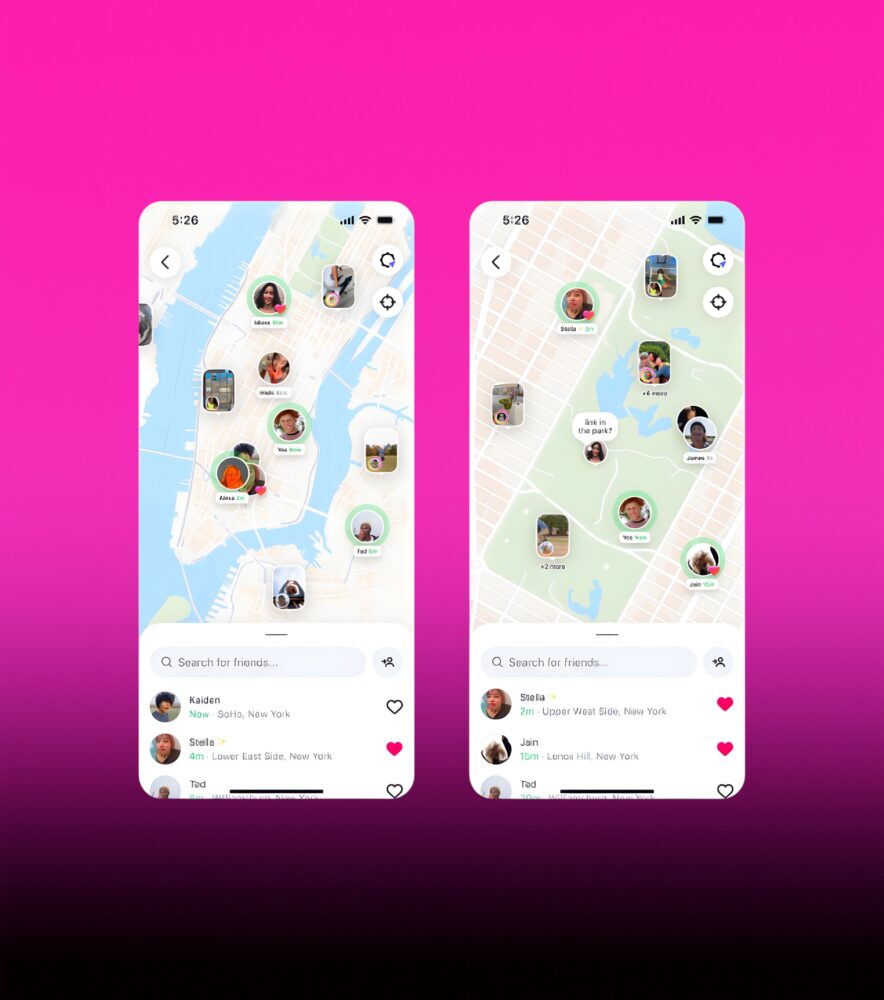
Instagram’s new Map feature has sparked concern among users who fear it might be revealing more about their whereabouts than intended. Similar to Snapchat’s Snap Map, the feature can display your precise last-active location and any location-tagged content from the people you follow, visible for 24 hours after posting.

Meta insists this isn’t as invasive as it sounds. Location sharing is off by default, and you have to opt in before your precise, real-time location is shown to others. Instagram head Adam Mosseri has publicly stressed that the feature won’t share your live location unless you choose to enable it. Still, confusion between “live” location and location-tagged posts has fueled worries about stalking and doxing risks.

If you want to double-check your settings—or turn off the feature entirely—here’s how:

To stop sharing your location on Instagram Map:

  1. Open Instagram and tap the Messages icon.
  2. Select “Map” at the top of your inbox.
  3. Tap the Settings icon in the top right.
  4. Under “Who can see your location,” choose “No one.”
  5. Confirm your choice by tapping Update or Done.

Even if you never enable Map sharing, location-tagged posts can still appear publicly if your account is public. To prevent this, skip adding location tags when creating posts or Stories, or remove tags from existing content. Switching to a private account will also limit who can see tagged locations.

For maximum privacy, you can block Instagram from accessing your location entirely via your phone’s settings. On iPhone, go to Settings > Instagram > Location and select “Never” or disable Precise Location. On Android, head to Settings > Apps > Instagram > Permissions > Location and choose “Deny.”

Cutting off location access means no targeted location ads and no location-tagged posts—but it also removes certain features, like sharing your spot in chats or tagging places in posts.

In short: Instagram’s Map isn’t secretly broadcasting your live location, but if you’d rather not appear on a social map at all, the controls are in your hands.


Share
What do you think?
Happy0
Sad0
Love0
Surprise0
Cry0
Angry0
Dead0

WHAT'S HOT ❰

Apple M5 Pro and M5 Max: what the new MacBook Pro chips change for on-device AI
Apple updates MacBook Pro with M5 Pro and M5 Max, boosting on-device AI
Apple updates MacBook Air with M5 chip, 512GB base storage, and Wi-Fi 7
Apple updates Studio Display and introduces Studio Display XDR with mini-LED and 120Hz
Tecno explores modular smartphones and Edge AI at MWC 2026
Absolute Geeks UAEAbsolute Geeks UAE
Follow US
AbsoluteGeeks.com was assembled by Absolute Geeks Media FZE LLC during a caffeine incident.
© 2014–2026. All rights reserved.
Proudly made in Dubai, UAE ❤️
Upgrade Your Brain Firmware
Receive updates, patches, and jokes you’ll pretend you understood.
No spam, just RAM for your brain.
Welcome Back!

Sign in to your account

Username or Email Address
Password

Lost your password?