

By using this site, you agree to our Privacy Policy and Terms of Service.
Accept
Absolute Geeks UAEAbsolute Geeks UAE
  • STORIES
    • TECH
    • AUTOMOTIVE
    • GUIDES
    • OPINIONS
  • REVIEWS
    • READERS’ CHOICE
    • ALL REVIEWS
    • ━
    • SMARTPHONES
    • CARS
    • HEADPHONES
    • ACCESSORIES
    • LAPTOPS
    • TABLETS
    • WEARABLES
    • SPEAKERS
    • APPS
  • WATCHLIST
    • TV & MOVIES REVIEWS
    • SPOTLIGHT
  • GAMING
    • GAMING NEWS
    • GAME REVIEWS
  • +
    • TMT LABS
    • WHO WE ARE
    • GET IN TOUCH
Reading: Google Meet gets collaborative annotations: here’s what you need to know
Share
Notification Show More
Absolute Geeks UAEAbsolute Geeks UAE
  • STORIES
    • TECH
    • AUTOMOTIVE
    • GUIDES
    • OPINIONS
  • REVIEWS
    • READERS’ CHOICE
    • ALL REVIEWS
    • ━
    • SMARTPHONES
    • CARS
    • HEADPHONES
    • ACCESSORIES
    • LAPTOPS
    • TABLETS
    • WEARABLES
    • SPEAKERS
    • APPS
  • WATCHLIST
    • TV & MOVIES REVIEWS
    • SPOTLIGHT
  • GAMING
    • GAMING NEWS
    • GAME REVIEWS
  • +
    • TMT LABS
    • WHO WE ARE
    • GET IN TOUCH
Follow US

Google Meet gets collaborative annotations: here’s what you need to know

GEEK DESK
GEEK DESK
Apr 22

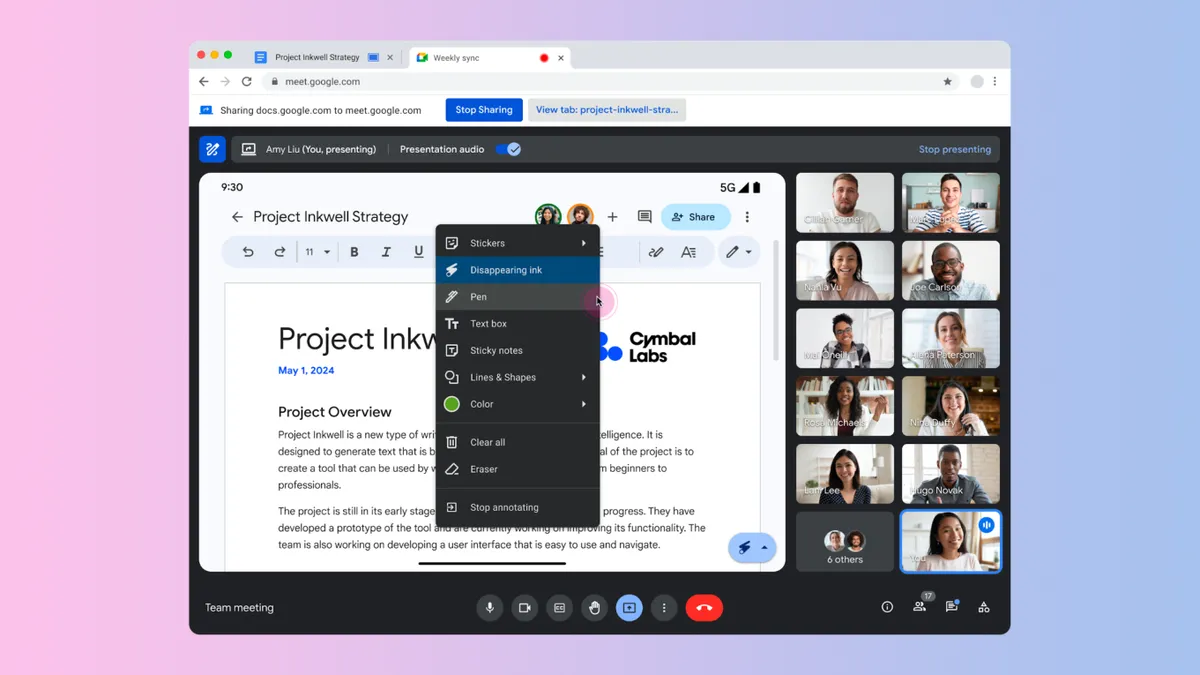
Get ready to make your Google Meet presentations more engaging! Google is rolling out annotation support, allowing you and other participants to highlight, draw, and add comments directly on presented content. It’s perfect for brainstorming sessions, live demonstrations, or collaborative note-taking.

How It Works

  • Find the Tools: Look for the new annotation menu in the bottom right corner of your shared content, or use the annotation button in the Google Meet toolbar.
  • Annotate Away: Choose from pens, highlighters, text boxes, sticky notes, shapes, and more!
  • Collaborate: Designate other participants as co-annotators to boost participation.
  • Easy Cleanup: Use the “Clear all” or eraser tools to start fresh.

Key Points & Limitations

  • Workspace Tiers: Annotations are available for specific Google Workspace tiers (listed below).
  • iOS & Android: Currently, iOS users can only co-annotate. Android users can present and annotate, but co-annotating is coming soon.
  • Rollout Schedule: The feature is rolling out gradually, so check your Google Meet settings in the coming weeks.

Eligible Google Workspace Tiers:

  • Business Starter, Standard, and Plus
  • Enterprise Starter, Standard, and Plus

Annotations in Google Meet can transform your presentations, making them more interactive, collaborative, and visually engaging.
Share
What do you think?
Happy0
Sad0
Love0
Surprise0
Cry0
Angry0
Dead0

WHAT'S HOT ❰

Realme reportedly returns to sub-brand role under Oppo
CES 2026: inside Lenovo’s experimental vision for personal computing in the AI era
Lenovo introduces Qira as a cross-device AI layer at CES 2026
Yango Yasmina usage in the UAE shows sustained growth and high daily engagement
Xbox Game Pass January 2026 combines surprise drops with major releases
Absolute Geeks UAEAbsolute Geeks UAE
Follow US
© 2014 - 2026 Absolute Geeks, a TMT Labs L.L.C-FZ media network
Upgrade Your Brain Firmware
Receive updates, patches, and jokes you’ll pretend you understood.

No spam, just RAM for your brain.
Welcome Back!

Sign in to your account

Username or Email Address
Password

Lost your password?