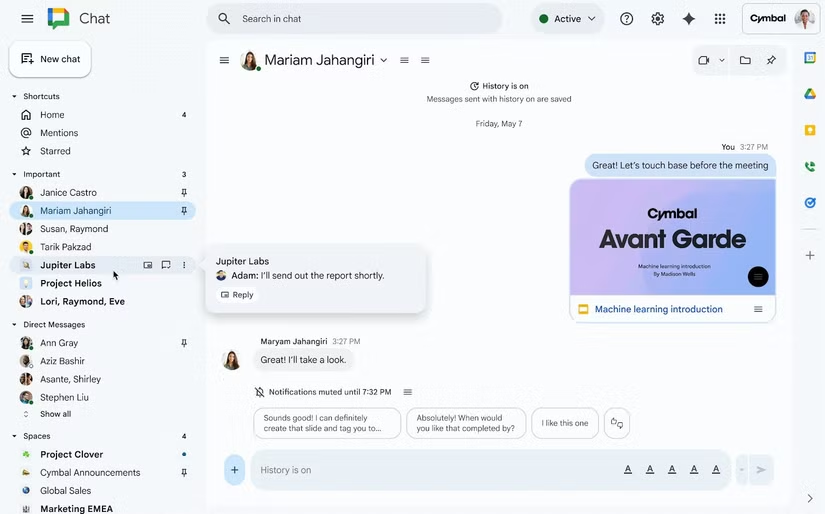
Google is introducing a small but practical update to Google Chat, adding a message preview feature designed to make everyday communication a bit more manageable. The new addition allows users to glance at unread messages directly from the left-hand navigation panel by hovering over any bolded conversation. Instead of opening a thread and automatically marking the message as read, you can now see the latest incoming line and decide whether it requires immediate attention or can wait for a calmer moment.
The change is subtle, but it solves a familiar problem. Chat platforms often push users into conversations the moment they click, which can make it difficult to manage multiple threads or keep certain discussions unread until you’re ready to respond. The hover preview avoids that issue by offering context without commitment. If the message is time-sensitive, you can enter the conversation with a click; if it isn’t, you can move on without triggering notifications or disrupting your workflow.
Google is rolling out the feature broadly, covering Workspace customers, Workspace Individual subscribers, and personal Google accounts. There are no toggles or admin controls—it’s being activated automatically across accounts. The rollout starts today and is scheduled to finish by mid-December 2025, so most users should notice the preview behavior appear in their sidebar soon.
This update lands alongside another workspace-oriented change: the general availability of Google’s integration with Egnyte, a content governance and security platform used across industries that rely on structured file management. The expanded integration makes it possible to access, open, edit, and manage Google Workspace files from within Egnyte’s own interface, whether on the web, mobile, or desktop. The goal is to minimize app-switching, a persistent friction point in environments where multiple tools need to coexist.
The addition of message previews doesn’t fundamentally alter Google Chat, but it does continue a pattern of incremental adjustments aimed at smoothing out productivity tools rather than reinventing them. At the same time, some users still express interest in a more distinct identity for Google Chat—one that separates it more clearly from Gmail and leans into being a standalone communication app rather than an attached feature. For now, Google appears focused on iterations that emphasize convenience and cross-platform cohesion rather than structural redesigns.
As the broader Workspace ecosystem gains new integrations and developer tools—including Google’s recent release of its own lightweight code editor—these quality-of-life updates suggest a steady, incremental strategy rather than sweeping changes. Users should see this latest Chat improvement appear automatically over the next few weeks.