Anthropic is expanding the capabilities of its AI assistant Claude with a feature designed to add visual context to conversations. The update allows Claude to generate diagrams, charts, and step-by-step visual instructions directly within the chat interface. The feature is currently rolling out in beta and is available across all Claude plans, including the free tier.
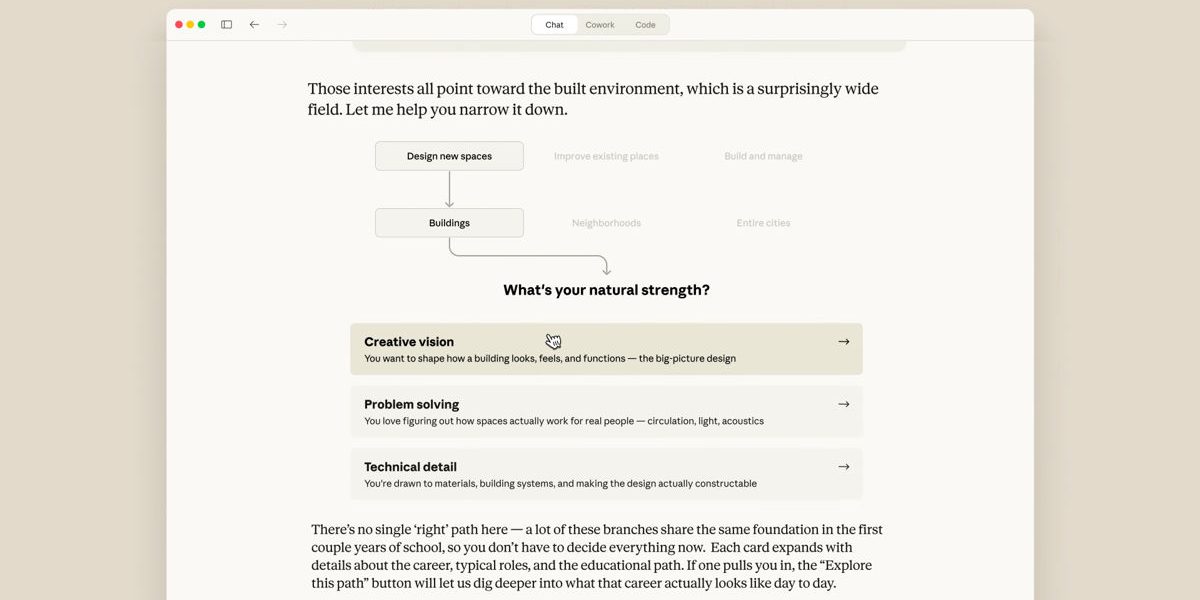
Until now, Claude has largely been a text-focused assistant. When users asked for instructions or explanations, the system typically responded with written descriptions. With the introduction of Claude visual instructions, the assistant can now sketch diagrams or visual layouts that appear inline in the conversation. The visuals are generated in real time as the discussion unfolds, allowing users to see structured explanations rather than relying solely on text.
Anthropic describes the feature as a type of interactive whiteboard that Claude can use to illustrate concepts during a conversation. Unlike static assets or downloadable files, these diagrams are designed to be temporary and adaptive. As a user continues the discussion or asks for changes, the visual can update to reflect the revised instructions or explanation. For example, if a user requests a diagram showing how to assemble an object or complete a step-by-step process, Claude can create a simple visual representation and then adjust it if additional steps are introduced.
Users can trigger the feature manually with prompts such as “draw this as a diagram.” In some cases, Claude may generate a visual automatically if the system determines that a diagram could clarify the explanation. The idea is to make complex instructions easier to understand without requiring users to switch to external tools or image generators.
The update also introduces a few additional interface elements designed to make responses more structured. Claude can now generate formatted recipe cards and display live weather conditions when web search is enabled. These elements appear directly inside the chat interface, similar to the diagrams. However, the weather and recipe visuals currently work only on desktop devices and are not yet supported on iOS.
Another change adds interactive multiple-choice prompts. Instead of requiring users to type out responses, Claude can present clickable options that allow the conversation to move forward with minimal typing. This approach is meant to simplify tasks where structured input is helpful, such as troubleshooting steps or guided instructions.
It is important to note that Claude visual instructions are not the same as traditional image generation systems. The diagrams are built using HTML and SVG code rendered within the chat interface rather than generated as standalone images. In practical terms, this means Claude can produce structured diagrams and instructional visuals but cannot create photorealistic images or artwork from text prompts.
That distinction separates Claude from several competing AI platforms. Other major AI systems from companies such as OpenAI, Google, and xAI include image generation models capable of producing detailed visuals from prompts. Anthropic has not indicated that it plans to introduce a comparable image generator for Claude.
The company’s development priorities have historically focused on reasoning ability, coding assistance, long-form analysis, and safety controls. Within that context, visual instructions appear to be aimed at improving practical explanations rather than expanding into creative image generation.
For everyday use cases, such as explaining how something works or outlining a process, these simple diagrams may prove more useful than full image generation. Whether Anthropic eventually adds a dedicated image model remains uncertain, but for now the company appears to be prioritizing tools that support structured explanations and technical tasks.