Apple has updated the Apple TV app on Android to add Google Cast support, addressing one of the most notable limitations since the app’s launch earlier this year. With the update, Android phone and tablet users can now cast Apple TV content directly to compatible TVs and streaming devices, bringing the Android experience closer to feature parity with other major video platforms.
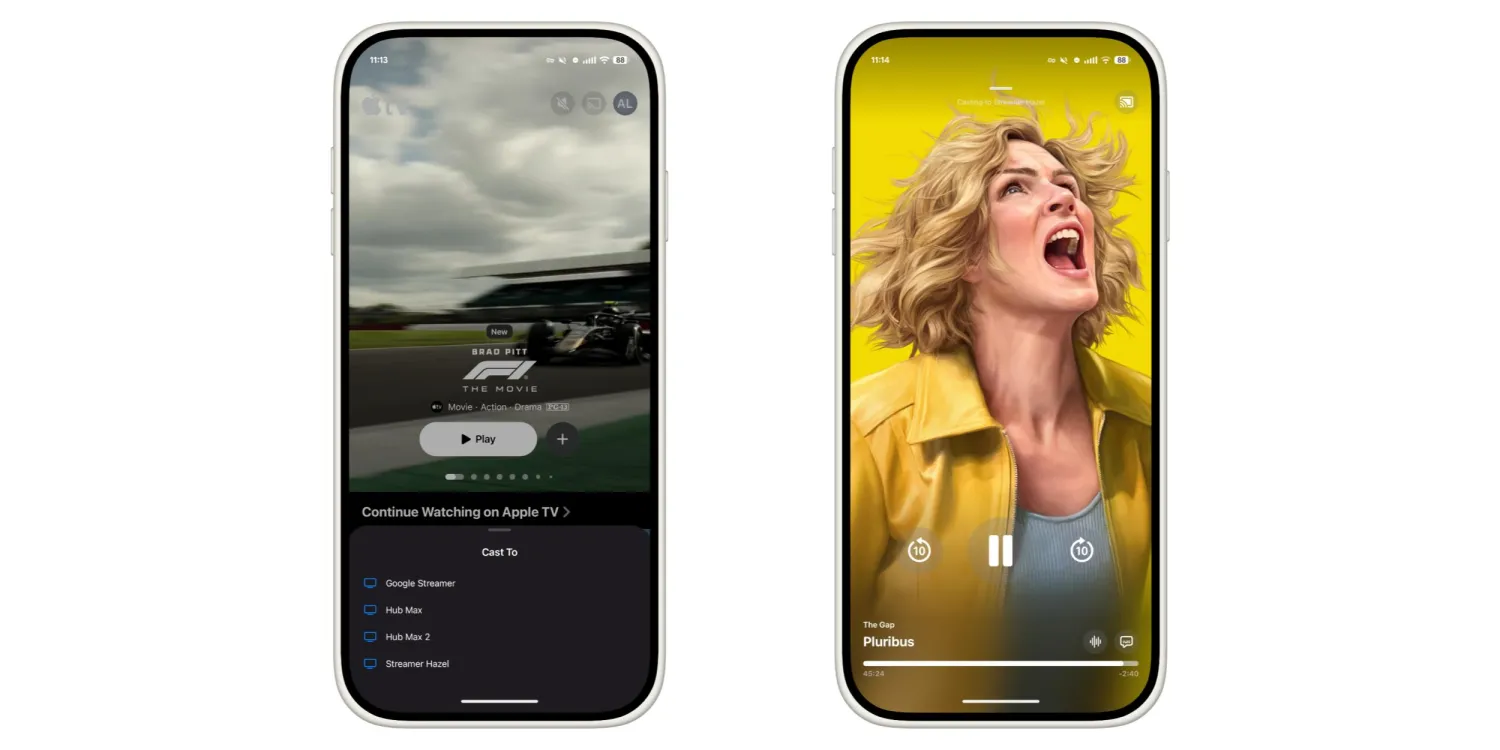
Following the update, a Google Cast icon appears in the top-right corner of the app, positioned next to the user profile avatar. Tapping it opens a “Cast To” menu that follows Apple’s existing design language, rather than relying on standard Android system styling. The Cast option is also accessible from within the fullscreen video player, where it sits alongside basic playback controls such as mute.
Once casting is active, the app displays a compact mini player that shows playback details, the connected device, and a progress timeline. Basic controls, including play, pause, and 10-second rewind, remain available. Selecting the mini player expands it into a fullscreen portrait interface with larger controls, a scrubber for navigation, and access to audio and subtitle options. The background uses the film or series poster artwork, and users can swipe down to return to the main browsing screen.
The absence of Google Cast support was a frequent point of criticism when the Apple TV app debuted on Android. At launch, users could stream content only on their devices, without an easy way to watch on larger screens unless they relied on workarounds or third-party solutions. Since February, Apple has gradually expanded functionality through incremental updates, including features such as new episode notifications, but casting remained a clear omission until now.
The addition of Google Cast suggests a more pragmatic approach from Apple as it continues to expand its services beyond its own hardware ecosystem. While the company has traditionally emphasized tight integration within its own devices, services like Apple TV+ depend on broad platform reach to sustain subscriber growth. Supporting Google Cast aligns the Android app more closely with user expectations, particularly in regions where Chromecast-enabled TVs and Android-based streaming devices are common.
Alongside the casting update, Apple has made a minor visual adjustment to the app icon, slightly reducing the size of the Apple TV logo within its circular background. While subtle, the change reflects ongoing refinement of the app’s presentation as it matures on Android.
The update, version 2.2 of the Apple TV app for Android, is now rolling out through the Google Play Store. With Google Cast finally in place, the Android version of Apple TV moves closer to being a fully competitive streaming option, though questions remain about how quickly Apple will continue to close remaining gaps between platforms.